three.js入门篇6之 环境贴图、经纬线映射贴图与高动态范围成像HDR
·
013-1 环境贴图
- 就是把周边的环境,贴在物体的表面之上
注意:px:x轴正向,nx:x轴负向
import * as THREE from "three"
// console.log('main.js',THREE);

// 导入轨道控制器
import { OrbitControls } from "three/examples/jsm/controls/OrbitControls"
// gsap 1-1:导入动画库
import gsap from "gsap"
// 导入 dat.gui
import * as dat from "dat.gui"

// 1:创建场景
const scene = new THREE.Scene()

// 2:创建相机
const camera = new THREE.PerspectiveCamera(75,window.innerWidth/ window.innerHeight,0.1,1000)
// 设置相机位置 x y z
camera.position.set(0,0,10)
// 把相机添加到场景之中
scene.add( camera );

// 013-1 环境贴图 start
// 设置cube纹理加载器
const cubeTextureLoader = new THREE.CubeTextureLoader()
const envTextureMap = cubeTextureLoader.load([
  "env/1/px.png", // x轴的正方向
  "env/1/nx.png", // x轴的负方向
  "env/1/py.png",
  "env/1/ny.png",
  "env/1/pz.png",
  "env/1/nz.png",
])
// 设置一个球形 - 几何体
const sphereGeometry = new THREE.SphereBufferGeometry(1,20,20)
const materials = new THREE.MeshStandardMaterial({
  metalness:0.8, // 金属材质
  roughness:0.1, // 粗糙度
  envMap:envTextureMap, // 环境贴图
})
const sphere = new THREE.Mesh(sphereGeometry,materials)
scene.add(sphere)
// 013-1 环境贴图 end

// 环境光
const light = new THREE.AmbientLight( 0xffffff,0.8 ); // soft white light
scene.add( light );
// 平行光
const directionalLight = new THREE.DirectionalLight( 0xffffff, 0.5 );
directionalLight.position.set(10,10,10) // 光源位置
scene.add( directionalLight );

// 初始化渲染器
const renderer = new THREE.WebGL1Renderer()
// 设置渲染的尺寸大小
renderer.setSize(window.innerWidth,window.innerHeight)
// 将webgl渲染的canvas内容添加到body上
document.body.appendChild(renderer.domElement)

// 创建轨道控制器
const controls = new OrbitControls(camera,renderer.domElement)
// 设置控制器阻尼,让控制器更具有真是效果
controls.enableDamping = true
// 06-1:添加坐标轴辅助器
const axesHelper = new THREE.AxesHelper( 5 );
scene.add( axesHelper );

// 渲染函数 - 每一帧渲染一次
function animate() {
  // 渲染下一帧 的时候 会调用 animate 函数
	requestAnimationFrame( animate );
	controls.update();
	renderer.render( scene, camera );
}
animate()
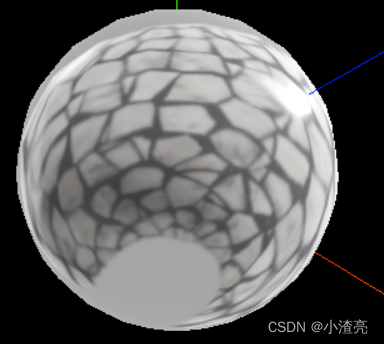
- 效果
013-2 经纬度映射贴图与HDR
- 高动态范围成像,是用来实现比普通数位图像技术更大曝光动态范围(即更大的明暗差别)的一组技术。
- 高动态范围成像的目的就是要正确地表示真实世界中从太阳光直射到最暗的阴影这样大的范围亮度。
- 亮暗的曝光度的突出,凸显细节
import * as THREE from "three"
// console.log('main.js',THREE);

// 导入轨道控制器
import { OrbitControls } from "three/examples/jsm/controls/OrbitControls"
// gsap 1-1:导入动画库
import gsap from "gsap"
// 导入 dat.gui
import * as dat from "dat.gui"

// 1:创建场景
const scene = new THREE.Scene()

// 2:创建相机
const camera = new THREE.PerspectiveCamera(75,window.innerWidth/ window.innerHeight,0.1,1000)
// 设置相机位置 x y z
camera.position.set(0,0,10)
// 把相机添加到场景之中
scene.add( camera );

// 013-2 经纬度映射贴图与HDR start
import {RGBELoader} from 'three/examples/jsm/loaders/RGBELoader'
// 设置hdr环境图
const rgbeLoader = new RGBELoader()
rgbeLoader.loadAsync("hdr/001.hdr").then((texture)=>{
  // 等距圆柱投影的环境贴图,也被叫做经纬线映射贴图
  texture.mapping = THREE.EquirectangularReflectionMapping
  // 设置背景图
  scene.background = texture
  // 设置默认环境
  scene.environment = texture
})
// 设置一个球形 - 几何体
const sphereGeometry = new THREE.SphereGeometry(1,20,20)
const materials = new THREE.MeshStandardMaterial({
  metalness:0.8, // 金属材质
  roughness:0.1, // 粗糙度
})
const sphere = new THREE.Mesh(sphereGeometry,materials)
scene.add(sphere)
// 013-2 经纬度映射贴图与HDR end

// 环境光
const light = new THREE.AmbientLight( 0xffffff,0.8 ); // soft white light
scene.add( light );
// 平行光
const directionalLight = new THREE.DirectionalLight( 0xffffff, 0.5 );
directionalLight.position.set(10,10,10) // 光源位置
scene.add( directionalLight );

// 初始化渲染器
const renderer = new THREE.WebGL1Renderer()
// 设置渲染的尺寸大小
renderer.setSize(window.innerWidth,window.innerHeight)
// 将webgl渲染的canvas内容添加到body上
document.body.appendChild(renderer.domElement)

// 创建轨道控制器
const controls = new OrbitControls(camera,renderer.domElement)
// 设置控制器阻尼,让控制器更具有真是效果
controls.enableDamping = true
// 06-1:添加坐标轴辅助器
const axesHelper = new THREE.AxesHelper( 5 );
scene.add( axesHelper );

// 渲染函数 - 每一帧渲染一次
function animate() {
  // 渲染下一帧 的时候 会调用 animate 函数
	requestAnimationFrame( animate );
	controls.update();
	renderer.render( scene, camera );
}
animate()
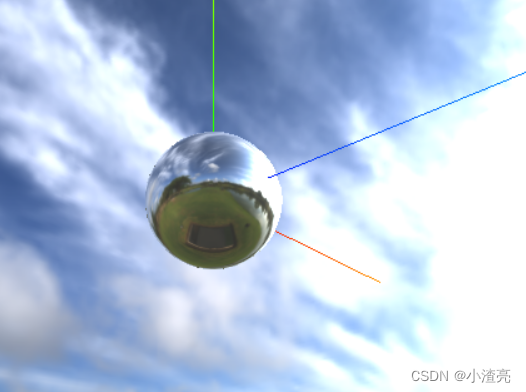
- 效果

北京人形旗下天工造物具身智能开源社区,聚焦具身天工与慧思开物两大平台
更多推荐
 1
1 0
0- 0


 已为社区贡献8条内容

所有评论(0)