org.yaml.snakeyaml.scanner.ScannerException: while scanning for the next token found character ‘@‘
·
一、解析yaml报错
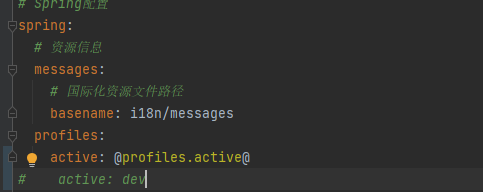
报错信息:
Application run failed org.yaml.snakeyaml.scanner.ScannerException: while scanning for the next token found character '@' that cannot start any token. (Do not use @ for indentation) in 'reader', line 58, column 13: active: @profiles.active@
二、原因
一、需要引入
<profiles>
        <profile>
            <id>dev</id>
            <properties>
                <!-- 环境标识,需要与配置文件的名称相对应 -->
                <profiles.active>dev</profiles.active>
            </properties>
            <activation>
                <!-- 默认环境 -->
                <activeByDefault>true</activeByDefault>
            </activation>
        </profile>
        <profile>
            <id>test</id>
            <properties>
                <!-- 环境标识,需要与配置文件的名称相对应 -->
                <profiles.active>test</profiles.active>
            </properties>
        </profile>
        <profile>
            <id>prod</id>
            <properties>
                <profiles.active>prod</profiles.active>
            </properties>
        </profile>
    </profiles>
二、需要开启 resource 过滤,才能进行占位符使用
    <build>
    .......
        <resources>
            <resource>
                <directory>src/main/resources</directory>
                <!-- 关闭过滤 -->
                <filtering>false</filtering>
            </resource>
            <resource>
                <directory>src/main/resources</directory>
                <!-- 引入所有 匹配文件进行过滤 -->
                <includes>
                    <include>application*</include>
                    <include>bootstrap*</include>
                    <include>banner*</include>
                </includes>
                <!-- 启用过滤 即该资源中的变量将会被过滤器中的值替换 -->
                <filtering>true</filtering>
            </resource>
        </resources>
    </build>
北京人形旗下天工造物具身智能开源社区,聚焦具身天工与慧思开物两大平台
更多推荐
 5
5 0
0- 0


 已为社区贡献5条内容

所有评论(0)