【小程序】微信小程序中实现【关注公众号】弹窗
·
1、效果,注意,在开发工具中并不显示公众号信息,只有在体验版和正式版中才能看到!
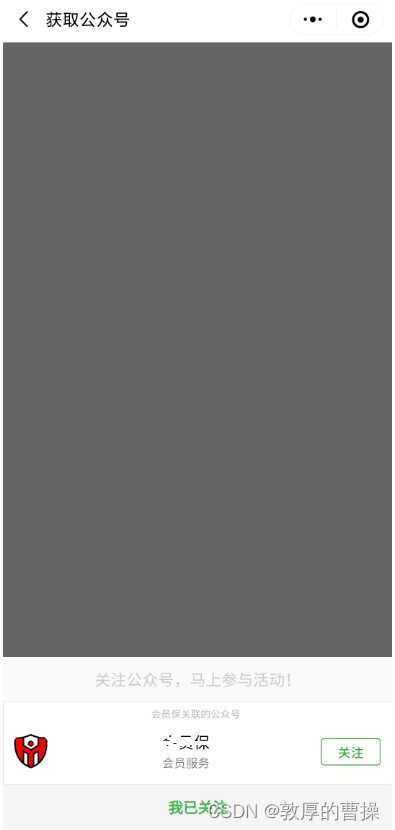
2、wxml代码实现
<!-- 关注公众号弹出 -->
<view wx:if="{{isCloseDown==1}}" class="pop_down">
  <view class="panel">
    <view class="row_1">
      关注公众号,马上参与活动!
    </view>
    <view class="row_2">
      <official-account>
      </official-account>
    </view>
    <view class="row_3" bindtap="closePop">
      我已关注
    </view>
  </view>
</view>
3、wxss代码
/* #region ==== 底部弹出【关注公众号】 */
.pop_down {
    width: 100%;
    height: 100%;
    position: fixed;
    z-index: 1000;
    background-color: rgba(36, 36, 36, 0.7);
    text-align: center;
}

.panel {
    width: 100%;
    height: 177px;
    position: absolute;
    bottom: 0;
    left: 0;
    background-color: rgb(255, 255, 255);
    text-align: center;
}

.row_1 {
    height: 45px;
    width: 100%;
    text-align: center;
    margin: 0 auto;
    background-color: rgb(250, 250, 250);
    font-size: 1;
    line-height: 45px;
    color: rgb(202, 202, 202);

}

.row_3 {
    height: 45px;
    width: 100%;
    text-align: center;
    margin: 0 auto;
    font-size: 15px;
    line-height: 45px;
    font-weight: bold;
    color: rgb(72, 182, 84);
    background-color: rgb(245, 245, 245);
    margin-bottom: 40px;
}

/* #endregion */
4、js代码
    data: {
        isCloseDown: 1, // 0-关闭 1-显示 [关注公众号]弹窗


    // 关闭[关注公众号]弹窗
    closePop: function () {
        this.setData({
            isCloseDown: 0
        })
    },

北京人形旗下天工造物具身智能开源社区,聚焦具身天工与慧思开物两大平台
更多推荐
 1
1 0
0- 0


 已为社区贡献9条内容

所有评论(0)