esp32cam应用一 点亮我的TFT小屏幕
·
USB转TTL的接线跟下载
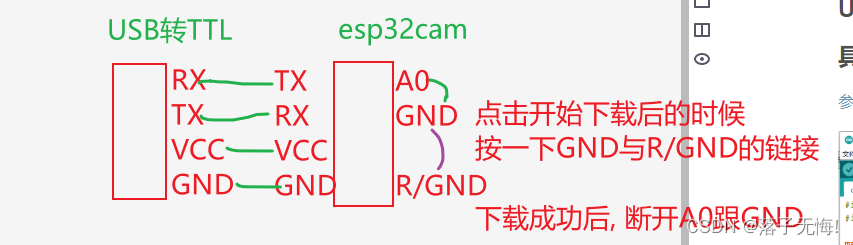
具体应用
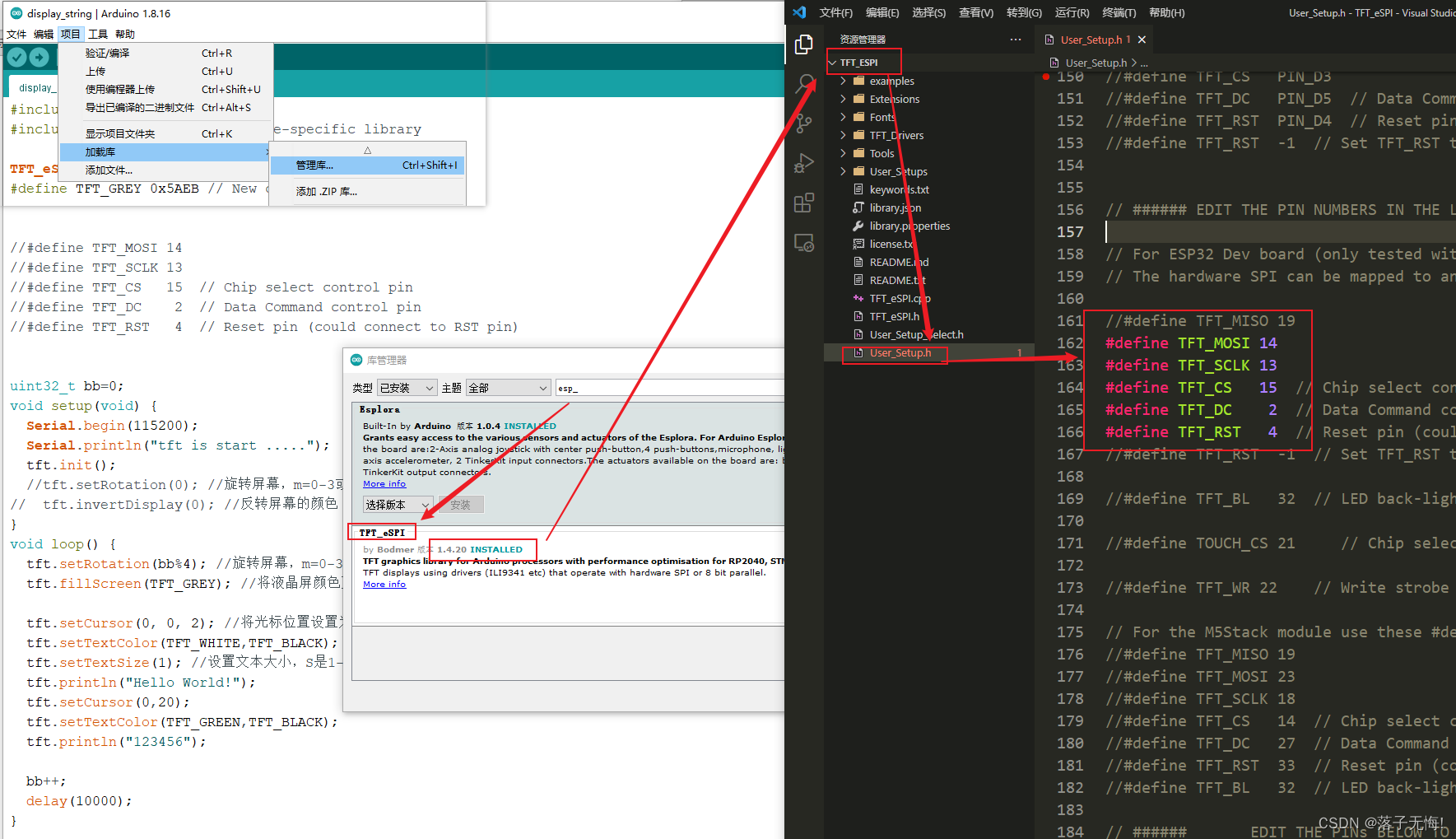
#include <SPI.h>
#include <TFT_eSPI.h> // Hardware-specific library

TFT_eSPI tft = TFT_eSPI(); // Invoke custom library
#define TFT_GREY 0x5AEB // New colour


//#define TFT_MOSI 14 // SDA
//#define TFT_SCLK 13 // SCK
//#define TFT_CS   15  // Chip select control pin
//#define TFT_DC    2  // DC/A0
//#define TFT_RST   4  // RST
// LED接vcc


uint32_t bb=0;
void setup(void) {
  Serial.begin(115200);
  Serial.println("tft is start .....");
  tft.init();
  //tft.setRotation(0); //旋转屏幕,m=0-3或4-7 0 = 0,1 = 90,2 = 180,3 = 270。
//  tft.invertDisplay(0); //反转屏幕的颜色
}
void loop() {
  tft.setRotation(bb%4); //旋转屏幕,m=0-3或4-7 0 = 0,1 = 90,2 = 180,3 = 270。
  tft.fillScreen(TFT_GREY); //将液晶屏颜色更改为color颜色。 color应该是包含UTFT颜色代码的32位变量

  tft.setCursor(0, 0, 2); //将光标位置设置为x和y,字体为font
  tft.setTextColor(TFT_WHITE,TFT_BLACK); //本身颜色,背景颜色
  tft.setTextSize(1); //设置文本大小,S是1-7之间的数字
  tft.println("Hello World!");
  tft.setCursor(0,20);
  tft.setTextColor(TFT_GREEN,TFT_BLACK);
  tft.println("123456");

  bb++;
  delay(10000);
}

北京人形旗下天工造物具身智能开源社区,聚焦具身天工与慧思开物两大平台
更多推荐
 1
1 0
0- 0


 已为社区贡献7条内容

所有评论(0)