微信小程序01-底部导航栏设置
·
效果图
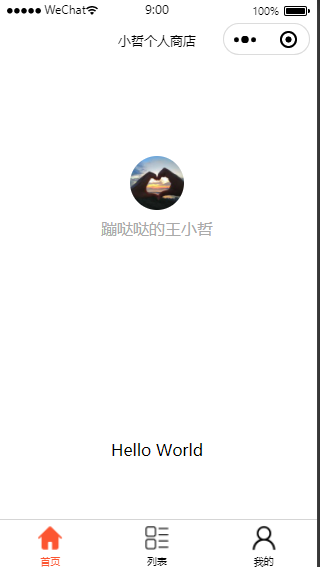
操作步骤:
1 在app.json找到 pages,增加pages配置地址栏路径,保存后会自动生成相应文件夹;
2,增加 tabBar 参数,“selectedColor” 参数是设置选中后文字的颜色;"list" 中放置导航数据。
list 中 相关参数: pagePath ----> 指向地址
text ----> 导航文字
iconPath -----> 导航图标
selectedIconPath -----> 选中状态下导航图标
{
  "pages": [
    "pages/index/index",
    "pages/list/list",
    "pages/mine/mine",
    "pages/logs/logs"
  ],
  "window": {
    "backgroundTextStyle": "light",
    "navigationBarBackgroundColor": "#fff",
    "navigationBarTitleText": "小哲个人商店",
    "navigationBarTextStyle": "black",
    "backgroundColor": "#eeeeee"
  },
  "tabBar": {
    "selectedColor": "#fc5531",
    "list": [
      {
        "pagePath": "pages/index/index",
        "text": "首页",
        "iconPath": "./images/home.png",
        "selectedIconPath": "./images/selected-home.png"
      },
      {
        "pagePath": "pages/list/list",
        "text": "列表",
        "iconPath": "./images/list.png",
        "selectedIconPath": "./images/selected-list.png"
      },
      {
        "pagePath": "pages/mine/mine",
        "text": "我的",
        "iconPath": "./images/mine.png",
        "selectedIconPath": "./images/selected-mine.png"
      }
    ]
  },
  "debug": true,
  "style": "v2",
  "sitemapLocation": "sitemap.json"
}

北京人形旗下天工造物具身智能开源社区,聚焦具身天工与慧思开物两大平台
更多推荐
 7
7 0
0- 0


 已为社区贡献3条内容

所有评论(0)