记录unity 自带读取excel的方法和遇到的一些坑的解决办法
·
using System.Collections;
using System.Collections.Generic;
using UnityEngine;
using UnityEngine.UI;
using Excel;
using System.IO;
using UnityEngine.Networking;
using System.Linq;
using System.Text;
using System.Text.RegularExpressions;
using System.Data;


public class MoveCameraByMouse : MonoBehaviour
{
    public Transform CenObj;//围绕的物体
    public float speed;//旋转速度
    public float speedup;//上升速度
    public GameObject CubePre;//生成的方块
    float xuanzhaun=180;//生成时旋转的角度
    public GameObject weizhi;//方块生成的位置
    int gaodu = 2;//方块初始高度
    int shuliang;//读取文件赋值计数
    public GameObject ui;//生成的ui
    public GameObject flaggo;//生成的红旗
    int toindex;//读取的资源计数
    public Image[] tempImage;//组件
    private    Texture2D pic;

    private   Sprite[] sp;//??

    public string[] diyihang;//读取excel第一行的接受
    public string[] dierhang;//第二行
    public string[] disanhang;//第三行

    public List<Texture> textureList;//读取所有png
    private void Awake()
    {

       InvokeRepeating("shengcheng", 1f, 2f);//生成物体的携程
        GameReadExcel(); //读取excel
    }

    void Start()
    {
        string[] filePath = Directory.GetFiles(Application.streamingAssetsPath,"*.png");//读取所有png
        StartCoroutine(LoadImage(filePath));
        //StartCoroutine(LoadTextureFromInternet());
    }
    void Update()
        {
        if (toindex<=0)//防止index过界
        {

            return;
        }
        transform.Rotate(Vector3.down*Time.deltaTime * speed, Space.World);//旋转


            //transform.RotateAround(CenObj.position, Vector3.up, -30 * Time.deltaTime * speed);
            transform.Translate(transform.up * Time.deltaTime * speedup);
        xuanzhaun=xuanzhaun++;
        }

    //镜头的远离和接近
    public  void shengcheng()//生成
        {

        if (toindex <= 0)
        {

            return;
        }
        gaodu = gaodu + 1;
        sp=new Sprite[toindex];
      GameObject go=  Instantiate(CubePre, weizhi.transform.position , Quaternion.Euler(0,-90, 0));
        go.GetComponent<Transform>().localScale = new Vector3(1f, gaodu, 1);

        GameObject to = Instantiate(ui, new Vector3(go.transform.position.x,go.transform.position.y+(go.transform.position.y/2)-0.5f,go.transform.position.z-0.53f), Quaternion.Euler(0,0,0));
        to.transform.parent = go.transform;
        Text[] ziwuti=to.GetComponentsInChildren<Text>();
        ziwuti[0].text = toindex.ToString();
        Text[] ziwutiname = to.GetComponentsInChildren<Text>();
        ziwutiname[1].text= diyihang[shuliang];
        Image[] ziwutiico=to.GetComponentsInChildren<Image>();
        //StartCoroutine(LoadTextureFromInternet());
        ziwutiico[0].sprite = Sprite.Create((Texture2D)textureList[shuliang], new Rect(0, 0, textureList[shuliang].width, textureList[shuliang].height), Vector2.zero);


        GameObject flag = Instantiate(flaggo, new Vector3(go.transform.position.x+0.2f, go.transform.position.y + (go.transform.position.y / 2)+1.5f, go.transform.position.z), Quaternion.Euler(0,-180 ,90));
        flag.transform.parent = go.transform;
        MeshRenderer mr = flag.GetComponent<MeshRenderer>();
        mr.material.mainTexture = textureList[shuliang];
        shuliang = shuliang + 1;
        toindex = toindex - 1;
    }
    IEnumerator LoadImage(string[] filePath)//读取所有png
    {
        foreach (var item in filePath)
        {
            UnityWebRequest request = UnityWebRequestTexture.GetTexture(item);
            yield return request.SendWebRequest();
            textureList.Add(DownloadHandlerTexture.GetContent(request));
        }
    }

    //[System.Obsolete]
    //IEnumerator LoadTextureFromInternet()
    //{
    //    tempImage = new Image[toindex];

    //    for (int i = 0; i < toindex; i++)
    //    {


    //        UnityWebRequest request = new UnityWebRequest(Application.streamingAssetsPath +"/"+ dierhang[i]);
    //        DownloadHandlerTexture texture = new DownloadHandlerTexture(true);
    //        request.downloadHandler = texture;
    //        yield return request.Send();
    //        if (string.IsNullOrEmpty(request.error))
    //        {
    //            pic = texture.texture;
    //        }

    //        //tempImage = GameObject.Find("Image").GetComponent<Image>();
    //        sp = Sprite.Create((Texture2D)pic, new Rect(0, 0, pic.width, pic.height), Vector2.zero);

    //        tempImage[i].sprite = sp;
    //        //Debug.Log(dierhang[i]);
    //        //GameObject go = GameObject.Find("Cube");
    //        //go.GetComponent<MeshRenderer>().material.mainTexture = pic;
    //    }
    //}
    public void GameReadExcel()//读取excel
    {
        FileStream stream = File.Open(Application.streamingAssetsPath +"/config.xlsx", FileMode.Open, FileAccess.Read);
        //IExcelDataReader excelReader = ExcelReaderFactory.CreateBinaryReader(stream);
        IExcelDataReader excelReader = ExcelReaderFactory.CreateOpenXmlReader(stream);

        DataSet result = excelReader.AsDataSet();

        toindex = result.Tables[0].Columns.Count;//获取列数
        int rows = result.Tables[0].Rows.Count;//获取行数


        //从第二行开始读
        //for (int i = 1; i < rows; i++)
        //{
        diyihang = new string[toindex];
        dierhang = new string[toindex];
        disanhang = new string[toindex];
        for (int j = 0; j < toindex; j++)
            {
            diyihang[j] = result.Tables[0].Rows[1][j].ToString();
            //Debug.Log(diyihang[j]);
            }
        //}
        for (int j = 0; j < toindex; j++)
        {
            dierhang[j] = result.Tables[0].Rows[2][j].ToString();
            //Debug.Log(dierhang);
        }
        for (int j = 0; j < toindex; j++)
        {
            disanhang[j] = result.Tables[0].Rows[3][j].ToString();
           // Debug.Log(disanhang);
        }

    }


}
先上代码,版本2020.3.26f1c1,第一注意命名空间,第二导入链接:https://pan.baidu.com/s/1N8tZ7nCg2Ak4LDplwYt3tQ?pwd=1234
提取码:1234
到Assets下解压,修改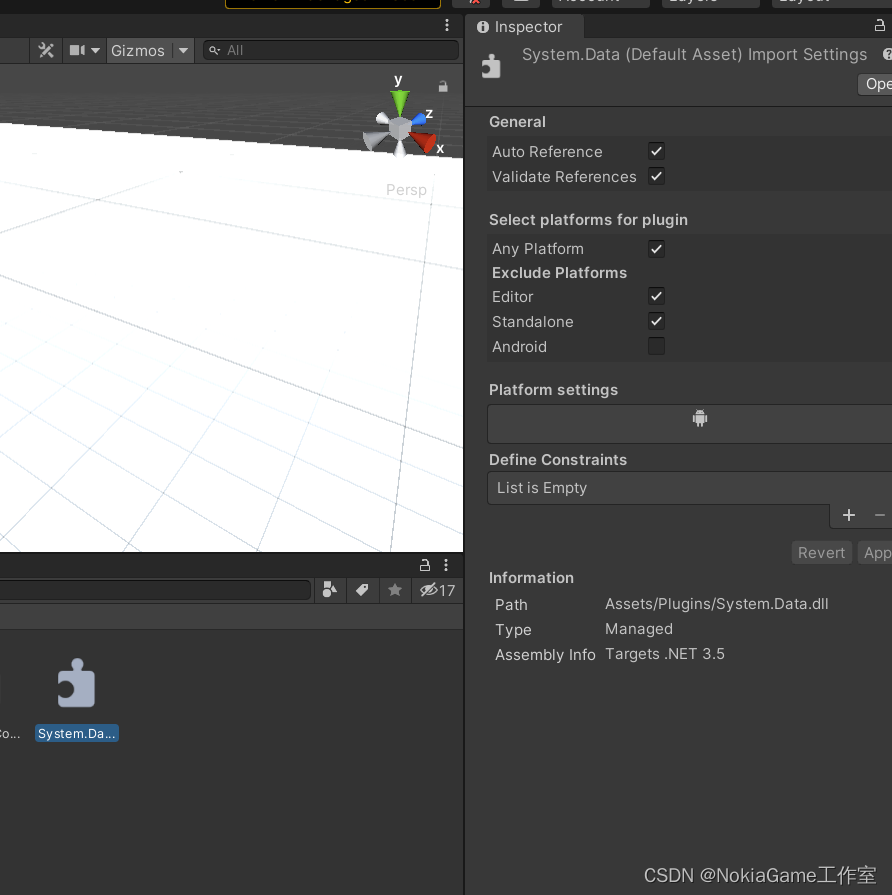
118如果不在我这下载就去找自己安装包对应的地址,此处重点切记!!!我的地址:C:\Program Files\Unity\Hub\Editor\2020.3.26f1c1\Editor\Data\MonoBleedingEdge\lib\mono\unityjit
切记切记切记!!!
代码比较乱,毕竟我不是只做这一个功能!再此只是记录遇到的坑,自己选择想要的功能,这个代码功能也比较全。

北京人形旗下天工造物具身智能开源社区,聚焦具身天工与慧思开物两大平台
更多推荐
 0
0 0
0- 0


 已为社区贡献3条内容

所有评论(0)