【Eslint】忽视某些 eslint 规矩检查导致的报错
·
报错信息
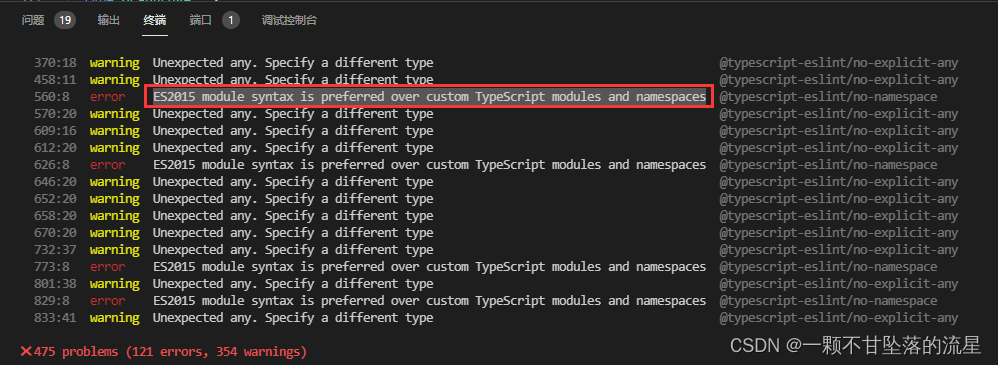
解决方法
- 找到
eslint配置文件eslintrc.js
1. 在 plugins 添加相应规矩的检查插件
2. 在 rules 中添加 eslint 检查规则
3. off 表示关闭该项检查,warn 表示将报错调整为警告
module.exports = {
  env: {
    browser: true,
    commonjs: true,
    es2021: true,
  },
  extends: [
    'eslint:recommended',
    'plugin:react/recommended',
    'plugin:@typescript-eslint/recommended',
  ],
  parser: '@typescript-eslint/parser',
  parserOptions: {
    ecmaFeatures: {
      jsx: true,
    },
    ecmaVersion: 12,
  },
  settings: {
    react: { version: 'detect' },
  },
  plugins: ['react', 'react-hooks', '@typescript-eslint'],
  rules: {
    'react/prop-types': 'off',
    'no-unsafe-finally': 'off',
    'no-plusplus': 'off',
    'no-constant-condition': 'off',
    'no-unsafe-optional-chaining': 'off',
    'no-constant-condition': 'off',
    'no-param-reassign': 'off',

    'react/jsx-key': 'off',
    'react/display-name': 'off',
    'react-hooks/exhaustive-deps': 'warn',
    'prefer-const': 'warn',
    'no-var': 'warn',
    'no-empty': 'warn',
    'no-empty-pattern': 'warn',
  },
};

北京人形旗下天工造物具身智能开源社区,聚焦具身天工与慧思开物两大平台
更多推荐
 0
0 0
0- 0


 已为社区贡献6条内容

所有评论(0)