Git提交异常解决方案ssh: connect to host gitlab.xxxx.com port 22: Connection timed out / Integrate the remote
·
Git提交异常解决方案
-
Git错误提示:Integrate the remote changes…
由于本地和远程仓库两者代码文件不同步,因此需要先pull,进行合并然后再进行push 先使用pull命令,再使用push命令 git pull --rebase origin master git push -u origin master -
Git错误提示:ssh: connect to host gitlab.xxxx.com port 22: Connection timed out
将ssh方式修改为https,这种方式解决了我的问题
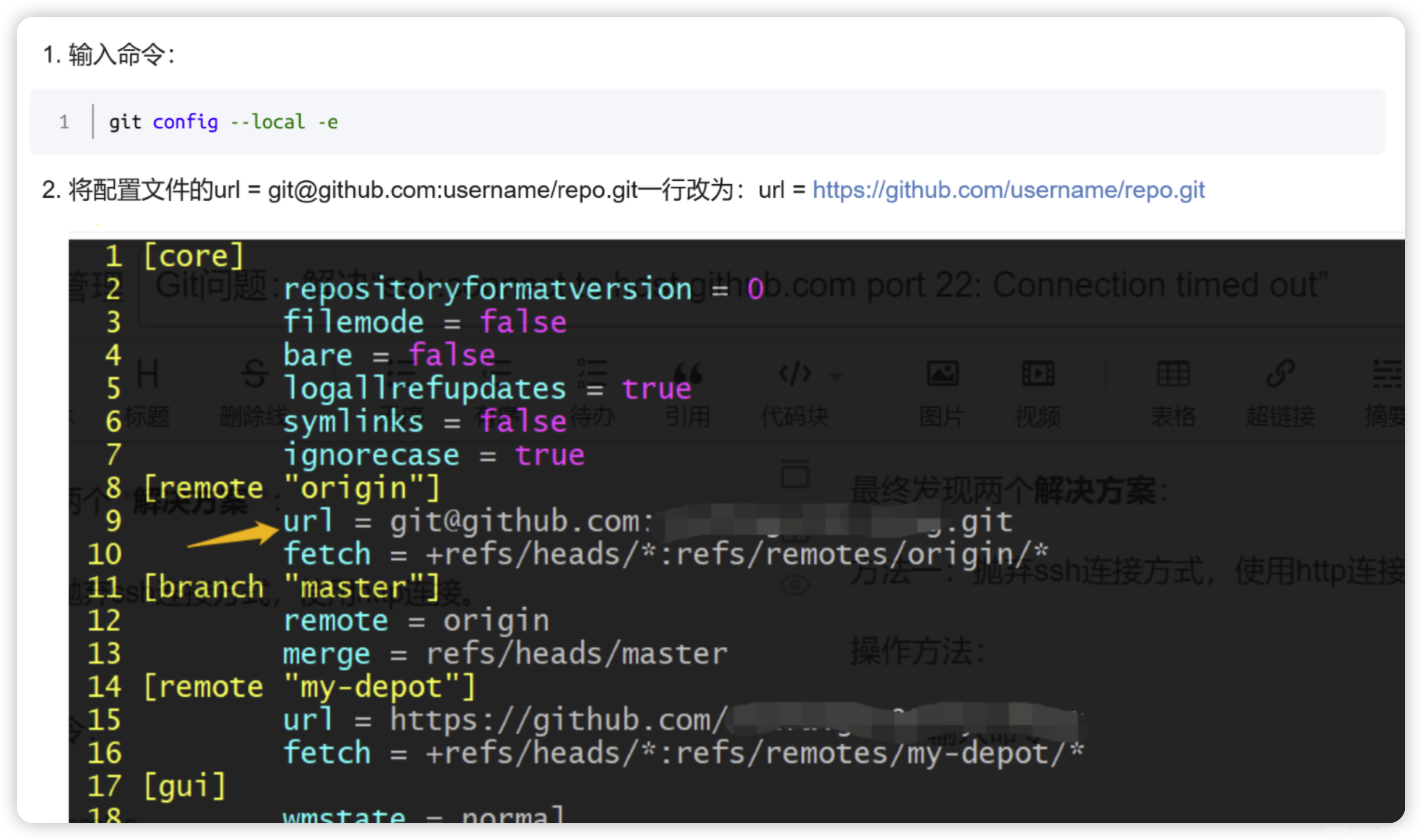
1.git config --local -e
2.将配置文件的url = git@github.com:username/repo.git一行改为: url = https://github.com/username/repo.git

北京人形旗下天工造物具身智能开源社区,聚焦具身天工与慧思开物两大平台
更多推荐
 1
1 0
0- 0


 已为社区贡献8条内容

所有评论(0)