springboot使用maven插件打包项目
·
springboot使用maven插件打包项目
springboot将项目打包成jar包时,默认会将所有依赖都打包进去,这样使得打包后的jar包十分庞大。可以通过配置maven插件来打包项目,将资源文件和依赖文件以及代码文件分离开。这样在依赖文件没有变动的情况下,后续只需要更新打包后的不含依赖的项目代码jar包即可。
1. 涉及插件
- maven-resources-plugin | 处理资源文件
- maven-dependency-plugin | 处理依赖文件
- maven-jar-plugin | 打包插件
- maven-surefire-plugin | 测试插件
2. 完整配置
<build>
    <!-- maven插件配置 -->
    <plugins>
        <!-- 资源处理插件 -->
        <plugin>
            <groupId>org.apache.maven.plugins</groupId>
            <artifactId>maven-resources-plugin</artifactId>
            <version>2.6</version>
            <executions>
                <execution>
                    <id>copy-resources</id>
                    <phase>process-resources</phase>
                    <goals>
                        <goal>copy-resources</goal>
                    </goals>
                    <configuration>
                        <!-- 资源文件输出路径 -->
                        <outputDirectory>${project.build.directory}/my_jump/config</outputDirectory>
                        <!-- 资源文件位置 -->
                        <resources>
                            <resource>
                                <directory>src/main/resources</directory>
                                <includes>
                                    <exclude>**/*.txt</exclude>
                                    <exclude>**/*.xml</exclude>
                                    <exclude>**/*.config</exclude>
                                    <exclude>**/*.properties</exclude>
                                </includes>
                                <filtering>true</filtering>
                            </resource>
                        </resources>
                        <!-- 文件编码 -->
                        <encoding>UTF-8</encoding>
                    </configuration>
                </execution>
            </executions>
        </plugin>

        <!-- 依赖处理插件 -->
        <plugin>
            <groupId>org.apache.maven.plugins</groupId>
            <artifactId>maven-dependency-plugin</artifactId>
            <version>2.6</version>
            <executions>
                <execution>
                    <id>copy-dependencies</id>
                    <phase>package</phase>
                    <goals>
                        <goal>copy-dependencies</goal>
                    </goals>
                    <configuration>
                        <!-- 依赖文件输出路径 -->
                        <outputDirectory>${project.build.directory}/my_jump/lib</outputDirectory>
                    </configuration>
                </execution>
            </executions>
        </plugin>

        <!-- 打包插件 -->
        <plugin>
            <groupId>org.apache.maven.plugins</groupId>
            <artifactId>maven-jar-plugin</artifactId>
            <version>2.6</version>
            <configuration>
                <outputDirectory>${project.build.directory}/my_jump</outputDirectory>
                <archive>
                    <!-- 生成的jar中,不要包含pom.xml和pom.properties这两个文件 -->
                    <addMavenDescriptor>false</addMavenDescriptor>
                    <manifest>
                        <!--如果没有这个属性,可能会引用本地maven库中带时间戳的依赖包,导致找不到依赖-->
                        <useUniqueVersions>false</useUniqueVersions>
                        <!-- 是否要把第三方jar放到manifest的classpath中 -->
                        <addClasspath>true</addClasspath>
                        <!-- 生成的manifest中classpath的前缀,因为要把第三方jar放到lib目录下,所以classpath的前缀是lib/ -->
                        <classpathPrefix>lib/</classpathPrefix>
                        <!-- 主函数位置 -->
                        <mainClass>com.demo.my_jump.MyJumpApplication</mainClass>
                    </manifest>
                    <manifestEntries>
                        <!-- 在Class-Path下添加配置文件的路径;可以手动把某个依赖添加进这个地方,用空格隔开就行 -->
                        <class-Path>config/</class-Path>
                    </manifestEntries>
                </archive>
                <excludes>
                    <exclude>*.txt</exclude>
                    <exclude>*.sh</exclude>
                    <exclude>*.lst</exclude>
                    <exclude>*.xml</exclude>
                    <exclude>*.properties</exclude>
                </excludes>
            </configuration>
        </plugin>

        <!-- 测试插件 -->
        <plugin>
            <groupId>org.apache.maven.plugins</groupId>
            <artifactId>maven-surefire-plugin</artifactId>
            <version>2.10</version>
            <configuration>
                <!-- 跳过测试 -->
                <skipTests>true</skipTests>
            </configuration>
        </plugin>
    </plugins>

    <!-- 打包文件名 -->
    <finalName>${project.artifactId}</finalName>
</build>
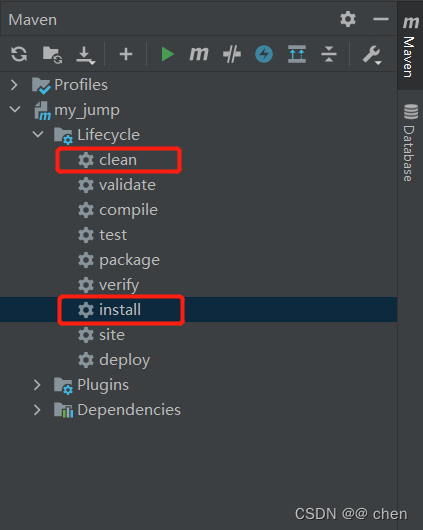
3. 打包
maven clean install
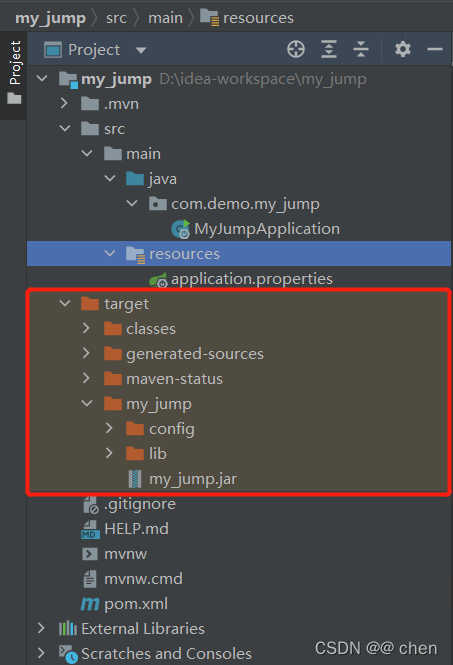
4. 结果
资源文件复制到config目录
依赖文件复制到lib目录
项目代码单独打包成jar

北京人形旗下天工造物具身智能开源社区,聚焦具身天工与慧思开物两大平台
更多推荐
 0
0 0
0- 0


 已为社区贡献3条内容

所有评论(0)