vue-cli4 vue3+element-plus采用本地cdn方式,提高开发启动速度
·
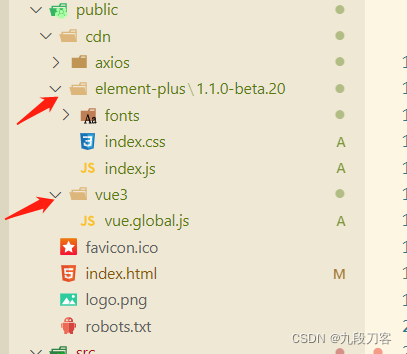
这里我用本地的方式没有采用线上cdn的方式,是因为我们的项目是工厂类项目要求文档,不能使用其他的外网,如果要外部cdn方式可以参考
public/index.html
<!DOCTYPE html>
<html lang="">
  <head>
    <meta charset="utf-8" />
    <meta http-equiv="X-UA-Compatible" content="IE=edge" />
    <meta name="viewport" content="width=device-width,initial-scale=1.0" />
    <link rel="icon" href="favicon.ico" />
    <title>xxxx管理</title>
    <link rel="stylesheet" href="/cdn/element-plus/1.1.0-beta.20/index.css" />
  </head>
  <body>
    <noscript>
      <strong
        >We're sorry but <%= htmlWebpackPlugin.options.title %> doesn't work
        properly without JavaScript enabled. Please enable it to
        continue.</strong
      >
    </noscript>
    <div id="app"></div>
    <!-- built files will be auto injected -->

    <!-- 导入 Vue 3 -->
    <script src="/cdn/vue3/vue.global.js"></script>
    <!-- 导入组件库 -->
    <script src="/cdn/element-plus/1.1.0-beta.20/index.js"></script>
  </body>
</html>
vue.config.js
module.exports = {
  productionSourceMap: false,
  configureWebpack: {
    // 打包忽略文件
    externals: {
      vue: 'Vue',
      'element-plus': 'ElementPlus',
    },
  },
};
博主开发了一个浏览器aweb123.com

北京人形旗下天工造物具身智能开源社区,聚焦具身天工与慧思开物两大平台
更多推荐
 0
0 0
0- 0


 已为社区贡献7条内容

所有评论(0)