elasticsearch实战(注解方式实现日志实时记录)
·
一、环境安装
1.es安装
下载地址:https://www.elastic.co/cn/downloads/past-releases/elasticsearch-7-3-1

选择对应版本下载。解压到文件夹。

双击 elasticsearch.bat 启动。

访问9200端口,启动成功。

2.安装可视化工具
本地安装node环境。
代码下载地址:https://github.com/mobz/elasticsearch-head
下载后解压并启动。


2.代码开发
1.添加依赖
        <!--ES-->
        <dependency>
            <groupId>org.elasticsearch.client</groupId>
            <artifactId>elasticsearch-rest-high-level-client</artifactId>
            <version>7.3.1</version>
        </dependency>
        <dependency>
            <groupId>org.elasticsearch.client</groupId>
            <artifactId>elasticsearch-rest-client</artifactId>
            <version>7.3.1</version>
        </dependency>
        <dependency>
            <groupId>org.elasticsearch</groupId>
            <artifactId>elasticsearch</artifactId>
            <version>7.3.1</version>
        </dependency>
2.添加配置
配置文件
elasticsearch:
  enabled: false
  maxConn: 8
  address: 127.0.0.1:9200
配置类
@Component
@Data
@ConfigurationProperties(prefix = "elasticsearch")
public class EsProperties {
    private boolean enabled;
    private int maxConn = 8;
    private String address;
}
3.工具类
public class ESUtil {

    private static Logger LOG = LoggerFactory.getLogger(ESUtil.class);

    protected static RestHighLevelClient client;

    /**
     * Java High Level REST Client  初始化
     */
    public ESUtil(String host, int port) {
        if (client == null) {
            client = new RestHighLevelClient(
                    RestClient.builder(
                            new HttpHost(host, port, "http")));
        }
    }

    public ESUtil(String address) {
        if (client == null) {
            List<HttpHost> httpHosts = new LinkedList<>();
            String[] addressString = address.split(",");
            for (String add : addressString) {
                String[] ipPort = add.split(":");
                String host = ipPort[0];
                String port = ipPort[1];
                Integer intPort = Integer.valueOf(port);
                httpHosts.add(new HttpHost(host, intPort, "http"));
            }
            HttpHost[] hosts = new HttpHost[httpHosts.size()];

            httpHosts.toArray(hosts);
            client = new RestHighLevelClient(
                    RestClient.builder(hosts));
        }
    }

    /**
     * 新增,修改文档
     *
     * @param indexName 索引
     * @param type      mapping type
     * @param id        文档id
     * @param jsonStr   文档数据
     */
    public void addData(String indexName, String type, String id, String jsonStr) {
        try {
            // 1、创建索引请求  //索引  // mapping type  //文档id
            IndexRequest request = new IndexRequest(indexName, type, id);     //文档id
//            IndexRequest request = new IndexRequest(indexName);
            // 2、准备文档数据
            // 直接给JSON串
            request.source(jsonStr, XContentType.JSON);
            //4、发送请求
            IndexResponse indexResponse = null;
            try {
                // 同步方式
                indexResponse = client.index(request, RequestOptions.DEFAULT);
//                LOG.info("进入ESUtil");
            } catch (ElasticsearchException e) {
                // 捕获,并处理异常
                //判断是否版本冲突、create但文档已存在冲突
                if (e.status() == RestStatus.CONFLICT) {
                    System.out.println("冲突了,请在此写冲突处理逻辑!" + e.getDetailedMessage());
                }
            }
            //5、处理响应
            if (indexResponse != null) {
                String index1 = indexResponse.getIndex();
                String type1 = indexResponse.getType();
                String id1 = indexResponse.getId();
                long version1 = indexResponse.getVersion();
                if (indexResponse.getResult() == DocWriteResponse.Result.CREATED) {
                    LOG.debug("新增文档成功!" + index1 + type1 + id1 + version1);
                } else if (indexResponse.getResult() == DocWriteResponse.Result.UPDATED) {
                    LOG.info("修改文档成功!");
                }
                // 分片处理信息
                ReplicationResponse.ShardInfo shardInfo = indexResponse.getShardInfo();
                if (shardInfo.getTotal() != shardInfo.getSuccessful()) {
                    LOG.debug("分片处理信息.....");
                }
                // 如果有分片副本失败,可以获得失败原因信息
                if (shardInfo.getFailed() > 0) {
                    for (ReplicationResponse.ShardInfo.Failure failure : shardInfo.getFailures()) {
                        String reason = failure.reason();
                        LOG.error("副本失败原因:" + reason);
                    }
                }
            }

        } catch (Exception e) {
            LOG.error("向ES写入日志异常", e);
        }
    }

    public void deleteIndex(String indexName){
        DeleteIndexRequest request = new DeleteIndexRequest(indexName);
        // 删除
        AcknowledgedResponse delete = null;
        try {
            delete = client.indices().delete(request, RequestOptions.DEFAULT);
            LOG.debug("delete index indexName "+ delete.isAcknowledged());
        } catch (IOException e) {
            LOG.error("删除索引"+indexName+"异常!",e);
        }
    }
    /**
     * 批量插入ES
     *
     * @param indexName 索引
     * @param type      类型
     * @param idName    id名称
     * @param list      数据集合
     */
    public void bulkDate(String indexName, String type, String idName, List<Map<String, Object>> list) {
        try {

            if (null == list || list.size() <= 0 || StringUtils.isBlank(indexName) || StringUtils.isBlank(idName) || StringUtils.isBlank(type)) {
                return;
            }
            BulkRequest request = new BulkRequest();
            for (Map map : list) {
                request.add(new IndexRequest(indexName, type, idName + System.nanoTime())
                        .source(map, XContentType.JSON));
            }
            // 2、可选的设置
                   /*
           request.timeout("2m");
           request.setRefreshPolicy("wait_for");
           request.waitForActiveShards(2);
           */
            //3、发送请求
            // 同步请求
            BulkResponse bulkResponse = client.bulk(request, RequestOptions.DEFAULT);

            //4、处理响应
            processResponse(bulkResponse);
        } catch (IOException e) {
            LOG.error("批量插入日志异常", e);
        }
    }

    /**
     * 处理响应
     *
     * @param bulkResponse
     */
    private void processResponse(BulkResponse bulkResponse) {
        if (bulkResponse == null) {
            return;
        }
        for (BulkItemResponse bulkItemResponse : bulkResponse) {
            DocWriteResponse itemResponse = bulkItemResponse.getResponse();
            if (bulkItemResponse.getOpType() == DocWriteRequest.OpType.INDEX
                    || bulkItemResponse.getOpType() == DocWriteRequest.OpType.CREATE) {
                IndexResponse indexResponse = (IndexResponse) itemResponse;
                if (indexResponse == null) {
                    LOG.error("新增失败," + bulkItemResponse.getFailureMessage());
                } else {
                    LOG.debug("新增成功,{}" + indexResponse.toString());
                }
            } else if (bulkItemResponse.getOpType() == DocWriteRequest.OpType.UPDATE) {
                UpdateResponse updateResponse = (UpdateResponse) itemResponse;
                LOG.debug("修改成功,{}" + updateResponse.toString());
            } else if (bulkItemResponse.getOpType() == DocWriteRequest.OpType.DELETE) {
                DeleteResponse deleteResponse = (DeleteResponse) itemResponse;
                LOG.debug("删除成功,{}" + deleteResponse.toString());
            }
        }
    }
 }
public class HttpContextUtil {
    private HttpContextUtil(){

    }
    //获取HttpServletRequest请求
    public static HttpServletRequest getHttpServletRequest() {
        return ((ServletRequestAttributes) Objects.requireNonNull(RequestContextHolder.getRequestAttributes())).getRequest();
    }

}
4.日志实体
@Setter
@Getter
@ToString
public class LogBean {
    private static final String indexPre="standard_access_log_";
//    private String appid;
    private String uri;
    private long status;
    private long executionTime;
    private String startTimestamp;

    public LogBean(){}

}
5.日志实现
public interface LogService {

    void save(LogBean blog);

}
@Service("blogService")
public class LogServiceImpl implements LogService {

    /**
     * 索引前缀
     */
    public static final String INDEX_PRE="standard_log_access_";

    /**
     * 索引后缀
     * 一天一个索引
     */
    private static final SimpleDateFormat index_suffix_ft = new SimpleDateFormat("yyyyMMdd");


    @Resource
    EsProperties esProperties;

    /**
     * ES连接工具类
     */
    private static ESUtil esUtil = null;

    /**
     * 获取ES连接
     * @return
     */
    private ESUtil getEsUtil(){
        if (esUtil == null) {
            esUtil = new ESUtil(esProperties.getAddress());
        }
        return esUtil;
    }


    @Override
    public void save(LogBean logBean) {
        Date dNow = new Date();
        getEsUtil().addData(INDEX_PRE + index_suffix_ft.format(dNow), String.valueOf(logBean.getStatus()), INDEX_PRE + System.nanoTime(), JSON.toJSONString(logBean));
    }


}
5.注解
/*
自己定义的保存ES日志注解
 */

@Target(ElementType.METHOD)
@Retention(RetentionPolicy.RUNTIME)
public @interface ESLog {

}
6.注解实现
@Aspect
@Component
public class TimingUtil {
    private static Logger LOG = LoggerFactory.getLogger(TimingUtil.class);

    /**
     * ES时间格式
     */
    private static final SimpleDateFormat es_ft = new SimpleDateFormat("yyyy-MM-dd'T'HH:mm:ss.SSSZ");

    @Autowired
    LogService logService;

    @Pointcut("@annotation(grp.pt3.annotation.ESLog)")
    private void pointCut(){}

    @Around("pointCut()")
    public Object timing(ProceedingJoinPoint joinPoint){
        Object object;
        LogBean logBean = new LogBean();
        Stopwatch stopwatch = Stopwatch.createStarted();
        Date dNow = new Date();
        logBean.setStartTimestamp(es_ft.format(dNow));
        try{
            object = joinPoint.proceed();
        } catch (Throwable throwable) {
            throwable.printStackTrace();
            return null;
        }
        HttpServletRequest request =  HttpContextUtil.getHttpServletRequest();
        HttpServletResponse response = ((ServletRequestAttributes) RequestContextHolder.getRequestAttributes()).getResponse();

//        String ip = IPUtils.getRequestClientRealIP(request);
//        String appid = allowIpService.getAppidByIp(ip);
//        if(!StringUtil.isEmpty(appid)){
//            logBean.setAppid(appid);
//        }
        String[] parts = request.getRequestURI().split("/");
        String url = summaryUrl(parts);
        if(StringUtil.isEmpty(url)){
            logBean.setUri(request.getMethod()+request.getRequestURI());
        }else {
            logBean.setUri(request.getMethod()+url);
        }

        logBean.setStatus(response.getStatus());
        logBean.setExecutionTime(stopwatch.elapsed(TimeUnit.MILLISECONDS));
        logService.save(logBean);
        LOG.info("调用save方法保存ES日志"+logBean.toString());
        return object;
    }

    //按一定规则对url做处理
    private String summaryUrl(String[] data){
        int len = data.length;
        String url = new String();
        if(len<5){
            return url;
        }
        if(data[3].equals("bas")&&len>5){
            for (int i = 0; i < len-1; i++) {
                url+=data[i]+"/";
            }
        } else if(data[3].equals("syncuserinfo")&&data[4].contains("?")){
            String[] strs = data[4].split("\\?");
            for (int i = 0; i < len-1; i++) {
                url+=data[i]+"/";
            }
                url+=strs[1];
        }
        return url;
    }
}
7.接口上使用注解
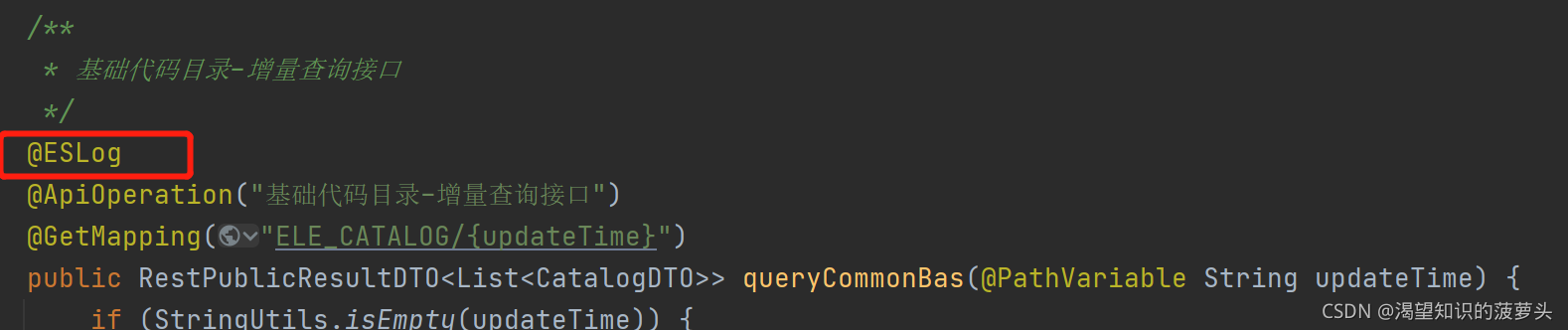
8.访问接口并查看日志

北京人形旗下天工造物具身智能开源社区,聚焦具身天工与慧思开物两大平台
更多推荐
 0
0 0
0- 0


 已为社区贡献1条内容

所有评论(0)