【百度飞桨Paddle】11类食品分类项目
项目描述
训练一个简单的卷积神经网络,实现食物图片的分类。
数据集介绍
本次使用的数据集为food-11数据集,共有11类
Bread, Dairy product, Dessert, Egg, Fried food, Meat, Noodles/Pasta, Rice, Seafood, Soup, and Vegetable/Fruit.
(面包,乳制品,甜点,鸡蛋,油炸食品,肉类,面条/意大利面,米饭,海鲜,汤,蔬菜/水果)
Training set: 9866张
Validation set: 3430张
Testing set: 3347张
数据格式
下载 zip 档后解压缩会有三个资料夹,分别为training、validation 以及 testing
training 以及 validation 中的照片名称格式为 [类别]_[编号].jpg,例如 3_100.jpg 即为类别 3 的照片(编号不重要)
解压数据
只运行一次!
!unzip -d work data/data76472/food-11.zip # 解压缩food-11数据集
引入环境
import os
import paddle
import paddle.vision.transforms as T
import numpy as np
import pandas as pd
from PIL import Image
import paddle.nn.functional as F
预处理环节
#只运行一次!!!!
针对图片的命名,进行索引文件的生成
照片名称格式为 [类别]_[编号].jpg,例如 3_100.jpg 即为类别 3 的照片(编号不重要)
data_path = '/home/aistudio/work/food-11/'  # 设置初始文件地址
character_folders = os.listdir(data_path)  # 给绝对地址

 #对训练集进行处理
for character_folder in character_folders:
    with open(f'./training_set.txt', 'a') as f_train:
        character_imgs = os.listdir(os.path.join(data_path,character_folder))
        #初始化计数器
        CNT = 0
        for img in character_imgs:
            f_train.write(os.path.join(data_path,character_folder,img) + '\t' + img[0:img.rfind('_', 1)] + '\n')
            CNT += 1

#对验证集进行处理
for character_folder in character_folders:
    with open(f'./validation_set.txt', 'a') as f_train:
        character_imgs = os.listdir(os.path.join(data_path,character_folder))
        #初始化计数器
        CNT = 0
        for img in character_imgs:
            f_train.write(os.path.join(data_path,character_folder,img) + '\t' + img[0:img.rfind('_', 1)] + '\n')
            CNT += 1

#对测试集进行处理
for character_folder in character_folders:
    with open(f'./test_set.txt', 'a') as f_train:
        character_imgs = os.listdir(os.path.join(data_path,character_folder))
        #初始化计数器
        CNT = 0
        for img in character_imgs:
            f_train.write(os.path.join(data_path,character_folder,img) + '\n')
            CNT += 1
        print(character_folder,CNT)
training 9866
validation 3430
testing 3347
验证对应关系是否正确
tf="training_set.txt"
with open(tf) as f:
    tfl=f.readlines()
#print(tfl)
outlist=[]
for i in tfl:
    outlist.append(i[:-1])
print(outlist,'/n')
数据EDA(Exploratory Data Analysis)
查看各个类别的数据量,查看分布情况。
此处使用pandas进行数据处理
关于无表头的txt文件,可以使用read_table的names参数,对其进行命令。可参考该文章
有关Pandas的使用,可参考以下文章
pandas学习记录
#读取txt文本
df =  pd.read_table(tf,sep='\t',names=['name','label'])
print(df)
#然后选定label列下的数据,进行绘图
d = df['label'].hist().get_figure()
d.savefig("EDA.png")
/opt/conda/envs/python35-paddle120-env/lib/python3.7/site-packages/matplotlib/__init__.py:107: DeprecationWarning: Using or importing the ABCs from 'collections' instead of from 'collections.abc' is deprecated, and in 3.8 it will stop working
  from collections import MutableMapping
/opt/conda/envs/python35-paddle120-env/lib/python3.7/site-packages/matplotlib/rcsetup.py:20: DeprecationWarning: Using or importing the ABCs from 'collections' instead of from 'collections.abc' is deprecated, and in 3.8 it will stop working
  from collections import Iterable, Mapping
/opt/conda/envs/python35-paddle120-env/lib/python3.7/site-packages/matplotlib/colors.py:53: DeprecationWarning: Using or importing the ABCs from 'collections' instead of from 'collections.abc' is deprecated, and in 3.8 it will stop working
  from collections import Sized
2021-04-05 16:06:54,139 - INFO - font search path ['/opt/conda/envs/python35-paddle120-env/lib/python3.7/site-packages/matplotlib/mpl-data/fonts/ttf', '/opt/conda/envs/python35-paddle120-env/lib/python3.7/site-packages/matplotlib/mpl-data/fonts/afm', '/opt/conda/envs/python35-paddle120-env/lib/python3.7/site-packages/matplotlib/mpl-data/fonts/pdfcorefonts']


                                                  name    label
0       /home/aistudio/work/food-11/training/3_288.jpg        3
1        /home/aistudio/work/food-11/training/4_36.jpg        4
2       /home/aistudio/work/food-11/training/6_328.jpg        6
3      /home/aistudio/work/food-11/training/10_707.jpg       10
4       /home/aistudio/work/food-11/training/2_957.jpg        2
...                                                ...      ...
16638     /home/aistudio/work/food-11/testing/0542.jpg  0542.jp
16639     /home/aistudio/work/food-11/testing/3091.jpg  3091.jp
16640     /home/aistudio/work/food-11/testing/0722.jpg  0722.jp
16641     /home/aistudio/work/food-11/testing/0805.jpg  0805.jp
16642     /home/aistudio/work/food-11/testing/1566.jpg  1566.jp

[16643 rows x 2 columns]


2021-04-05 16:06:54,469 - INFO - generated new fontManager
/opt/conda/envs/python35-paddle120-env/lib/python3.7/site-packages/matplotlib/cbook/__init__.py:2349: DeprecationWarning: Using or importing the ABCs from 'collections' instead of from 'collections.abc' is deprecated, and in 3.8 it will stop working
  if isinstance(obj, collections.Iterator):
/opt/conda/envs/python35-paddle120-env/lib/python3.7/site-packages/matplotlib/cbook/__init__.py:2366: DeprecationWarning: Using or importing the ABCs from 'collections' instead of from 'collections.abc' is deprecated, and in 3.8 it will stop working
  return list(data) if isinstance(data, collections.MappingView) else data
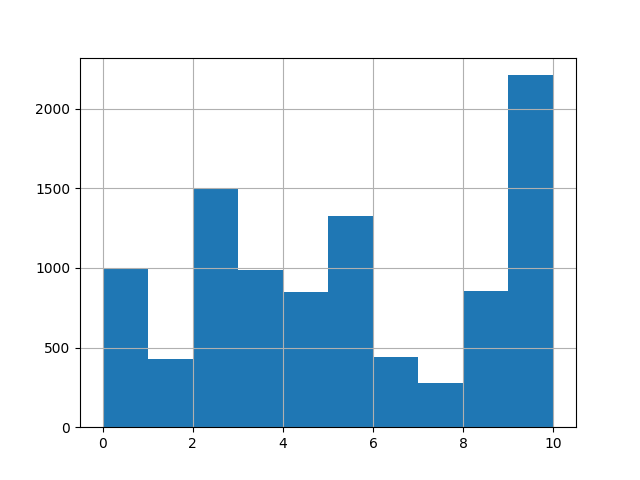
标签清洗(label shuffling)
通过上图可以看出,第10分类的数据过多,这可能会造成我们的深度学习模型在训练过程中,出现特定类别过拟合的情况,使得模型泛化能力不足,在此基础下,我们采用shuffling的方法进行
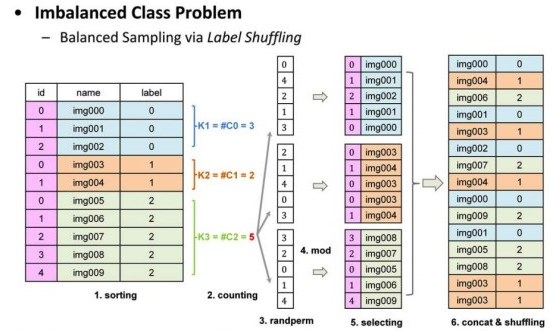
其原理如下
在此感谢ID:闲人的原理说明
首先对原始的图像列表,按照标签顺序进行排序; 然后计算每个类别的样本数量,并得到样本最多的那个类别的样本数。 根据这个最多的样本数,对每类都产生一个随机排列的列表; 然后用每个类别的列表中的数对各自类别的样本数求余,得到一个索引值,从该类的图像中提取图像,生成该类的图像随机列表; 然后把所有类别的随机列表连在一起,做个Random Shuffling,得到最后的图像列表,用这个列表进行训练。
#查看数据格式
print(df.shape)
print(len(df))
#shuffle程序
from sklearn.utils import shuffle
def labelShuffling(dataFrame, groupByName='label'):
    groupDataFrame = dataFrame.groupby(by=[groupByName])
    labels = groupDataFrame.size()
    print("length of label is ", len(labels))
    maxNum = max(labels)
    lst = pd.DataFrame()
    for i in range(len(labels)):
        print("Processing label  :", i)
        tmpGroupBy = groupDataFrame.get_group(i)
        createdShuffleLabels = np.random.permutation(np.array(range(maxNum))) % labels[i]  # 随机排列组合
        print("Num of the label is : ", labels[i])
        lst=lst.append(tmpGroupBy.iloc[createdShuffleLabels], ignore_index=True)
        # print("Done")
    # lst.to_csv('test1.csv', index=False)
    return lst

all_size = len(df)
print("训练集大小:", all_size)

# train_image_list = df

df1 = labelShuffling(df)
df1 = shuffle(df1)
print("shuffle后数据集大小:", len(df1))

train_image_path_list = df1['name'].values
label_list = df1['label'].values
label_list = paddle.to_tensor(label_list, dtype='int64')
train_label_list = paddle.nn.functional.one_hot(label_list, num_classes=11)
训练集大小: 9866
length of label is  11
Processing label  : 0
Num of the label is :  994
Processing label  : 1
Num of the label is :  429
Processing label  : 2
Num of the label is :  1500
Processing label  : 3
Num of the label is :  986
Processing label  : 4
Num of the label is :  848
Processing label  : 5
Num of the label is :  1325
Processing label  : 6
Num of the label is :  440
Processing label  : 7
Num of the label is :  280
Processing label  : 8
Num of the label is :  855
Processing label  : 9
Num of the label is :  1500
Processing label  : 10
Num of the label is :  709
shuffle后数据集大小: 16500
#查看shuffling后的数据格式
print(df1.shape)
print(len(df1))
print(df1)
(16500, 2)
16500
                                                  name  label
13196   /home/aistudio/work/food-11/training/8_813.jpg      8
3445    /home/aistudio/work/food-11/training/2_783.jpg      2
5117    /home/aistudio/work/food-11/training/3_818.jpg      3
12593   /home/aistudio/work/food-11/training/8_719.jpg      8
15083  /home/aistudio/work/food-11/training/10_655.jpg     10
...                                                ...    ...
7211    /home/aistudio/work/food-11/training/4_139.jpg      4
3078    /home/aistudio/work/food-11/training/2_328.jpg      2
9574    /home/aistudio/work/food-11/training/6_199.jpg      6
9338    /home/aistudio/work/food-11/training/6_205.jpg      6
1035     /home/aistudio/work/food-11/training/0_32.jpg      0

[16500 rows x 2 columns]
#将Shuffling后的列表,转换为txt保存
with open('./t1.txt','a') as f:
    for i in range(len(df1)):
        f.write(str(df1.iloc[i]))
#对验证集进行处理
#读取txt文本
vsf =  pd.read_table('./validation_set.txt',sep='\t',names=['name','label'])
print(vsf)
val_image_list=vsf

val_image_path_list = val_image_list['name'].values
val_label_list = val_image_list['label'].values
val_label_list = paddle.to_tensor(val_label_list, dtype='int64')
val_label_list = paddle.nn.functional.one_hot(val_label_list, num_classes=11)
                                                  name  label
0     /home/aistudio/work/food-11/validation/3_316.jpg      3
1     /home/aistudio/work/food-11/validation/2_314.jpg      2
2     /home/aistudio/work/food-11/validation/3_167.jpg      3
3      /home/aistudio/work/food-11/validation/8_73.jpg      8
4      /home/aistudio/work/food-11/validation/1_56.jpg      1
...                                                ...    ...
3425  /home/aistudio/work/food-11/validation/3_212.jpg      3
3426  /home/aistudio/work/food-11/validation/6_115.jpg      6
3427  /home/aistudio/work/food-11/validation/4_264.jpg      4
3428  /home/aistudio/work/food-11/validation/5_148.jpg      5
3429  /home/aistudio/work/food-11/validation/2_105.jpg      2

[3430 rows x 2 columns]
#测试用
print(train_label_list[1])
print(train_label_list[2])
print(train_label_list[3])
print(train_label_list[4])
print(train_label_list[5])
print(train_label_list[6])
Tensor(shape=[11], dtype=float32, place=CUDAPlace(0), stop_gradient=True,
       [0., 0., 0., 0., 1., 0., 0., 0., 0., 0., 0.])
Tensor(shape=[11], dtype=float32, place=CUDAPlace(0), stop_gradient=True,
       [1., 0., 0., 0., 0., 0., 0., 0., 0., 0., 0.])
Tensor(shape=[11], dtype=float32, place=CUDAPlace(0), stop_gradient=True,
       [0., 0., 0., 0., 1., 0., 0., 0., 0., 0., 0.])
Tensor(shape=[11], dtype=float32, place=CUDAPlace(0), stop_gradient=True,
       [0., 0., 0., 0., 0., 0., 0., 0., 0., 0., 1.])
Tensor(shape=[11], dtype=float32, place=CUDAPlace(0), stop_gradient=True,
       [0., 0., 0., 0., 1., 0., 0., 0., 0., 0., 0.])
Tensor(shape=[11], dtype=float32, place=CUDAPlace(0), stop_gradient=True,
       [0., 0., 0., 1., 0., 0., 0., 0., 0., 0., 0.])
建立数据集
# # 定义数据预处理
# data_transforms = T.Compose([
#     T.RandomResizedCrop(224, scale=(0.8, 1.2), ratio=(3. / 4, 4. / 3), interpolation='bilinear'),
#     T.RandomHorizontalFlip(),
#     T.RandomVerticalFlip(),
#     T.RandomRotation(15),
#     T.Transpose(),    # HWC -> CHW
#     T.Normalize(
#         mean=[127.5, 127.5, 127.5],        # 归一化
#         std=[127.5, 127.5, 127.5],
#         to_rgb=True)
# ])
# 构建Dataset
class MyDataset(paddle.io.Dataset):
    """
    步骤一:继承paddle.io.Dataset类
    """
    def __init__(self, train_img_list, val_img_list, train_label_list, val_label_list, mode='train'):
        """
        步骤二:实现构造函数,定义数据读取方式,划分训练和测试数据集
        """
        super(MyDataset, self).__init__()
        self.img = []
        self.label = []
        # 借助pandas读csv的库
        self.train_images = train_img_list
        self.test_images = val_img_list
        self.train_label = train_label_list
        self.test_label = val_label_list
        if mode == 'train':
            # 读train_images的数据
            for img,la in zip(self.train_images, self.train_label):
                self.img.append(img)
                self.label.append(la)
        else:
            # 读test_images的数据
            for img,la in zip(self.test_images, self.test_label):
                self.img.append(img)
                self.label.append(la)

    def load_img(self, image_path):
        # 实际使用时使用Pillow相关库进行图片读取即可,这里我们对数据先做个模拟
        image = Image.open(image_path).convert('RGB')
        return image

    def __getitem__(self, index):
        """
        步骤三:实现__getitem__方法,定义指定index时如何获取数据,并返回单条数据(训练数据,对应的标签)
        """
        image = self.load_img(self.img[index])
        label = self.label[index]
        ## label = paddle.to_tensor(label)
        img=image.resize((100, 100), Image.ANTIALIAS)  # 图片大小样式归一化
        img = np.array(img).astype('float32')  # 转换成数组类型浮点型32位
        img = img.transpose((2, 0, 1))     #读出来的图像是rgb,rgb,rbg..., 转置为 rrr...,ggg...,bbb...
        img = img/255.0  # 数据缩放到0-1的范围
        label=np.argmax(label)#从ONE HOT转回标签
        return img, label
        #return data_transforms(image), paddle.nn.functional.label_smooth(label)


    def __len__(self):
        """
        步骤四:实现__len__方法,返回数据集总数目
        """
        return len(self.img)

BATCH_SIZE = 128
PLACE = paddle.CUDAPlace(0)
# train_loader
train_dataset = MyDataset(
    train_img_list=train_image_path_list,
    val_img_list=val_image_path_list,
    train_label_list=train_label_list,
    val_label_list=val_label_list,
    mode='train')
train_loader = paddle.io.DataLoader(
    train_dataset,
    places=PLACE,
    batch_size=BATCH_SIZE,
    shuffle=True,
    num_workers=0)

# val_loader
val_dataset = MyDataset(
    train_img_list=train_image_path_list,
    val_img_list=val_image_path_list,
    train_label_list=train_label_list,
    val_label_list=val_label_list,
    mode='test')

val_loader = paddle.io.DataLoader(
    val_dataset,
    places=PLACE,
    batch_size=BATCH_SIZE,
    shuffle=False,
    num_workers=0)

print('train大小:', train_dataset.__len__())
print('val大小:', val_dataset.__len__())

# 查看图片数据、大小及标签
for data, label in train_dataset:
    print(data)
    print(np.array(data).shape)
    print(label)
    break
train大小: 16500
val大小: 3430
(3, 100, 100)
5
构建网络
该网络参考了ID:三岁的公开项目,在此表示感谢
class MyCNN(paddle.nn.Layer):
    def __init__(self):
        super(MyCNN,self).__init__()
        self.conv0 = paddle.nn.Conv2D(in_channels=3, out_channels=20, kernel_size=5, padding=0)  # 二维卷积层
        self.pool0 = paddle.nn.MaxPool2D(kernel_size =2, stride =2)  # 最大池化层
        self._batch_norm_0 = paddle.nn.BatchNorm2D(num_features = 20)  # 归一层

        self.conv1 = paddle.nn.Conv2D(in_channels=20, out_channels=50, kernel_size=5, padding=0)
        self.pool1 = paddle.nn.MaxPool2D(kernel_size =2, stride =2)
        self._batch_norm_1 = paddle.nn.BatchNorm2D(num_features = 50)

        self.conv2 = paddle.nn.Conv2D(in_channels=50, out_channels=50, kernel_size=5, padding=0)
        self.pool2 = paddle.nn.MaxPool2D(kernel_size =2, stride =2)
        self.fc1 = paddle.nn.Linear(in_features=4050, out_features=218)  # 线性层
        self.fc2 = paddle.nn.Linear(in_features=218, out_features=100)
        self.fc3 = paddle.nn.Linear(in_features=100, out_features=11)

    def forward(self,input):
        input = paddle.reshape(input,shape=[-1,3,100,100])  # 转换维读
        # print(input.shape)
        x = self.conv0(input)  #数据输入卷积层
        x = F.relu(x)  # 激活层
        x = self.pool0(x)  # 池化层
        x = self._batch_norm_0(x)  # 归一层

        x = self.conv1(x)
        x = F.relu(x)
        x = self.pool1(x)
        x = self._batch_norm_1(x)

        x = self.conv2(x)
        x = F.relu(x)
        x = self.pool2(x)
        x = paddle.reshape(x, [x.shape[0], -1])
        # print(x.shape)

        x = self.fc1(x)  # 线性层
        x = F.relu(x)
        x = self.fc2(x)
        x = F.relu(x)
        x = self.fc3(x)
        y = F.softmax(x)  # 分类器
        return y
network = MyCNN()  # 模型实例化
paddle.summary(network, (1,3,100,100))  # 模型结构查看
---------------------------------------------------------------------------
 Layer (type)       Input Shape          Output Shape         Param #
===========================================================================
   Conv2D-1      [[1, 3, 100, 100]]    [1, 20, 96, 96]         1,520
  MaxPool2D-1    [[1, 20, 96, 96]]     [1, 20, 48, 48]           0
 BatchNorm2D-1   [[1, 20, 48, 48]]     [1, 20, 48, 48]          80
   Conv2D-2      [[1, 20, 48, 48]]     [1, 50, 44, 44]        25,050
  MaxPool2D-2    [[1, 50, 44, 44]]     [1, 50, 22, 22]           0
 BatchNorm2D-2   [[1, 50, 22, 22]]     [1, 50, 22, 22]          200
   Conv2D-3      [[1, 50, 22, 22]]     [1, 50, 18, 18]        62,550
  MaxPool2D-3    [[1, 50, 18, 18]]      [1, 50, 9, 9]            0
   Linear-1         [[1, 4050]]            [1, 218]           883,118
   Linear-2          [[1, 218]]            [1, 100]           21,900
   Linear-3          [[1, 100]]            [1, 11]             1,111
===========================================================================
Total params: 995,529
Trainable params: 995,249
Non-trainable params: 280
---------------------------------------------------------------------------
Input size (MB): 0.11
Forward/backward pass size (MB): 3.37
Params size (MB): 3.80
Estimated Total Size (MB): 7.29
---------------------------------------------------------------------------


{'total_params': 995529, 'trainable_params': 995249}
训练
由于训练集采用了shuffle,导致训练集偏大,可以提高batch_size
model = paddle.Model(network)  # 模型封装

# 配置优化器、损失函数、评估指标
model.prepare(paddle.optimizer.Adam(learning_rate=0.0001, parameters=model.parameters()),
              paddle.nn.CrossEntropyLoss(),
              paddle.metric.Accuracy())


# 启动模型全流程训练
model.fit(train_dataset,  # 训练数据集
          val_dataset,   # 评估数据集
          epochs=5,       # 训练的总轮次
          batch_size=64,  # 训练使用的批大小
          verbose=1      # 日志展示形式
)
The loss value printed in the log is the current step, and the metric is the average value of previous step.
Epoch 1/5


/opt/conda/envs/python35-paddle120-env/lib/python3.7/site-packages/paddle/fluid/layers/utils.py:77: DeprecationWarning: Using or importing the ABCs from 'collections' instead of from 'collections.abc' is deprecated, and in 3.8 it will stop working
  return (isinstance(seq, collections.Sequence) and
/opt/conda/envs/python35-paddle120-env/lib/python3.7/site-packages/paddle/nn/layer/norm.py:648: UserWarning: When training, we now always track global mean and variance.
  "When training, we now always track global mean and variance.")


step 258/258 [==============================] - loss: 2.1116 - acc: 0.2521 - 3s/step
Eval begin...
The loss value printed in the log is the current batch, and the metric is the average value of previous step.
step 54/54 [==============================] - loss: 2.4477 - acc: 0.0469 - 775ms/step
Eval samples: 3430
Epoch 2/5
step 258/258 [==============================] - loss: 2.1425 - acc: 0.3990 - 3s/step
Eval begin...
The loss value printed in the log is the current batch, and the metric is the average value of previous step.
step 54/54 [==============================] - loss: 2.5067 - acc: 0.0207 - 825ms/step
Eval samples: 3430
Epoch 3/5
step 258/258 [==============================] - loss: 2.0256 - acc: 0.4742 - 3s/step
Eval begin...
The loss value printed in the log is the current batch, and the metric is the average value of previous step.
step 54/54 [==============================] - loss: 2.4263 - acc: 0.0825 - 776ms/step
Eval samples: 3430
Epoch 4/5
step 258/258 [==============================] - loss: 1.9744 - acc: 0.5348 - 3s/step
Eval begin...
The loss value printed in the log is the current batch, and the metric is the average value of previous step.
step 54/54 [==============================] - loss: 2.4410 - acc: 0.0985 - 809ms/step
Eval samples: 3430
Epoch 5/5
step 258/258 [==============================] - loss: 1.8584 - acc: 0.5815 - 3s/step
Eval begin...
The loss value printed in the log is the current batch, and the metric is the average value of previous step.
step 54/54 [==============================] - loss: 2.3978 - acc: 0.1087 - 792ms/step
Eval samples: 3430
model.save('finetuning/mnist') # 保存模型
def openimg():  # 读取图片函数
    with open(f'test_set.txt') as f:  #读取文件夹
        test_img = []
        txt =  []
        for line in f.readlines():  # 循环读取每一行
            img = Image.open(line[:-1])  # 打开图片
            img = img.resize((100, 100), Image.ANTIALIAS)  # 大小归一化
            img = np.array(img).astype('float32')  # 转换成 数组
            img = img.transpose((2, 0, 1))     #读出来的图像是rgb,rgb,rbg..., 转置为 rrr...,ggg...,bbb...
            img = img/255.0  # 缩放
            txt.append(line[:-1])  # 生成列表
            test_img.append(img)
        return txt,test_img
img_path, img = openimg()  # 读取列表
预测
建立查询列表,最终以中文标签进行显示
from PIL import Image
labal_name=['面包','乳制品','甜点','鸡蛋','油炸食品','肉类','面条/意大利面','米饭','海鲜','汤','蔬菜/水果']
site = 255  # 读取图片位置
model_state_dict = paddle.load('finetuning/mnist.pdparams')  # 读取模型
model = MyCNN()  # 实例化模型
model.set_state_dict(model_state_dict)
model.eval()

ceshi = model(paddle.to_tensor(img[site]))  # 测试
print('label:',np.argmax(ceshi.numpy()))
print('预测的结果为:', labal_name[np.argmax(ceshi.numpy())])  # 获取值
t.pdparams')  # 读取模型
model = MyCNN()  # 实例化模型
model.set_state_dict(model_state_dict)
model.eval()

ceshi = model(paddle.to_tensor(img[site]))  # 测试
print('label:',np.argmax(ceshi.numpy()))
print('预测的结果为:', labal_name[np.argmax(ceshi.numpy())])  # 获取值
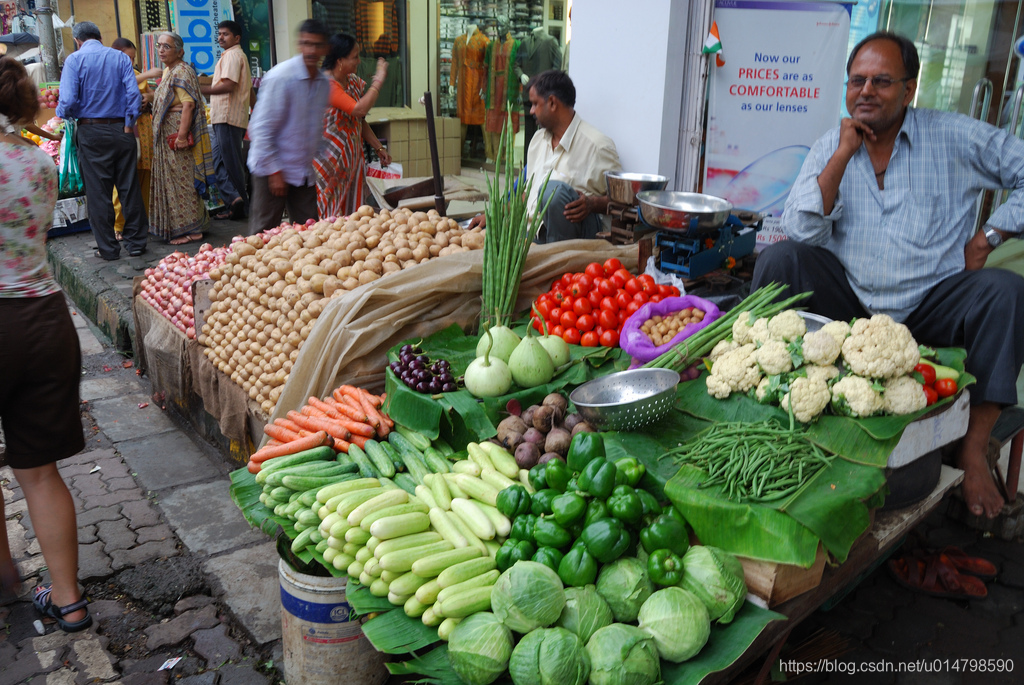
Image.open(img_path[site])  # 显示图片
label: 10
预测的结果为: 蔬菜/水果
[外链图片转存失败,源站可能有防盗链机制,建议将图片保存下来直接上传(img-Nd8C6HZE-1618979172332)(output_30_1.png)]

北京人形旗下天工造物具身智能开源社区,聚焦具身天工与慧思开物两大平台
更多推荐
 2
2 0
0- 0


 已为社区贡献1条内容

所有评论(0)