skywalking实现链路监控\业务日志输出\链路标记TID打印
前置条件:需要安装skywalking-aop 与 skywalking-ui, 并配置aop使用的数据源(es/mysql/H2等).
注:安装配置过程不在此赘述.
1.引入POM 用于输出业务日志到skywalking
<dependency>
<groupId>org.apache.skywalking</groupId>
<artifactId>apm-toolkit-logback-1.x</artifactId>
<version>8.5.0</version>
</dependency>
2.logBack.xml 控制日志文件等需要输出链路ID,将<appender> 中的<encoder>替换为
<encoder class="ch.qos.logback.core.encoder.LayoutWrappingEncoder">
    <layout class="org.apache.skywalking.apm.toolkit.log.logback.v1.x.mdc.TraceIdMDCPatternLogbackLayout">
        <pattern>%date [%X{tid}] [%thread] %-5level [%logger{50}] %file:%line - %msg%n</pattern>
    </layout>
</encoder>
3.控制台输出的<pattern>内容替换为
%clr(%d{${LOG_DATEFORMAT_PATTERN:-yyyy-MM-dd HH:mm:ss.SSS}}){faint} [%X{tid}] %clr(${LOG_LEVEL_PATTERN:-%5p}) %clr(${PID:- }){magenta} %clr(---){faint} %clr([%15.15t]){faint} %clr(%-40.40logger{39}){cyan} %clr(:){faint} %m%n${LOG_EXCEPTION_CONVERSION_WORD:-%wEx}
4.日志输出到skywalking, 在logBack.xml中增加
<appender name="grpc-log" class="org.apache.skywalking.apm.toolkit.log.logback.v1.x.log.GRPCLogClientAppender">

    <encoder class="ch.qos.logback.core.encoder.LayoutWrappingEncoder">

        <layout class="org.apache.skywalking.apm.toolkit.log.logback.v1.x.mdc.TraceIdMDCPatternLogbackLayout">

            <pattern>%date [%file:%line]-%msg%n</pattern>

        </layout>

    </encoder>

    <filter class="ch.qos.logback.classic.filter.ThresholdFilter">

        <level>INFO</level>

    </filter>

</appender>
在<root>标签中增加
<appender-ref ref="grpc-log"/>
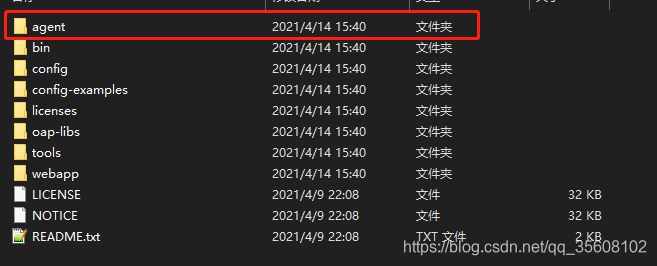
5.项目中增加agent文件夹
下载地址:https://skywalking.apache.org/downloads/
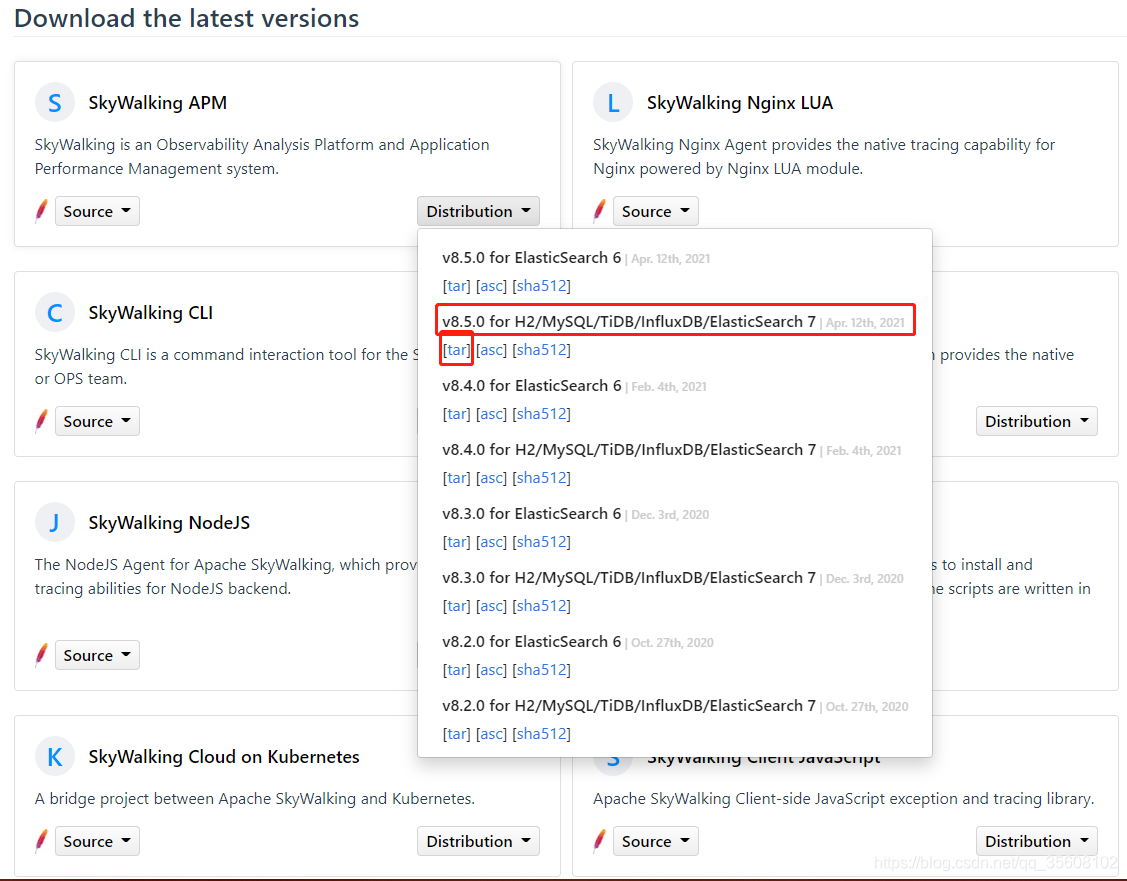
将词文件夹放置到服务器或本机指定位置. 稍后会使用到该文件夹
/agent/config/agent.config 配置样例
# Licensed to the Apache Software Foundation (ASF) under one
# or more contributor license agreements.  See the NOTICE file
# distributed with this work for additional information
# regarding copyright ownership.  The ASF licenses this file
# to you under the Apache License, Version 2.0 (the
# "License"); you may not use this file except in compliance
# with the License.  You may obtain a copy of the License at
#
#     http://www.apache.org/licenses/LICENSE-2.0
#
# Unless required by applicable law or agreed to in writing, software
# distributed under the License is distributed on an "AS IS" BASIS,
# WITHOUT WARRANTIES OR CONDITIONS OF ANY KIND, either express or implied.
# See the License for the specific language governing permissions and
# limitations under the License.

# The agent namespace
# agent.namespace=${SW_AGENT_NAMESPACE:default-namespace}

# The service name in UI
agent.service_name=${SW_AGENT_NAME}

# The number of sampled traces per 3 seconds
# Negative or zero means off, by default
# agent.sample_n_per_3_secs=${SW_AGENT_SAMPLE:-1}

# Authentication active is based on backend setting, see application.yml for more details.
# agent.authentication = ${SW_AGENT_AUTHENTICATION:xxxx}

# The max amount of spans in a single segment.
# Through this config item, SkyWalking keep your application memory cost estimated.
# agent.span_limit_per_segment=${SW_AGENT_SPAN_LIMIT:150}

# If the operation name of the first span is included in this set, this segment should be ignored. Multiple values should be separated by `,`.
# agent.ignore_suffix=${SW_AGENT_IGNORE_SUFFIX:.jpg,.jpeg,.js,.css,.png,.bmp,.gif,.ico,.mp3,.mp4,.html,.svg}

# If true, SkyWalking agent will save all instrumented classes files in `/debugging` folder.
# SkyWalking team may ask for these files in order to resolve compatible problem.
# agent.is_open_debugging_class = ${SW_AGENT_OPEN_DEBUG:true}

# If true, SkyWalking agent will cache all instrumented classes files to memory or disk files (decided by class cache mode),
# allow other javaagent to enhance those classes that enhanced by SkyWalking agent.
# agent.is_cache_enhanced_class = ${SW_AGENT_CACHE_CLASS:false}

# The instrumented classes cache mode: MEMORY or FILE
# MEMORY: cache class bytes to memory, if instrumented classes is too many or too large, it may take up more memory
# FILE: cache class bytes in `/class-cache` folder, automatically clean up cached class files when the application exits
# agent.class_cache_mode = ${SW_AGENT_CLASS_CACHE_MODE:MEMORY}

# The operationName max length
# Notice, in the current practice, we don't recommend the length over 190.
# agent.operation_name_threshold=${SW_AGENT_OPERATION_NAME_THRESHOLD:150}

# The agent use gRPC plain text in default.
# If true, SkyWalking agent uses TLS even no CA file detected.
# agent.force_tls=${SW_AGENT_FORCE_TLS:false}

# If true, skywalking agent will enable profile when user create a new profile task. Otherwise disable profile.
# profile.active=${SW_AGENT_PROFILE_ACTIVE:true}

# Parallel monitor segment count
# profile.max_parallel=${SW_AGENT_PROFILE_MAX_PARALLEL:5}

# Max monitor segment time(minutes), if current segment monitor time out of limit, then stop it.
# profile.duration=${SW_AGENT_PROFILE_DURATION:10}

# Max dump thread stack depth
# profile.dump_max_stack_depth=${SW_AGENT_PROFILE_DUMP_MAX_STACK_DEPTH:500}

# Snapshot transport to backend buffer size
# profile.snapshot_transport_buffer_size=${SW_AGENT_PROFILE_SNAPSHOT_TRANSPORT_BUFFER_SIZE:50}

# Backend service addresses.
collector.backend_service=${SW_AGENT_COLLECTOR_BACKEND_SERVICES}

# Logging file_name
logging.file_name=${SW_LOGGING_FILE_NAME:skywalking.log}

# Logging level
logging.level=${SW_LOGGING_LEVEL:INFO}

# Logging dir
# logging.dir=${SW_LOGGING_DIR:""}

# Logging max_file_size, default: 300 * 1024 * 1024 = 314572800
# logging.max_file_size=${SW_LOGGING_MAX_FILE_SIZE:314572800}

# The max history log files. When rollover happened, if log files exceed this number,
# then the oldest file will be delete. Negative or zero means off, by default.
# logging.max_history_files=${SW_LOGGING_MAX_HISTORY_FILES:-1}

# Listed exceptions would not be treated as an error. Because in some codes, the exception is being used as a way of controlling business flow.
# Besides, the annotation named IgnoredException in the trace toolkit is another way to configure ignored exceptions.
# statuscheck.ignored_exceptions=${SW_STATUSCHECK_IGNORED_EXCEPTIONS:}

# The max recursive depth when checking the exception traced by the agent. Typically, we don't recommend setting this more than 10, which could cause a performance issue. Negative value and 0 would be ignored, which means all exceptions would make the span tagged in error status.
# statuscheck.max_recursive_depth=${SW_STATUSCHECK_MAX_RECURSIVE_DEPTH:1}

# Mount the specific folders of the plugins. Plugins in mounted folders would work.
plugin.mount=${SW_MOUNT_FOLDERS:plugins,activations}

# Exclude activated plugins
# plugin.exclude_plugins=${SW_EXCLUDE_PLUGINS:}

# If set to true, the parameters of the sql (typically java.sql.PreparedStatement) would be collected.
# plugin.jdbc.trace_sql_parameters=${SW_JDBC_TRACE_SQL_PARAMETERS:false}

# Kafka producer configuration
# plugin.kafka.bootstrap_servers=${SW_KAFKA_BOOTSTRAP_SERVERS:localhost:9092}

# Match spring bean with regex expression for classname
# plugin.springannotation.classname_match_regex=${SW_SPRINGANNOTATION_CLASSNAME_MATCH_REGEX:}

plugin.toolkit.log.grpc.reporter.server_host=${SW_GRPC_LOG_SERVER_HOST}

plugin.toolkit.log.grpc.reporter.server_port=${SW_GRPC_LOG_SERVER_PORT}

plugin.toolkit.log.grpc.reporter.max_message_size=${SW_GRPC_LOG_MAX_MESSAGE_SIZE:10485760}

plugin.toolkit.log.grpc.reporter.upstream_timeout=${SW_GRPC_LOG_GRPC_UPSTREAM_TIMEOUT:30}

plugin.springmvc.use_qualified_name_as_endpoint_name=true

plugin.toolit.use_qualified_name_as_operation_name=true

plugin.jdbc.trace_sql_parameters=true

plugin.springmvc.collect_http_params=true

plugin.httpclient.collect_http_params=true

plugin.feign.collect_request_body=true
注:配置详细介绍请参考 https://skywalking.apache.org/docs/main/v8.5.0/en/setup/service-agent/java-agent/readme/#table-of-agent-configuration-properties 官方文档
6.本地idea启动接入skywalking
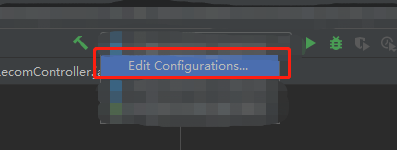
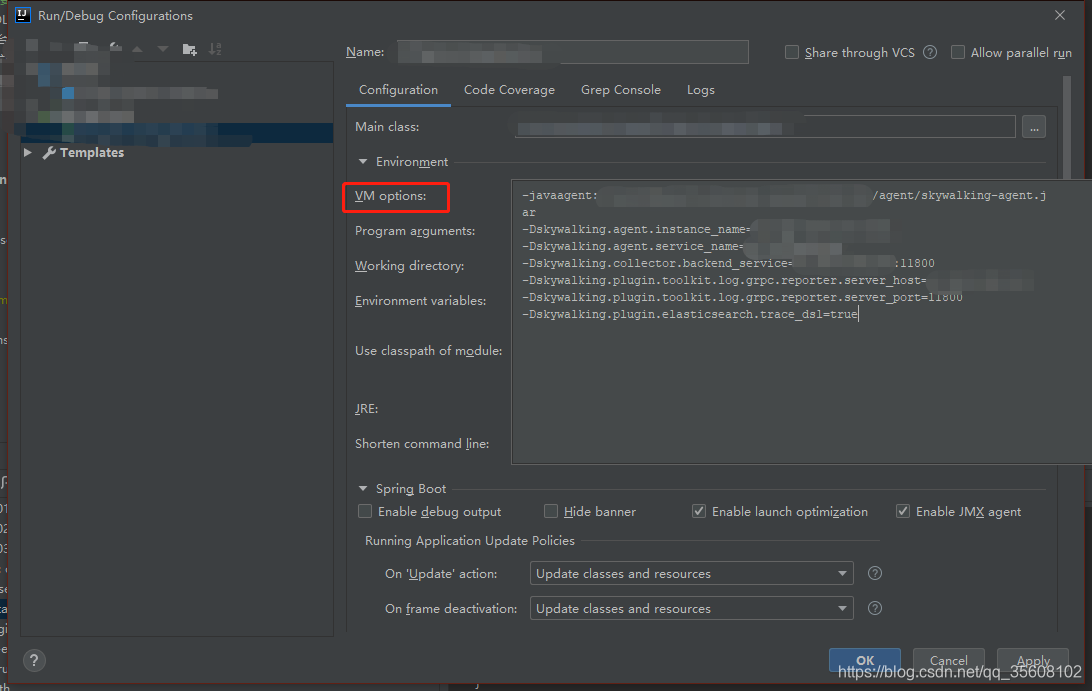
其中-javaagent 后面是agent文件夹下的skywalking jar包
agent.service_name 为服务名
agent.instance_name 为服务下的实例名
collector.backend_service 为skywalking-oap的地址和端口号 如:127.0.0.1:1180 即为AOP所安装的IP地址:端口
plugin.toolkit.log.grpc.reporter.server_host 为日志输出skywalking的IP 如127.0.0.1 即为AOP所安装的IP地址
plugin.toolkit.log.grpc.reporter.server_ port 为日志输出skywalking的端口
plugin.elasticsearch.trace_dsl 为是否开启ES的查询记录入链路
7.过滤url不记录链路
1.在agent下,将apache-skywalking-apm-bin-es7\agent\optional-plugins\apm-trace-ignore-plugin-*.*.*.jar复制到apache-skywalking-apm-bin-es7\agent\plugins下面。
2.在apache-skywalking-apm-bin-es7\agent\config下面新建一个配置文件 apm-trace-ignore-plugin.config . 样例如下- 修改为自己要过滤的路径
trace.ignore_path=/v1/**,/v1/kv/**/,Kafka/**,Lettuce/**
8.启动项目请求项目接口后,进入http://skywalking-ui:8080/ 查看效果
skywalking-ui在服务器安装的UI页面的IP地址

北京人形旗下天工造物具身智能开源社区,聚焦具身天工与慧思开物两大平台
更多推荐
 1
1 0
0- 0


 已为社区贡献1条内容

所有评论(0)