java发送微信小程序模板消息_微信小程序-发送模板消息
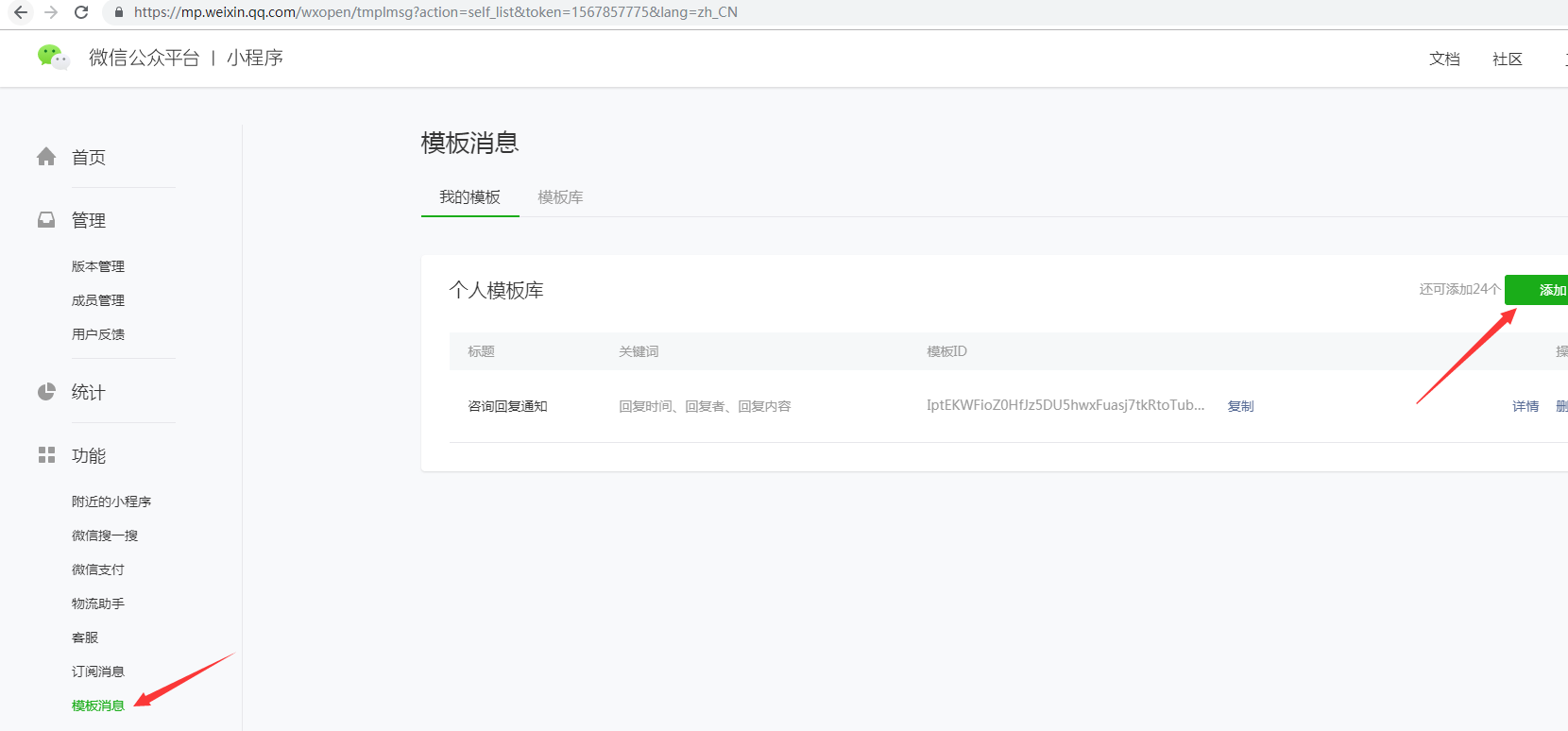
1 添加一个小程序的消息模板,获取到模板id,存储到数据库中,方便以后修改调用
这里有个坑,就是 form_id, 这个是用户触发表单事件的表单id,需要存储到数据库中,给这个表单提交以后的数据,添加一个字段叫做form_id(7天过期), 这个formid 是和提交时的openid有关联的,只能是提交的那个人才能用,别人用不了
也就是说,想要给谁发送模板消息,就要存储谁的form_id。
例如 剑圣给守望者提交了一个 爱你呦 的表单(数据库里会存储这个表单的form_id),但是守望者回复这个表单,并且向给 剑圣发送一个提醒的模板消息,就需要从剑圣提交的表单中获取存储的form_id,然后拼接url,发送post请求才能成功
守望者提交表单时的 form_id,只能给守望者自己发送模板消息
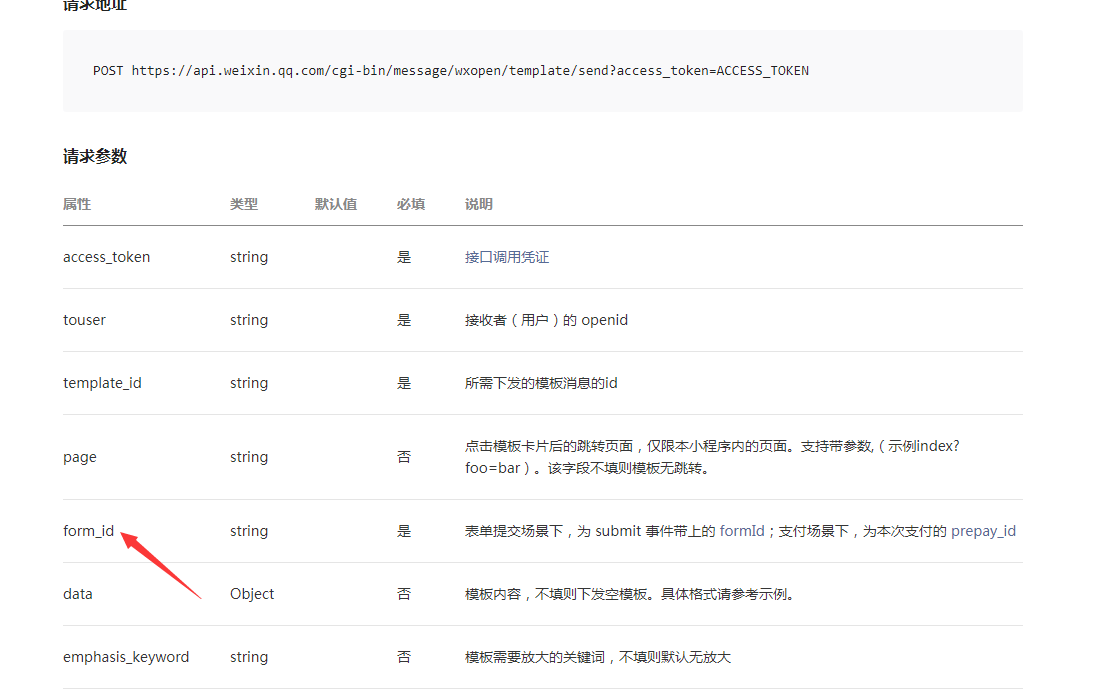
3. 代码正文:
剑圣端:
Form表单属性
bindsubmit="sendClick" 提交方法
report-submit="true" 必须有,用来获取form_id
button
formType="submit" 使用这个属性,进行表单提交,不用bindtap提交
Wxml:
发送
Js:
sendClick: function(e) {
var formId = e.detail.formId;//获取form_id,存储到数据库
hcxcx.requestPost(hcxcx.apiUrl.addquestion, { formId : formId },function(){
})
}
守望者端:
执行回复操作,C#代码:
//发送模板消息
Public void Addquestion(){
//获取用户的formid,这个就是剑圣端提交保单时存储的formId
var list = questionbll.GetList("IsNoTeam:1,MemberId:'" + memberid + "',XcxFormIdNoNull:1");
var fid = list.OrderByDescending(x => x.CreateTime).FirstOrDefault().XcxFormId;
var openid=memberid.openid;//这个是需要发送的用户(剑圣的openid,必须是小程序的openid)
//拼接模板消息主体
XcxRequestData xr = new XcxRequestData();
XcxRequestDataKeyword xcxRequest1 = new XcxRequestDataKeyword();
xcxRequest1.value = createTime.ToString("yyyy-MM-dd HH:mm:ss");
XcxRequestDataKeyword xcxRequest2 = new XcxRequestDataKeyword();
xcxRequest2.value = user.RealName;
XcxRequestDataKeyword xcxRequest3 = new XcxRequestDataKeyword();
xcxRequest3.value = "尊敬的用户您好,您的咨询已经被" + user.RealName + "解答,请及时查看";
xr.keyword1 = xcxRequest1;
xr.keyword2 = xcxRequest2;
xr.keyword3 = xcxRequest3;
//获取消息模板
TemplateMesEntity templateMesEntity = templateMesCache.GetEntityByTeamIdAndTypeId(teamid.ToInt(), 30);
//延迟4秒发送,否则苹果收不到消息
System.Timers.Timer timer = new System.Timers.Timer(4000);
timer.Elapsed += delegate (object sender, System.Timers.ElapsedEventArgs e)
{
timer.Enabled = false;
XcxSendTemplateMsg xcxSend = new XcxSendTemplateMsg();
xcxSend.form_id = fid;
xcxSend.page = "pages/GroupTools/UserClient/UserClient";
xcxSend.template_id = templateMesEntity.TemplateId;
xcxSend.touser = openid;
xcxSend.data = xr;
XcxSendTemplateMsg(xcxSend);
};
timer.Enabled = true;
}
///
/// 获取小程序token
///
///
public static string GetXcxAccessToken()
{
var token = "";
var tw = twCache.GetDataItemList("1001");
if (tw != null)
{
if (string.IsNullOrEmpty(tw.XcxAccessToken) || (!string.IsNullOrEmpty(tw.XcxAccessToken) && tw.XcxExpires != null && tw.XcxExpires <= DateTime.Now))
{
//获取新的token,存储到数据库
var url = "https://api.weixin.qq.com/cgi-bin/token?grant_type=client_credential&appid=" + tw.XcxAppId + "&secret=" + tw.XcxAppSecret + "";
var accesstokenstr = HcCrm.Util.HttpMethods.HttpGet(url);
var xcxtoken = JsonConvert.DeserializeObject(accesstokenstr);
if (xcxtoken.errcode == 0)
{
token = xcxtoken.access_token;
tw.XcxAccessToken = xcxtoken.access_token;
tw.XcxExpires = DateTime.Now.AddSeconds(xcxtoken.expires_in);
teamwechatBLL.SaveForm(tw.TeamWcId, tw);
}
}
else
{
token = tw.XcxAccessToken;
}
}
return token;
}
///
/// 发送小程序模板消息
///
///
///
public static XcxReturnResult XcxSendTemplateMsg(XcxSendTemplateMsg xcxSendTemplateMsg)
{
try
{
var token = GetXcxAccessToken();
var url = "https://api.weixin.qq.com/cgi-bin/message/wxopen/template/send?access_token=" + token;
var data = JsonConvert.SerializeObject(xcxSendTemplateMsg);
var resultstr = HcCrm.Util.HttpMethods.HttpPost(url, data);
// using Newtonsoft.Json;
var result = JsonConvert.DeserializeObject(resultstr);
LogEntity log = new LogEntity();
log.ExecuteResultJson = result.errmsg;
LogBLL.WriteLog(log);
return result;
}
catch (Exception ex)
{
LogEntity log = new LogEntity();
log.ExecuteResultJson = "XcxSendTemplateMsg Exception:" + ex.Message;
LogBLL.WriteLog(log);
throw;
}
}
///
/// HTTP POST方式请求数据
///
/// URL.
/// POST的数据
///
public static string HttpPost(string url, string param = null)
{
HttpWebRequest request;
//如果是发送HTTPS请求
if (url.StartsWith("https", StringComparison.OrdinalIgnoreCase))
{
ServicePointManager.ServerCertificateValidationCallback = new RemoteCertificateValidationCallback(CheckValidationResult);
request = WebRequest.Create(url) as HttpWebRequest;
request.ProtocolVersion = HttpVersion.Version10;
}
else
{
request = WebRequest.Create(url) as HttpWebRequest;
}
request.Method = "POST";
//request.ContentType = "application/x-www-form-urlencoded";
request.ContentType = "application/x-www-form-urlencoded;charset=unicode";//解决中文乱码问题
request.Accept = "*/*";
request.Timeout = 15000;
request.AllowAutoRedirect = false;
StreamWriter requestStream = null;
WebResponse response = null;
string responseStr = null;
try
{
requestStream = new StreamWriter(request.GetRequestStream());
requestStream.Write(param);
requestStream.Close();
response = request.GetResponse();
if (response != null)
{
// StreamReader reader = new StreamReader(response.GetResponseStream(), Encoding.Default);
StreamReader reader = new StreamReader(response.GetResponseStream(), Encoding.UTF8);//解决中文乱码问题
responseStr = reader.ReadToEnd();
reader.Close();
}
}
catch (Exception)
{
throw;
}
finally
{
request = null;
requestStream = null;
response = null;
}
return responseStr;
}
///
/// 小程序token类
///
public class XcxAccessToken
{
public string access_token { get; set; }
public double expires_in { get; set; }
public int errcode { get; set; }
public string errmsg { get; set; }
}
public class XcxSendTemplateMsg
{
///
/// 接收者(用户)的 openid
///
public string touser { get; set; }
///
/// 所需下发的模板消息的id
///
public string template_id { get; set; }
///
/// 点击模板卡片后的跳转页面,仅限本小程序内的页面。支持带参数,(示例index?foo=bar)。该字段不填则模板无跳转。
///
public string page { get; set; }
///
/// 表单提交场景下,为 submit 事件带上的 formId;支付场景下,为本次支付的 prepay_id
///
public string form_id { get; set; }
///
/// 模板内容,不填则下发空模板。具体格式请参考示例。
///
public XcxRequestData data { get; set; }
///
/// 模板需要放大的关键词,不填则默认无放大
///
public string emphasis_keyword { get; set; }
}
public class XcxRequestData
{
public XcxRequestDataKeyword keyword1 { get; set; }
public XcxRequestDataKeyword keyword2 { get; set; }
public XcxRequestDataKeyword keyword3 { get; set; }
}
public class XcxRequestDataKeyword
{
public string value { get; set; }
}
public class XcxReturnResult
{
public int errcode { get; set; }
public string errmsg { get; set; }
}

北京人形旗下天工造物具身智能开源社区,聚焦具身天工与慧思开物两大平台
更多推荐
 0
0 0
0- 0


 已为社区贡献11条内容

所有评论(0)