maven安装jar包到本地仓库
·
前言
项目中经常会有些私有jar包无法通过maven进行下载,通常我们会把jar包安装到本地仓库。在此对过程做下记录。
一、通过命令进行安装
前置条件
安装了maven,并正确配置好了环境变量
验证:mvn -v

maven命令
mvn install:install-file -DgroupId=<groupId> -DartifactId=<artifactId> -Dversion=1.0.0 -Dpackaging=jar -Dfile=<myfile.jar>
参数解释:
groupId: 包名
artifactId: 模块名
version:版本号
packaging: 文件类型
file:指定文件路径
一些不常用的参数例如classifier此处不作列出
安装命令实例:
mvn install:install-file -DgroupId=com.zerofx -DartifactId=clearEmptyFolder -Dversion=1.0.0 -Dpackaging=jar -Dfile= clearEmptyFolder-1.0-SNAPSHOT.jar
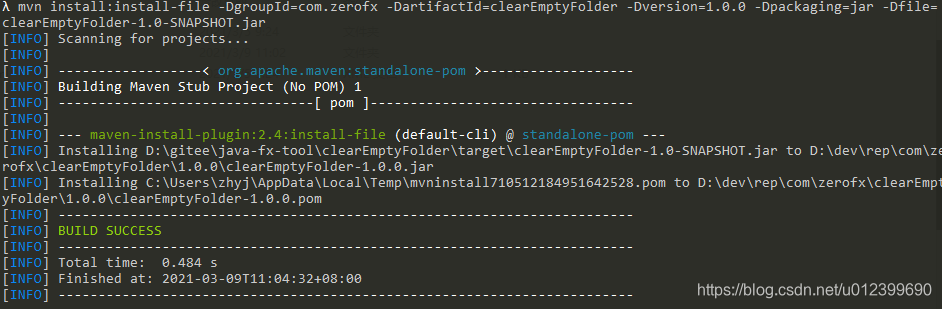
见到BuildSuccess即为安装成功
二、通过界面进行操作
查找的时候并没有发现现成的工具,可以自行写一个小工具。核心就是拼接上述命令,通过程序自动化自行调用。
1.代码
各类语言均可,此处基于javaFx
/**
 * 安装到本地
 */
@SneakyThrows
public void installLocal(){
    if(file==null || !file.exists()){
        System.out.println("文件不存在");
        return;
    }

    String groupIdText = groupId.getText();
    if(StrUtil.isBlank(groupIdText)){
        return;
    }
    String artifactIdText = artifactId.getText();
    if(StrUtil.isBlank(artifactIdText)){
        return;
    }
    String versionText = version.getText();
    if(StrUtil.isBlank(versionText)){
        return;
    }
    String classifierText = classifier.getText();

    StringBuffer sb = new StringBuffer("mvn install:install-file");
    sb.append(" ").append(StrUtil.format("-DgroupId={}",groupIdText)).
            append(" ").append(StrUtil.format("-Dfile={}",file.getAbsolutePath())).
            append(" ").append(StrUtil.format("-DartifactId={}",artifactIdText)).
            append(" ").append(StrUtil.format("-Dversion={}",versionText)).
            append(" ").append(StrUtil.format("-Dpackaging={}",packaging.getText()));
    if(StrUtil.isNotBlank(classifierText)){
        sb.append(" ").append(StrUtil.format("-Dclassifier={}",classifierText));
    }
    System.out.println(sb.toString());
    long timeStamp = System.currentTimeMillis();
    File file = new File(getBatPath(),String.valueOf(timeStamp)+".bat");
    System.out.println(file.getAbsolutePath());
    PrintStream ps = new PrintStream(new FileOutputStream(file));
    // 往文件里写入字符串
    ps.println(sb.toString());
    ps.close();
    //运行bat文件
    Process exec = Runtime.getRuntime().exec(file.getAbsolutePath());
    String result = RuntimeUtil.getResult(exec);
    System.out.println(result);
    if(result.contains("BUILD SUCCESS")){
        System.out.println("安装到本地成功");
    }
    //删除bat文件
    file.delete();
}
此处原本打算通过RunTime直接调用cmd命令,没有搞定,迂回调用bat完成(命令继续尝试ing)。
简单效果如下:
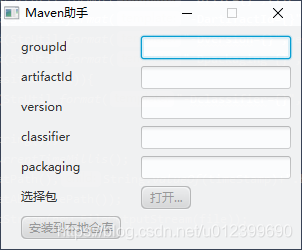
安装到远程仓库等有时间再更新

北京人形旗下天工造物具身智能开源社区,聚焦具身天工与慧思开物两大平台
更多推荐
 0
0 0
0- 0


 已为社区贡献4条内容

所有评论(0)