微信小程序点击按钮弹出弹窗_微信小程序自定义头部返回按钮及回到首页样式...
·
在进行小程序开发的过程中,经常遇到的一个问题就是,通过好友分享打开的小程序,去首页的入口太深,导致有部分用户流失,还有对返回按钮和返回地址进行特殊化处理,需要返回到指定位置,则可以通过自定义的方式进行处理。
配置:
通过配置
navigationStyle对页面或者全局页面进行自定义头部
思路
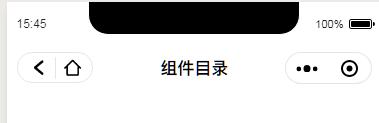
首先我们指定自定义头部肯定是以组件的形式存在的; 我们自定义的同时需要保持右边胶囊位置一致,同时也需要保留页面标题 我们实现的效果如下图所示:
实现
首先我们通过
wx.getMenuButtonBoundingClientRect()获取右边胶囊的位置 使用wx.getSystemInfo 获取系统信息 这两组数据不是经常改变的所以我们在进入小程序的时候执行放到全局变量里面。
this.globalData.headerBtnPosi = wx.getMenuButtonBoundingClientRect()wx.getSystemInfo({ // iphonex底部适配success: res => {that.globalData.systeminfo = res}})根据下图分析
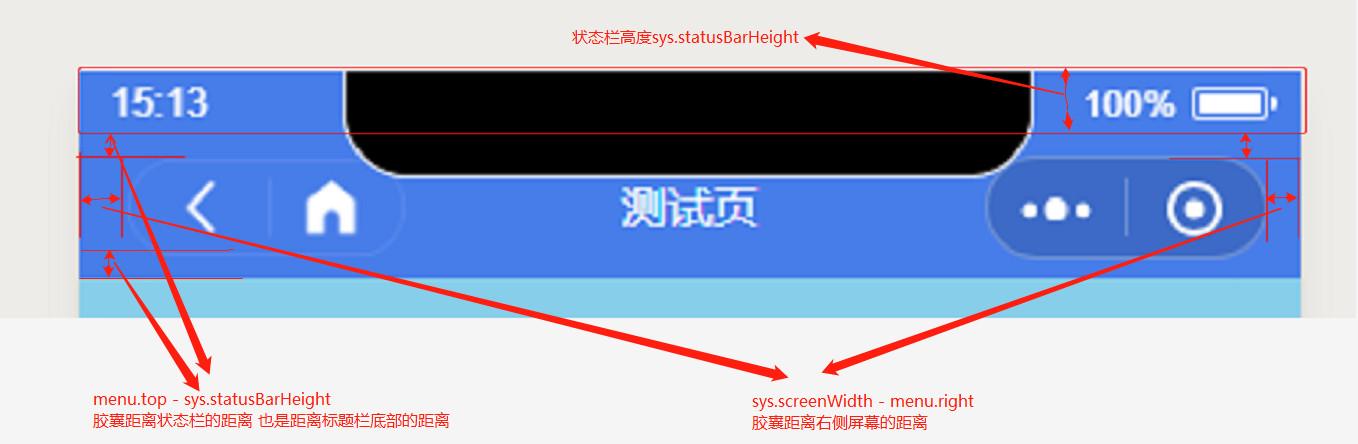
我们自定义的图标和右边胶囊位置一致 因此我们通过右边胶囊的位置定位左边自定义图标的位置 我们最初获取到的右边胶囊位置
headerPosi:{bottom: 82height: 32left: 278right: 365top: 50width: 87}获取到的状态栏高度为statusH = 44
所以自定义胶囊距离最顶部的高度为 胶囊距离状态栏高度 - 状态栏高度
customNav.top = headerPosi.top - statusHwxml部分
组件目录wxss部分
.custom_nav { width: 100%; background: #fff;}.custom_nav_box { position: fixed; width: 100%; background: #fff;}.custom_nav_bar{ position: relative;}.custom_nav_box .nav_title { font-size: 34rpx; color: #000; text-align: center; position: absolute; max-width: 360rpx; overflow: hidden; text-overflow: ellipsis; white-space: nowrap; top: 0; left: 0; right: 0; bottom: 0; margin: auto; font-weight: 600;}.custom_nav_box .custom_nav_icon { position: absolute; border: .5rpx solid rgba(0, 0, 0, .1); border-radius: 50%; display: flex; padding: 0 10rpx}.custom_nav_icon .gobank { background: url('https://www.easyicon.net/api/resizeApi.php?id=1225467&size=128') no-repeat center center; background-size: 60%; padding:0 5px; margin: 4px 0;}.custom_nav_icon .home { background: url('https://www.easyicon.net/api/resizeApi.php?id=1223065&size=128') no-repeat center center; background-size: 60%; padding:0 5px; margin: 4px 0; border-left: 1px solid rgba(0, 0, 0, .1)}js部分
const app = getApp();Component({ properties: { navbarData: { // navbarData 由父页面传递的数据 type: Object, value: { gobank: true, gohome: true, has_search: false, }, observer: function (newVal, oldVal) { } } }, data: { haveBack: true, // 是否有返回按钮,true 有 false 没有 若从分享页进入则没有返回按钮 statusBarHeight: 0, // 状态栏高度 navbarHeight: 0, // 顶部导航栏高度 navbarBtn: { // 胶囊位置信息 height: 0, width: 0, top: 0, bottom: 0, right: 0 }, cusnavH: 0, searchW: 0, //搜索框宽度 }, // 微信7.0.0支持wx.getMenuButtonBoundingClientRect()获得胶囊按钮高度 attached: function () { let statusBarHeight = app.globalData.systeminfo.statusBarHeight // 状态栏高度 let headerPosi = app.globalData.headerBtnPosi // 胶囊位置信息 console.log(statusBarHeight) console.log(headerPosi) let btnPosi = { // 胶囊实际位置,坐标信息不是左上角原点 height: headerPosi.height, width: headerPosi.width, top: headerPosi.top - statusBarHeight, // 胶囊top - 状态栏高度 bottom: headerPosi.bottom - headerPosi.height - statusBarHeight, // 胶囊bottom - 胶囊height - 状态栏height (胶囊实际bottom 为距离导航栏底部的长度) right: app.globalData.systeminfo.screenWidth - headerPosi.right // 屏幕宽度 - 胶囊right } let haveBack; if (getCurrentPages().length === 1) { // 当只有一个页面时,并且是从分享页进入 haveBack = false; } else { haveBack = true; } var cusnavH = btnPosi.height + btnPosi.top + btnPosi.bottom // 导航高度 var searchW = app.globalData.systeminfo.screenWidth - headerPosi.width - btnPosi.right * 2 - 30 console.log(searchW, app.globalData.systeminfo.screenWidth, headerPosi.width) this.setData({ haveBack: haveBack, // 获取是否是通过分享进入的小程序 statusBarHeight: statusBarHeight, navbarHeight: headerPosi.bottom + btnPosi.bottom, // 胶囊bottom + 胶囊实际bottom navbarBtn: btnPosi, cusnavH: cusnavH, searchW: searchW }) }, methods: { _goBack: function () { wx.navigateBack({ delta: 1 }); }, _goHome: function () { wx.navigateTo({ url: '/pages/index/index', }); } }})使用方式
在需要自定义的页面引入该组件navbarData 控制显示及返回按钮等操作

北京人形旗下天工造物具身智能开源社区,聚焦具身天工与慧思开物两大平台
更多推荐
 0
0 0
0- 0


 已为社区贡献2条内容

所有评论(0)