SpringBoot 学习笔记 【单元测试】
·
SpringBoot 学习笔记 【单元测试 JUnit】
| 注解 | 说明 (从下到下,越来越节约) |
|---|---|
| @SpringBootTest | 加载完整的Srping容器。测试类加上注解后,直接注入bean 即可。 |
| @WebMvcTest | 测试 Controller 层 |
| @TestConfiguration | 测试 Service 层 |
| @DataJpaTest | 测试 DAO 层 |
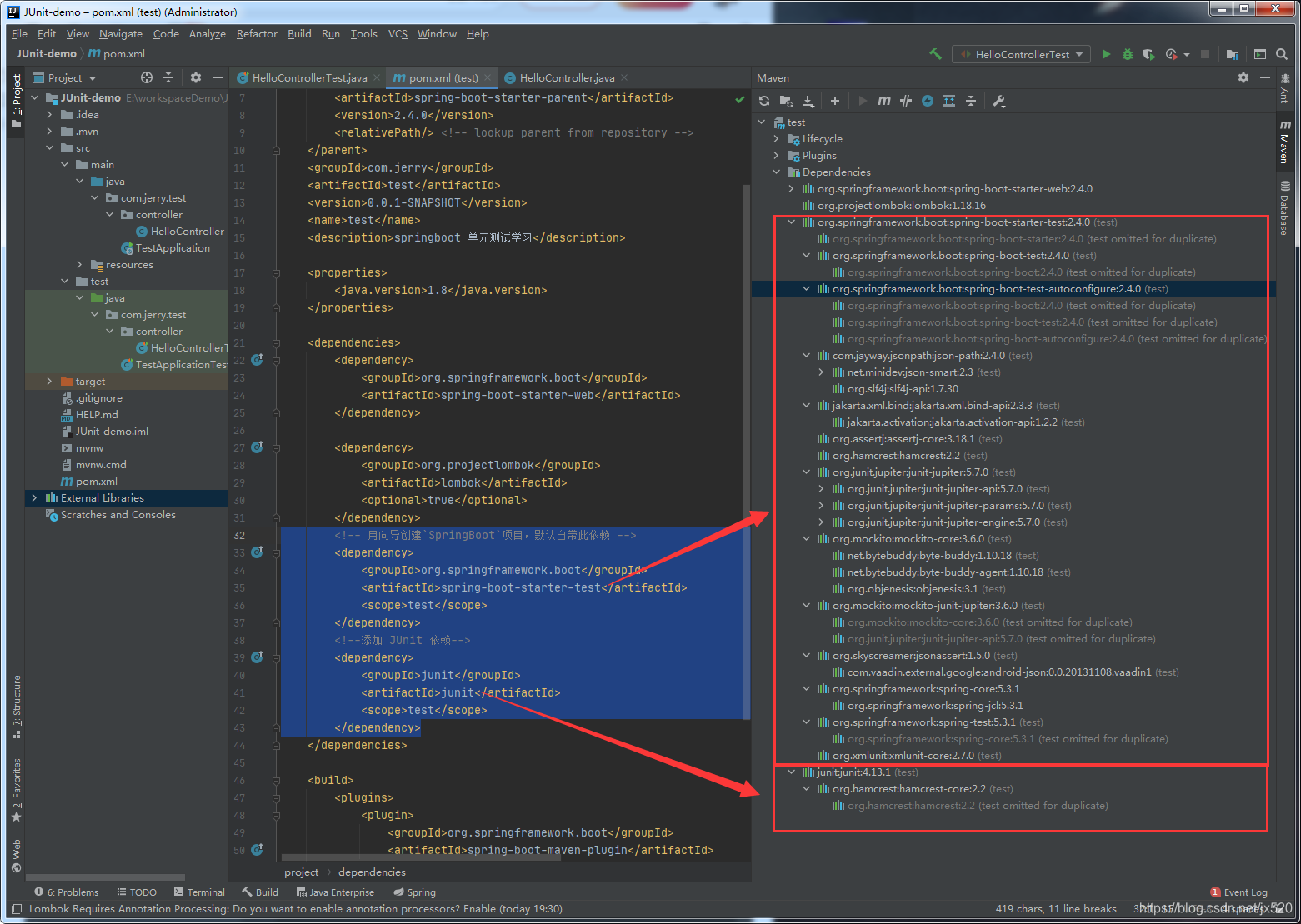
依赖
注意:SpringBoot 2.4开始,需要手动添加JUnit依赖,否则@RunWith用不了
        <!-- 用向导创建`SpringBoot`项目,默认自带此依赖 -->
        <dependency>
            <groupId>org.springframework.boot</groupId>
            <artifactId>spring-boot-starter-test</artifactId>
            <scope>test</scope>
        </dependency>
        <!--添加 JUnit 依赖-->
        <dependency>
            <groupId>junit</groupId>
            <artifactId>junit</artifactId>
            <scope>test</scope>
        </dependency>
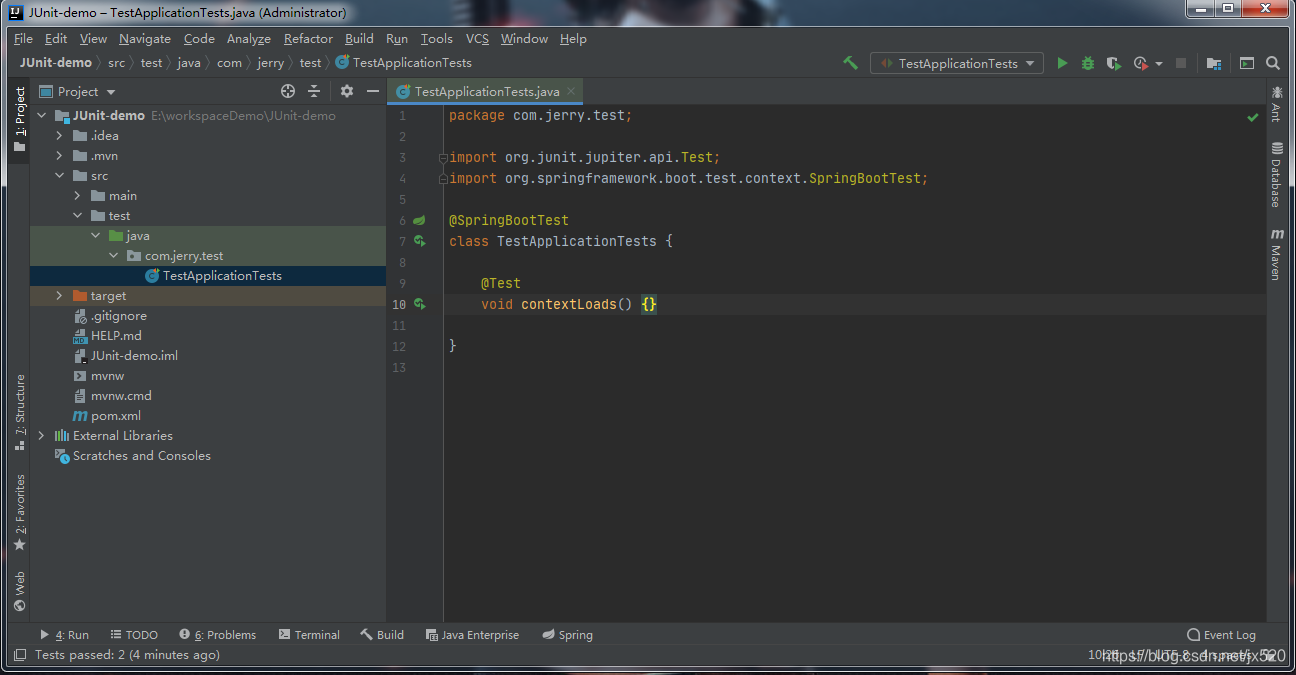
测试类默认样子
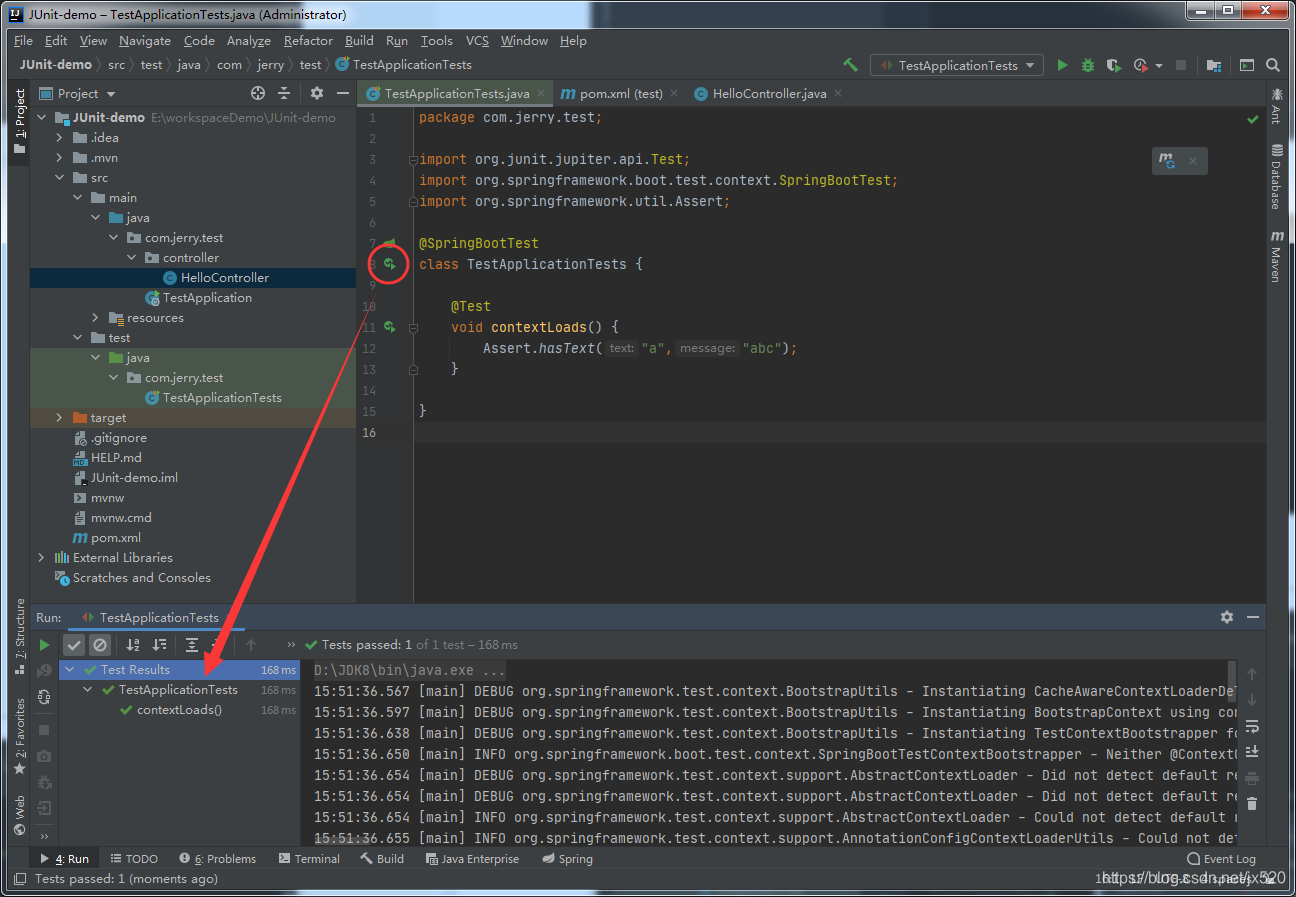
添加测试代码,跑一下。
package com.jerry.test;

import org.junit.jupiter.api.Test;
import org.springframework.boot.test.context.SpringBootTest;
import org.springframework.util.Assert;

@SpringBootTest
public class TestApplicationTests {
    @Test
    void contextLoads() {
        Assert.hasText("a", "abc");
    }
}
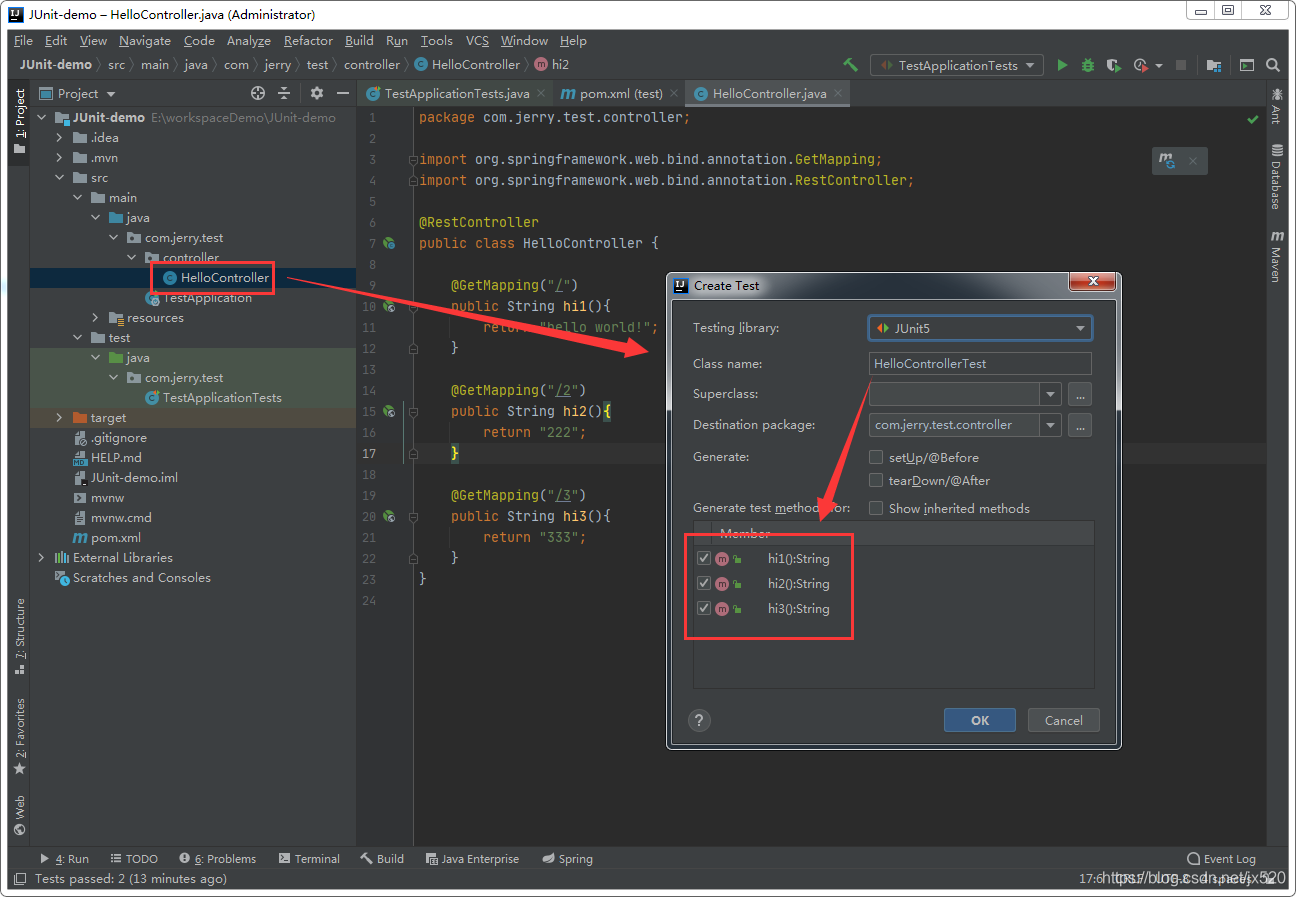
创建测试方法
打开文件按Ctrl + Shift + T弹出对话框,勾选目标方法,为当前类创建测试。
Web测试
通过上一步创建了HelloControllerTest.class我们添加一下测试代码。
注意:这里的断言来至org.springframework.util.Assert
package com.jerry.test.controller;

import org.junit.jupiter.api.Test;
import org.springframework.beans.factory.annotation.Autowired;
import org.springframework.boot.test.context.SpringBootTest;
import org.springframework.boot.test.web.client.TestRestTemplate;
import org.springframework.util.Assert;

@SpringBootTest(webEnvironment = SpringBootTest.WebEnvironment.RANDOM_PORT)
public class HelloControllerTest {
    @Autowired
    private TestRestTemplate restTemplate;

    @Test
    void hi1() {
        String result = restTemplate.getForObject("/", String.class);
        Assert.hasText("hello", result);
        Assert.hasText("world", result);
        Assert.hasText("!", result);
    }

    @Test
    void hi2() {
        String result = restTemplate.getForObject("/2", String.class);
        Assert.hasText("2", result);
    }

    @Test
    void hi3() {
        String result = restTemplate.getForObject("/3", String.class);
        Assert.hasText("3", result);
    }
}
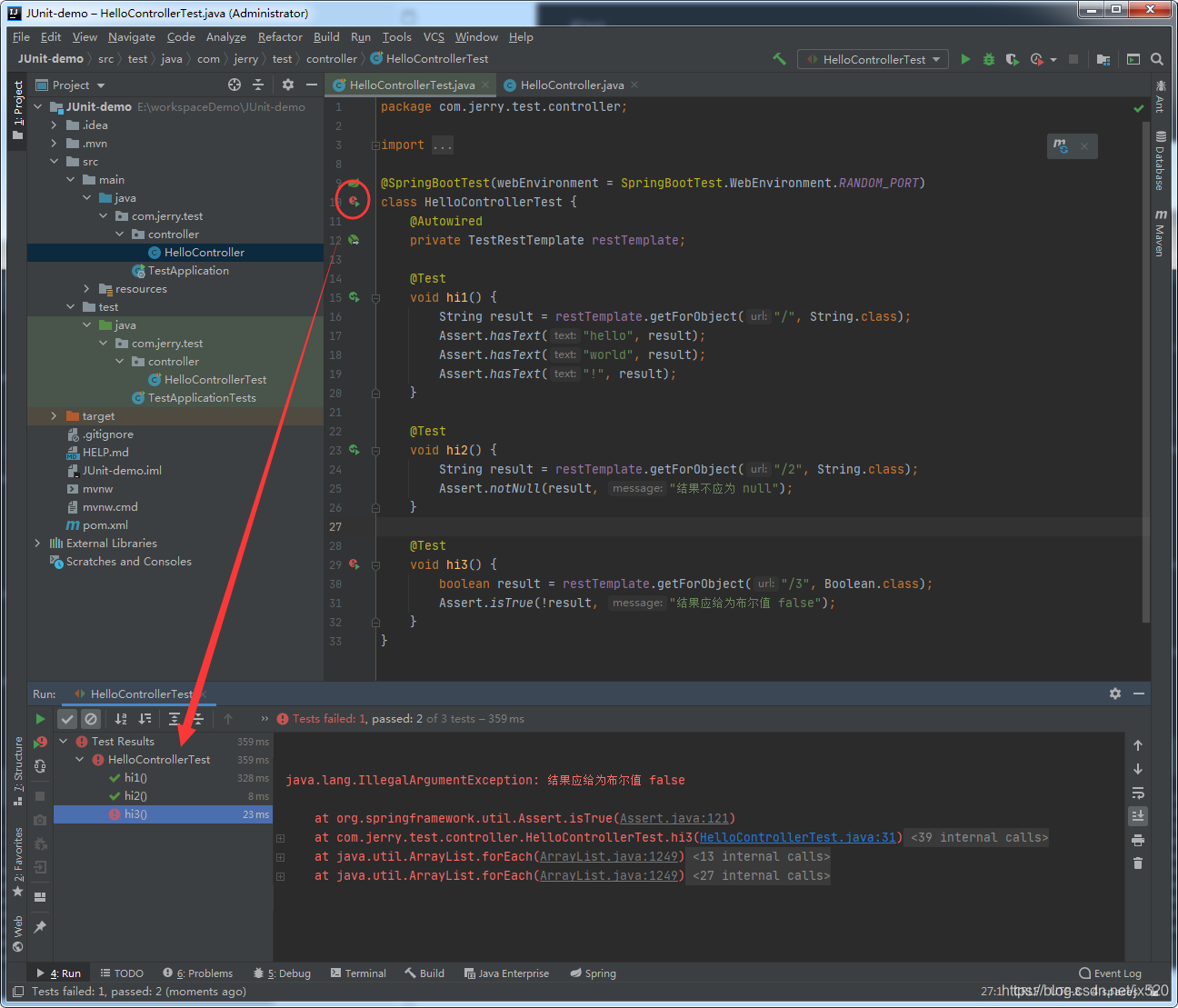
我们故意搞个两对一错看看效果:
数据库测试
测试方法上添加注解@Transactional便不会写入数据了。
@SpringBootTest
@RunWith(SpringRunner.class) // 为JUnit的运行环境
@ComponentScan(basePackages={"com.jerry.mapper.CollectionsMapper"}) // 指定一下mapper路径,这里
public class LawCollectionsMapperTest {

    @Autowired
    private CollectionsMapper collectionsMapper;

    @Test
    public void selectCollection() {
        Map<String, Integer> collection = collectionsMapper.selectCollection();
        System.out.println(JSONObject.toJSONString(collection));
    }
}
测试 service 层
@TestConfiguration 直接没搞懂怎么用。还是直接跑 @SpringBootTest 了。
@SpringBootTest
class PoemServiceImplTest {

    @Autowired
    private PoemService poemService;

    @Test
    void saveBatch() {
        ArrayList<Poem> poemList = new ArrayList<>();
        for (int i = 0; i < 1000; i++) {
            poemList.add(new Poem("诗词" + i, "内容" + i));
        }
        poemService.saveBatch(poemList);
    }
}
JUnit
注意:这里我们添加了@RunWith(SpringRunner.class)现在是使用JUnit断言方法了
- Bug 处理
- 解决:
resolving maven dependencies junit-platform-engin-1.6.3卡死问题,手动添加依赖
package com.jerry.test.controller;

import org.junit.*;
import org.junit.Test;
import org.junit.jupiter.api.Disabled;
import org.junit.jupiter.api.Timeout;
import org.junit.runner.RunWith;
import org.springframework.beans.factory.annotation.Autowired;
import org.springframework.boot.test.context.SpringBootTest;
import org.springframework.boot.test.web.client.TestRestTemplate;
import org.springframework.test.context.junit4.SpringRunner;


@RunWith(SpringRunner.class) // 为JUnit的运行环境
@SpringBootTest(webEnvironment = SpringBootTest.WebEnvironment.RANDOM_PORT)
public class HelloControllerTest {
    @Autowired
    private TestRestTemplate restTemplate;

    @BeforeClass
    public static void beforeClass() {
        System.out.println("============== 测试类开始 ==============");
    }

    @AfterClass
    public static void afterClass() {
        System.out.println("============== 测试类结束 ==============");
    }

    @Before
    public void before() {
        System.out.println("↓↓↓↓↓↓↓↓↓↓↓↓↓↓↓↓ 测试方法开始 ↓↓↓↓↓↓↓↓↓↓↓↓↓↓↓↓");
    }

    @After
    public void after() {
        System.out.println("↑↑↑↑↑↑↑↑↑↑↑↑↑↑↑↑ 测试方法结束 ↑↑↑↑↑↑↑↑↑↑↑↑↑↑↑↑");
    }

    @Test
    public void hi1() {
        String result = restTemplate.getForObject("/", String.class);
        Assert.assertNotNull(result);
        Assert.assertTrue("结果包含 hello", result.contains("hello"));
        Assert.assertTrue("结果包含 world", result.contains("world"));
        Assert.assertTrue("结果包含 !", result.contains("!"));
        Assert.assertEquals("结果为:hello world!", "hello world!", result);
        Assert.assertNotEquals("结果不是:呵呵哒!", "呵呵哒!", result);
        Assert.assertArrayEquals("结果拆分为数组等于:{\"hello\",\"world!\"}", new String[]{"hello","world!"}, result.split(" "));
    }

    @Test
    @Timeout(3) // 3秒超时
    public void hi2() {
        Object obj = new Object();
        Assert.assertSame("期望是同一个对象", obj, obj);
    }

    @Disabled // @Ignore("我已经被淘汰了")
    @Test
    public void hi3() {
        Assert.assertTrue("呵呵哒", false);
    }
}
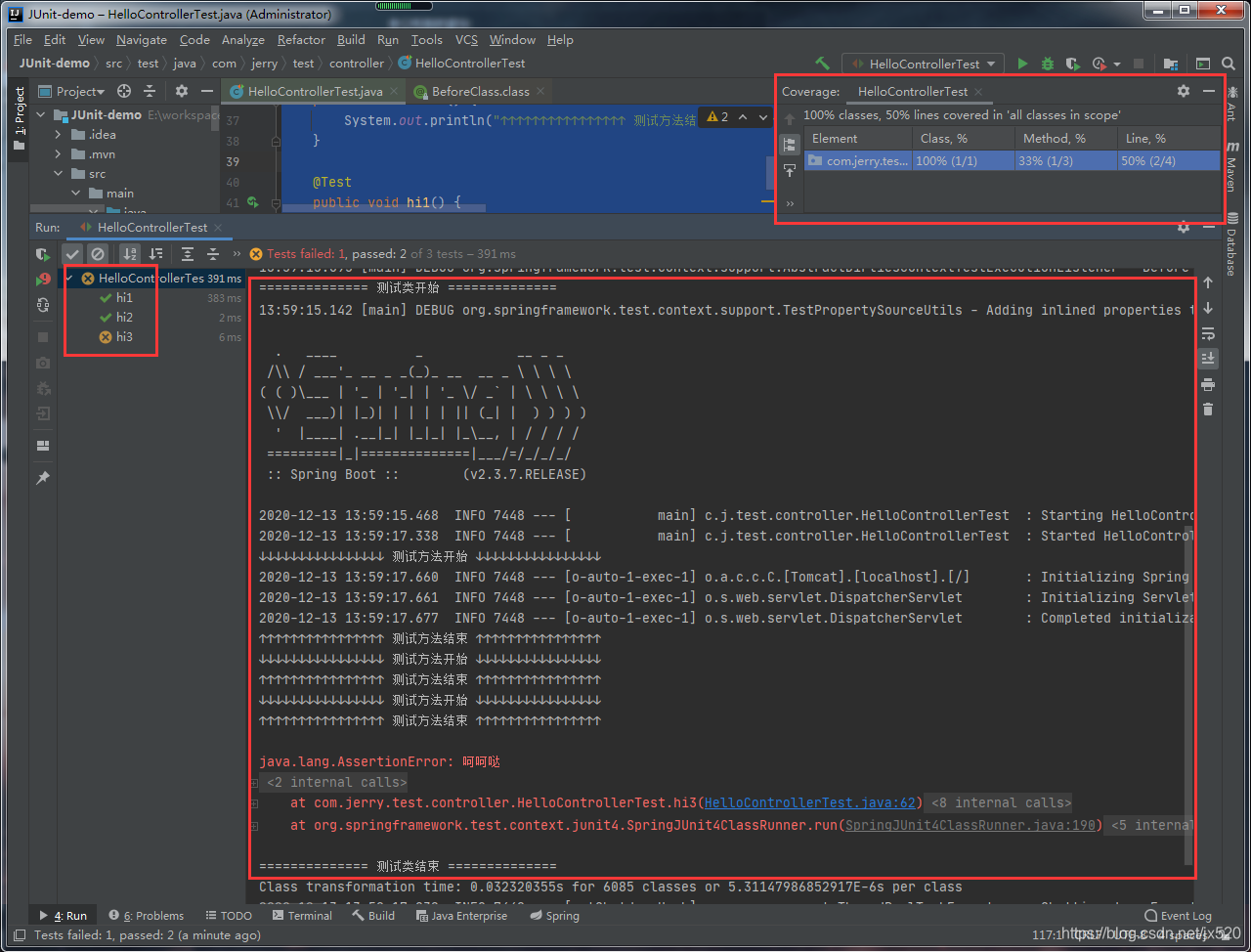 )
)
MockMvc
MockMvc 可以测试 SpringMVC 的一切。
创建 MockMvc 注解
注解:@WebMvcTest(HelloController2.class)
- 注解不仅自动装配了
MockMvc还创建了与MVC相关bean的上下文环境。 HelloController2.class为测试目标类。- 测试类的访问修饰符
public
package com.jerry.test.controller;

import org.junit.Test;
import org.junit.runner.RunWith;
import org.springframework.beans.factory.annotation.Autowired;
import org.springframework.boot.test.autoconfigure.web.servlet.WebMvcTest;
import org.springframework.test.context.junit4.SpringRunner;
import org.springframework.test.web.servlet.MockMvc;
import org.springframework.test.web.servlet.request.MockMvcRequestBuilders;

import static org.springframework.test.web.servlet.result.MockMvcResultMatchers.status;

@RunWith(SpringRunner.class)
@WebMvcTest(HelloController2.class)
public class HelloControllerTest2 {
    @Autowired
    private MockMvc mockMvc;
    @Test
    public void hi1() throws Exception {
        mockMvc.perform(MockMvcRequestBuilders.get("/").param("name","笨笨").param("msg","你在忙什么?")).andExpect(status().isOk());
    }
}
Web (集成测试)
@MockBean 和 BDDMockito.given 是模拟注入的代码。去掉后就真的走 Spring容器了。
package com.mybatis.demo.controller;

import com.mybatis.demo.DemoApplication;
import com.mybatis.demo.entity.Poem;
import com.mybatis.demo.service.PoemService;
import org.junit.jupiter.api.Test;
import org.mockito.BDDMockito;
import org.springframework.beans.factory.annotation.Autowired;
import org.springframework.boot.test.autoconfigure.web.servlet.AutoConfigureMockMvc;
import org.springframework.boot.test.context.SpringBootTest;
import org.springframework.boot.test.mock.mockito.MockBean;
import org.springframework.test.web.servlet.MockMvc;
import org.springframework.test.web.servlet.MvcResult;
import org.springframework.test.web.servlet.request.MockHttpServletRequestBuilder;
import org.springframework.test.web.servlet.request.MockMvcRequestBuilders;
import org.springframework.test.web.servlet.result.MockMvcResultHandlers;
import org.springframework.test.web.servlet.result.MockMvcResultMatchers;

@SpringBootTest(classes = DemoApplication.class)
@AutoConfigureMockMvc
class PoemControllerTest {

    @Autowired
    private MockMvc mockMvc;

    @MockBean
    private PoemService poemService;

    @Test
    public void selectOne() throws Exception {

        Poem poem = new Poem();
        poem.setId(1L);
        poem.setTitle("痴情癫");
        poem.setAuthor("笑虾");
        poem.setContent("<p>多情黯叹痴情癫,痴情苦笑多情难。</p><p>相思自古无良药,从来独步赴黄泉。</p>");

        BDDMockito.given(poemService.queryById(1L)).willReturn(poem);

        MockHttpServletRequestBuilder request = MockMvcRequestBuilders.get("/poem/get/1")
                .accept("application/json;charset=UTF-8");
        MvcResult mvcResult = mockMvc.perform(request)
                .andExpect(MockMvcResultMatchers.status().isOk()) // 是否 200
                .andDo(MockMvcResultHandlers.print()) // 打印结果
                .andReturn(); // 返回结果对象

//        mvcResult.getResponse().setCharacterEncoding("UTF-8"); // 也可以在拿到结果后再设置编码
        System.out.println("结果:" + mvcResult.getResponse().getContentAsString());

    }
}
Controller 测试(切片测试)
@SpringBootTest(classes = DemoApplication.class)
@AutoConfigureMockMvc
class PoemControllerTest {

    @Autowired
    private MockMvc mockMvc;

    @Test
    public void selectOne() throws Exception {

        MockHttpServletRequestBuilder request = MockMvcRequestBuilders.get("/poem/get/1")
                .accept("application/json;charset=UTF-8");
        MvcResult mvcResult = mockMvc.perform(request)
                .andExpect(MockMvcResultMatchers.status().isOk()) // 是否 200
                .andDo(MockMvcResultHandlers.print()) // 打印结果
                .andReturn(); // 返回结果对象

        System.out.println("结果:" + mvcResult.getResponse().getContentAsString());

    }
}
参考资料
官网:Testing the Web Layer
JUnit4 官网
文档 MockMvc
Testing in Spring Boot

北京人形旗下天工造物具身智能开源社区,聚焦具身天工与慧思开物两大平台
更多推荐
 0
0 0
0- 0


 已为社区贡献8条内容

所有评论(0)