Linux上安装编译lzo报错:Failed to execute goal org.apache.maven.plugins:maven-antrun-plugin:1.7:run 已解决
·
1、详细报错信息
[ERROR] Failed to execute goal org.apache.maven.plugins:maven-antrun-plugin:1.7:run (build-native-non-win) on project hadoop-lzo: An Ant BuildException has occured: exec returned: 1
[ERROR] around Ant part ...<exec failonerror="true" dir="${build.native}" executable="sh">... @ 16:66 in /data/hadoop-lzo-master/target/antrun/build-build-native-non-win.xml
[ERROR] -> [Help 1]
[ERROR]
[ERROR] To see the full stack trace of the errors, re-run Maven with the -e switch.
[ERROR] Re-run Maven using the -X switch to enable full debug logging.
[ERROR]
[ERROR] For more information about the errors and possible solutions, please read the following articles:
[ERROR] [Help 1] http://cwiki.apache.org/confluence/display/MAVEN/MojoExecutionException
2、查看自己的java环境
vim /etc/profile
export JAVA_HOME=/usr/java/jdk1.8.0_251-amd64/
export PATH=$PATH:$JAVA_HOME/bin
sorce /etc/profile
3、在maven中的settings.xml文件添加配置
cd /data/apache-maven/conf
vim settings.xml
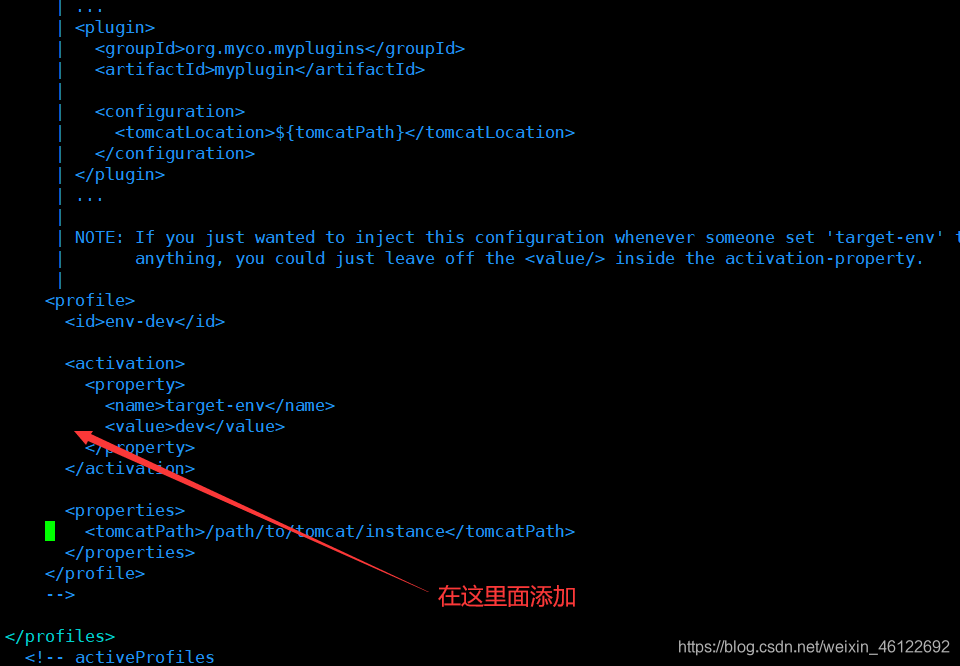
添加内容:
<profile>
    <id>jdk-1.8</id>
    <activation>
        <activeByDefault>true</activeByDefault>
        <jdk>1.8</jdk>
    </activation>
    <properties>
        <maven.compiler.source>1.8</maven.compiler.source>
        <maven.compiler.target>1.8</maven.compiler.target>
        <maven.compiler.compilerVersion>1.8</maven.compiler.compilerVersion>
    </properties>
</profile>

北京人形旗下天工造物具身智能开源社区,聚焦具身天工与慧思开物两大平台
更多推荐
 1
1 0
0- 0


 已为社区贡献4条内容

所有评论(0)