Mask-RCNN:error: Unable to find vcvarsall.bat
文章目录
✨必看
用此方法解决错误的前提条件:
- 电脑上必须安装有Visual Studio 2019
- 或者安装了Visual Studio 其他版本(参考)。
Python版本: 虚拟环境Python 3.6
系统: Win 10
Anaconda版本:conda 4.8.5
1. 背景介绍
想在虚拟环境python3.6下安装pycocotools安装包,从网上下载pycocotools的安装包并解压后,虚拟环境下cd 到cocoapi-master\PythonAPI目录下:
执行 python setup.py build_ext --inplace出错:
(py36) D:\WorkSpace\RepetitionCode\cocoapi-master\PythonAPI>python setup.py build_ext --inplacle
Compiling pycocotools/_mask.pyx because it changed.
[1/1] Cythonizing pycocotools/_mask.pyx
D:\CodingSoftware\Anaconda3\envs\py36\lib\site-packages\Cython\Compiler\Main.py:369: FutureWarning: Cython directive 'language_level' not set, using 2 for now (Py2). This will change in a later release! File: D:\WorkSpace\RepetitionCode\cocoapi-master\PythonAPI\pycocotools\_mask.pyx
  tree = Parsing.p_module(s, pxd, full_module_name)
running build_ext
building 'pycocotools._mask' extension
error: Unable to find vcvarsall.bat
报错:error: Unable to find vcvarsall.bat
2. 错误分析
2.1 错误原因
该问题的产生是在windows环境中,PythonAPI下 的 setup.py需要调用一个vcvarsall.bat的文件,该文件却找不到。
需要安装c++编程环境才会有
2.2 vcvarsall.bat是什么?
主要参考自: linshiyx
Python通过安装第三方包实现更多的功能。这些包中包含扩展模块(extension),有时也叫本地模块(native modules)。它们以.pyd结尾,包含针对平台的代码,可能由其他语言编写的,所以需要vcvarsall.bat编译这些模块。vcvarsall.bat是visual studio的一个编译器。
也可以下载wheel,wheel中是已经被编译过的模块。且pip优先下载wheel文件。如果不能安装wheel的情况下,就需要自己建立编译环境了。
那么首先要选编译工具的版本。不同的python版本对编译器版本可能要求不同。
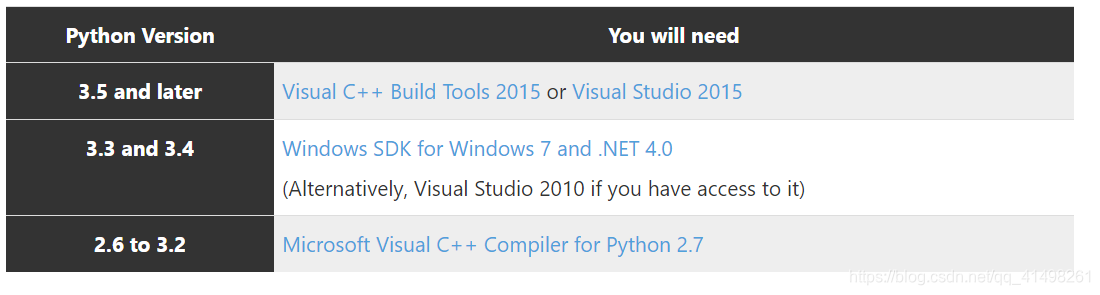
简单来说,就是python3.5开始,就需要你安装Visual C++Build Tools 2015(Visual C++Build Tools 2015+也可)或者Visual Studio 2015(Visual Studio 2015+也可)软件。
所以如果你的电脑里没有安装VC/VS2015+版本的话,可以查看网上别的教程来解决此问题。
2.3 vcvarsall.bat在哪?
主要参考自: Where is vcvarsall.bat file?
通过查询,大概知道,这个文件的安装位置应该是在VS安装的路径下的某个地方(所以不同的CP上可能位置不同)。
采用最直接的方式,在C或者D盘下搜索此文件:
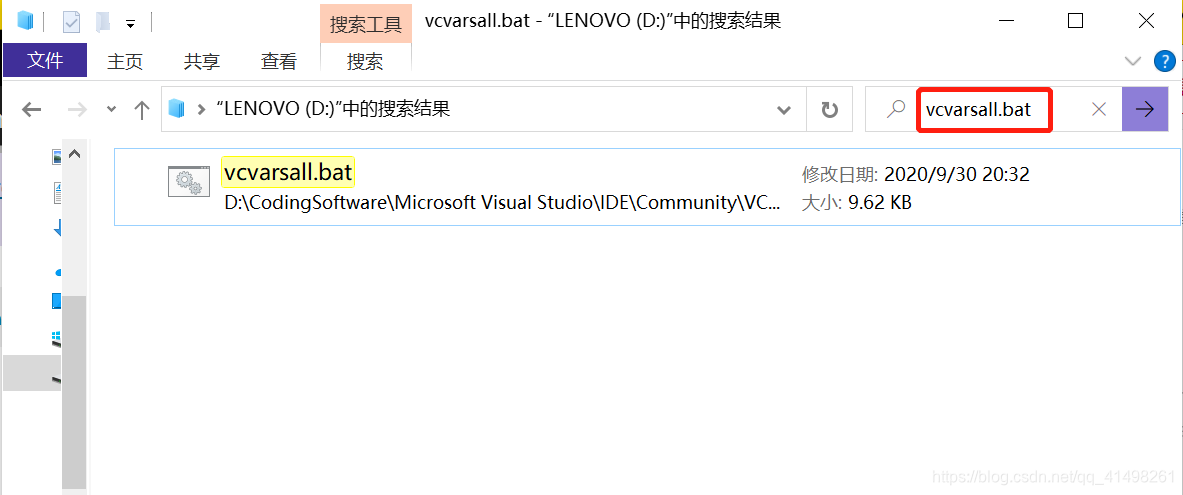
然后你就找到了具体的位置。
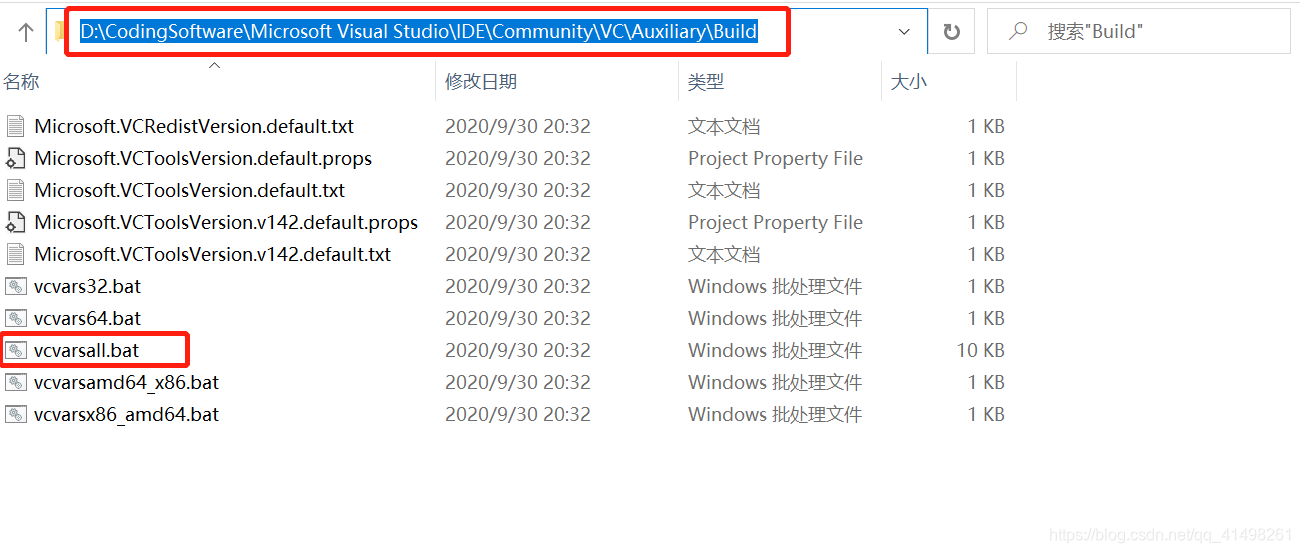
想要了解
vcvarsall.bat ,vcvars32.bat,vcvars64.bat,vcvarsx86_amd64.bat 和 vcvarsamd64_x86.bat这些文件,可以直接点击Visual Studio 2017 vcvarsall.bat 环境配置对应关系
3. 解决
既然电脑上存在此文件,为什么报错找不到?又是如何谁指挥查找此文件?
经过二三个小时的各种百度(😫😫哭了),了解到:
查找vcvarsall.bat的方法是定义在虚拟环境下的_msvccompiler.py文件中(注意该文件前面是有下划线的)的。
具体位置根据你自己安装pycocotools时候所用python环境的安装位置。
- 如果使用的是conda 安装的虚拟环境,那么在anaconda安装目录下的envs中查找。envs中存放所有的虚拟环境。
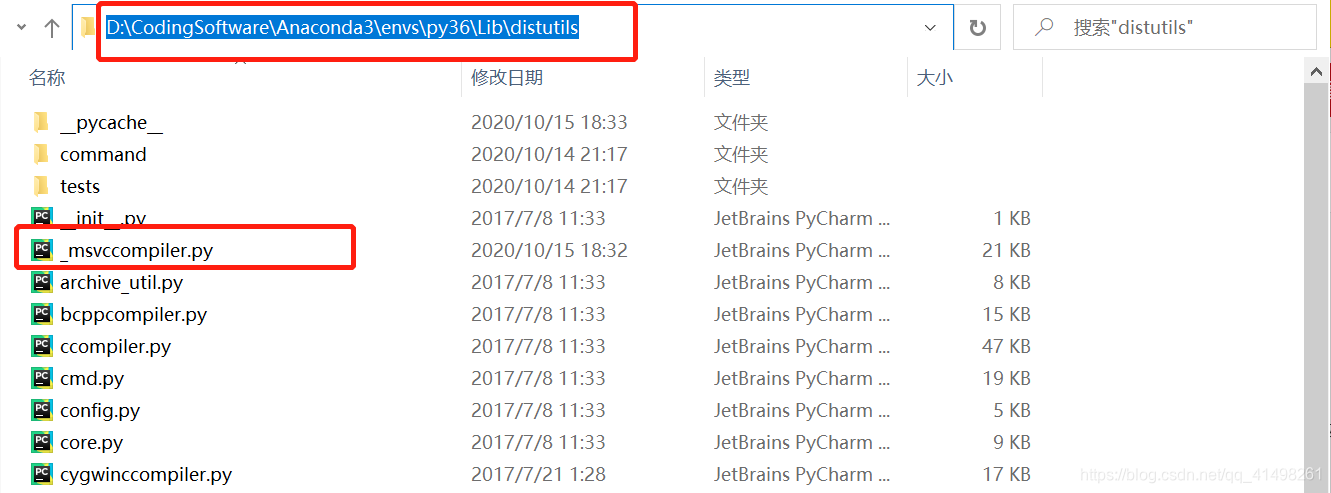
- 如果在anaconda默认的python下安装的,则找anaconda安装目录下的Lib中查找,比如我的anaconda 自带python3.7。那么此文件在:
D:\CodingSoftware\Anaconda3\Lib\distutils
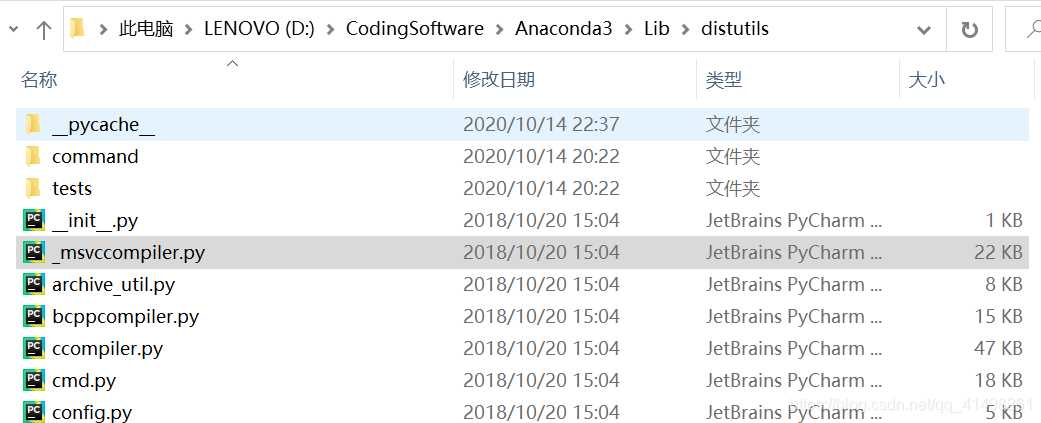
我通过anaconda创建的虚拟环境python3.6。所以此文件在D:\CodingSoftware\Anaconda3\envs\py36\Lib\distutils。

🎉🎉🎉🎉🎉🎉🎉🎉🎉🎉重点🎉🎉🎉🎉🎉🎉🎉🎉🎉
查看_find_vcvarsall方法:
def _find_vcvarsall(plat_spec):
    try:
        key = winreg.OpenKeyEx(
            winreg.HKEY_LOCAL_MACHINE,
            r"Software\Microsoft\VisualStudio\SxS\VC7",
            access=winreg.KEY_READ | winreg.KEY_WOW64_32KEY
        )
    except OSError:
        log.debug("Visual C++ is not registered")
        return None, None

    with key:
        best_version = 0
        best_dir = None
        for i in count():
            try:
                v, vc_dir, vt = winreg.EnumValue(key, i)
            except OSError:
                break
            if v and vt == winreg.REG_SZ and os.path.isdir(vc_dir):
                try:
                    version = int(float(v))
                except (ValueError, TypeError):
                    continue
                if version >= 14 and version > best_version:
                    best_version, best_dir = version, vc_dir
        if not best_version:
            log.debug("No suitable Visual C++ version found")
            return None, None

        vcvarsall = os.path.join(best_dir, "vcvarsall.bat")
        if not os.path.isfile(vcvarsall):
            log.debug("%s cannot be found", vcvarsall)
            return None, None

        vcruntime = None
        vcruntime_spec = _VCVARS_PLAT_TO_VCRUNTIME_REDIST.get(plat_spec)
        if vcruntime_spec:
            vcruntime = os.path.join(best_dir,
                vcruntime_spec.format(best_version))
            if not os.path.isfile(vcruntime):
                log.debug("%s cannot be found", vcruntime)
                vcruntime = None

        return vcvarsall, vcruntime
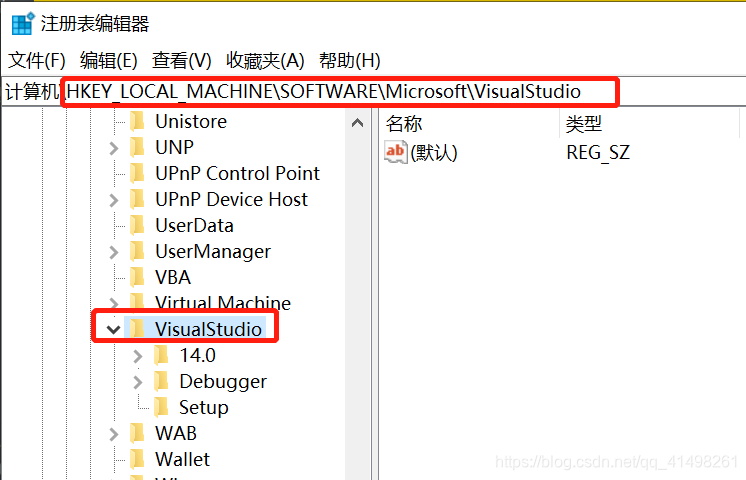
发现它从注册表中加载vcvarsall文件的位置,安装它提示的路径:
找HKEY_LOCAL_MACHINE下的Software\Microsoft\VisualStudio\SxS\VC7,发现注册表中SxS\VC7根本不存在,所以自然会出错。
3.1 方法1:改注册表
将vcvarsall路径加入到它所查找的注册表。
没有尝试…
3.2 方法2:改_msvccompiler.py代码
将_find_vcvarsall(plat_spec)代码中的vcvarsall路径改成绝对路径。
原代码:
def _find_vcvarsall(plat_spec):
    try:
        key = winreg.OpenKeyEx(
            winreg.HKEY_LOCAL_MACHINE,
            r"Software\Microsoft\VisualStudio\SxS\VC7",
            access=winreg.KEY_READ | winreg.KEY_WOW64_32KEY
        )
    except OSError:
        log.debug("Visual C++ is not registered")
        return None, None

    with key:
        best_version = 0
        best_dir = None
        for i in count():
            try:
                v, vc_dir, vt = winreg.EnumValue(key, i)
            except OSError:
                break
            if v and vt == winreg.REG_SZ and os.path.isdir(vc_dir):
                try:
                    version = int(float(v))
                except (ValueError, TypeError):
                    continue
                if version >= 14 and version > best_version:
                    best_version, best_dir = version, vc_dir
        if not best_version:
            log.debug("No suitable Visual C++ version found")
            return None, None

        vcvarsall = os.path.join(best_dir, "vcvarsall.bat")
        if not os.path.isfile(vcvarsall):
            log.debug("%s cannot be found", vcvarsall)
            return None, None

        vcruntime = None
        vcruntime_spec = _VCVARS_PLAT_TO_VCRUNTIME_REDIST.get(plat_spec)
        if vcruntime_spec:
            vcruntime = os.path.join(best_dir,
                vcruntime_spec.format(best_version))
            if not os.path.isfile(vcruntime):
                log.debug("%s cannot be found", vcruntime)
                vcruntime = None

        return vcvarsall, vcruntime
更改成:
def _find_vcvarsall(plat_spec):
    best_version = 19
    best_dir = r'D:\CodingSoftware\Microsoft Visual Studio\IDE\Community\VC\Auxiliary\Build'
    vcvarsall = os.path.join(best_dir, "vcvarsall.bat")
    if not os.path.isfile(vcvarsall):
        log.debug("%s cannot be found", vcvarsall)
        return None, None
    vcruntime = None
    vcruntime_spec = _VCVARS_PLAT_TO_VCRUNTIME_REDIST.get(plat_spec)
    if vcruntime_spec:
        vcruntime = os.path.join(best_dir,
                                 vcruntime_spec.format(best_version))
        if not os.path.isfile(vcruntime):
            log.debug("%s cannot be found", vcruntime)
            vcruntime = None
    return vcvarsall, vcruntime
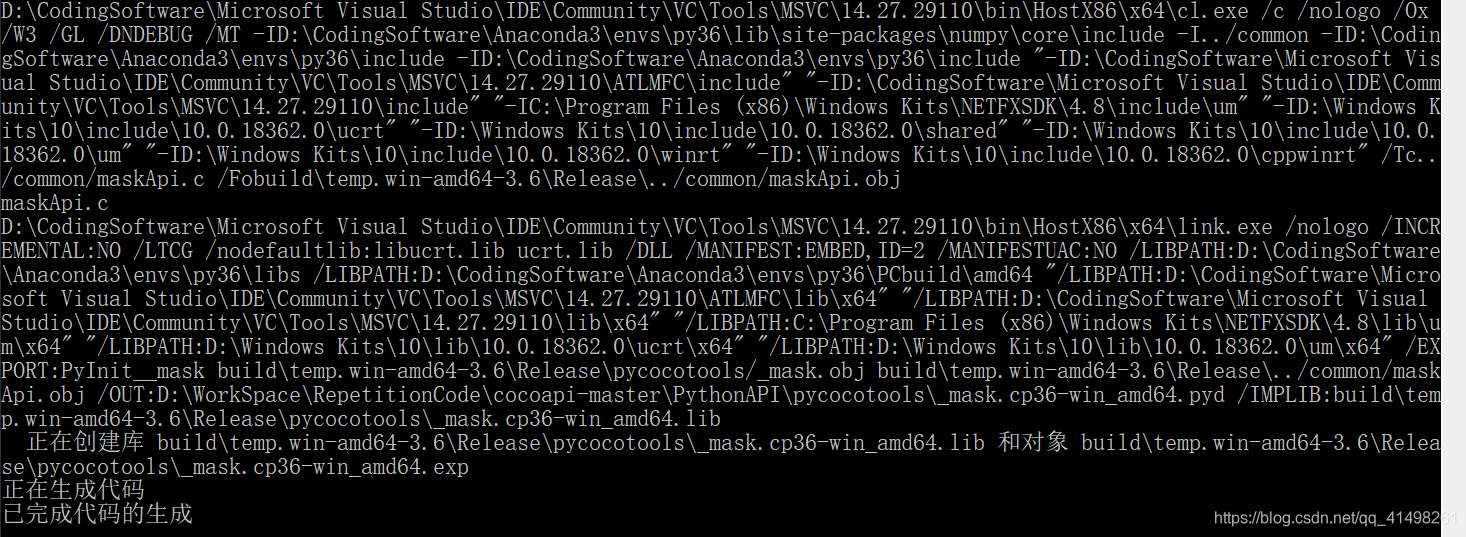
保存一下,再次安装pycocotools。
python setup.py build_ext --inplace
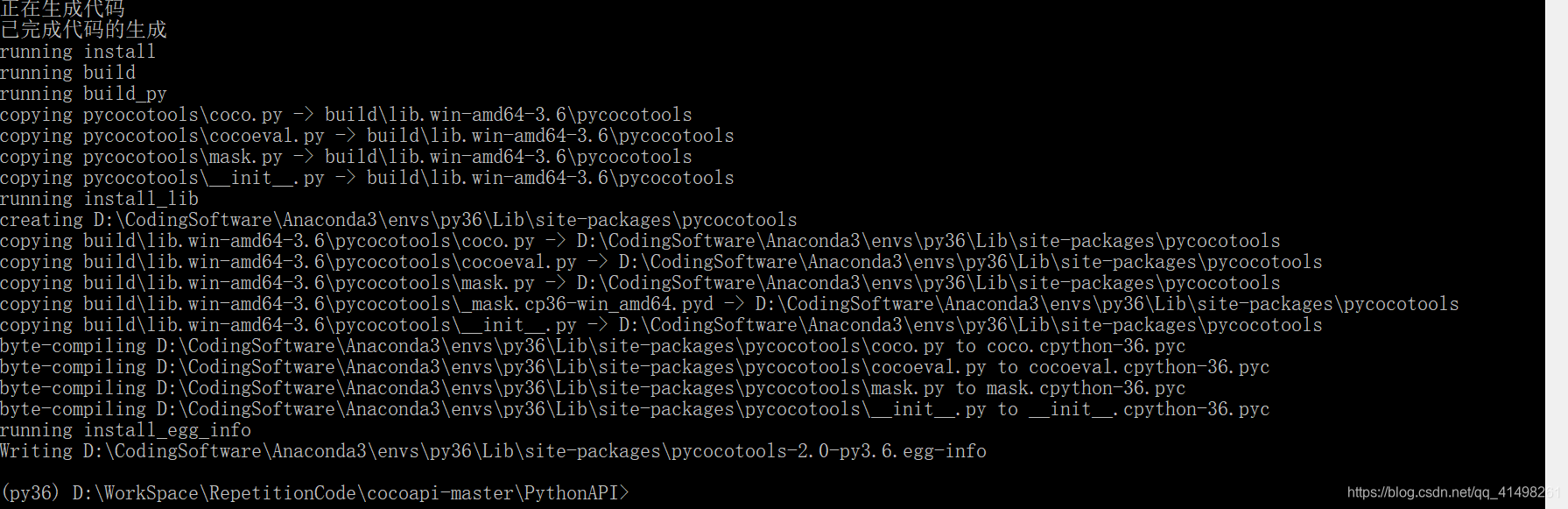
#install pycocotools to the Python site-packages
python setup.py build_ext install
整个过程简直无力吐槽。

北京人形旗下天工造物具身智能开源社区,聚焦具身天工与慧思开物两大平台
更多推荐
 8
8 0
0- 0


 已为社区贡献5条内容

所有评论(0)