定制专属你的markdown样式,你也可以!
·
Markdown你真的会用过吗?
有时我们在看到别人使用的markdown特别好看,其实他们只是自定义了相应的样式而已,相信看了这篇文章的你,也可以拥有属于自己让他人羡慕的markdown(如果自定样式,需要熟悉一些前端知识。)
大家熟知的功能
可以根据上方菜单选择适合自己的功能。
打造属于你的markdown——自定义样式
- 首先需要打开调试模式
文件 => 偏好设置 => 开启调试模式(通用里面)=> 右键检查元素
注意:如果没有检查元素菜单,重启markdown使用。
2.找到想要修改的元素,可以修改成自己喜欢的样式
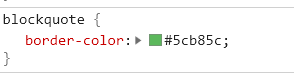
3.打开主题文件夹(文件=>偏好设置=>外观=>打开主题文件夹)将修改的css代码放到对应的主题文件内或基本主题样式内

4.修改完成,效果如下

markdown自定添加序号
我们都知道markdown标题有序号比较好看,可是一旦修改了标题,那序号就全乱了,修改起来贼麻烦,有没有可以自动生成标号,修改后自动调整?如果你想到了这里,恭喜你,有的。
在你的主题文件夹下,创建base.user.css文件,将一下代码粘贴进去,重启markdown即可。
#write {
	max-width: 1200px;
}

/*设置颜色*/
#write h1 {
	text-align: center;
	font-size: 50px;
	line-height: 1;
	color: #e42b2b;
}

#write {
    /*counter-reset: h1 */
}

h1 {
    counter-reset: h2
}

h2 {
    counter-reset: h3
}

h3 {
    counter-reset: h4
}

h4 {
    counter-reset: h5
}

h5 {
    counter-reset: h6
}
/* 去掉首标题序号 */
/*#write h1:before {
    counter-increment: h1;
    content: counter(h1) " "
}*/

#write h2:before {
    counter-increment: h2;
    /*content: counter(h1) "." counter(h2) " "*/
	content: counter(h2) " "
}

#write h3:before,
h3.md-focus.md-heading:before {
    counter-increment: h3;
    /*content: counter(h1) "." counter(h2) "." counter(h3) " "*/
	content: counter(h2) "." counter(h3) " "
}

#write h4:before,
h4.md-focus.md-heading:before {
    counter-increment: h4;
    /*content: counter(h1) "." counter(h2) "." counter(h3) "." counter(h4) " "*/
	content: counter(h2) "." counter(h3) "." counter(h4) " "
}

#write h5:before,
h5.md-focus.md-heading:before {
    counter-increment: h5;
    /*content: counter(h1) "." counter(h2) "." counter(h3) "." counter(h4) "." counter(h5) " "*/
	content: counter(h2) "." counter(h3) "." counter(h4) "." counter(h5) " "
}

#write h6:before,
h6.md-focus.md-heading:before {
    counter-increment: h6;
    /*content: counter(h1) "." counter(h2) "." counter(h3) "." counter(h4) "." counter(h5) "." counter(h6) " "*/
	content: counter(h2) "." counter(h3) "." counter(h4) "." counter(h5) "." counter(h6) " "
}

#write > h3.md-focus:before,
#write > h4.md-focus:before,
#write > h5.md-focus:before,
#write > h6.md-focus:before,
h3.md-focus:before,
h4.md-focus:before,
h5.md-focus:before,
h6.md-focus:before {
    color: inherit;
    border: inherit;
    border-radius: inherit;
    position: inherit;
    left: initial;
    float: none;
    top: initial;
    font-size: inherit;
    padding-left: inherit;
    padding-right: inherit;
    vertical-align: inherit;
    font-weight: inherit;
    line-height: inherit;
}
注意:一般我喜欢一个页面只有一级标题标题,没有序号,其他以此递增。
如果你喜欢一级标题也有序号,可以将注释的代码下面的代码注视掉,解除注释代码,重启markdown即可。
喜欢的话,赶紧去尝试下吧。有你的支持,我会继续努力的!

北京人形旗下天工造物具身智能开源社区,聚焦具身天工与慧思开物两大平台
更多推荐
 0
0 0
0- 0


 已为社区贡献4条内容

所有评论(0)