单元测试体系(五)-mapper单元测试例子(MyBatis)
单元测试体系目录
| 序号 | 类型 |
|---|---|
| 1 | 单元测试体系(一)-什么是单元测试? |
| 2 | 单元测试体系(二)-快速生成单元测试目录结构(eclipse) |
| 3 | 单元测试体系(三)-controller单元测试例子 |
| 4 | 单元测试体系(四)-service单元测试例子 |
| 5 | 单元测试体系(五)-mapper单元测试例子(MyBatis) |
| 6 | 单元测试体系(六)-异常模块 |
单元测试体系(五)-mapper单元测试例子(MyBatis)
工具: eclipse
项目类型: springBoot
junit常用注解
junit常用注解
@Test(timeout = 10)
测试,该注解必须加到方法上
timeout超时时间,单位是毫秒
终止死循环,当达到设定的值,结束循环
@Ignore
忽略不想被测试的方法,该注解必须加到方法上,也可以加到类上(慎用)
@RunWith(SpringJUnit4ClassRunner.class)
把junit和spring整合到一块,该注解加到类上
@ContextConfiguration(locations = {“classpath:conf/applicationContext.xml”})
用于加载spring配置文件的注解,添加到类上
locations代表spring配置文件路径的数组,数组的类型为Stirng
classpath:这个东西代表从源包下开始寻找
@Resource(name = “blogService”)
注入属性的注解,就相当于set、get方法,name指明bean的id值
@Before
在所有方法之前执行,一般加到方法上
@After
在所有方法之后执行,一般加到方法上
@Transactional
@TransactionConfiguration(transactionManager = “transactionManager”, defaultRollback = true)
上边这俩注解要一块用,用于事物控制,加到类上
transactionManager代表配置文件中事务管理器bean的id值
defaultRollback代表事物回滚,默认值为true,是回滚的
assert常用方法
Assert.assertEquals(“message”,A,B):
判断对象A和B是否相等,这个判断比较时调用了equals()方法。
Assert.assertSame(“message”,A,B):
判断对象A和B是否相同,使用的是==操作符。
Assert.assertTure(“message”,A):
判断A条件是否为真。
Assert.assertFalse(“message”,A):
判断A条件是否不为真。
Assert.assertNotNull(“message”,A):
判断A对象是否不为null
Assert.assertArrayEquals(“message”,A,B):
判断A数组与B数组是否相等。
公用注解
@WebMvcTest
主要用于controller层测试,只覆盖应用程序的controller层,HTTP请求和响应是Mock出来的,因此不会创建真正的连接。因此需要创建 MockMvc bean进行模拟接口调用
@RunWith(SpringRunner.class)
@RunWith(SpringJUnit4ClassRunner)
是Junit和Spring Boot test联系的桥梁
@Slf4j
日志
准备MyBatis单元测试用的xml
位置:
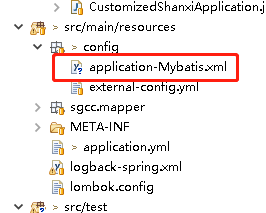
xml内容:
<?xml version="1.0" encoding="UTF-8"?>
<beans xmlns="http://www.springframework.org/schema/beans"
       xmlns:context="http://www.springframework.org/schema/context"
    xmlns:xsi="http://www.w3.org/2001/XMLSchema-instance"
    xsi:schemaLocation="http://www.springframework.org/schema/beans
        http://www.springframework.org/schema/beans/spring-beans.xsd
        http://www.springframework.org/schema/context
        http://www.springframework.org/schema/context/spring-context.xsd">
       <context:component-scan base-package="yzy.com"></context:component-scan>

       <bean id="dataSource"  class="org.springframework.jdbc.datasource.DriverManagerDataSource">
              <property name="driverClassName" value="oracle.jdbc.OracleDriver" />
              <property name="url"  value="jdbc:oracle:thin:@10.51.32.39:1521:stand" />
              <property name="username" value="ELECTRICTESTGP02" />
              <property name="password" value="ELECTRICTESTGP02" />
       </bean>

       <!-- 配置会话工厂bean -->
       <bean id="sqlSessionFactory"  class="org.mybatis.spring.SqlSessionFactoryBean">
              <!-- 数据源 -->
              <property name="dataSource" ref="dataSource" />
              <!-- 给实体类取别名,这样配置可以只需要写类名,不需要带类完整路径,简化映射文件中的返回类型resultType书写(可能其他地方还有用到) -->
              <property name="typeAliasesPackage" value="com.yzy.shanxi" />
              <!-- 指定sql映射文件路径 -->
              <property name="mapperLocations"  value="classpath*:yzy/mapper/shanxi/*/*Mapper.xml" />
       </bean>

       <!-- 配置自动扫描对象关系映射文件 -->
       <bean class="org.mybatis.spring.mapper.MapperScannerConfigurer">
              <!-- 指定会话工厂,如配置中只有一个则可省去 -->
              <property name="sqlSessionFactoryBeanName" value="sqlSessionFactory"  />
              <!-- 指定要自动扫描的包,不带类名,表示扫描工程下所有在这一层下面的接口,所以为了方便,尽量把所有映射接口都放在同一包下 -->
              <property name="basePackage" value="com.yzy.shanxi" />
       </bean>
</beans>
例子:
@RunWith(SpringRunner.class)
@Slf4j
public class TestMapperTest {
      private TestMapper mapper = null;

      private TestQueryVo aggregateQueryVo;
      //日志信息
      private  static String DY_MSG = "";

      private final static String DY_MSG1 = "单元测试【TestMapper】 query";
      private final static String DY_MSG2 = "单元测试【TestMapper】 queryDatas";
      static{
            DY_MSG = DY_MSG1 ;
      }
      public void init(){
            String xmlPath = "/src/main/resources/config/application-Mybatis.xml";
            ApplicationContext ac = new FileSystemXmlApplicationContext(xmlPath);
            mapper = ac.getBean(TestMapper.class);
      }


    @Before
      public void setQueryUp(){
            log.info("{}--start!!!!",DY_MSG);

            @SuppressWarnings("resource")
            Scanner s = new Scanner(System.in);
            String  g = s.next().toString();
            aggregateQueryVo = new TestQueryVo();
            aggregateQueryVo.setTradeDate(g);
      }


      @Test
      public void testQuery() {
             init();
            List<TSettleDayPgcb> query = mapper.query(aggregateQueryVo);
            Assert.assertNotNull(query);
      }


    /**
    *
    * 结束
    * @author yangzhenyu
    * @date 2020/08/18
    *
    * */
      @After
      public void after(){
            log.info("{}--end!!!!",DY_MSG);
      }
}

北京人形旗下天工造物具身智能开源社区,聚焦具身天工与慧思开物两大平台
更多推荐
 1
1 0
0- 0


 已为社区贡献3条内容

所有评论(0)