游戏引擎unity3d_安装Unity 3D游戏引擎
游戏引擎unity3d
Game development requires the use of an IDE along with one or two programming language(s). This IDE will be the Game Engine on which you will be developing you game project. In this tutorial, we will learn how to install/setup and use the Unity Game Engine to use it as your game development environment.
游戏开发需要使用IDE以及一种或两种编程语言。 该IDE将是您将在其上开发游戏项目的Game Engine。 在本教程中,我们将学习如何安装/设置并使用Unity Game Engine将其用作您的游戏开发环境。
为Windows设置Unity 3D环境 (Setup Unity 3D environment for Windows)
For using Unity 3D, you have to download the Installer from the Unity's official website. For that, just follow the steps given.
要使用Unity 3D,您必须从Unity的官方网站下载安装程序。 为此,只需遵循给出的步骤。
Download and install the Unity Editor from the link: unity3d.com/get-unity/download/archive
从以下链接下载并安装Unity编辑器: unity3d.com/get-unity/download/archive

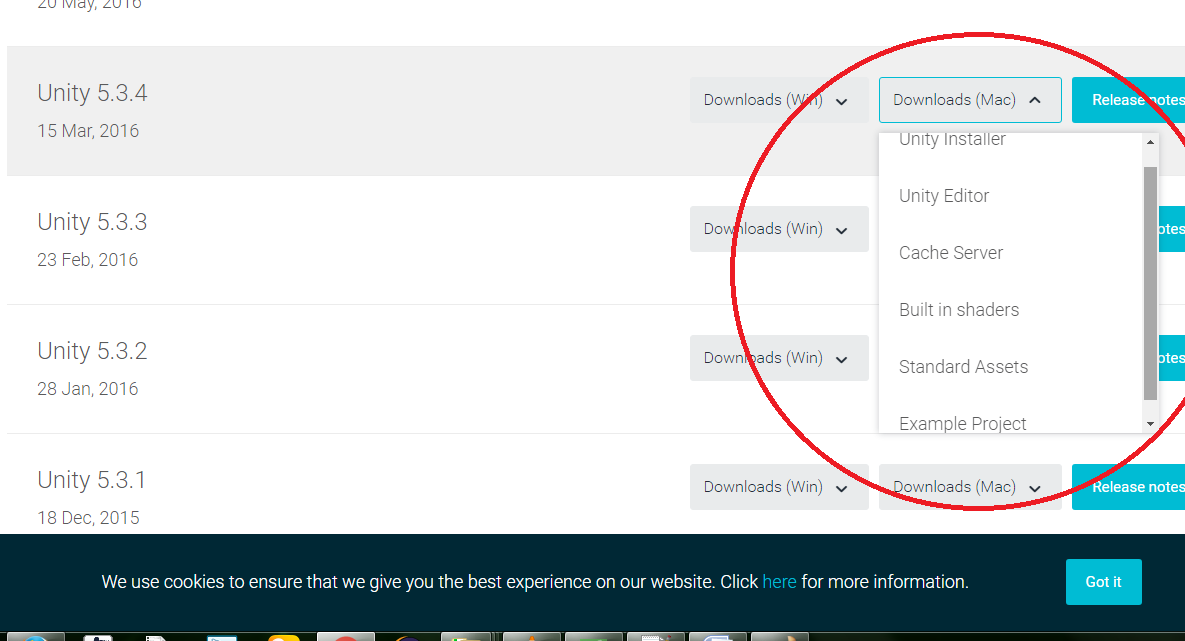
Clicking on the Download (for Windows) button, will show a drop down list of options like this,
点击“下载(适用于Windows)”按钮,将显示一个下拉列表,如下所示:

Select your required choice and start the downloading.
选择所需的选项,然后开始下载。
The installer uses a Download Assistant and has detailed instructions that you need to follow. Unity Download Assistant is a light weight, small sized executable (.exe) program, that will let you select the components of the Unity Editor, which you want to download and install.
安装程序使用下载助手,并提供您需要遵循的详细说明。 Unity Download Assistant是一个重量轻,体积小的可执行文件(.exe)程序,可让您选择要下载和安装的Unity Editor组件。
Select the editor component to install and then click the Next button.
选择要安装的编辑器组件,然后单击下一步按钮。
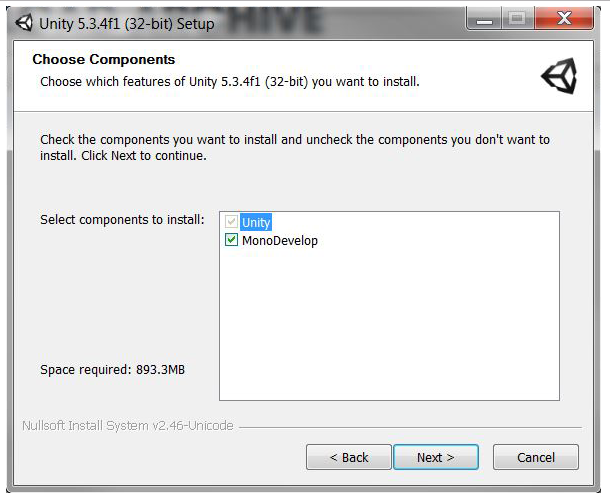
In the next step, if you're not sure which components you want to install, you can leave the default selections, click Next to continue, and follow the installer's instructions.
在下一步中,如果不确定要安装哪些组件,可以保留默认选择,单击“ 下一步”继续,然后按照安装程序的说明进行操作。
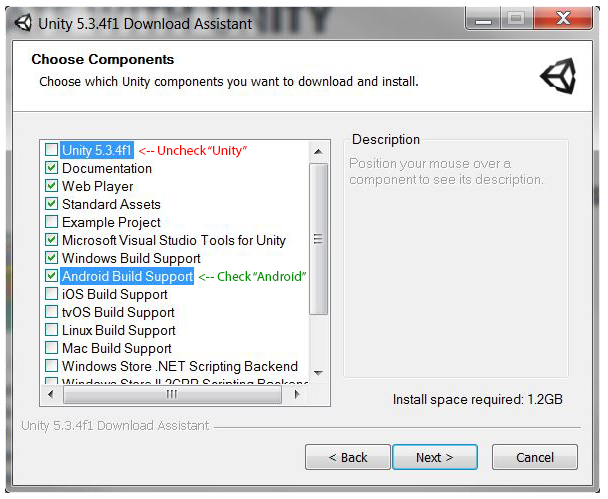
In the below shown screenshot, some of the check boxes are:
在下面显示的屏幕快照中,一些复选框是:
- Microsoft Visual Studio tools for Unity (is required).
- Windows Build Support (if you are planning to make Windows phone based Game as well).
- Android Build Support (if you are planning to make Android based Game using Unity 3D).
- Rest, leave default selected check-boxes.
Now, let that installer download and install Unity in your PC and then launch the Unity Game Engine after it gets installed.
现在,让该安装程序下载并在您的PC中安装Unity,然后在安装后启动Unity Game Engine。
在macOS X上安装Unity (Installing Unity on macOS X)
We can either use command line to install Unity 3D on Mac OS X or use the Unity Download Assistant.
我们可以使用命令行在Mac OS X上安装Unity 3D,也可以使用Unity Download Assistant。
使用下载助手进行安装 (Installing using the Download Assistant)
Download the Unity Installer file for your Mac PC from the link: unity3d.com/get-unity/download/archive
从以下链接下载适用于Mac PC的Unity Installer文件: unity3d.com/get-unity/download/archive
A
.dmgfile names UnityDownloadAssitant will be downloaded. Double click on it to start the installation process.将下载一个名为UnityDownloadAssitant的
.dmg文件。 双击它以开始安装过程。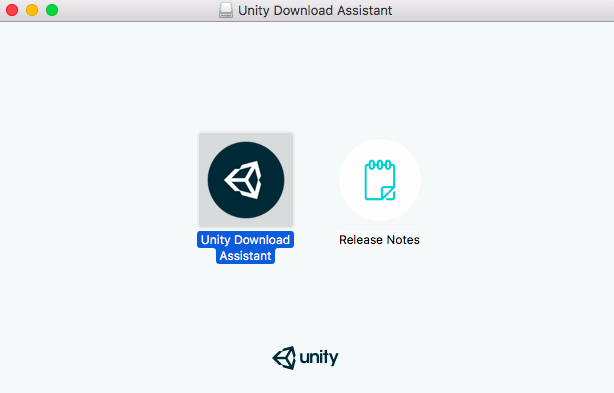
Double Click on the Unity Download Assistant icon to start installation.
双击Unity Download Assistant图标开始安装。
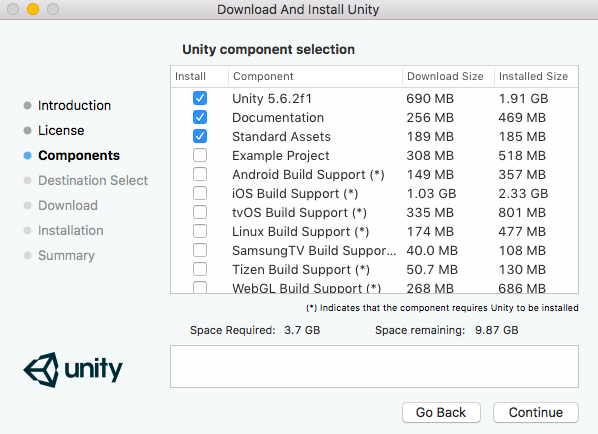
Agree to the Terms and Conditions and click on Continue. Then you will be asked to select packages to be installed, stick to the default ones, if you are a beginner.
同意条款和条件,然后单击继续 。 然后,如果您是初学者,将要求您选择要安装的软件包,并使用默认软件包。
使用命令行安装Unity (Installing Unity using the Command Line)
Download the Unity Editor file for your Mac PC from the link: unity3d.com/get-unity/download/archive
从以下链接为您的Mac PC下载Unity编辑器文件: unity3d.com/get-unity/download/archive
The individual Unity Editors are provided as
.pkgfiles that you can install using the command line.各个Unity编辑器以
.pkg文件的形式提供,您可以使用命令行进行安装。This will get installed into the folder /Applications/Unity on the specified target volume. Type the following command first-
这将安装到指定目标卷上的文件夹/ Applications / Unity中 。 首先输入以下命令-
sudo installer [-dumplog] -package Unity.pkg -target /Here Unity.pkg is the filename that we downloaded in step 1.
这里的Unity.pkg是我们在步骤1中下载的文件名。
Now in order to install the Standard Assets, which will get installed into folder /Applications/Unity/Standard Assets on the specified volume, use the commands-
现在,为了安装标准资产,该资产将安装到指定卷上的文件夹/ Applications / Unity / Standard Assets中 ,请使用以下命令-
sudo installer [-dumplog] -package StandardAssets.pkg -target /The file StandardAssets.pkg can be downloaded from the same drop down from which we downloaded the Unity Editor file in the step 1. Click on the option Standard Assets.
该文件StandardAssets.pkg可以从下从我们在步骤1单击选项标准资产下载统一编辑文件相同的下降下载。
To install Example Project, which will reside in the folder, /Users/Shared/Unity/Standard-Assets on the specified volume, the command will be-
要安装示例项目(该示例项目位于指定卷上的/ Users / Shared / Unity / Standard-Assets文件夹中),该命令将是-
sudo installer [-dumplog] -package Examples.pkg -target /The file Examples.pkg can be downloaded from the same drop down from which we downloaded the Unity Editor file in the step 1. Click on the option Example Projects.
可以从在步骤1中下载Unity Editor文件的下拉列表中下载文件Examples.pkg 。单击选项Example Projects 。
资产商店 (Assets Store)
Unity based game Developers can get the assets from the assets store as well. Just follow the link given below:
基于Unity的游戏开发人员也可以从资产商店获取资产。 只需点击以下链接即可:
Visit: Unity Asset Store
翻译自: https://www.studytonight.com/3d-game-engineering-with-unity/installing-game-engine
游戏引擎unity3d

北京人形旗下天工造物具身智能开源社区,聚焦具身天工与慧思开物两大平台
更多推荐
 0
0 0
0- 0


 已为社区贡献6条内容

所有评论(0)