unity RectTransform.anchoredPosition计算方法逆推
转自localPosition与anchoredPosition转化
首先很感谢这篇文章,让我对RectTransform里面的各个属性有了很深了解,建议对RectTransform不是很了解的都可以读一下。
感谢完之后,进入我们的推理环节。
至于推理的起点,就是我们都熟知的事情,分别有以下6条:
       // offsetMin, offsetMax, sizeDelta, pivot, anchoredPosition 之间的关系
        public Vector2 offsetMin
        {
            get
            {
                return anchoredPosition - Vector2.Scale(sizeDelta, pivot);
            }
            set
            {
                Vector2 offset = value - (anchoredPosition - Vector2.Scale(sizeDelta, pivot));
                sizeDelta -= offset;
                anchoredPosition += Vector2.Scale(offset, Vector2.one - pivot);
            }
        }

        public Vector2 offsetMax
        {
            get
            {
                return anchoredPosition + Vector2.Scale(sizeDelta, Vector2.one - pivot);
            }
            set
            {
                Vector2 offset = value - (anchoredPosition + Vector2.Scale(sizeDelta, Vector2.one - pivot));
                sizeDelta += offset;
                anchoredPosition += Vector2.Scale(offset, pivot);
            }
        }
- offsetMin, offsetMax, sizeDelta, pivot, anchoredPosition 之间的关系(见上方代码,源于unity现在开源的代码中)(这个就是万恶之源的关系式)
- sizeDelta=offsetMax - offsetMin(见上方链接文章中的五、sizeDelta详解)
- offsetMin = UI左下角坐标-anchorMin锚点坐标(见上方链接文章中的四、offsetMin和offsetMax详解)
- offsetMax= UI右上角坐标-anchorMax锚点坐标(见上方链接文章中的四、offsetMin和offsetMax详解)
- 除了上面链接提到的,和上面几条提到几个属性变量,RectTransform里面还有一个rect(Rect),存着这个UI的起点坐标、最大坐标、宽高(毕竟现在知道了sizeDelta并不是表示UI的真实大小了)
- pivot点就是我们UI的中心点,它的位置,就表示UI对象的位置;子节点的pivot,与父节点的pivot之间的坐标插值,就是当前UI的localPosition(我自己推理证明的,证明方法下一篇文章写吧)(用的就是这个,将localPosition和anchoredPosition联系在一起的)
我们已经理清楚了RectTransform的各个属性变量的关系了,那么现在就反过来,从第6条开始,一步一步往第一条的关系式里面靠。
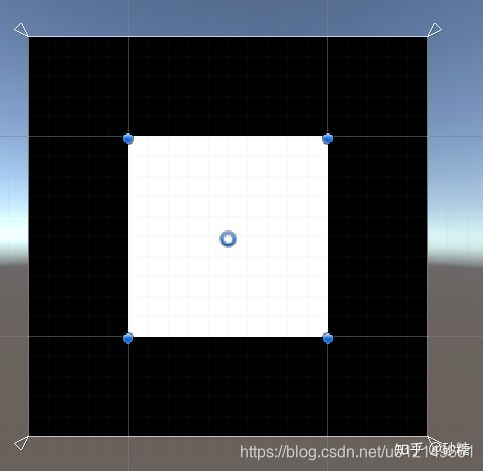
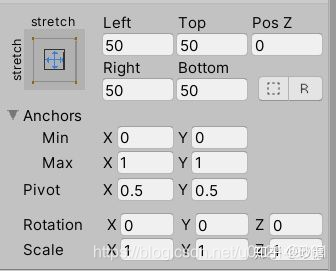
一、通过anchorMin和rect,求得锚点左下角锚点(AnchorMin)的坐标
1、anchorMin:表示锚点左下点在父节点位置的百分比,0-1之间
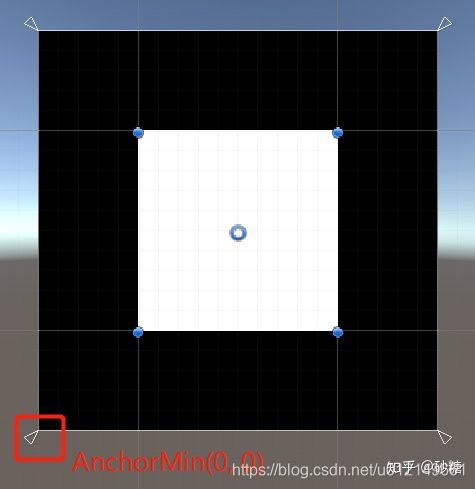 2、由anchorMin的定义可以知道,要求出这个位置,就需要用到父节点的真实大小了,即parentRectTransform.rect
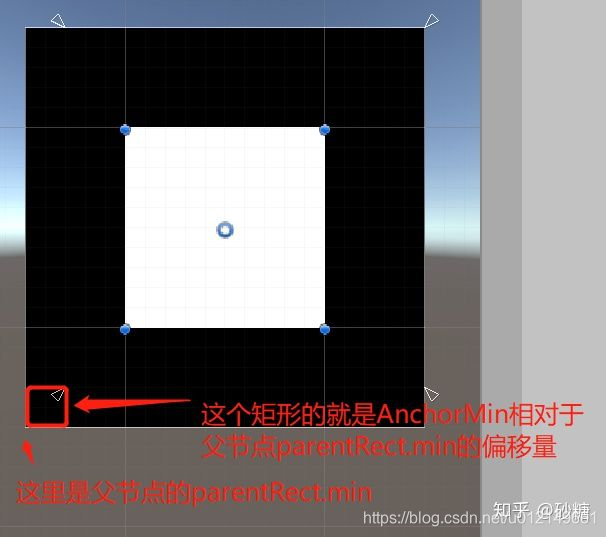 3、根据定义,求得偏移量为 offset = Vector2.Scale(rect.anchorMin, parentRect.rect.size); // 父节点的长宽 * anchorMin这个百分比。
4、最后, 将这个偏移量加上parentRect.min这个坐标,即可以得到左下角锚点AnchorMin的坐标(在父节点坐标系中)
Vector2 anchorMinPos = parentRect.rect.min + Vector2.Scale(rect.anchorMin, parentRect.rect.size);
5、右上角锚点AnchorMax同理(有兴趣的可以自己证明):
Vector2 anchorMaxPos = parentRect.rect.max - Vector2.Scale(Vector2.one - rect.anchorMax, parentRect.rect.size);
二、通过rect和localPosition,求出当前节点左下角位置
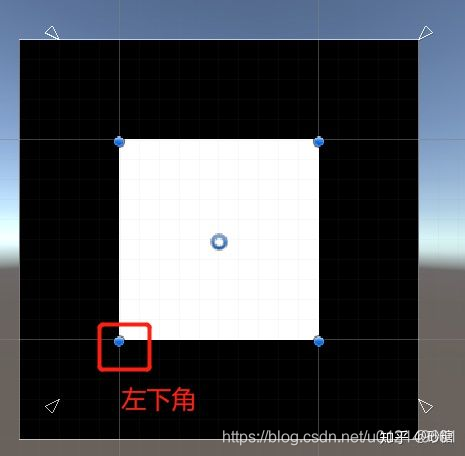
1、众所周知,Rect里面有一个min,可以表示左下角的坐标(这个坐标的坐标系为当前UI gameObject的)
2、这时候我们会发现,求出来的左下角锚点与UI左下角的坐标系不一样,需要进行坐标系转化
3、理所当然的,子节点坐标系转父节点坐标系简单一点,只需要在子节点坐标系下加一个localPosition,即可转换,所以我们求出来左下角坐标为:
Vector2 rectMinPos = rect.rect.min + localPosition2D;
4、右上角坐标同理:
Vector2 rectMaxPos = rect.rect.max + localPosition2D;
三、需要推理计算的步骤已经完了,剩下的就代公式就好了
// 1、求offsetMin, offsetMax:
Vector2 offsetMin = rectMinPos - anchorMinPos;
Vector2 offsetMax = rectMaxPos - anchorMaxPos;

// 2、求sizeDelta
 Vector2 sizeDelta = offsetMax - offsetMin;

// 3、通过offsetMin 求anchoredPosition (最后一步啦)
Vector2 anchoredPositionByMin = offsetMin + Vector2.Scale(sizeDelta, rect.pivot);

// 4、因为从源码里面可以看到,除了offsetMin ,offsetMax也可以求出anchoredPosition (这两个2选1就好了)
Vector2  anchoredPositionByMax = offsetMax - Vector2.Scale(sizeDelta, Vector2.one - pivot);
四、总结
然后将上面所有流程统一起来,就可以得到下面代码啦
  RectTransform rect = GetComponent<RectTransform>();
     RectTransform parentRect = transform.parent.GetComponent<RectTransform>();

     Vector2 GetAnchoredPositionByLocalPosition()
    {
        // 通过OffsetMin、OffsetMax,将anchoredPosition和localPosition联系起来
        Vector2 localPosition2D = new Vector2(rect.localPosition.x, rect.localPosition.y);

        Vector2 anchorMinPos = parentRect.rect.min + Vector2.Scale(rect.anchorMin, parentRect.rect.size);
        Vector2 rectMinPos = rect.rect.min + localPosition2D;
        Vector2 offsetMin = rectMinPos - anchorMinPos;

        Vector2 anchorMaxPos = parentRect.rect.max - Vector2.Scale(Vector2.one - rect.anchorMax, parentRect.rect.size);
        Vector2 rectMaxPos = rect.rect.max + localPosition2D;
        Vector2 offsetMax = rectMaxPos - anchorMaxPos;

        Vector2 sizeDelta = offsetMax - offsetMin;

        Vector2 anchoredPosition = offsetMin + Vector2.Scale(sizeDelta, rect.pivot);

        return anchoredPosition;
    }
五、后记
我们这篇文章只是了解一下localPosition和anchoredPosition之间的转化关系,毕竟疑惑了我好久的一个问题,网上也一直没找到答案,于是就自己动手去了解、推理、计算了。
不过当小数点过多的时候,最后几位会有误差,毕竟感觉可能unity底层与c#层的计算精度可能有区别,个人就认为允许范围内了。
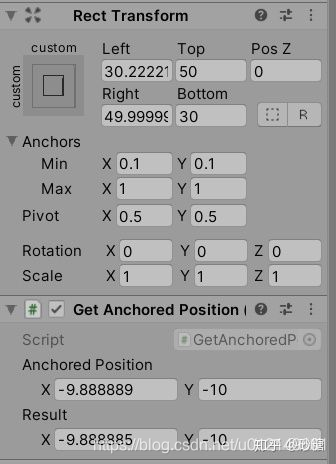
当然我们实际开发过程中并不需要调用这么一个函数进行转化,直接rect.localPostion就能拿到localPosition,rect.anchroedPostion就能拿到anchroedPostion~~
再次感谢并推荐这篇文章,帮助真的很大,有种茅塞顿开的感觉
Unity进阶技巧 - RectTransform详解
后再推荐一下我做这个的github工程
localPosition与anchoredPosition转化关系推导
PS:
毕竟是我个人自己逆推出来的,没有测试到所有情况,如果发现错误的同学,也希望指出来让我再推理一下~~~

北京人形旗下天工造物具身智能开源社区,聚焦具身天工与慧思开物两大平台
更多推荐
 2
2 0
0- 0


 已为社区贡献2条内容

所有评论(0)