apollo集群部署策略
·

龟兔赛跑,就算你跑的慢,也能到终点。
生产环境部署
当一个项目要上线部署到生产环境时,项目的配置比如数据库连接、RocketMQ地址等都会发生变化,这时候就需要通过Apollo为生产环境添加自己的配置。
企业部署方案
在企业中常用的部署方案为:Apollo-adminservice和Apollo-configservice两个服务分别在线上环境(pro),仿真环
境(uat)和开发环境(dev)各部署一套,Apollo-portal做为管理端只部署一套,统一管理上述三套环境。
下面以添加生产环境部署为例
创建数据库
创建生产环境的ApolloConfigDB:每添加一套环境就需要部署一套ApolloConfgService和ApolloAdminService
source apollo/ApolloConfigDB_PRO__initialization.sql
配置启动参数
- 设置生产环境数据库连接
- 设置ApolloConfigService端口为:8081,ApolloAdminService端口为8091
echo
set url="192.168.56.121:33065"
set username="root"
set password="root"
start "configServicePRO" java -Dserver.port=8081 -Xms256m -Xmx256m -Dapollo_profile=github -Dspring.datasource.url=jdbc:mysql://%url%/ApolloConfigDBPRO?characterEncoding=utf8 -Dspring.datasource.username=%username% -Dspring.datasource.password=%password% -Dlogging.file=.\logs\pro\apollo-configservice.log -jar .\apollo-configservice-1.3.0-github\apollo-configservice-1.3.0.jar
start "adminServicePRO" java -Dserver.port=8091 -Xms256m -Xmx256m -Dapollo_profile=github -Dspring.datasource.url=jdbc:mysql://%url%/ApolloConfigDBPRO?characterEncoding=utf8 -Dspring.datasource.username=%username% -Dspring.datasource.password=%password% -Dlogging.file=.\logs\pro\apollo-adminservice.log -jar .\apollo-adminservice-1.3.0-github\apollo-adminservice-1.3.0.jar
- 运行runApollo-PRO.bat
修改Eureka地址
更新生产环境Apollo的Eureka地址:
USE ApolloConfigDBPRO;
UPDATE ServerConfig SET `Value` = "http://localhost:8081/eureka/" WHERE `key` ="eureka.service.url";
调整ApolloPortal服务配置
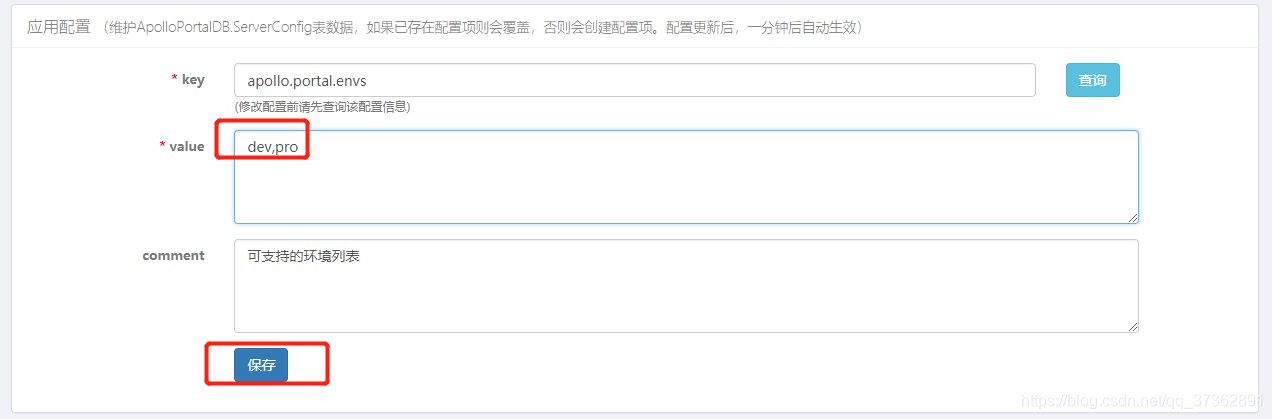
服务配置项统一存储在ApolloPortalDB.ServerConfig表中,可以通过管理员工具 - 系统参数页面进行配置:
apollo.portal.envs - 可支持的环境列表
启动ApolloPortal
Apollo Portal需要在不同的环境访问不同的meta service(apollo-configservice)地址,所以我们需要在配置中提供
这些信息。
‐Ddev_meta=http://localhost:8080/ ‐Dpro_meta=http://localhost:8081/
- 关闭之前启动的ApolloPortal服务,使用runApolloPortal.bat启动多环境配置
echo
set url="192.168.56.121:33065"
set username="root"
set password="root"

start "ApolloPortal" java -Xms256m -Xmx256m -Dapollo_profile=github,auth -Dpro_meta=http://localhost:8081/ -Ddev_meta=http://localhost:8080/ -Dserver.port=8070 -Dspring.datasource.url=jdbc:mysql://%url%/ApolloPortalDB?characterEncoding=utf8 -Dspring.datasource.username=%username% -Dspring.datasource.password=%password% -Dlogging.file=.\logs\apollo-portal.log -jar .\apollo-portal-1.3.0-github\apollo-portal-1.3.0.jar
- 启动之后,点击account-service服务配置后会提示环境缺失,此时需要补全上边新增生产环境的配置
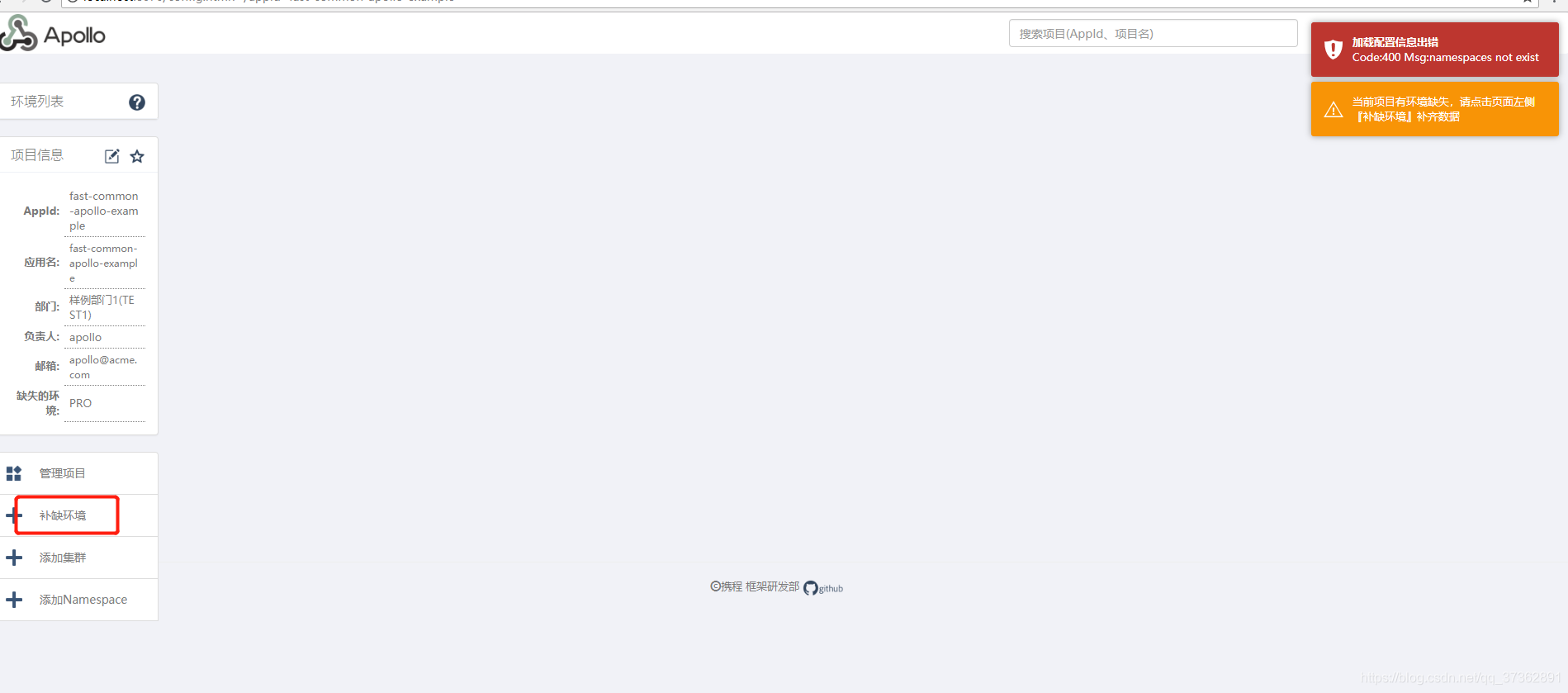
3. 点击补缺环境同步配置即可。
修改启动配置
vm参数测试-Denv=dev和-Denv=pro

北京人形旗下天工造物具身智能开源社区,聚焦具身天工与慧思开物两大平台
更多推荐
 0
0 0
0- 0


 已为社区贡献14条内容

所有评论(0)