【Android】Android Studio中gradle scripts的配置,如何运行别人项目源码
·
目录
1.build.gradle(Project:test) 文件配置
2.build.gradle(Module:app) 文件配置
3.gradle-wrapper.properties(Gradle Version) 文件配置
4.proguard-rules.pro (ProGuard Rules for app) 文件配置
5.gradle.properties (Project Properties) 文件配置
6.settings.gradle (Project Settings) 文件配置
7.local.properties(SDK Location) 文件配置
前言
我这里用到的是Android Studio3.0.1
我们通常下载好Android Studio之后,配置好SDK路径并且安装完一些必要的工具后,
想要去运行别人的源码需要修改其中的gradle scripts的配置文件,改成我们自己的。
首先自己先创建一个工程,让它能够编译为make project之后运行 run,如果可以运行,
那么这个配置文件就可以用了,我这里用的是我的文件配置
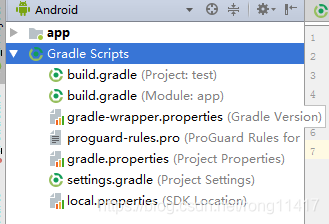
Gradle Scripts
1.build.gradle(Project:test) 文件配置
// Top-level build file where you can add configuration options common to all sub-projects/modules.

buildscript {

    repositories {
        google()
        jcenter()
    }
    dependencies {
        classpath 'com.android.tools.build:gradle:3.0.1'


        // NOTE: Do not place your application dependencies here; they belong
        // in the individual module build.gradle files
    }
}

allprojects {
    repositories {
        google()
        jcenter()
    }
}

task clean(type: Delete) {
    delete rootProject.buildDir
}
2.build.gradle(Module:app) 文件配置
apply plugin: 'com.android.application'

android {
    compileSdkVersion 26
    defaultConfig {
        applicationId "com.example.administrator.picturebroswer"
        minSdkVersion 22
        targetSdkVersion 26
        versionCode 1
        versionName "1.0"
        testInstrumentationRunner "android.support.test.runner.AndroidJUnitRunner"
    }
    buildTypes {
        release {
            minifyEnabled false
            proguardFiles getDefaultProguardFile('proguard-android.txt'), 'proguard-rules.pro'
        }
    }
}

dependencies {
    implementation fileTree(dir: 'libs', include: ['*.jar'])
    implementation 'com.android.support:appcompat-v7:26.1.0'
    implementation 'com.android.support.constraint:constraint-layout:1.1.3'
    testImplementation 'junit:junit:4.12'
    androidTestImplementation 'com.android.support.test:runner:1.0.2'
    androidTestImplementation 'com.android.support.test.espresso:espresso-core:3.0.2'
}
3.gradle-wrapper.properties(Gradle Version) 文件配置
#Sun Feb 02 13:08:01 CST 2020
distributionBase=GRADLE_USER_HOME
distributionPath=wrapper/dists
zipStoreBase=GRADLE_USER_HOME
zipStorePath=wrapper/dists
distributionUrl=https\://services.gradle.org/distributions/gradle-4.1-all.zip
4.proguard-rules.pro (ProGuard Rules for app) 文件配置
# Add project specific ProGuard rules here.
# You can control the set of applied configuration files using the
# proguardFiles setting in build.gradle.
#
# For more details, see
#   http://developer.android.com/guide/developing/tools/proguard.html

# If your project uses WebView with JS, uncomment the following
# and specify the fully qualified class name to the JavaScript interface
# class:
#-keepclassmembers class fqcn.of.javascript.interface.for.webview {
#   public *;
#}

# Uncomment this to preserve the line number information for
# debugging stack traces.
#-keepattributes SourceFile,LineNumberTable

# If you keep the line number information, uncomment this to
# hide the original source file name.
#-renamesourcefileattribute SourceFile
5.gradle.properties (Project Properties) 文件配置
# Project-wide Gradle settings.

# IDE (e.g. Android Studio) users:
# Gradle settings configured through the IDE *will override*
# any settings specified in this file.

# For more details on how to configure your build environment visit
# http://www.gradle.org/docs/current/userguide/build_environment.html

# Specifies the JVM arguments used for the daemon process.
# The setting is particularly useful for tweaking memory settings.
org.gradle.jvmargs=-Xmx1536m

# When configured, Gradle will run in incubating parallel mode.
# This option should only be used with decoupled projects. More details, visit
# http://www.gradle.org/docs/current/userguide/multi_project_builds.html#sec:decoupled_projects
# org.gradle.parallel=true
6.settings.gradle (Project Settings) 文件配置
include ':app'
7.local.properties(SDK Location) 文件配置
## This file is automatically generated by Android Studio.
# Do not modify this file -- YOUR CHANGES WILL BE ERASED!
#
# This file should *NOT* be checked into Version Control Systems,
# as it contains information specific to your local configuration.
#
# Location of the SDK. This is only used by Gradle.
# For customization when using a Version Control System, please read the
# header note.
sdk.dir=E\:\\Android Studio SDK
只需要替换成自己的项目配置就可以了,一般是可以的

北京人形旗下天工造物具身智能开源社区,聚焦具身天工与慧思开物两大平台
更多推荐
 2
2 0
0- 0


 已为社区贡献8条内容

所有评论(0)