iptables & netfilter
什么是iptables
在Linux 操作系统中,iptables是管理防火墙规则的工具。 iptables使用内置chain和用户自定义chain,管理Linux流入流出的IP包,
网络包特点
根据网络包特点,网络包经历的阶段也不一样。
| 网络包 | 经历阶段 |
|---|---|
| 入境网络包,目的地址是本地 | PREROUTING -> INPUT |
| 入境网络包,目的地址非本地 | PREROUTING -> FORWARD -> POSTROUTING |
| 出境网络包,本地生成 | OUTPUT -> POSTROUTING |
下图说明了网络包的路径:
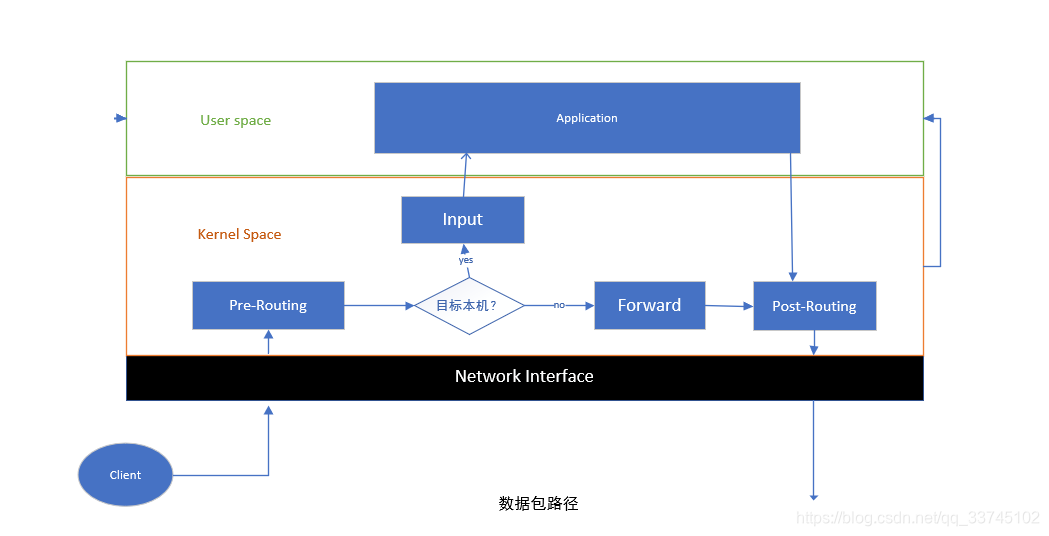
内核对这些数据包的处理根据其特点(源地址和目标地址)分成几个处理阶段,如Pre-Routing之类的,这些阶段在netfilter术语中称为Chain。
为什么称为Chain呢?
就是因为一个处理阶段中,需要经过多条规则判断,就拿一个阶段来说(Pre-Routing):
Chain中的规则执行是有顺序的,每条规则都有一个对应的优先级。多个具有相同优先级的规则往往具有相同的特点,比如都是包过滤规则。因此它们组织成一个个的表:
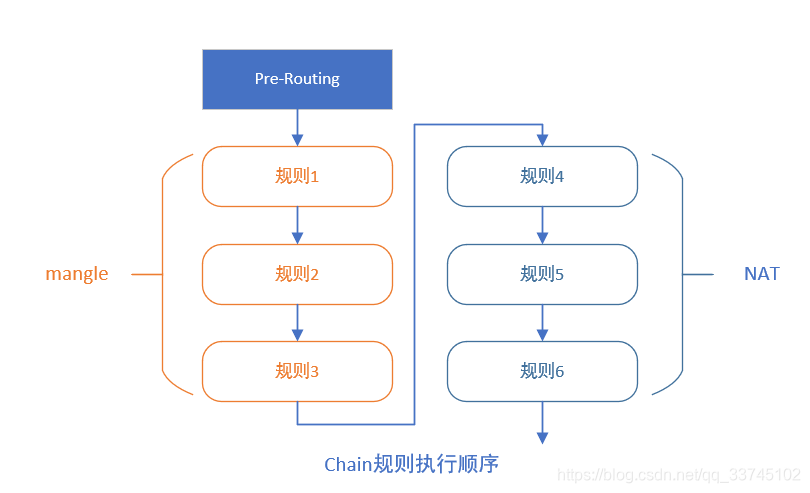
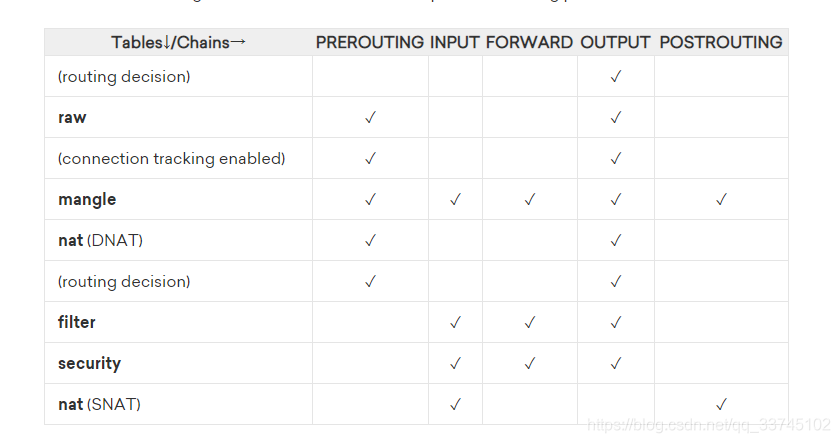
另外需要注意的是,每个表并不局限于一个阶段。这也就是说,filter chain的规则,不只可以在Input阶段被执行,也可以在Output chain中被执行。另外,有的表的规则不允许在某些阶段执行,比如filter表里的规则没必要在Pre-Routing阶段被执行。table与chain的完整关系如下图:
iptables & netfilter
iptables是linux上负责包过滤的软件,基于linux 内核 netfilter模块。netfilter定义几个内置的函数,称为hook。假如我们是iptables的实现者,我们需要定义几条规则,就需要向这几个内置函数注册。当网络包从网络流入本机时,netfilter会按顺序
调用我们注册的函数。
//下面是伪码,语法js,Register方法接受一个函数对象和一个用int表示优先级的参数
netfilter.Register(Rule.filterIP,5) //注册Rule对象的filterIP成员方法,优先级为5
netfilter.Register(Rule.filterPort,10) //注册Rule对象的filterPort成员方法,优先级为10
假如此时网络有一个包过来,netfilter会按优先级调用,先调用filterIP方法,在调用filterPort方法。
内置的hook有五个,如下表:
| hook | description | 简述 |
|---|---|---|
NF_IP_PRE_ROUTING | This hook will be triggered by any incoming traffic very soon after entering the network stack. This hook is processed before any routing decisions have been made regarding where to send the packet. | 流入的包 |
NF_IP_LOCAL_IN | This hook is triggered after an incoming packet has been routed if the packet is destined for the local system. | 目的地址是本机的流入包 |
NF_IP_FORWARD | This hook is triggered after an incoming packet has been routed if the packet is to be forwarded to another host. | 目的地址不是本机的流入包 |
NF_IP_LOCAL_OUT | This hook is triggered by any locally created outbound traffic as soon it hits the network stack. | 本地生成的流出包 |
NF_IP_POST_ROUTING | This hook is triggered by any outgoing or forwarded traffic after routing has taken place and just before being put out on the wire. | 外来流出包(或称为转发包,本机充当中间设备) |
明白netfilter的callback机制,就可以继续理解chain和table的概念了。
先说tables,一个table有多个规则,不同类型的规则被放入不同的table当中。比如网络包需要NAT转换,则放入NAT table中。大多数网络包需要过滤,就放入filter表中。各种table的说明见下表:
| table name | 描述 |
|---|---|
| The Filter Table | The filter table is one of the most widely used tables in iptables. The filter table is used to make decisions about whether to let a packet continue to its intended destination or to deny its request. In firewall parlance, this is known as “filtering” packets. This table provides the bulk of functionality that people think of when discussing firewalls. |
| The NAT Table | The nat table is used to implement network address translation rules. As packets enter the network stack, rules in this table will determine whether and how to modify the packet’s source or destination addresses in order to impact the way that the packet and any response traffic are routed. This is often used to route packets to networks when direct access is not possible. |
| The Mangle Table | The mangle table is used to alter the IP headers of the packet in various ways. For instance, you can adjust the TTL (Time to Live) value of a packet, either lengthening or shortening the number of valid network hops the packet can sustain. Other IP headers can be altered in similar ways.This table can also place an internal kernel “mark” on the packet for further processing in other tables and by other networking tools. This mark does not touch the actual packet, but adds the mark to the kernel’s representation of the packet. |
| The Raw Table | The iptables firewall is stateful, meaning that packets are evaluated in regards to their relation to previous packets. The connection tracking features built on top of the netfilter framework allow iptables to view packets as part of an ongoing connection or session instead of as a stream of discrete, unrelated packets. The connection tracking logic is usually applied very soon after the packet hits the network interface.The raw table has a very narrowly defined function. Its only purpose is to provide a mechanism for marking packets in order to opt-out of connection tracking.eature Deprecation |
| The Security Table | The security table is used to set internal SELinux security context marks on packets, which will affect how SELinux or other systems that can interpret SELinux security contexts handle the packets. These marks can be applied on a per-packet or per-connection basis. |
| 简单总结下上面的描述: | |
| table name | 简述 |
| ----- | -------- |
| The Filter Table | 包过滤,决定是否让包通过 |
| The NAT Table | 这个表中的规则描述哪些包需要NAT转换 |
| The Mangle Table | 定义什么网络包里面的字段需要修改,如生存周期TTL |
| The Raw Table | 定义哪些网络包需要启用跟踪连接的功能 |
| The Security Table | 定义哪些包需要加入Selinux标志位 |
刚才说到表是规则的集合,规则是由两个字段组成的,匹配项和动作项。匹配项定义目标网络包(规则适用于哪些网络包),动作项定义对匹配到网络包执行哪些动作。
记得考场排座位,每列由10个桌子,从第一列第一个到最有一列最后一个的号是连着的,一条龙。规则之间的也是一样:
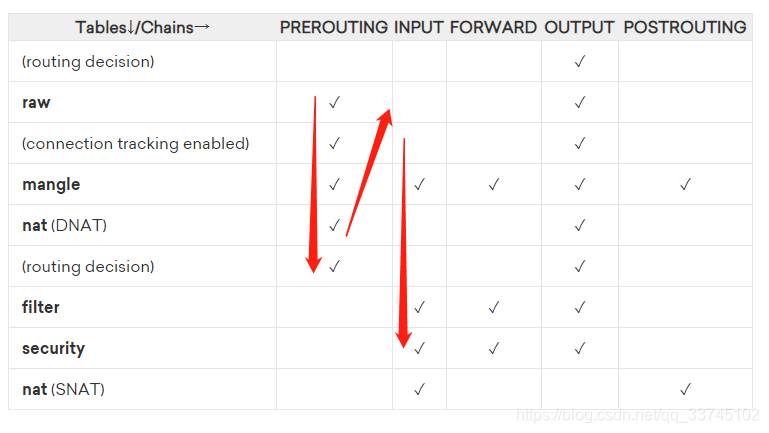
如上图所示,竖着的是iptables的各种表,横着的是chains。每个chain相当于考场中的列,可以视为网络包被处理的一个阶段,每个阶段中,在哪些tables表里能定义规则有要求。比如PREROUTING阶段,只能使用raw->mangle->nat的表里的规则。每个表的优先级不一样(即被netfilter调用的顺序不一样)。
firewall-cmd
# default zone
firewall-cmd --get-default-zone
# print out a list of all zones that are available
firewall-cmd --get-zones
# show even more information on each zone
firewall-cmd --list-all-zones
# lists only those zones that are currently in use and have a binding to an interface.
firewall-cmd --get-active-zones
# 查看防火墙手册
man 5 firewalld.richlanguage


# 查看改变
firewall-cmd --list-all --zone=test
更改规则
# 永久修改规则之后要记得
firewall-cmd --reload
白名单
# 允许所有192.168.0.1/24的主机连接
firewall-cmd --permanent --add-rich-rule='rule family="ipv4" source address="192.168.0.1/24" accept '
firewall-cmd --permanent --remove-rich-rule="rule family="ipv4" source address="192.168.0.1/24" port protocol="tcp" port="3306" reject"
Reference List
- https://firewalld.org/documentation/concepts.html
- https://www.digitalocean.com/community/tutorials/a-deep-dive-into-iptables-and-netfilter-architecture
- How To Use Firewalld Rich Rules And Zones For Filtering And NAT
- https://firewalld.org/documentation/man-pages/firewall-cmd.html

北京人形旗下天工造物具身智能开源社区,聚焦具身天工与慧思开物两大平台
更多推荐
 1
1 0
0- 0


 已为社区贡献7条内容

所有评论(0)