在hbase shell中执行list抛出异常:ERROR: No valid credentials provided
·
在hbase shell中执行list抛出异常:ERROR: No valid credentials provided
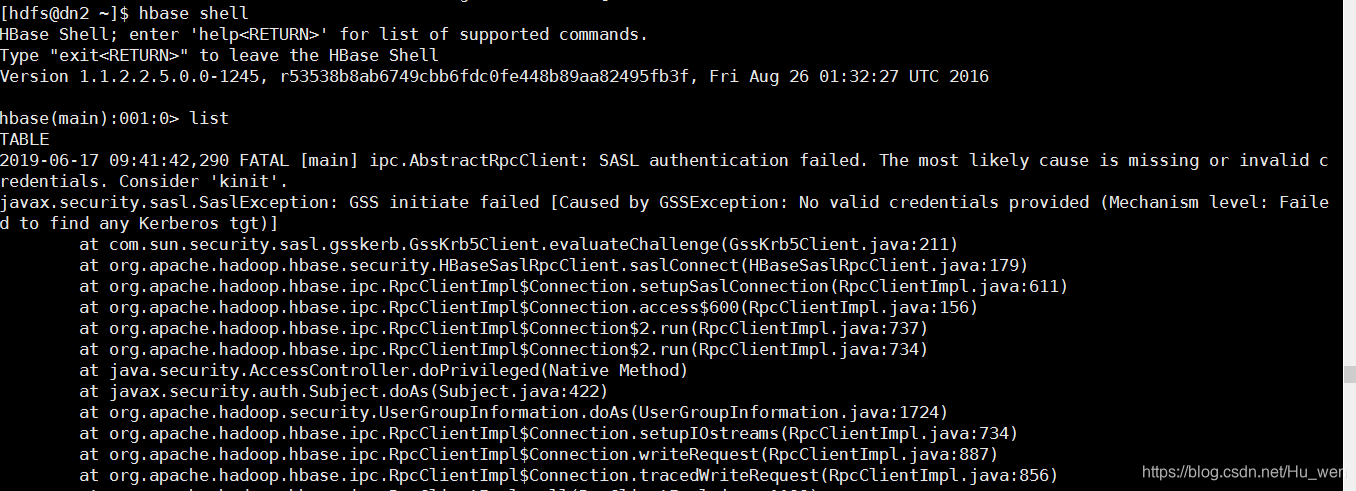
解决方法:
1、查看klist
[hdfs@kjss1 ~]$ klist
klist: No credentials cache found (ticket cache FILE:/tmp/krb5cc_504)
2、若未查到相关的缓存数据,执行以下操作
[hdfs@dn1 ~]$ klist -kte /etc/security/keytabs/hdfs.headless.keytab
Keytab name: FILE:/etc/security/keytabs/hdfs.headless.keytab
KVNO Timestamp           Principal
---- ------------------- ------------------------------------------------------
   1 06/14/2019 17:37:50 hdfs-bigdata@EXAMPLE.COM (arcfour-hmac)
   1 06/14/2019 17:37:50 hdfs-bigdata@EXAMPLE.COM (des3-cbc-sha1)
   1 06/14/2019 17:37:50 hdfs-bigdata@EXAMPLE.COM (aes128-cts-hmac-sha1-96)
   1 06/14/2019 17:37:50 hdfs-bigdata@EXAMPLE.COM (des-cbc-md5)
   1 06/14/2019 17:37:50 hdfs-bigdata@EXAMPLE.COM (aes256-cts-hmac-sha1-96)
3、找到对应的 “Principal ”名:hdfs-bigdata@EXAMPLE.COM,执行以下命令
[hdfs@dn1 ~]$ kinit -kt /etc/security/keytabs/hdfs.headless.keytab hdfs-bigdata@EXAMPLE.COM
[hdfs@dn1 ~]$ klist
Ticket cache: FILE:/tmp/krb5cc_1003
Default principal: hdfs-bigdata@EXAMPLE.COM

Valid starting       Expires              Service principal
06/17/2019 09:20:56  06/18/2019 09:20:56  krbtgt/EXAMPLE.COM@EXAMPLE.COM
4、查看文件列表
[hdfs@dn1 ~]$  hdfs dfs -ls /
Found 4 items
drwxr-xr-x   - hdfs hdfs          0 2019-04-11 11:41 /apps
drwxr-xr-x   - hdfs hdfs          0 2019-05-09 10:39 /opt
drwxrwxrwx   - hdfs hdfs          0 2019-06-14 17:44 /tmp
drwxr-xr-x   - hdfs hdfs          0 2019-05-07 15:21 /user
5、然后运行hbase shell中的list 查看表
[hdfs@dn1 ~]$ hbase shell
HBase Shell; enter 'help<RETURN>' for list of supported commands.
Type "exit<RETURN>" to leave the HBase Shell
Version 1.1.2.2.5.0.0-1245, r53538b8ab6749cbb6fdc0fe448b89aa82495fb3f, Fri Aug 26 01:32:27 UTC 2016

hbase(main):001:0> list
TABLE
0 row(s) in 0.2940 seconds

=> []

北京人形旗下天工造物具身智能开源社区,聚焦具身天工与慧思开物两大平台
更多推荐
 1
1 0
0- 0


 已为社区贡献12条内容

所有评论(0)