Patch OpenSSL使其支持CHACH20_POLY1305加密算法
截止目前的OpenSSL-1.0.2j的版本还不支持Google的CHACHA20加密算法.CHACHA20加密算法相对RC4等相对安全,也针对ARM的手机端进行优化,使其更快更省电。
不过最新的Intel处理器及ARM V8的处理器通过AES-NI指令集对AES-GCM加密算法进行了优化,速度要比chacha20快很多,所以在支持AES-NI指令集的设备上优先使用AES-GCM加密算法,在设备不支持的情况下使用chacha20加密算法。
支持chacha20加密算法的3种方式:
-
使用LibreSSL(OpenBSD Fork)
-
使用BoringSSL(Google Fork)
-
使用CloudFlare提供的Patch
三种方法对比:
-
LibreSSL能支持OCSP stapling,但是如果首选了CHACHA20作为优先算法,则只要支持CHACHA20算法的都是用CHACHA20算法,支持AES-NI指令集的设备无法发挥出相应的性能
-
BoringSSL则可以对支持AES-NI指令集的设备优先使用AES-GCM加密算法,但是目前不支持OCSP stapling
-
使用CloudFlare提供的Patch则可以自动适应,AES-NI设备使用AES-GCM,不支持的设备使用CHACHA20
环境:
CentOS 6.8 x86_64
OpenSSL-1.0.2j
Nginx-1.10.2
下载CloudFlare提供的Patch
|
1
|
wget https:
//codeload
.github.com
/cloudflare/sslconfig/zip/master
|
下载OpenSSL
|
1
|
wget https:
//www
.openssl.org
/source/openssl-1
.0.2j.
tar
.gz
|
下载Nginx
|
1
|
wget http:
//nginx
.org
/download/nginx-1
.10.2.
tar
.gz
|
安装依赖包
|
1
|
yum -y
install
gcc gcc-c++ pcre-devel zlib-devel unzip patch
|
解压文件
|
1
2
3
|
unzip master
tar
zxf nginx-1.10.2.
tar
.gz
tar
zxf openssl-1.0.2j.
tar
.gz
|
对OpenSSL进行补丁操作
|
1
2
3
4
|
cd
openssl-1.0.2j
patch -p1 < ..
/sslconfig-master/patches/openssl__chacha20_poly1305_draft_and_rfc_ossl102j
.patch
#此处说明一下须使用同版本的补丁,我这里是1.0.2j就用ossl102j的patch
cd
..
|
编译Nginx
|
1
2
3
|
cd
nginx-1.10.2
.
/configure
--prefix=
/usr/local/nginx1
.10.2 --user=www --group=www --with-openssl=..
/openssl-1
.0.2j --with-http_stub_status_module --with-http_ssl_module --with-http_gzip_static_module
make
&&
make
install
|
如果执行make && make install的时候报错,则需要
|
1
2
3
4
5
6
7
8
9
10
11
12
13
14
|
make
-f objs
/Makefile
make
[1]: Entering directory `
/root/nginx-1
.10.2'
cd
..
/openssl-1
.0.2j \
&&
if
[ -f Makefile ];
then
make
clean;
fi
\
&& .
/config
--prefix=
/root/nginx-1
.10.2/..
/openssl-1
.0.2j/.openssl no-shared \
&&
make
\
&&
make
install_sw LIBDIR=lib
make
[2]: Entering directory `
/root/openssl-1
.0.2j'
Makefile is older than Makefile.org, Configure or config.
Reconfigure the
source
tree (via
'./config'
or
'perl Configure'
), please.
make
[2]: *** [Makefile] Error 1
make
[2]: Leaving directory `
/root/openssl-1
.0.2j'
make
[1]: *** [..
/openssl-1
.0.2j/.openssl
/include/openssl/ssl
.h] Error 2
make
[1]: Leaving directory `
|
上面的报错信息是因为打了补丁的原因,提示Makefile.org比Makefile新,所以停止操作。这个时候我们可以手动编译OpenSSL
|
1
2
3
4
|
cd
..
/openssl-1
.0.2j
.
/config
--prefix=
/root/nginx-1
.10.2/..
/openssl-1
.0.2j/.openssl no-shared
make
make
install_sw LIBDIR=lib
|
再次执行make && make install就不会报错了
查看结果:
|
1
2
3
4
5
6
|
/usr/local/nginx1
.10.2
/sbin/nginx
-V
nginx version: nginx
/1
.10.2
built by gcc 4.4.7 20120313 (Red Hat 4.4.7-17) (GCC)
built with OpenSSL 1.0.2j 26 Sep 2016
TLS SNI support enabled
configure arguments: --prefix=
/usr/local/nginx1
.10.2 --user=www --group=www --with-openssl=..
/openssl-1
.0.2j --with-http_stub_status_module --with-http_ssl_module --with-http_gzip_static_module
|
可以看到的是OpenSSL 1.0.2j.
然后Nginx的配置文件如下:
|
1
2
3
4
5
6
7
8
9
10
11
12
13
14
15
16
17
|
server {
listen 443;
server_name m.abc.com;
access_log logs
/https_m
.abc.com.log main;
ssl on;
ssl_certificate keys
/server
.pem;
ssl_certificate_key keys
/server
.key;
ssl_protocols TLSv1 TLSv1.1 TLSv1.2;
ssl_prefer_server_ciphers on;
#定义加密算法
ssl_ciphers EECDH+CHACHA20:EECDH+CHACHA20-draft:EECDH+AES128:RSA+AES128:EECDH+AES256:RSA+AES256:EECDH+3DES:RSA+3DES:!MD5;
ssl_session_timeout 5m;
ssl_session_cache
builtin
:1000 shared:SSL:10m;
location / {
root html;
index index.html;
}
|
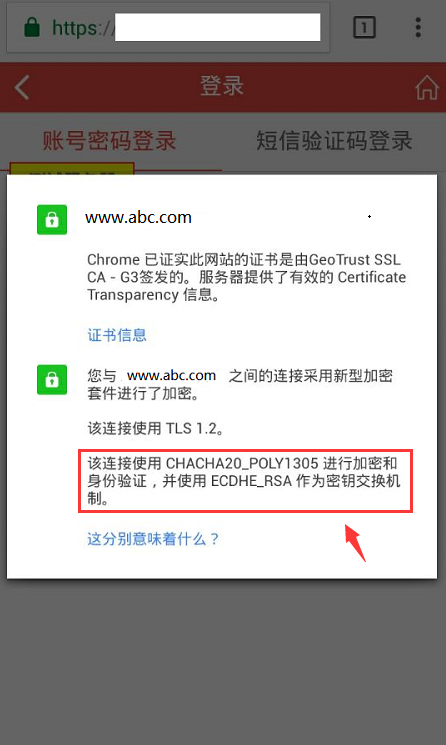
不支持AES-NI指令集的手机访问使用CHACHA20_POLY1305进行加密和身份验证
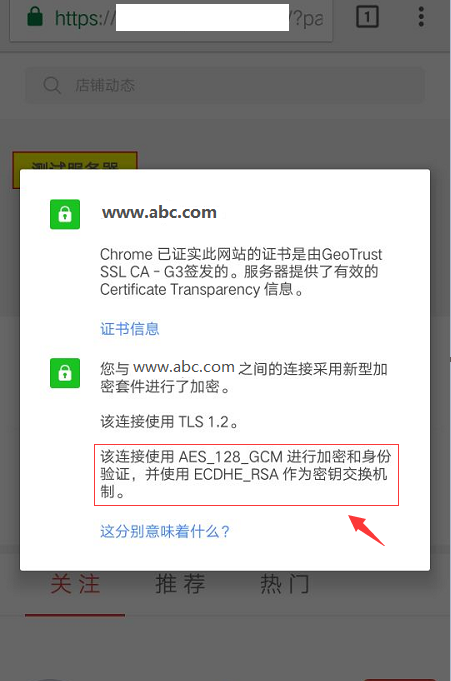
支持AES-NI指令集的手机访问使用AES_128_GCM进行加密和身份验证
本文转自 rong341233 51CTO博客,原文链接:http://blog.51cto.com/fengwan/1871529

北京人形旗下天工造物具身智能开源社区,聚焦具身天工与慧思开物两大平台
更多推荐
 0
0 0
0- 0


 已为社区贡献7条内容

所有评论(0)