解决eclipse集成maven插件 add dependencies搜索不到jar包的问题
·
背景:
新建了maven项目,要添加jar包,但有不想去网上一个一个搜索再写到pom.xml里
所以想在add dependencies中搜索添加,奈何搜索出来只有本地的那几个jar包(默认)
尝试:
去百度查了很多解决方法...
如:1、配置阿里的远程仓库,但...又报错-找不到xxx.zip文件~
2、设置eclipse的属性啊...没有效果
3、删除.m目录啊,重新update index ,a、下载非常慢...通宵挂了电脑400多M,虽然已经下载成功,但是还不能搜索到...
b、报错-找不到XXX文件
......
好了,不说这么多坑了
解决方案:
1、在eclipse集成maven环境下,这个目录下setting.xml文件是没有的
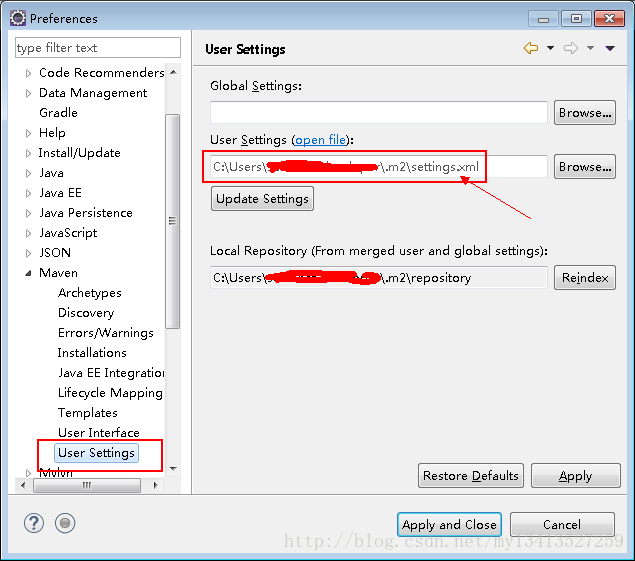
2、所以要自己新建一个(内容可参考下面的)
setting.xml
<?xml version="1.0"?>
<settings xmlns="http://maven.apache.org/SETTINGS/1.0.0"
    xmlns:xsi="http://www.w3.org/2001/XMLSchema-instance"
    xsi:schemaLocation="http://maven.apache.org/SETTINGS/1.0.0 http://maven.apache.org/xsd/settings-1.0.0.xsd">
    <mirrors>
        <mirror>
            <id>Nexus</id>
            <name>Nexus Public Mirror</name>
            <url>http://121.42.166.202:8081/nexus/content/groups/public</url>
            <mirrorOf>central</mirrorOf>
        </mirror>
    </mirrors>

    <profiles>
        <profile>
            <id>dev</id>
            <repositories>
                <repository>
                    <id>Nexus</id>
                    <url>http://121.42.166.202:8081/nexus/content/groups/public</url>
                    <releases>
                        <enabled>true</enabled>
                        <updatePolicy>always</updatePolicy>
                        <checksumPolicy>warn</checksumPolicy>
                    </releases>
                    <snapshots>
                        <enabled>true</enabled>
                        <updatePolicy>never</updatePolicy>
                        <checksumPolicy>fail</checksumPolicy>
                    </snapshots>
                </repository>
            </repositories>
            <pluginRepositories>
                <pluginRepository>
                    <id>Nexus</id>
                    <url>http://121.42.166.202:8081/nexus/content/groups/public</url>
                    <releases>
                        <enabled>true</enabled>
                        <checksumPolicy>warn</checksumPolicy>
                    </releases>
                    <snapshots>
                        <enabled>true</enabled>
                        <checksumPolicy>fail</checksumPolicy>
                    </snapshots>
                </pluginRepository>
            </pluginRepositories>
            <!-- <properties> <environment.type>prod</environment.type> </properties> -->
        </profile>
    </profiles>
    <activeProfiles>
        <activeProfile>dev</activeProfile>
    </activeProfiles>
</settings>
我选择了这个小哥的配置尝试下:点击打开链接,居然成功了~555(开心的哭)终于成功了
3、eclipse设置maven更新勾上
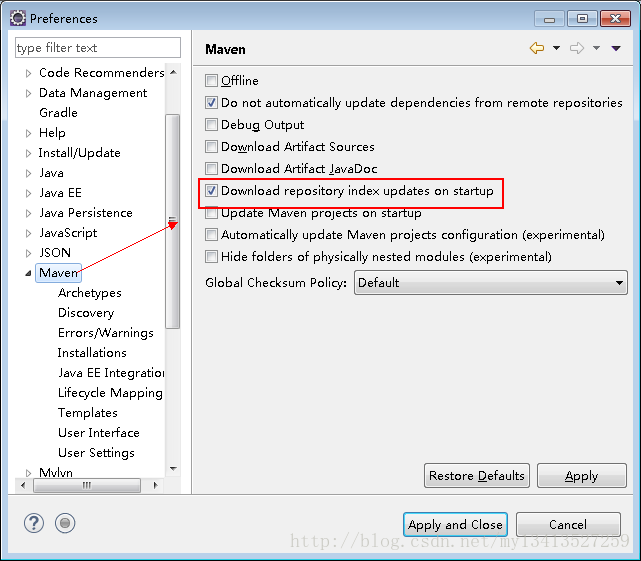
4、show view打开maven窗口,full或者mini一下所选的远程仓库,等待......可以打开console切换到maven查看日志

5、按alt+f5重构项目
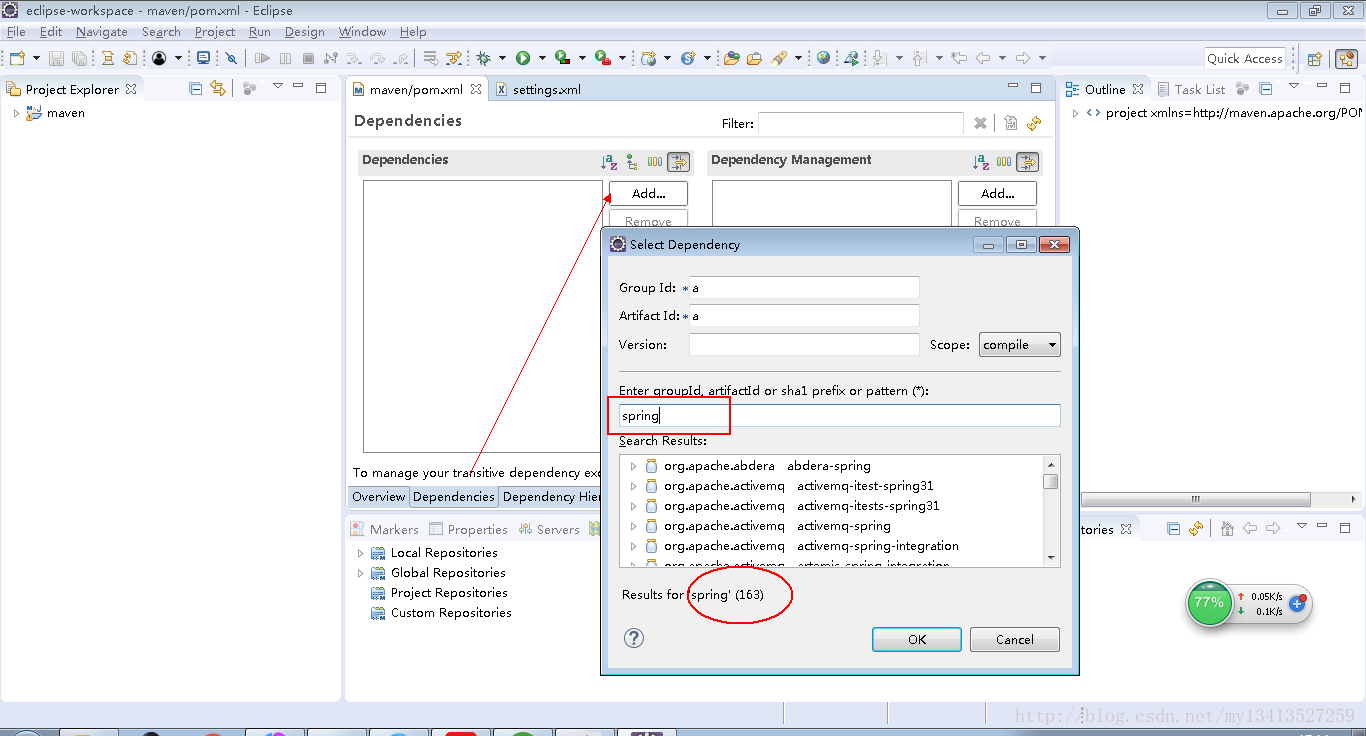
ok~去尽情搜索吧~

北京人形旗下天工造物具身智能开源社区,聚焦具身天工与慧思开物两大平台
更多推荐
 6
6 0
0- 0


 已为社区贡献3条内容

所有评论(0)