unity5.6新功能VideoPlayer播放声音,判断视频播放完毕,以及遇到的坑总结
·
总体使用方式如下
http://blog.csdn.net/dark00800/article/details/70160463
如何判断视频播放完毕呢,用这几个属性就可以了
//判断是否播放完毕,在update里
       // Debug.Log("vp.frameCount:" + vp.frameCount);
        //Debug.Log("player.frame" + vp.frame);
        //vp.Pause();
注意事项:
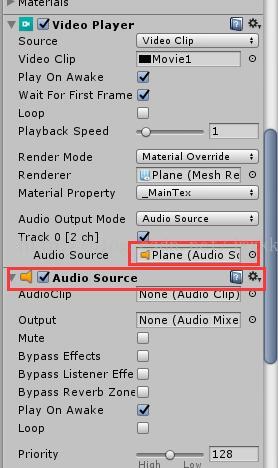
1、如果要播放声音,需要对VideoPlayer挂载的gameObject在增加Audio Source,并且把VideoPlayer的Audio Source选择为当前对象,才能播放声音
2、如果一个视频有声音源,一个没有,切换视频的时候,根据顺序不同会引起视频不能play或没有声音的情况,所以播放的clip都要有声音
url切换声音最上面地址里有,切换本地声音代码
 public VideoClip _VideoClip;
    private VideoPlayer vp;
//所有的影片
    public List<VideoClip> VideoClipList;
 // Use this for initialization
    void Start()
    {
        vp = GetComponent<VideoPlayer>();
        vp.clip = _VideoClip;
        vp.Play();
        //mr.prepareCompleted += Prepared;
       // mr.Prepare();

    }

    //void Prepared(VideoPlayer vPlayer)
    //{
    //    Debug.Log("End reached!");
    //    vPlayer.Play();
    //}
// Update is called once per frame
    void Update () {
        if (Input.GetKeyDown(KeyCode.Escape))
        {
            Application.Quit();
        }

        if (vp.clip.name != "title1" && (ulong)vp.frame>=vp.frameCount)//也可以这么判断是否播放完毕
        {
            vp.clip = VideoClipList[6];
            vp.Play();
        }


    }

北京人形旗下天工造物具身智能开源社区,聚焦具身天工与慧思开物两大平台
更多推荐
 4
4 0
0- 0


 已为社区贡献5条内容

所有评论(0)