使用java客户端操作elasticsearch
·
使用java客户端操作elasticsearch
本文主要参考:
https://www.elastic.co/guide/en/elasticsearch/client/java-api/current/index.html
本文的主要目的不是追求如何用java语言进行elasticsearch的操作,而是如何搭建一个环境,这个环境能够进行访问elasticsearch。
好,下面上货。
1、首先新建一个简单maven项目。
mvn archetype:generate -DarchetypeCatalog=internal
2、然后修改pom文件,添加依赖。
<dependency>
            <groupId>org.elasticsearch.client</groupId>
            <artifactId>transport</artifactId>
            <version>5.2.2</version>
        </dependency>

        <dependency>
            <groupId>org.apache.logging.log4j</groupId>
            <artifactId>log4j-api</artifactId>
            <version>2.7</version>
        </dependency>
        <dependency>
            <groupId>org.apache.logging.log4j</groupId>
            <artifactId>log4j-core</artifactId>
            <version>2.7</version>
        </dependency>
添加plugins查看,方便打jar包。
<plugins>
            <plugin>
                <groupId>org.apache.maven.plugins</groupId>
                <artifactId>maven-compiler-plugin</artifactId>
                <configuration>
                    <source>1.8</source>
                    <target>1.8</target>
                    <encoding>utf-8</encoding>
                </configuration>
            </plugin>
            <plugin>
                <artifactId>maven-assembly-plugin</artifactId>
                <version>3.0.0</version>
                <configuration>
                    <archive>
                        <manifest>
                            <mainClass>com.xueyouc.xueyou.App</mainClass>
                        </manifest>
                    </archive>
                    <descriptorRefs>
                        <descriptorRef>jar-with-dependencies</descriptorRef>
                    </descriptorRefs>
                </configuration>
                <executions>
                    <execution>
                        <id>make-assembly</id> <!-- this is used for inheritance merges -->
                        <phase>package</phase> <!-- bind to the packaging phase -->
                        <goals>
                            <goal>single</goal>
                        </goals>
                    </execution>
                </executions>
            </plugin>
        </plugins>
3、添加log4j2的配置文件和本地配置文件

log4j2.properties:
appender.console.type = Console
appender.console.name = console
appender.console.layout.type = PatternLayout

rootLogger.level = info
rootLogger.appenderRef.console.ref = console
conf.properties:
elasticsearch.clustername=xycluster
elasticsearch.addr1=127.0.0.1
4、编写程序实现对elasticsearch的访问:
App.java
package com.xueyouc.xueyou;

import org.elasticsearch.action.index.IndexResponse;
import org.elasticsearch.client.transport.TransportClient;
import org.elasticsearch.common.settings.Settings;
import org.elasticsearch.common.transport.InetSocketTransportAddress;
import org.elasticsearch.common.xcontent.XContentBuilder;
import org.elasticsearch.transport.client.PreBuiltTransportClient;

import java.io.IOException;
import java.net.InetAddress;
import java.net.UnknownHostException;
import java.util.Date;
import java.util.ResourceBundle;

import static org.elasticsearch.common.xcontent.XContentFactory.jsonBuilder;

/**
 * Hello world!
 */
public class App {
    public static void main(String[] args) {
        /**
         * 读取配置文件
         */
        ResourceBundle rb = ResourceBundle.getBundle("conf");
        String clustername = rb.getString("elasticsearch.clustername");
        String addr1 = rb.getString("elasticsearch.addr1");

        String[] temparray = addr1.split("\\.");
        byte[] localAddr = new byte[temparray.length];
        for (int i = 0; i < temparray.length; i++) {
            localAddr[i] = Byte.parseByte(temparray[i]);
        }

        TransportClient client = null;
        try {
            Settings settings = Settings.builder().put("cluster.name", clustername).build();
            client = new PreBuiltTransportClient(settings)
                    .addTransportAddress(new InetSocketTransportAddress(InetAddress.getByAddress(localAddr), 9300));
            //插入你的处理逻辑

            try {
                XContentBuilder builder = jsonBuilder().startObject().field("user", "user002").field("postDate", new Date()).field("message", "trying out elasticsearch").endObject();
                IndexResponse response = client.prepareIndex("testindex","testtype","2").setSource(builder).execute().actionGet();

                System.out.println("============================");
                System.out.println(response.getIndex());
                System.out.println(response.getType());
                System.out.println(response.getId());
                System.out.println("============================");
            } catch (IOException e) {
                e.printStackTrace();
            } finally {
            }


        } catch (UnknownHostException e) {
            e.printStackTrace();
        } finally {
            client.close();
        }


    }
}
localAddr[i] = (byte) Integer.parseInt(temparray[i]);5、运行结果:

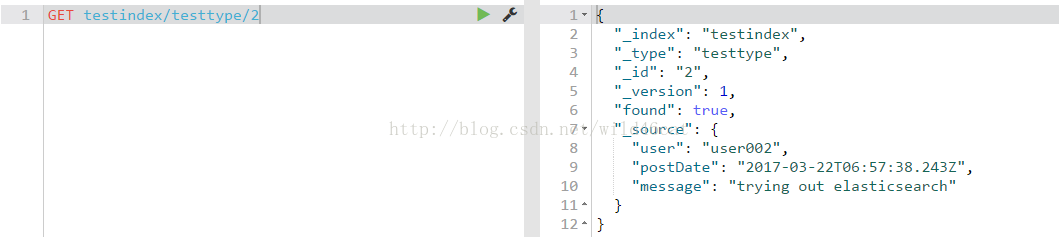
6、检索elasticsearch中的数据

北京人形旗下天工造物具身智能开源社区,聚焦具身天工与慧思开物两大平台
更多推荐
 1
 0
- 0


 已为社区贡献6条内容

所有评论(0)