maven如何为不同的环境打包-开发、测试、生产环境
·
在开发过程中,我们的软件会面对不同的运行环境,比如开发环境、测试环境、生产环境,而我们的软件在不同的环境中,有的配置可能会不一样,比如数据源配置、日志文件配置、以及一些软件运行过程中的基本配置,那每次我们将软件部署到不同的环境时,都需要修改相应的配置文件,这样来回修改,是个很麻烦的事情。有没有一种方法能够让我们不用修改配置就能发布到不同的环境中呢?当然有,这就是接下来要做的事。
当然,这里的前提是使用maven做为构建工具。
使用maven来实现多环境的构建可移植性,需要借助maven提供的profile功能,通过不同的环境激活不同的profile来达到构建的可移植性。
1.配置profile
首先在pom.xml文件中添加如下profile配置
<profiles>
        <!--本地开发环境-->
        <profile>
            <id>local-develop</id>
            <properties>
                <env.profile>local-develop</env.profile>
            </properties>
            <activation>
                <activeByDefault>true</activeByDefault>
            </activation>
        </profile>
        <!--测试环境-->
        <profile>
            <id>local</id>
            <properties>
                <env.profile>local</env.profile>
            </properties>
        </profile>
        <!--生产环境-->
        <profile>
            <id>remote</id>
            <properties>
                <env.profile>remote</env.profile>
            </properties>
        </profile>
    </profiles>
2.配置文件
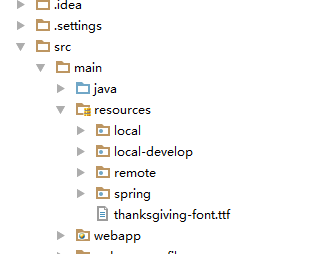
针对不同的环境,我们定义不同的配置文件,而这些配置文件都做为资源文件放到maven工程的resources目录下,即src/main/resources目录下,
且各个环境的配置分别放到相应的目录下,而所有环境都公用的配置,直接放到src/main/resources目录下或WEB-INF/目录下。如下图所示:
3.maven资源插件配置
第一种方法
<build>
        <finalName>demo</finalName>
        <resources>
            <resource>
                <directory>src/main/java</directory>
                <includes>
                    <include>**/*.xml</include>
                </includes>
                <filtering>true</filtering>
            </resource>
            <resource>
                <directory>src/main/resources</directory>
                <excludes>
                    <exclude>local-develop/**</exclude>
                    <exclude>local/**</exclude>
                    <exclude>remote/**</exclude>
                </excludes>
            </resource>
            <!--筛选打包的环境-->
            <resource>
                <directory>src/main/resources/${env.profile}</directory>
            </resource>
        </resources>
    </build>
第二种方法
<build/>
<!--筛选打包的环境-->
  <filters>
      <filter>src/main/resources/${env.profile}</filter>
  </filters>
  <!--当在是webapp下的某个文件时-->
  <!--
  <filters>
      <filter>src/main/webapp/h5/cosmetic/js/param-${env.profile}.js</filter>
  </filters>
  -->## 标题 ##
  <resources>
      <resource>
          <directory>src/main/resources</directory>
          <filtering>true</filtering>
      </resource>
  </resources>
</build>
但是当配置文件在WEB-INF目录下时,需要增加如下配置:
<plugin>
    <groupId>org.apache.maven.plugins</groupId>
    <artifactId>maven-war-plugin</artifactId>
    <configuration>
        <warName>demo</warName>
        <webResources>
            <resource>
                <directory>src/main/webapp</directory>
                <filtering>true</filtering>
            </resource>
        </webResources>
    </configuration>
</plugin>
北京人形旗下天工造物具身智能开源社区,聚焦具身天工与慧思开物两大平台
更多推荐
 0
0 0
0- 0


 已为社区贡献1条内容

所有评论(0)