在windows平台上部署bytetrack
一、环境配置:
使用conda创建python3.8.20env
在github下载源码或clone之后,按指引安装,下图是官方给出的安装指引,但显然不会那么顺利,要不然也不会有这篇文章。
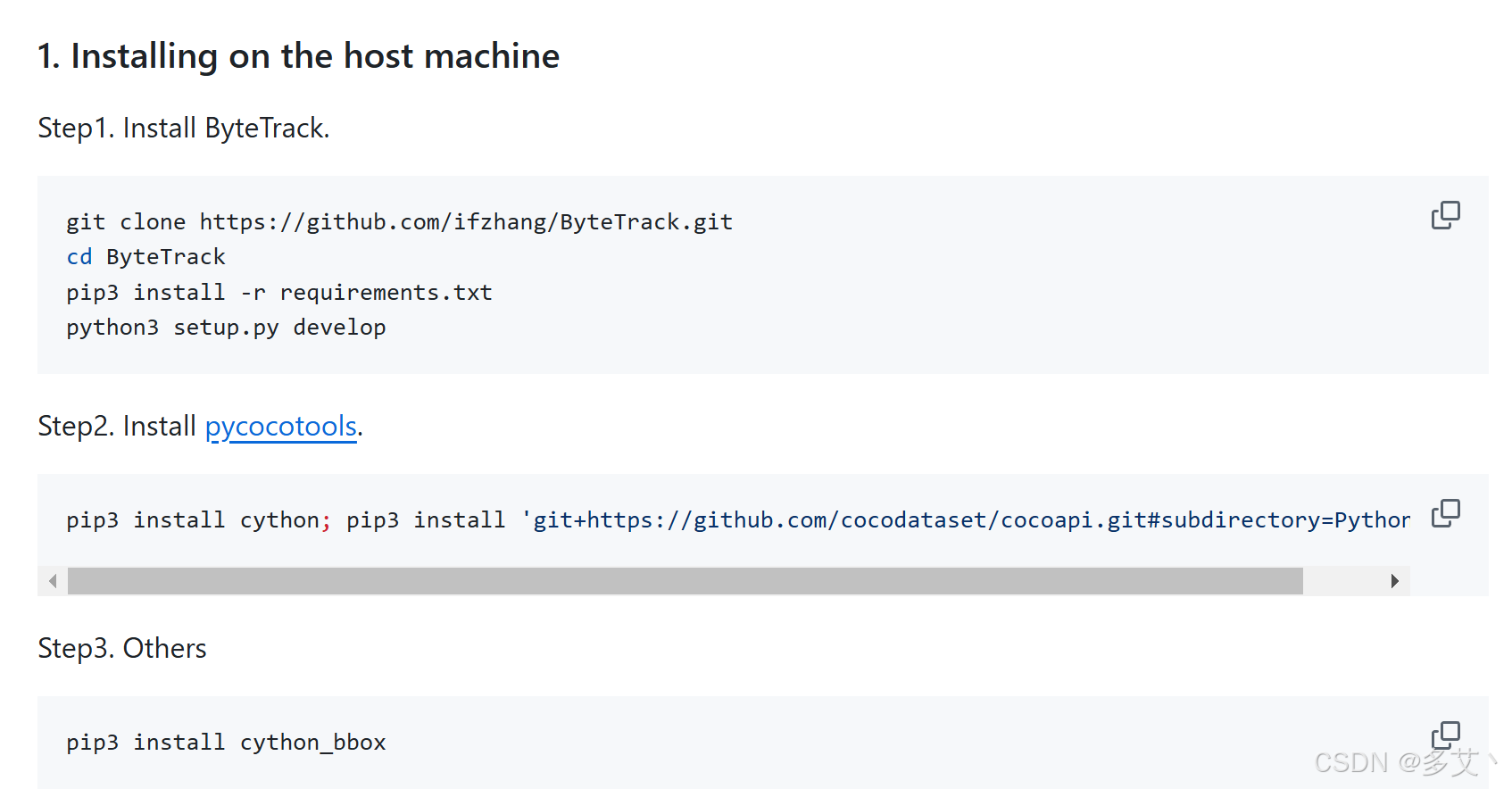
在运行
pip install -r requirement.txt之前,应当先安装lap
conda install -c conda-forge lap当执行安装setup:
python setup.py develop时候,会出现字符错误:
Traceback (most recent call last):
File "setup.py", line 51, in <module>
long_description = f.read()
UnicodeDecodeError: 'gbk' codec can't decode byte 0x80 in position 5218: illegal multibyte sequence
需要将源码中setup.py中的line51处改为
#更改前
with open("README.md", "r") as f:
    long_description = f.read()
#更改后
with open("README.md", "r",encoding='utf-8') as f:
    long_description = f.read()
提示没有cpp环境,,
warnings.warn(f'Error checking compiler version for {compiler}: {error}')
building 'yolox._C' extension
error: Microsoft Visual C++ 14.0 or greater is required. Get it with "Microsoft C++ Build Tools": https://visualstudio.microsoft.com/visual-cpp-build-tools/
需要去https://visualstudio.microsoft.com/visual-cpp-build-tools/微软官网下载并安装c++生成工具。请注意,c++ maker是必要项,

仅需安装以上拓展即可,运行setup会报错,但是不重要,最后能看到如下结果:
Processing dependencies for yolox==0.1.0
Finished processing dependencies for yolox==0.1.0
继续:
pip install cython
pip install cython_bbox
如果你不需要做微调或者其他预训练,不需要执行下列命令,这是与coco数据集相关的API。
pip install 'git+https://github.com/cocodataset/cocoapi.git#subdirectory=PythonAPI'
二、轨迹追踪demo
选择你需要的模型版本,本项目后续做端侧开发,选择的是最小size的版本nano。
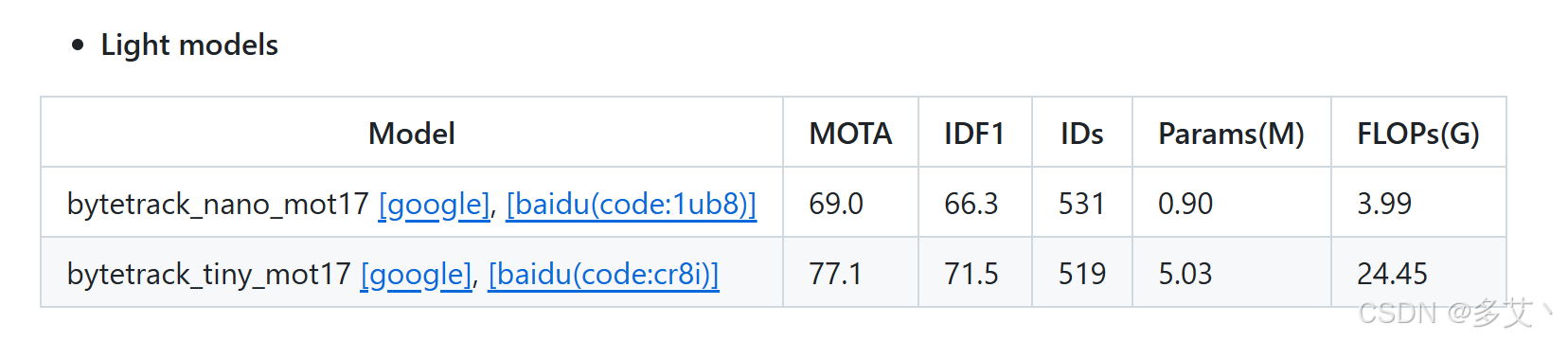
此处提供了百度云盘的下载链接,读者自行在github页面下载。
请记住自己的模型位置,本文是在pretrained/bytetrack_nano_mot17.pth.tar
运行脚本:(本机也没有gpu,所以直接运行cpu,也不用bf16)
python tools/demo_track.py video -f exps/example/mot/yolox_nano_mix_det.py -c pretrained/bytetrack_nano_mot17.pth.tar --fuse --save_result
仍有配置问题需解决:
pip install protobuf==3.20
pip install numpy==1.23
pip install pycocotools
如果正常运行,结果如下:
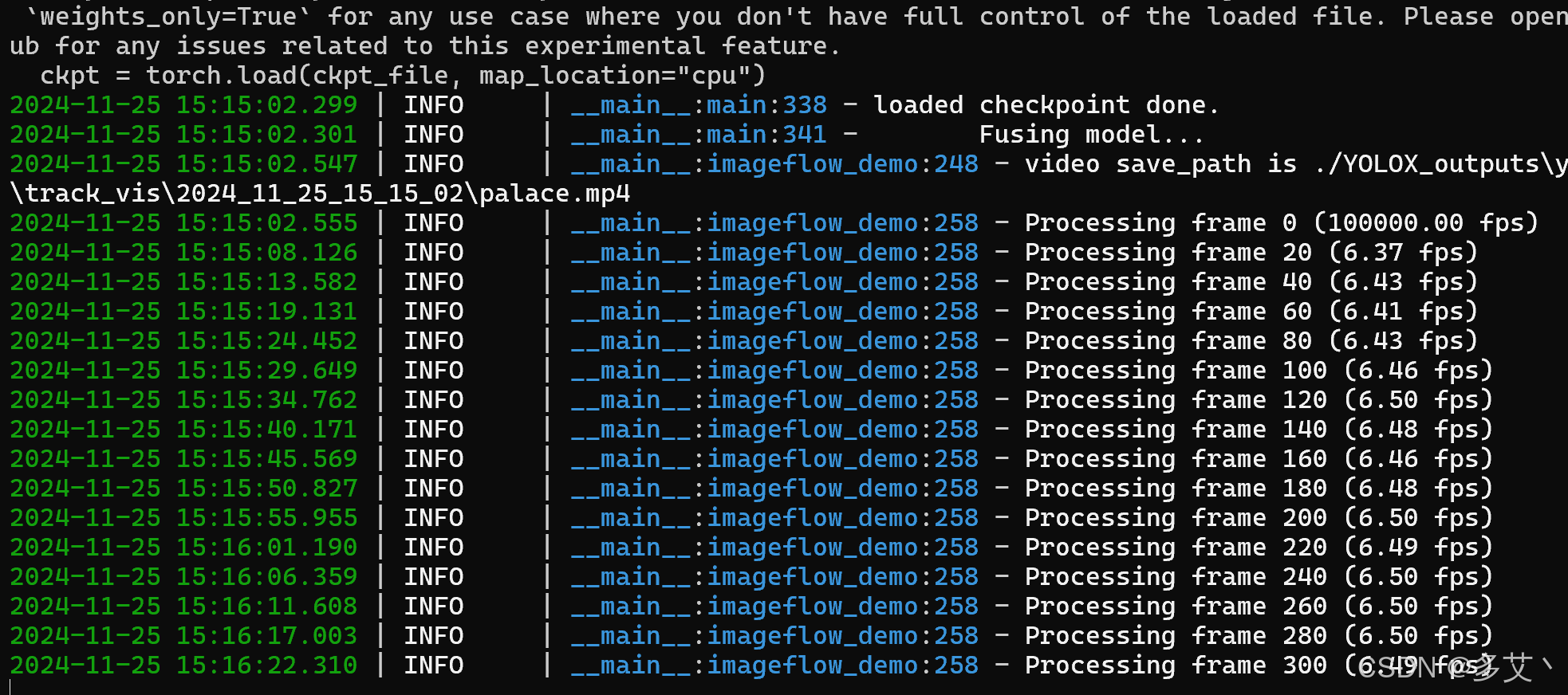
最后,你的结果会在下述路径中找到,此文件中亦包含一个输出结果。下文即为实例视频
\ByteTrack\YOLOX_outputs\yolox_nano_mix_det\track_vis
bytetrack_demo
三、数据科学工作者就应该用jupyter
脚本模式比较难用与调试,模仿demo_track.py,写一个jupyter文件实现同样的功能:
import os
import os.path as osp
import time
import cv2
import torch
from loguru import logger

from yolox.data.data_augment import preproc
from yolox.exp import get_exp
from yolox.utils import fuse_model, get_model_info, postprocess
from yolox.utils.visualize import plot_tracking
from yolox.tracker.byte_tracker import BYTETracker
from yolox.tracking_utils.timer import Timer

# 定义常量
IMAGE_EXT = [".jpg", ".jpeg", ".webp", ".bmp", ".png"]

# 配置参数
class Args:
    def __init__(self):
        self.demo = "video"  # 可选: "image", "video", "webcam"
        self.experiment_name = None
        self.name = None
        self.path = "../videos/palace.mp4"  # 视频路径
        self.camid = 0
        self.save_result = True
        self.exp_file = "../exps/example/mot/yolox_nano_mix_det.py"
        self.ckpt = "../pretrained/bytetrack_nano_mot17.pth.tar"
        self.device = "cpu"  # 可选: "cpu" 或 "gpu"
        self.conf = None
        self.nms = None
        self.tsize = None
        self.fps = 30
        self.fp16 = False
        self.fuse = False
        self.trt = False
        self.track_thresh = 0.5
        self.track_buffer = 30
        self.match_thresh = 0.8
        self.aspect_ratio_thresh = 1.6
        self.min_box_area = 10
        self.mot20 = False

# Predictor类保持不变
class Predictor(object):
    def __init__(
        self,
        model,
        exp,
        trt_file=None,
        decoder=None,
        device=torch.device("cpu"),
        fp16=False
    ):
        self.model = model
        self.decoder = decoder
        self.num_classes = exp.num_classes
        self.confthre = exp.test_conf
        self.nmsthre = exp.nmsthre
        self.test_size = exp.test_size
        self.device = device
        self.fp16 = fp16
        if trt_file is not None:
            from torch2trt import TRTModule
            model_trt = TRTModule()
            model_trt.load_state_dict(torch.load(trt_file))
            x = torch.ones((1, 3, exp.test_size[0], exp.test_size[1]), device=device)
            self.model(x)
            self.model = model_trt
        self.rgb_means = (0.485, 0.456, 0.406)
        self.std = (0.229, 0.224, 0.225)

    def inference(self, img, timer):
        img_info = {"id": 0}
        if isinstance(img, str):
            img_info["file_name"] = osp.basename(img)
            img = cv2.imread(img)
        else:
            img_info["file_name"] = None

        height, width = img.shape[:2]
        img_info["height"] = height
        img_info["width"] = width
        img_info["raw_img"] = img

        img, ratio = preproc(img, self.test_size, self.rgb_means, self.std)
        img_info["ratio"] = ratio
        img = torch.from_numpy(img).unsqueeze(0).float().to(self.device)
        if self.fp16:
            img = img.half()

        with torch.no_grad():
            timer.tic()
            outputs = self.model(img)
            if self.decoder is not None:
                outputs = self.decoder(outputs, dtype=outputs.type())
            outputs = postprocess(
                outputs, self.num_classes, self.confthre, self.nmsthre
            )
        return outputs, img_info

# 运行追踪器
def run_tracker():
    args = Args()
    exp = get_exp(args.exp_file, args.name)

    if not args.experiment_name:
        args.experiment_name = exp.exp_name

    output_dir = osp.join(exp.output_dir, args.experiment_name)
    os.makedirs(output_dir, exist_ok=True)

    vis_folder = osp.join(output_dir, "track_vis")
    if args.save_result:
        os.makedirs(vis_folder, exist_ok=True)

    args.device = torch.device("cuda" if args.device == "gpu" else "cpu")

    # 设置模型参数
    if args.conf is not None:
        exp.test_conf = args.conf
    if args.nms is not None:
        exp.nmsthre = args.nms
    if args.tsize is not None:
        exp.test_size = (args.tsize, args.tsize)

    model = exp.get_model().to(args.device)
    logger.info("Model Summary: {}".format(get_model_info(model, exp.test_size)))
    model.eval()

    if not args.trt:
        if args.ckpt is None:
            ckpt_file = osp.join(output_dir, "best_ckpt.pth.tar")
        else:
            ckpt_file = args.ckpt
        ckpt = torch.load(ckpt_file, map_location="cpu")
        model.load_state_dict(ckpt["model"])

    if args.fuse:
        model = fuse_model(model)

    if args.fp16:
        model = model.half()

    predictor = Predictor(model, exp, None, None, args.device, args.fp16)
    current_time = time.localtime()

    # 视频处理
    cap = cv2.VideoCapture(args.path)
    width = cap.get(cv2.CAP_PROP_FRAME_WIDTH)
    height = cap.get(cv2.CAP_PROP_FRAME_HEIGHT)
    fps = cap.get(cv2.CAP_PROP_FPS)

    timestamp = time.strftime("%Y_%m_%d_%H_%M_%S", current_time)
    save_folder = osp.join(vis_folder, timestamp)
    os.makedirs(save_folder, exist_ok=True)
    save_path = osp.join(save_folder, args.path.split("/")[-1])

    vid_writer = cv2.VideoWriter(
        save_path, cv2.VideoWriter_fourcc(*"mp4v"), fps, (int(width), int(height))
    )

    tracker = BYTETracker(args, frame_rate=30)
    timer = Timer()
    frame_id = 0
    results = []

    while True:
        ret_val, frame = cap.read()
        if not ret_val:
            break

        outputs, img_info = predictor.inference(frame, timer)
        if outputs[0] is not None:
            online_targets = tracker.update(outputs[0], [img_info['height'], img_info['width']], exp.test_size)
            online_tlwhs = []
            online_ids = []
            online_scores = []

            for t in online_targets:
                tlwh = t.tlwh
                tid = t.track_id
                vertical = tlwh[2] / tlwh[3] > args.aspect_ratio_thresh
                if tlwh[2] * tlwh[3] > args.min_box_area and not vertical:
                    online_tlwhs.append(tlwh)
                    online_ids.append(tid)
                    online_scores.append(t.score)
                    results.append(
                        f"{frame_id},{tid},{tlwh[0]:.2f},{tlwh[1]:.2f},{tlwh[2]:.2f},{tlwh[3]:.2f},{t.score:.2f},-1,-1,-1\n"
                    )

            timer.toc()
            online_im = plot_tracking(
                img_info['raw_img'], online_tlwhs, online_ids, frame_id=frame_id + 1, fps=1. / timer.average_time
            )
        else:
            timer.toc()
            online_im = img_info['raw_img']

        if args.save_result:
            vid_writer.write(online_im)

        if frame_id % 20 == 0:
            logger.info('Processing frame {} ({:.2f} fps)'.format(frame_id, 1. / max(1e-5, timer.average_time)))

        frame_id += 1

    cap.release()
    vid_writer.release()

    if args.save_result:
        res_file = osp.join(vis_folder, f"{timestamp}.txt")
        with open(res_file, 'w') as f:
            f.writelines(results)
        logger.info(f"save results to {res_file}")


run_tracker()
北京人形旗下天工造物具身智能开源社区,聚焦具身天工与慧思开物两大平台
更多推荐
 27
27 0
0- 0


 已为社区贡献1条内容

所有评论(0)