windows系统cmake生成c++动态库无lib文件:提示LINK : fatal error LNK1104: cannot open file ‘Debug\math.lib‘
一、正常情况下,我们使用VS生成动态dll库的时候,都会伴随着生成一份“动态导入库”lib文件。但是,测试cmake的时候,并没有生成,当使用指令:cmake --build .
的时候,有下方的提示:
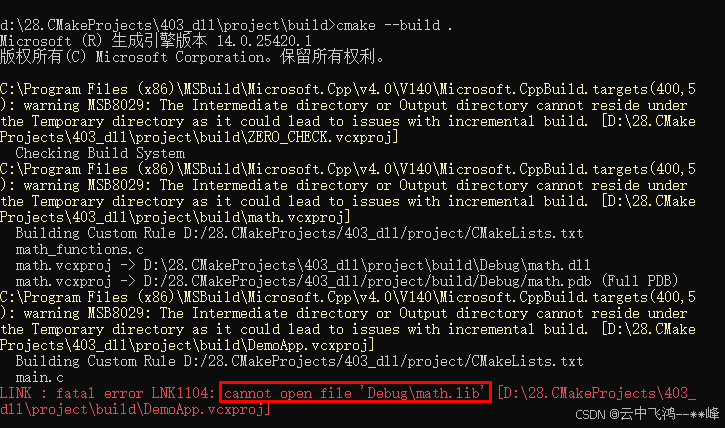
意思是,在D:\28.CMakeProjects\403_dll\project\build\Debug目录下无法打开math.lib文件。经查看,确实没有这个文件。
参考原文:windows系统cmake生成c++动态库无lib文件解决方法 && bat文件批处理cmd命令_x64 release生成无lib-CSDN博客
发现,在windows系统下,还需要在CMakeLists.txt中添加以下命令:
#windows系统动态库生成lib文件命令
set(CMAKE_WINDOWS_EXPORT_ALL_SYMBOLS ON)
二、具体如下:
1.文件目录架构:
——project
——|——main.c
——|——CMakeLists.txt
——|——math_functions.c
——|——math_functions.h
2. main.c中
#include <stdio.h>
#include "math_functions.h"

int main() {
    int sum = add(1, 2);
    int difference = subtract(4, 2);

    printf("Sum: %d\n", sum);
    printf("Difference: %d\n", difference);

    return 0;
}
3. math_functions.c、 math_functions.h
// math_functions.c
#include "math_functions.h"

int add(int a, int b) {
    return a + b;
}

int subtract(int a, int b) {
    return a - b;
}
// math_functions.h
#ifndef MATH_FUNCTIONS_H
#define MATH_FUNCTIONS_H
int add(int a, int b);
int subtract(int a, int b);
#endif4. CMakeLists.txt
# CMakeLists.txt cmake文件名大小写不敏感

cmake_minimum_required(VERSION 3.10)
project(DemoProject VERSION 1.0)

# 添加此“到处所有符合”指令,才能生产lib文件。
set(CMAKE_WINDOWS_EXPORT_ALL_SYMBOLS ON)

# 创建动态库
add_library(math SHARED math_functions.c)
set_target_properties(math PROPERTIES PREFIX "")

# 创建可执行文件
add_executable(DemoApp main.c)

# 链接动态库
target_link_libraries(DemoApp math)
5、构建项目,即可正常运行
在windows中使用命令行,cd 到project\目录下:
mkdir build
cd build
cmake ..
cmake --build .
6、执行exe,即可得到既定结果

三、CMake --build . 之后,执行exe报错,找不到dll位置
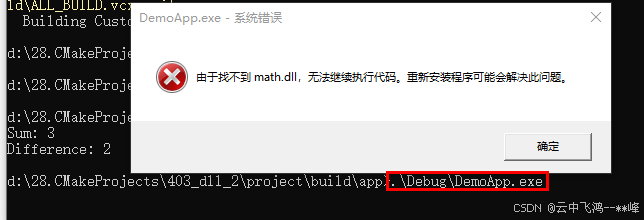
当尝试运行这个可执行文件时,它无法找到所需的动态链接库(DLLs),因为这些库不在可执行文件预期的搜索路径上。
=>解决方法:
1. 找到math.dll所在位置,将其拷贝到exe同级目录中即可!
2. 或者在系统环境变量PATH中指定的目录下;
3. 配置CMakeLists.txt,使用set_target_properties将DLLs设置为构建后的RUNTIME_DIRECTORY。

北京人形旗下天工造物具身智能开源社区,聚焦具身天工与慧思开物两大平台
更多推荐
 3
3 0
0- 0


 已为社区贡献3条内容

所有评论(0)