java 加文字水印MultipartFile方式
·
实体类 inputStream 转 MultipartFile
import org.springframework.util.FileCopyUtils;
import org.springframework.web.multipart.MultipartFile;

import java.io.ByteArrayInputStream;
import java.io.File;
import java.io.IOException;
import java.io.InputStream;

/**
 * @author jxj
 * file转MultipartFile的时候会用到MockMultipartFile
 * 当你导入spring-test依赖的时候 会跟某些依赖冲突(暂未找到具体是哪个冲突)
 * 解决方法 重写一个类去实现MultipartFile接口
 * 直接用MockMultipartFile的源码
 *
 */
public class MultipartFileDto implements MultipartFile {
    private final String name;

    private String originalFilename;

    private String contentType;

    private final byte[] content;

    /**
     * Create a new MultipartFileDto with the given content.
     * @param name the name of the file
     * @param content the content of the file
     */
    public MultipartFileDto(String name, byte[] content) {
        this(name, "", null, content);
    }

    /**
     * Create a new MultipartFileDto with the given content.
     * @param name the name of the file
     * @param contentStream the content of the file as stream
     * @throws IOException if reading from the stream failed
     */
    public MultipartFileDto(String name, InputStream contentStream) throws IOException {
        this(name, "", null, FileCopyUtils.copyToByteArray(contentStream));
    }

    /**
     * Create a new MultipartFileDto with the given content.
     * @param name the name of the file
     * @param originalFilename the original filename (as on the client's machine)
     * @param contentType the content type (if known)
     * @param content the content of the file
     */
    public MultipartFileDto(String name, String originalFilename, String contentType, byte[] content) {
        this.name = name;
        this.originalFilename = (originalFilename != null ? originalFilename : "");
        this.contentType = contentType;
        this.content = (content != null ? content : new byte[0]);
    }

    /**
     * Create a new MultipartFileDto with the given content.
     * @param name the name of the file
     * @param originalFilename the original filename (as on the client's machine)
     * @param contentType the content type (if known)
     * @param contentStream the content of the file as stream
     * @throws IOException if reading from the stream failed
     */
    public MultipartFileDto(String name, String originalFilename, String contentType, InputStream contentStream)
            throws IOException {

        this(name, originalFilename, contentType, FileCopyUtils.copyToByteArray(contentStream));
    }

    @Override
    public String getName() {
        return this.name;
    }

    @Override
    public String getOriginalFilename() {
        return this.originalFilename;
    }

    @Override
    public String getContentType() {
        return this.contentType;
    }

    @Override
    public boolean isEmpty() {
        return (this.content.length == 0);
    }

    @Override
    public long getSize() {
        return this.content.length;
    }

    @Override
    public byte[] getBytes() throws IOException {
        return this.content;
    }

    @Override
    public InputStream getInputStream() throws IOException {
        return new ByteArrayInputStream(this.content);
    }

    @Override
    public void transferTo(File dest) throws IOException, IllegalStateException {
        FileCopyUtils.copy(this.content, dest);
    }
}
utils
import org.springframework.web.multipart.MultipartFile;
import javax.imageio.ImageIO;
import java.awt.AlphaComposite;
import java.awt.Color;
import java.awt.Font;
import java.awt.Graphics2D;
import java.awt.RenderingHints;
import java.awt.image.BufferedImage;
import java.io.*;

/**
 * @author jxj
 * 定义文字加水印
 */
public class ImageWatermarkUtils {

    /**
     * 水印字体
     */
    private static final Font FONT = new Font("微软雅黑", Font.PLAIN, 14);
    /**
     * 透明度
     */
    private static final AlphaComposite COMPOSITE = AlphaComposite
            .getInstance(AlphaComposite.SRC_OVER, 0.8f);

    /**
     * 水印之间的间隔
     */
    private static final int X_MOVE = 150;

    /**
     * 水印之间的间隔
     */
    private static final int Y_MOVE = 200;

    /**
     * 打水印(文字)
     *
     * @param file       MultipartFile
     * @return MultipartFile
     */
    public static MultipartFile markWithContent(MultipartFile file,String keyword) {
        FileOutputStream fos = null;
        try {
            BufferedImage srcImg = ImageIO.read(file.getInputStream());

            // 图片宽、高
            int imgWidth = srcImg.getWidth();
            int imgHeight = srcImg.getHeight();

            // 图片缓存
            BufferedImage bufImg = new BufferedImage(imgWidth, imgHeight, BufferedImage.TYPE_INT_RGB);

            // 创建绘图工具
            Graphics2D graphics = bufImg.createGraphics();

            // 画入原始图像
            graphics.drawImage(srcImg, 0, 0, imgWidth, imgHeight, null);

            // 设置水印颜色
            graphics.setColor(Color.lightGray);

            // 设置水印透明度
            graphics.setComposite(COMPOSITE);

            // 设置倾斜角度
            graphics.rotate(Math.toRadians(-35), (double) bufImg.getWidth() / 2,
                    (double) bufImg.getHeight() / 2);

            // 设置水印字体
            graphics.setFont(FONT);

            // 消除java.awt.Font字体的锯齿
            graphics.setRenderingHint(RenderingHints.KEY_ANTIALIASING, RenderingHints.VALUE_ANTIALIAS_ON);

            int xCoordinate = -imgWidth / 2, yCoordinate;
            String mark = "ls65535";
            // 字体长度
            int markWidth = FONT.getSize() * getTextLength(mark);
            // 字体高度
            int markHeight = FONT.getSize();

            double odf = 1.5 ;
            // 循环添加水印
            while (xCoordinate < imgWidth * odf) {
                yCoordinate = -imgHeight / 2;
                while (yCoordinate < imgHeight * odf) {
                    graphics.drawString(keyword, xCoordinate, yCoordinate);
                    yCoordinate += markHeight + Y_MOVE;
                }
                xCoordinate += markWidth + X_MOVE;
            }
            InputStream inputStream = buffToInputStream(bufImg);
            // 释放画图工具
            graphics.dispose();
            return new MultipartFileDto(file.getName(),file.getOriginalFilename(),file.getContentType(),inputStream);
        } catch (Exception e) {
            e.printStackTrace();
        } finally {
            if (fos != null) {
                try {
                    fos.flush();
                    fos.close();
                } catch (Exception e) {
                    e.printStackTrace();
                }
            }
        }
        return null;
    }

    /**
     * 计算水印文本长度
     * 1、中文长度即文本长度 2、英文长度为文本长度二分之一
     * @param text
     * @return
     */
    public static int getTextLength(String text) {
        //水印文字长度
        int length = text.length();

        for (int i = 0; i < text.length(); i++) {
            String s = String.valueOf(text.charAt(i));
            if (s.getBytes().length > 1) {
                length++;
            }
        }
        length = length % 2 == 0 ? length / 2 : length / 2 + 1;
        return length;
    }

    public static InputStream buffToInputStream(BufferedImage buffer) throws IOException {
        ByteArrayOutputStream os = new ByteArrayOutputStream();
        ImageIO.write(buffer, "png", os);
        return new ByteArrayInputStream(os.toByteArray());
    }

}
测试代码 controller
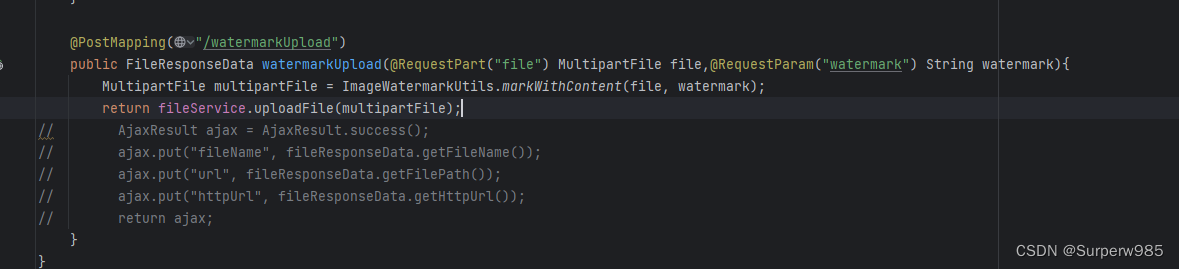
watermark 为水印内容
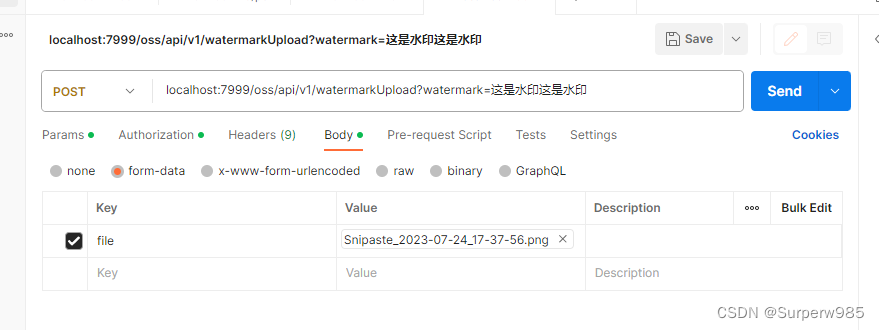
查看效果


北京人形旗下天工造物具身智能开源社区,聚焦具身天工与慧思开物两大平台
更多推荐
 2
2 0
0- 0


 已为社区贡献1条内容

所有评论(0)