【Linux】自动生成makefile(ubuntu)
文章目录
前言
菜鸟第一次试水写博客,请多关照!`
因为一些个人需要,所以跑去研究了一下“如何自动生成一个Makefile”。之后要写的一个工程可能代码量会大一些,再加之本身对Makefile的了解没有太多,所以想摸鱼用自动生成makefile工具玩一玩。
本文以ubuntu16.04及automake工具为例。
提示:以下是本篇文章正文内容,下列步骤可供参考
一、Automake工具
GNU Automake 是一个自动生成符合 GNU 编码标准的 Makefile.in 文件的工具。(本句from 百度,还有很多其他的工具,这里就不做讨论了(毕竟也没用过其他的))
二、具体步骤
1.下载Automake
在使用之前可以先用automake命令试看看是否有下载automake工具:
如果有下载:(如下所示)
【ps:命令请只看~/test_03_automake001$ 之后的语句】
book@100ask:~/test_03_automake001$ automake
automake: error: 'configure.ac' is required
【此处提示也表示了 执行自动生成makefile命令需要文件“configure.ac”】
如果显示“command not found ”就代表没有下载,(以ubuntu为例)可以执行下面这个命令进行下载
sudo apt install automake
2.autoscan
因为自动生成makefile需要 ‘configure.ac’ ,所以我们先用autoscan命令生成configure.scan,
再将configure.scan重命名为configure.ac
【ps:此处使用“tree”命令仅仅是个人习惯(看文件比较清晰,也可以使用ls命令来查看)】
【pss:同理可得,也可以通过sudo apt install tree命令 在ubuntu下载tree】
【psss:除了configure.scan,还生成了autoscan.log。这是automake的日志文件】
代码如下(示例):
book@100ask:~/test_03_automake001$ autoscan
book@100ask:~/test_03_automake001$ tree
.
├── autoscan.log
├── configure.scan
└── hello.c

0 directories, 3 files
3.重命名configure.scan为configure.ac
上一个步骤已经用autoscan命令生成了configure.scan,
那么此时就需要将configure.scan重命名为configure.ac
【ps:此处使用“tree”命令仅仅是个人习惯】
重命名代码如下(示例):
book@100ask:~/test_03_automake001$ mv configure.scan configure.ac
book@100ask:~/test_03_automake001$ tree
.
├── autoscan.log
├── configure.ac
└── hello.c

0 directories, 3 files
4.修改重命名后的configure.ac
在这一步反复栽跟头的我(QAQ)……
- 先看看文件里是啥吧(初始文件代码如图所示(我偷偷加点中文注释不过分吧==))
#                                               -*- Autoconf -*-
# Process this file with autoconf to produce a configure script.
#使用 autoconf 处理此文件以生成配置脚本#

AC_PREREQ([2.69])                                              #最新版本#
AC_INIT([FULL-PACKAGE-NAME], [VERSION], [BUG-REPORT-ADDRESS])  #三个参数:包名,版本名,邮箱地址#
AC_CONFIG_SRCDIR([hello.c])				                       #指定属于项目的文件(通常是源文件)#
AC_CONFIG_HEADERS([config.h])								   #创建一个 config.h 文件,收集由 configure.ac 中其他的“#define”#

# Checks for programs.
AC_PROG_CC

# Checks for libraries.

# Checks for header files.

# Checks for typedefs, structures, and compiler characteristics.

# Checks for library functions.

AC_OUTPUT
~
~
~
- 下面为修改完的configure.ac文件
# Process this file with autoconf to produce a configure script.

AC_PREREQ([2.69])
AC_INIT(test_03_001, 1.0, 101255983@qq.com)
AC_CONFIG_SRCDIR([hello.c])
AC_CONFIG_HEADERS([config.h])
#添加了这一行↓
AM_INIT_AUTOMAKE([-Wall -Werror foreign])
#(如果你想用AM_INIT_AUTOMAKE(test_03_001, 1.0)就把AC_init删掉,如果不想删就只写AM_INIT_AUTOMAKE就好

# Checks for programs.
AC_PROG_CC

# Checks for libraries.

# Checks for header files.

# Checks for typedefs, structures, and compiler characteristics.

# Checks for library functions.

#还添加了这一行 注意不要在括号前加空格(出错了就巨难找)
AC_CONFIG_FILES([Makefile])
AC_OUTPUT

#由 AC_CONFIG_FILES 创建的文件
5.执行aclocal命令
- 生成aclocal.m4文件
【ps:生成了很多文件 眼花缭乱警告TAT】
book@100ask:~/test_03_automake001$ aclocal
book@100ask:~/test_03_automake001$ tree
.
├── aclocal.m4
├── autom4te.cache
│   ├── output.0
│   ├── requests
│   └── traces.0
├── autoscan.log
├── configure.ac
└── hello.c

1 directory, 7 file
6.autoheader
生成 config.h.in configure.in文件
book@100ask:~/test_03_automake001$ autoheader
book@100ask:~/test_03_automake001$ tree
.
├── aclocal.m4
├── autom4te.cache
│   ├── output.0
│   ├── output.1
│   ├── requests
│   ├── traces.0
│   └── traces.1
├── autoscan.log
├── config.h.in
├── configure
├── configure.ac
├── hello.c
└── Makefile.am

1 directory, 12 files
7.autoconf
执行autoconf 生成 configure文件
book@100ask:~/test_03_automake001$ autoconf
book@100ask:~/test_03_automake001$ tree
.
├── aclocal.m4
├── autom4te.cache
│   ├── output.0
│   ├── output.1
│   ├── requests
│   ├── traces.0
│   └── traces.1
├── autoscan.log
├── configure
├── configure.ac
└── hello.c

1 directory, 10 files
8.创建Makefile.am
Makefile.am 文件如下所示
bin_PROGRAMS = test_03 			  //生成的可执行文件 为test_03
test_03_SOURCES = hello.c			//源文件为hello.c
9.automake
- 直接执行automake发现出错 出错提示如下所示:
(缺少一些文件 以及 configure.ac中的 AC_CONFIG_FILES([Makefile]) 有误)
检查发现:AC_CONFIG_FILES([Makefile])括号前多加了一个空格
book@100ask:~/test_03_automake001$ automake
automake: warnings are treated as errors
configure.ac:23: warning: not enough arguments for AC_CONFIG_FILES
configure.ac:13: error: required file './compile' not found
configure.ac:13:   'automake --add-missing' can install 'compile'
configure.ac:9: error: required file './install-sh' not found
configure.ac:9:   'automake --add-missing' can install 'install-sh'
configure.ac:9: error: required file './missing' not found
configure.ac:9:   'automake --add-missing' can install 'missing'
automake: error: no 'Makefile.am' found for any configure output
automake: Did you forget AC_CONFIG_FILES([Makefile]) in configure.ac?
文件缺少的问题可以通过
- 执行出错信息里提示的命令
automake --add-missing得到补充
2.手工创建,运用touch命令 例如touch compile depcomp install-sh missing
(ps:如果出现Permission denied就用sudo su root转换成root用户就可了)
然后再次执行
automake
autoconf
(生成配置文件 configure)
【事实上我觉着autoconf 起到更新configure的作用】
10.执行configure
执行情况如下:(直接打 ./configure就行)
book@100ask:~/test_03_automake001$ ./configure
checking for a BSD-compatible install... /usr/bin/install -c
checking whether build environment is sane... yes
checking for a thread-safe mkdir -p... /bin/mkdir -p
checking for gawk... gawk
checking whether make sets $(MAKE)... yes
checking whether make supports nested variables... yes
checking for gcc... gcc
checking whether the C compiler works... yes
checking for C compiler default output file name... a.out
checking for suffix of executables...
checking whether we are cross compiling... no
checking for suffix of object files... o
checking whether we are using the GNU C compiler... yes
checking whether gcc accepts -g... yes
checking for gcc option to accept ISO C89... none needed
checking whether gcc understands -c and -o together... yes
checking for style of include used by make... GNU
checking dependency style of gcc... gcc3
checking that generated files are newer than configure... done
configure: creating ./config.status
config.status: creating Makefile
config.status: creating config.h
config.status: config.h is unchanged
config.status: executing depfiles commands
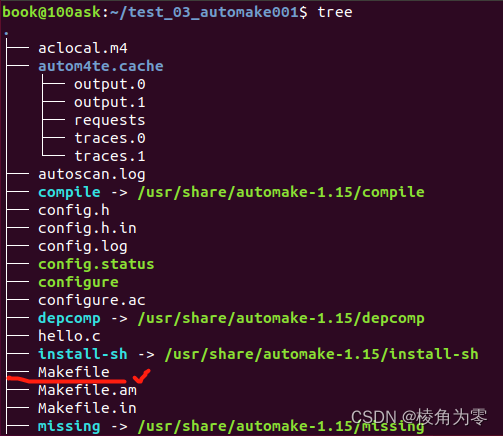
执行完通过 tree命令 (或者ls命令查看是否生成Makefile文件)
11.执行make
这步没啥好写的直接敲make就是了
12.执行Makefile编译完生成的可执行文件
(还记得在Makefile.am里写的可执行文件名吗?……执行它就对了)
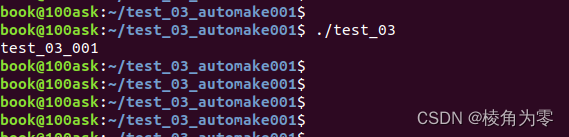
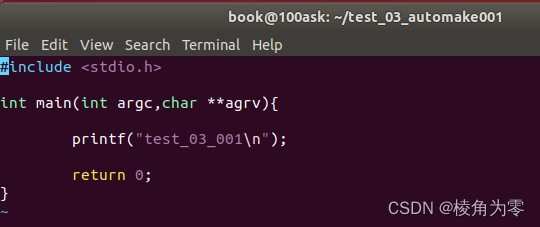
(下面是hello.c的代码 印证一下makefile有正确执行→_→)
总结
yep!终于写完了。
第一次试水写博客,也是因为自己折腾了一天,终于站在了巨人的肩膀上完成了automake初体验,鉴于个人糟糕的记忆力,还是写个博客记录比较靠谱。然后也希望可以帮助到一些有需要的朋友们。
学艺不精,若有不足,欢迎指教讨论~请多关照!
- automake参考文档
https://www.gnu.org/software/automake/manual/automake.html
- 知乎专栏
https://zhuanlan.zhihu.com/p/466365720
- CSDN参考博客
https://blog.csdn.net/yygydjkthh/article/details/43197031
https://blog.csdn.net/snowpiaop/article/details/52998027

北京人形旗下天工造物具身智能开源社区,聚焦具身天工与慧思开物两大平台
更多推荐
 9
9 0
0- 0


 已为社区贡献1条内容

所有评论(0)