ubuntu18.04 编译open-telemetry-cpp (opentelemetry c-sdk)
一、首先下载代码
GitHub - open-telemetry/opentelemetry-cpp: The OpenTelemetry C++ Client
// git config --global https.proxy 'socks5://127.0.0.1:1081'
// git config --global http.proxy 'socks5://127.0.0.1:1081'
git clone --recursive https://github.com/open-telemetry/opentelemetry-cpp.git
git submodule update --init
在子模块下载过程中,始终报错,试了好几次,之后用手机作为热点,搞定了
二、编译流程
mkdir build && cd build
cmake ../
1) 报错:
CMake Error at /usr/share/cmake-3.10/Modules/FindPackageHandleStandardArgs.cmake:137 (message):
  Could NOT find GTest (missing: GTEST_LIBRARY GTEST_MAIN_LIBRARY)
Call Stack (most recent call first):
  /usr/share/cmake-3.10/Modules/FindPackageHandleStandardArgs.cmake:378 (_FPHSA_FAILURE_MESSAGE)
  /usr/share/cmake-3.10/Modules/FindGTest.cmake:196 (FIND_PACKAGE_HANDLE_STANDARD_ARGS)
  CMakeLists.txt:398 (find_package)
说是无法找到GTEST模块,
解决方法:
sudo apt-get install libgtest-dev
cd
cd /usr/src/gtest
sudo cmake CMakeLists.txt
sudo make
sudo cp *.a /usr/lib
会拷贝2个文件到系统目录;
2) 还是报错:
-- Building for architecture ARCH=x64
Trying to use local nlohmann::json from submodule
-- Using the single-header code from /usr/local/soft/ot/third_party/nlohmann-json/single_include/
-- Found GTest: /usr/lib/libgtest.a
GTEST_INCLUDE_DIRS   = /usr/include
GTEST_BOTH_LIBRARIES = /usr/lib/libgtest.a;/usr/lib/libgtest_main.a
CMake Error at CMakeLists.txt:405 (find_package):
  Could not find a package configuration file provided by "benchmark" with
  any of the following names:

    benchmarkConfig.cmake
    benchmark-config.cmake

  Add the installation prefix of "benchmark" to CMAKE_PREFIX_PATH or set
  "benchmark_DIR" to a directory containing one of the above files.  If
  "benchmark" provides a separate development package or SDK, be sure it has
  been installed.


-- Configuring incomplete, errors occurred!
See also "/usr/local/soft/ot/build/CMakeFiles/CMakeOutput.log".
See also "/usr/local/soft/ot/build/CMakeFiles/CMakeError.log".
那就接着安装一个:
sudo apt install cmake
git clone https://github.com/google/benchmark.git
git clone https://github.com/google/googletest.git  benchmark/googletest
mkdir build && cd build
cmake -DCMAKE_BUILD_TYPE=RELEASE ..
make -j4
make install
备注:一定要在子目录放置一个GTEST,不然还是不能编译;编译后要install一下,设置环境变量,拷贝配置文件过去;
3) 报错,说找不到CURL,示例程序要用;
解决:
sudo apt-get update
sudo apt install curl
apt-get install libcurl4-openssl-dev
4)报错:Unknown CMake command "add_compile_definitions".
我是ubuntn18.04,用的cmake是3.10版本,
安装cmake 3.14
1.下载

wget https://cmake.org/files/v3.14/cmake-3.14.5.tar.gz

2.解压
tar -xzvf cmake-3.14.5.tar.gz
cd cmake-3.14.5/

3.编译

这一步可能需要很长时间,依次输入

./bootstrap
make -j8
sudo make install
安装后测试cmake
cmake --version
CMake Error: Could not find CMAKE_ROOT !!!
CMake has most likely not been installed correctly.
Modules directory not found in
/usr/local/share/cmake-3.10
cmake version 3.10.2
还是不对,需要设置一下:
但是我没有设置,
直接使用目录运行
/usr/loca/bin/cmake ../这时可以了,不报错了;
5) 编译
make -j8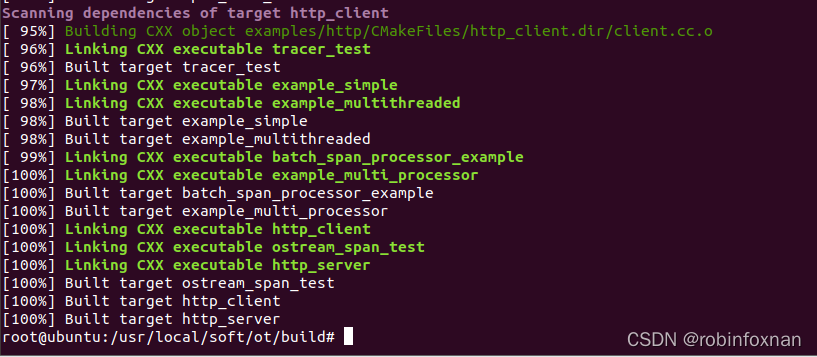
理论行可以运行测试了。
三、再次编译
默认的编译导出器只有流方式,需要添加一个选项
/usr/local/bin/cmake -DWITH_OTLP=ON ../
这时报了一个错误:
Please set them or make sure they are set and tested correctly in the CMake files:
GMOCK_LIB
可以参考:GTEST GMOCK使用入门-使用源码编译gtest gmock的方法_zishuijing_dd的博客-CSDN博客
我的方式是比较暴力,从third目录直接把googletest拷贝到自己的一个目录,然后编译并安装,然后就有了libgmock.a
再次执行cmake就不报错了!
cmake -DCMAKE_POSITION_INDEPENDENT_CODE=ON    -DWITH_OTLP=ON  ../

#不用使用make命令

cmake --build . --target all
四、运行
./example_otlp_http http://10.128.6.99:4318/v1/traces

北京人形旗下天工造物具身智能开源社区,聚焦具身天工与慧思开物两大平台
更多推荐
 0
0 0
0- 0


 已为社区贡献7条内容

所有评论(0)