ubuntu 好用的桌面小工具
·
目录
1.pdf阅读器
okular
sudo apt-get install okular
sudo apt-get install kde-l10n-zhcn
2.桌面壁纸更换
Variety
sudo add-apt-repository ppa:peterlevi/ppa
sudo apt-get update
sudo apt-get install variety
3.小便签
Sticky Notes Indictor
sudo add-apt-repository ppa:umang/indicator-stickynotes

sudo apt-get update

sudo apt-get install indicator-stickynotes或者直接下载.deb进行安装Index of /umang/indicator-stickynotes/ubuntu/pool/main/i/indicator-stickynotes
sudo dpkg -i indicator-stickynotes_0.5.9-0_ppa2_all.deb安装后,发现便签启动不了报错:
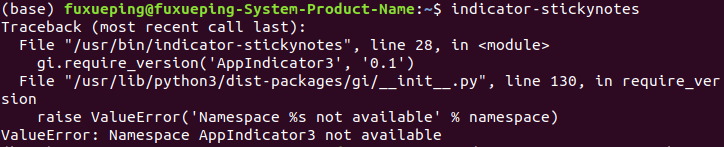
解决办法:安装libappindicator3-1_libappindicator3-1软件包
此处下载:libappindicator3-1_amd64.deb_debianlibappindicator3-1-Ubuntu文档类资源-CSDN下载
安装:
sudo dpkg -i libappindicator3-1_0.4.92-3.1_amd64.deb问题解决;

北京人形旗下天工造物具身智能开源社区,聚焦具身天工与慧思开物两大平台
更多推荐
 0
0 0
0- 0


 已为社区贡献5条内容

所有评论(0)