linux scrapy 定时任务_Scrapy定时执行爬取任务与定时关闭任务
当我们利用Python scrapy框架写完脚本后,脚本已经可以稳定的进行数据的爬取,但是每次需要手动的执行,太麻烦,如果能自动运行,在自动关闭那就好了,经过小编研究,完全是可以实现的,今天小编介绍2种方案来解决这个问题
由于scrapy框架本身没有提供这样的功能,所以小编采用了linux 中crontab的方式进行定时任务的爬取
方案一:
编写shell脚本文件cron.sh
#! /bin/bash
export PATH=$PATH:/usr/local/bin
cd/home/python3/scrapydemo/Ak17/AK17/spiders
nohup scrapy crawl novel>> novel.log 2>&1 &
终端执行命令crontab -e,规定crontab要执行的命令和要执行的时间频率,这里我需要每5分钟就执行scrapy crawl novel 这条爬取命令:
#daemon's notion of time and timezones.#
#Output of the crontab jobs (including errors) is sent through#email to the user the crontab file belongs to (unless redirected).#
#For example, you can run a backup of all your user accounts#at 5 a.m every week with:#0 5 * * 1 tar -zcf /var/backups/home.tgz /home/#
#For more information see the manual pages of crontab(5) and cron(8)# #m h dom mon dow command
*/5 * * * * sh /home/python3/scrapydemo/Ak17/cron.sh
* 如果报错No MTA installed, discarding output,可以重定向到/dev/null,这个文件是一个无底洞,无法打开
例如:*/5 * * * * sh /home/python3/scrapydemo/Ak17/cron.sh >/dev/null 2>&1
如果输入crontab -e后显示如下,直接随便输入一个数字即可,小编这里输入的2
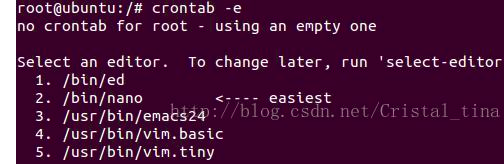
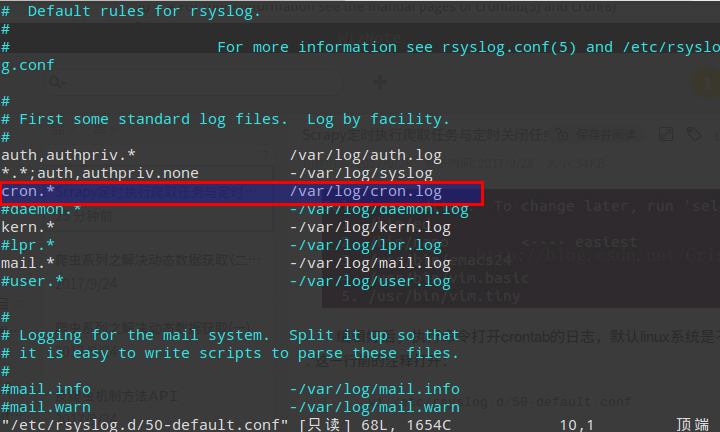
编辑好后,执行命令打开crontab的日志,默认linux系统是不开启的,将cron.*这一行前的注释打开:
vi /etc/rsyslog.d/50-default.conf
重启系统日志服务
sudo service rsyslog restart
最后就可以使用tail –f /var/log/cron.log查看crontab的日志了
方案二:
和方案一唯一的区别是没有日志的输出信息,直接修改定时任务即可
终端执行命令crontab -e,规定crontab要执行的命令和要执行的时间频率
#daemon's notion of time and timezones.#
#Output of the crontab jobs (including errors) is sent through#email to the user the crontab file belongs to (unless redirected).#
#For example, you can run a backup of all your user accounts#at 5 a.m every week with:#0 5 * * 1 tar -zcf /var/backups/home.tgz /home/#
#For more information see the manual pages of crontab(5) and cron(8)# #m h dom mon dow command
*/5 * * * * cd /home/python3/scrapydemo/Ak17/AK17/spiders && /usr/local/bin/scrapy crawl novel
关闭定时任务:
scrapy的setting中添加一个配置项
CLOSESPIDER_TIMEOUT = 82800 # 23小时后结束爬虫
解释一下
CLOSESPIDER_TIMEOUT
默认值:0
一个整数值,单位为秒。如果一个spider在指定的秒数后仍在运行, 它将以 closespider_timeout 的原因被自动关闭。 如果值设置为0(或者没有设置),spiders不会因为超时而关闭。
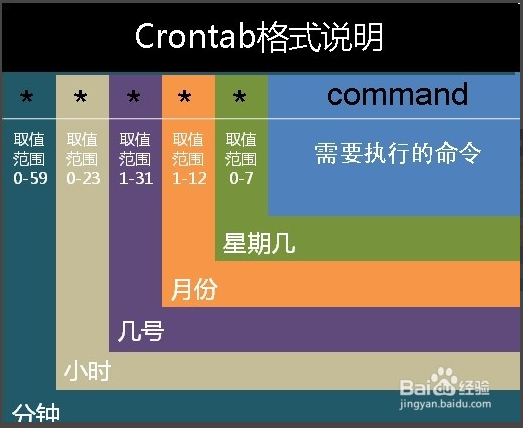
顺便说一下crontab的常见格式:
每分钟执行 */1 * * * *
每小时执行 0 * * * *
每天执行 0 0 * * *
每周执行 0 0 * * 0
每月执行 0 0 1 * *
每年执行 0 0 1 1 *

北京人形旗下天工造物具身智能开源社区,聚焦具身天工与慧思开物两大平台
更多推荐
 0
0 0
0- 0


 已为社区贡献4条内容

所有评论(0)