串口通信(qt/c++)
·
本文 源自于 个人对串口通信好奇 完成的简单程序 参考了知乎的这位博主的文章 写的很好
以下是 Widget.cpp的代码
#include "widget.h"
#include "ui_widget.h"
#include <QMessageBox>

Widget::Widget(QWidget *parent)
    : QWidget(parent)
    , ui(new Ui::Widget)
{
    ui->setupUi(this);
    /* 创建一个存储可用串口的list */
    QStringList serialNamePort;

    /* 设置标题 */
    ui->widget->setWindowTitle("Serial");

    /* 创建一个串口对象 */
    serial = new QSerialPort(this);

    /* 找到本机可用的串口 */
    foreach(const QSerialPortInfo &info ,QSerialPortInfo::availablePorts())
    {
        serialNamePort<<info.portName();
    }
    /* 将找到的串口信息设置到下拉列表中 */
    ui->port->addItems(serialNamePort);

    /* 连接槽 */
    connect(ui->close_port,&QPushButton::clicked,this,&Widget::on_close_port_clicked);
    connect(ui->open_prot,&QPushButton::clicked,this,&Widget::on_open_prot_clicked);

    connect(ui->open_l,&QPushButton::clicked,this,&Widget::on_open_l_clicked);
    connect(ui->close_l,&QPushButton::clicked,this,&Widget::on_close_l_clicked);
}
Widget::~Widget()
{
    delete ui;
}


void Widget::on_close_port_clicked()
{
    /* 关闭串口 */
    serial->close();
}


void Widget::on_open_prot_clicked()
{
    /* 串口设置 */
    serial->setPortName(ui->port->currentText());   /* 设置串口 */
    serial->setBaudRate(ui->portrate->currentText().toInt()); /* 设置波特率 */
    serial->setDataBits(QSerialPort::Data8);   /* 设置了串行端口的数据位为8位 */
    serial->setStopBits(QSerialPort::OneStop); /* 设置了串行端口的停止位为1位 */
    serial->setParity(QSerialPort::NoParity);  /* 设置了串行端口的奇偶校验为无 */
    /* 打开串口提示框 */
    if (true == serial->open(QIODevice::ReadWrite))
    {
        QMessageBox::information(this, "提示", "串口打开成功");
    }
    else
    {
        QMessageBox::critical(this, "提示", "串口打开失败");
    }
}


void Widget::on_open_l_clicked()
{
    /* 串口写入开 */
    serial->write("ON\n");
    qDebug("ON\n");
}


void Widget::on_close_l_clicked()
{
   /* 串口写入关 */
    serial->write("OFF\n");
    qDebug("ON\n");
}
这里是 widget.h的代码
#ifndef WIDGET_H
#define WIDGET_H

#include <QWidget>
#include <QSerialPort>  //提供了操作串口的各种接口
#include <QSerialPortInfo>//提供计算机中可用串口的各种信息

QT_BEGIN_NAMESPACE
namespace Ui { class Widget; }
QT_END_NAMESPACE

class Widget : public QWidget
{
    Q_OBJECT

public:
    Widget(QWidget *parent = nullptr);
    ~Widget();

private slots:
    void on_close_port_clicked();

    void on_open_prot_clicked();

    void on_open_l_clicked();

    void on_close_l_clicked();

private:
    Ui::Widget *ui;
    QSerialPort *serial;
};
#endif // WIDGET_H
这个是ui的设计
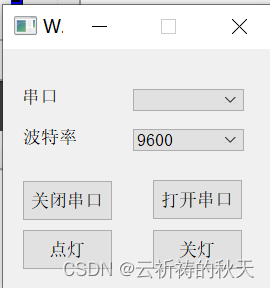
同时在pro工程文件中 加入 serialport 模块 不然无法使用串口的相关函数
以下是打包程序
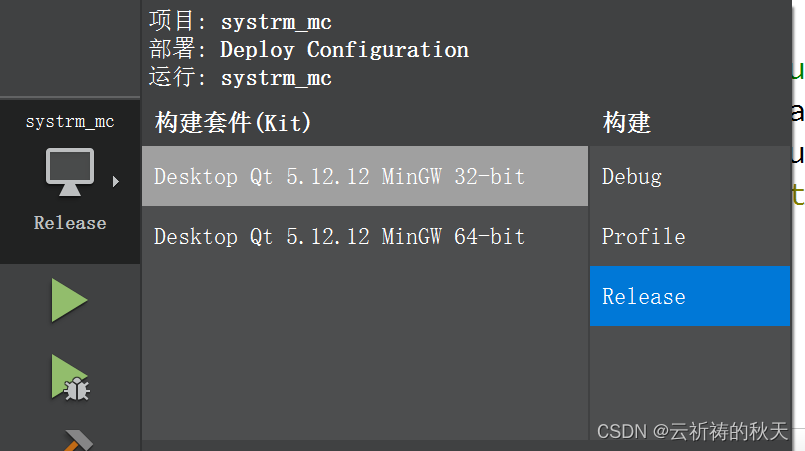
首先在构建中将代码从debug点击到release状态
CTRL+R运行之后在我们工程目录创建一个新的文件夹
将 工程目下release 结尾的文件夹打开 再打开里面的release 文件夹找到exe文件 将其放入到新建文件夹中
打开QT for Disktop工具
执行如下命令进入打包目录:
cd /d /* 你打包文件的路径 */
执行以下命令打包
windeployqt /*自己移入新建文件夹的那个exe的文件名*/

北京人形旗下天工造物具身智能开源社区,聚焦具身天工与慧思开物两大平台
更多推荐
 0
0 0
0- 0


 已为社区贡献1条内容

所有评论(0)