python语言淘宝商品爬虫和分析程序CSV版代码QZQ-2025-9-18
·
# pip install matplotlib pandas numpy requests
#URL和Cookie记得更新
import requests
import json
import re
import time
import tkinter as tk
from tkinter import ttk, scrolledtext, messagebox, filedialog
import csv
import os
from datetime import datetime
from matplotlib.backends.backend_tkagg import FigureCanvasTkAgg
import matplotlib.pyplot as plt
import pandas as pd
import numpy as np
import urllib.parse
# 确保中文显示正常
plt.rcParams["font.family"] = ["SimHei", "WenQuanYi Micro Hei", "Heiti TC"]
plt.rcParams["axes.unicode_minus"] = False
class TaobaoLaptopSystem:
def __init__(self, root):
self.root = root
self.root.title("淘宝笔记本电脑数据爬取与分析系统 (CSV版)")
self.root.geometry("1200x800")
self.root.minsize(1000, 700)
# 爬取控制变量
self.crawling = False
self.total_pages = 0 # 总爬取页数
self.current_crawl_page = 0 # 当前正在爬取的页码
self.total_items_estimate = 0 # 预估总商品数(每页48个)
self.current_crawl_items = 0 # 当前已爬取商品数
# CSV文件路径
self.csv_file = "taobao_laptops.csv"
# 数据缓存
self.data = []
# 创建主框架
self.main_frame = ttk.Frame(root)
self.main_frame.pack(fill=tk.BOTH, expand=True, padx=10, pady=10)
# 创建左侧导航栏
self.nav_frame = ttk.Frame(self.main_frame, width=200)
self.nav_frame.pack(side=tk.LEFT, fill=tk.Y)
self.nav_buttons = [
("数据爬取", self.show_crawl_frame),
("数据展示", self.show_display_frame),
("价格分布", self.show_price_distribution_frame),
("销量排行", self.show_sales_rank_frame),
("店铺地区分布", self.show_region_distribution_frame),
("价格区间分析", self.show_price_range_frame),
("导入/导出", self.show_import_export_frame)
]
for text, command in self.nav_buttons:
btn = ttk.Button(self.nav_frame, text=text, command=command)
btn.pack(fill=tk.X, padx=5, pady=5)
# 创建右侧内容框架
self.content_frame = ttk.Frame(self.main_frame)
self.content_frame.pack(side=tk.RIGHT, fill=tk.BOTH, expand=True)
# 加载现有数据
self.load_data()
# 初始显示数据爬取页面
self.show_crawl_frame()
def load_data(self):
"""从CSV文件加载数据"""
self.data = []
if os.path.exists(self.csv_file):
try:
with open(self.csv_file, 'r', encoding='utf-8') as f:
reader = csv.DictReader(f)
for row in reader:
# 转换数据类型
row['price'] = float(row['price'])
row['sales'] = int(row['sales'])
self.data.append(row)
print(f"已从 {self.csv_file} 加载 {len(self.data)} 条数据")
except Exception as e:
print(f"加载CSV文件出错: {e}")
self.data = []
else:
# 如果文件不存在,创建空的CSV文件
self.save_data()
def save_data(self):
"""保存数据到CSV文件"""
try:
with open(self.csv_file, 'w', encoding='utf-8', newline='') as f:
if self.data:
fieldnames = self.data[0].keys()
writer = csv.DictWriter(f, fieldnames=fieldnames)
writer.writeheader()
writer.writerows(self.data)
else:
# 创建空文件时写入表头
fieldnames = ['id', 'title', 'price', 'price_str', 'sales', 'sales_str',
'shop_name', 'address', 'crawl_time']
writer = csv.DictWriter(f, fieldnames=fieldnames)
writer.writeheader()
print(f"数据已保存到 {self.csv_file}")
except Exception as e:
print(f"保存CSV文件出错: {e}")
def clear_content_frame(self):
"""清空内容框架"""
for widget in self.content_frame.winfo_children():
widget.destroy()
def show_crawl_frame(self):
"""显示数据爬取页面"""
self.clear_content_frame()
crawl_frame = ttk.Frame(self.content_frame)
crawl_frame.pack(fill=tk.BOTH, expand=True, padx=10, pady=10)
# 配置网格权重,使控件能够随窗口大小调整
crawl_frame.columnconfigure(0, weight=1)
crawl_frame.columnconfigure(1, weight=1)
crawl_frame.rowconfigure(12, weight=1)
crawl_frame.rowconfigure(14, weight=1)
# Cookie配置
ttk.Label(crawl_frame, text="请输入淘宝Cookie字符串:").grid(row=0, column=0, sticky=tk.W, pady=5)
self.cookie_entry = scrolledtext.ScrolledText(crawl_frame, height=5)
self.cookie_entry.grid(row=1, column=0, columnspan=2, sticky=tk.W + tk.E + tk.N + tk.S, pady=5)
# 尝试加载已保存的cookie
try:
with open("cookie.txt", "r", encoding="utf-8") as f:
self.cookie_entry.insert(tk.END, f.read())
except:
pass
ttk.Button(crawl_frame, text="测试Cookie", command=self.test_cookie).grid(row=2, column=0, pady=5)
ttk.Button(crawl_frame, text="保存Cookie", command=self.save_cookie).grid(row=2, column=1, pady=5)
# 搜索配置
ttk.Label(crawl_frame, text="搜索关键词:").grid(row=3, column=0, sticky=tk.W, pady=5)
self.keyword_entry = ttk.Entry(crawl_frame)
self.keyword_entry.insert(0, "笔记本电脑")
self.keyword_entry.grid(row=4, column=0, columnspan=2, sticky=tk.W + tk.E, pady=5)
ttk.Label(crawl_frame, text="爬取页数:").grid(row=5, column=0, sticky=tk.W, pady=5)
self.page_entry = ttk.Entry(crawl_frame)
self.page_entry.insert(0, "3")
self.page_entry.grid(row=6, column=0, sticky=tk.W, pady=5)
# 爬取控制按钮
control_frame = ttk.Frame(crawl_frame)
control_frame.grid(row=7, column=0, columnspan=2, pady=10)
ttk.Button(control_frame, text="开始爬取", command=self.start_crawl).pack(side=tk.LEFT, padx=10)
ttk.Button(control_frame, text="停止爬取", command=self.stop_crawl).pack(side=tk.LEFT, padx=10)
ttk.Button(control_frame, text="清空数据", command=self.clear_data).pack(side=tk.LEFT, padx=10)
# 实时进度
ttk.Label(crawl_frame, text="实时进度:").grid(row=8, column=0, sticky=tk.W, pady=5)
self.progress_var = tk.StringVar()
self.progress_var.set("准备就绪")
ttk.Label(crawl_frame, textvariable=self.progress_var).grid(row=9, column=0, sticky=tk.W, pady=5)
# 总进度条
ttk.Label(crawl_frame, text="总爬取进度:").grid(row=10, column=0, sticky=tk.W, pady=5)
self.total_progress_bar = ttk.Progressbar(
crawl_frame,
orient=tk.HORIZONTAL,
length=100,
mode='determinate',
maximum=100
)
self.total_progress_bar.grid(row=11, column=0, columnspan=2, sticky=tk.W + tk.E, pady=5)
self.total_progress_label = ttk.Label(crawl_frame, text="0% (0/0 商品)")
self.total_progress_label.grid(row=12, column=0, sticky=tk.W, pady=2)
# 当前页进度条
ttk.Label(crawl_frame, text="当前页进度:").grid(row=13, column=0, sticky=tk.W, pady=5)
self.page_progress_bar = ttk.Progressbar(
crawl_frame,
orient=tk.HORIZONTAL,
length=100,
mode='determinate',
maximum=48
)
self.page_progress_bar.grid(row=14, column=0, columnspan=2, sticky=tk.W + tk.E, pady=5)
self.page_progress_label = ttk.Label(crawl_frame, text="0/48 商品")
self.page_progress_label.grid(row=15, column=0, sticky=tk.W, pady=2)
# 操作日志
ttk.Label(crawl_frame, text="操作日志:").grid(row=16, column=0, sticky=tk.W, pady=5)
self.log_text = scrolledtext.ScrolledText(crawl_frame, height=10)
self.log_text.grid(row=17, column=0, columnspan=2, sticky=tk.W + tk.E + tk.N + tk.S, pady=5)
# 设置行权重
for i in [1, 12, 14, 17]:
crawl_frame.rowconfigure(i, weight=1)
def test_cookie(self):
"""测试Cookie有效性"""
try:
cookie = self.cookie_entry.get("1.0", tk.END).strip()
if not cookie:
messagebox.showwarning("警告", "请输入Cookie")
return
test_url = "https://h5api.m.taobao.com/h5/mtop.relationrecommend.wirelessrecommend.recommend/2.0/"
headers = {
'user-agent': 'Mozilla/5.0 (Windows NT 10.0; Win64; x64) AppleWebKit/537.36 (KHTML, like Gecko) Chrome/112.0.0.0 Safari/537.36 Edg/112.0.1722.68',
'cookie': cookie,
'referer': 'https://s.taobao.com/'
}
res = requests.get(test_url, headers=headers, timeout=10)
if res.status_code == 200:
self.log_text.insert(tk.END, "Cookie测试成功\n")
messagebox.showinfo("测试结果", "Cookie测试成功")
else:
self.log_text.insert(tk.END, f"Cookie测试失败,状态码: {res.status_code}\n")
messagebox.showerror("测试结果", f"Cookie测试失败,状态码: {res.status_code}")
self.log_text.see(tk.END)
except Exception as e:
self.log_text.insert(tk.END, f"Cookie测试出错: {str(e)}\n")
messagebox.showerror("测试错误", f"Cookie测试出错: {str(e)}")
self.log_text.see(tk.END)
def save_cookie(self):
"""保存Cookie到文件"""
cookie = self.cookie_entry.get("1.0", tk.END).strip()
if not cookie:
messagebox.showwarning("警告", "请输入Cookie")
return
with open("cookie.txt", "w", encoding="utf-8") as f:
f.write(cookie)
self.log_text.insert(tk.END, "Cookie已保存到cookie.txt\n")
messagebox.showinfo("保存成功", "Cookie已保存到cookie.txt")
self.log_text.see(tk.END)
def start_crawl(self):
"""开始爬取数据"""
if self.crawling:
messagebox.showinfo("提示", "正在爬取中,请不要重复点击")
return
self.crawling = True
self.progress_var.set("爬取中...")
self.log_text.insert(tk.END, "开始爬取数据...\n")
self.log_text.see(tk.END)
try:
keyword = self.keyword_entry.get().strip()
if not keyword:
keyword = "笔记本电脑"
# 编码关键词用于URL
encoded_keyword = urllib.parse.quote(keyword)
# 获取爬取页数
try:
self.total_pages = int(self.page_entry.get().strip())
if self.total_pages < 1 or self.total_pages > 20:
raise ValueError
except:
messagebox.showwarning("警告", "请输入1-20之间的数字作为爬取页数")
self.crawling = False
self.progress_var.set("准备就绪")
return
# 初始化进度条参数
self.current_crawl_page = 0
self.current_crawl_items = 0
self.total_items_estimate = self.total_pages * 48
self.total_progress_bar["value"] = 0
self.total_progress_label["text"] = f"0% (0/{self.total_items_estimate} 商品)"
self.page_progress_bar["value"] = 0
self.page_progress_label["text"] = "0/48 商品"
# 获取Cookie
try:
with open("cookie.txt", "r", encoding="utf-8") as f:
cookie = f.read().strip()
except:
cookie = self.cookie_entry.get("1.0", tk.END).strip()
if not cookie:
messagebox.showwarning("警告", "请输入或保存Cookie")
self.crawling = False
self.progress_var.set("准备就绪")
return
# 设置请求头
headers = {
'user-agent': 'Mozilla/5.0 (Windows NT 10.0; Win64; x64) AppleWebKit/537.36 (KHTML, like Gecko) Chrome/112.0.0.0 Safari/537.36 Edg/112.0.1722.68',
'cookie': cookie,
'referer': 'https://s.taobao.com/',
'accept': 'application/json, text/javascript, */*; q=0.01',
'x-requested-with': 'XMLHttpRequest'
}
item_count = 0
# 循环爬取每一页
for page in range(1, self.total_pages + 1):
if not self.crawling:
break
self.current_crawl_page = page
page_item_count = 0
self.log_text.insert(tk.END, f"开始爬取第{page}页...\n")
self.log_text.see(tk.END)
self.progress_var.set(f"正在爬取第{page}/{self.total_pages}页")
self.page_progress_bar["value"] = 0
self.page_progress_label["text"] = "0/48 商品"
self.root.update_idletasks()
try:
# 构造请求URL
timestamp = int(time.time() * 1000)
url = f"https://h5api.m.taobao.com/h5/mtop.relationrecommend.wirelessrecommend.recommend/2.0/?jsv=2.7.4&appKey=12574478&t=1758161006706&sign=ed76504f47eb10ccb4e8fe80d3524b53&api=mtop.relationrecommend.wirelessrecommend.recommend&v=2.0&timeout=10000&type=jsonp&dataType=jsonp&callback=mtopjsonp16&data=%7B%22appId%22%3A%2234385%22%2C%22params%22%3A%22%7B%5C%22device%5C%22%3A%5C%22HMA-AL00%5C%22%2C%5C%22isBeta%5C%22%3A%5C%22false%5C%22%2C%5C%22grayHair%5C%22%3A%5C%22false%5C%22%2C%5C%22from%5C%22%3A%5C%22nt_history%5C%22%2C%5C%22brand%5C%22%3A%5C%22HUAWEI%5C%22%2C%5C%22info%5C%22%3A%5C%22wifi%5C%22%2C%5C%22index%5C%22%3A%5C%224%5C%22%2C%5C%22rainbow%5C%22%3A%5C%22%5C%22%2C%5C%22schemaType%5C%22%3A%5C%22auction%5C%22%2C%5C%22elderHome%5C%22%3A%5C%22false%5C%22%2C%5C%22isEnterSrpSearch%5C%22%3A%5C%22true%5C%22%2C%5C%22newSearch%5C%22%3A%5C%22false%5C%22%2C%5C%22network%5C%22%3A%5C%22wifi%5C%22%2C%5C%22subtype%5C%22%3A%5C%22%5C%22%2C%5C%22hasPreposeFilter%5C%22%3A%5C%22false%5C%22%2C%5C%22prepositionVersion%5C%22%3A%5C%22v2%5C%22%2C%5C%22client_os%5C%22%3A%5C%22Android%5C%22%2C%5C%22gpsEnabled%5C%22%3A%5C%22false%5C%22%2C%5C%22searchDoorFrom%5C%22%3A%5C%22srp%5C%22%2C%5C%22debug_rerankNewOpenCard%5C%22%3A%5C%22false%5C%22%2C%5C%22homePageVersion%5C%22%3A%5C%22v7%5C%22%2C%5C%22searchElderHomeOpen%5C%22%3A%5C%22false%5C%22%2C%5C%22search_action%5C%22%3A%5C%22initiative%5C%22%2C%5C%22sugg%5C%22%3A%5C%22_4_1%5C%22%2C%5C%22sversion%5C%22%3A%5C%2213.6%5C%22%2C%5C%22style%5C%22%3A%5C%22list%5C%22%2C%5C%22ttid%5C%22%3A%5C%22600000%40taobao_pc_10.7.0%5C%22%2C%5C%22needTabs%5C%22%3A%5C%22true%5C%22%2C%5C%22areaCode%5C%22%3A%5C%22CN%5C%22%2C%5C%22vm%5C%22%3A%5C%22nw%5C%22%2C%5C%22countryNum%5C%22%3A%5C%22156%5C%22%2C%5C%22m%5C%22%3A%5C%22pc%5C%22%2C%5C%22page%5C%22%3A1%2C%5C%22n%5C%22%3A48%2C%5C%22q%5C%22%3A%5C%22%25E7%25AC%2594%25E8%25AE%25B0%25E6%259C%25AC%25E7%2594%25B5%25E8%2584%2591%5C%22%2C%5C%22qSource%5C%22%3A%5C%22url%5C%22%2C%5C%22pageSource%5C%22%3A%5C%22%5C%22%2C%5C%22channelSrp%5C%22%3A%5C%22%5C%22%2C%5C%22tab%5C%22%3A%5C%22all%5C%22%2C%5C%22pageSize%5C%22%3A48%2C%5C%22totalPage%5C%22%3A100%2C%5C%22totalResults%5C%22%3A4800%2C%5C%22sourceS%5C%22%3A%5C%220%5C%22%2C%5C%22sort%5C%22%3A%5C%22_coefp%5C%22%2C%5C%22bcoffset%5C%22%3A%5C%22%5C%22%2C%5C%22ntoffset%5C%22%3A%5C%22%5C%22%2C%5C%22filterTag%5C%22%3A%5C%22%5C%22%2C%5C%22service%5C%22%3A%5C%22%5C%22%2C%5C%22prop%5C%22%3A%5C%22%5C%22%2C%5C%22loc%5C%22%3A%5C%22%5C%22%2C%5C%22start_price%5C%22%3Anull%2C%5C%22end_price%5C%22%3Anull%2C%5C%22startPrice%5C%22%3Anull%2C%5C%22endPrice%5C%22%3Anull%2C%5C%22itemIds%5C%22%3Anull%2C%5C%22p4pIds%5C%22%3Anull%2C%5C%22p4pS%5C%22%3Anull%2C%5C%22categoryp%5C%22%3A%5C%22%5C%22%2C%5C%22ha3Kvpairs%5C%22%3Anull%2C%5C%22myCNA%5C%22%3A%5C%22gJ5KIcEknxUCAd9KApH0VX4v%5C%22%2C%5C%22screenResolution%5C%22%3A%5C%221536x864%5C%22%2C%5C%22userAgent%5C%22%3A%5C%22Mozilla%2F5.0%20(Windows%20NT%2010.0%3B%20Win64%3B%20x64)%20AppleWebKit%2F537.36%20(KHTML%2C%20like%20Gecko)%20Chrome%2F140.0.0.0%20Safari%2F537.36%20Edg%2F140.0.0.0%5C%22%2C%5C%22couponUnikey%5C%22%3A%5C%22%5C%22%2C%5C%22subTabId%5C%22%3A%5C%22%5C%22%2C%5C%22np%5C%22%3A%5C%22%5C%22%2C%5C%22clientType%5C%22%3A%5C%22h5%5C%22%2C%5C%22isNewDomainAb%5C%22%3A%5C%22false%5C%22%2C%5C%22forceOldDomain%5C%22%3A%5C%22false%5C%22%7D%22%7D&bx-ua=231!Kj43iAmUGDA%2Bj3IAW%2B3Hts%2BjUCg32xTcI9QnxMDGrTnM2MlrTwPsP24S7y72KKXu%2F5b032ZBHPI5DHa9KWgNvWitv2j78RpsRrCyxl9RdrXpog3HVnmUM0cjoJwoJWTasGHGviHQyVsN54uGUCKszzEQ84O9rcuIMHL%2BjeVCBmFeuEvi%2FsHl09AfbQ9bha8tnDWxYxFtexd3sV9DfPTo7sbzi0fkaJcQyhQgfyEVaU7UfetavmVk%2BzC%2B3ko10Q3oyE%2BjauHhUYZJYVIGHkE%2B%2B%2B3%2BqCS4%2BItgC46bg8VCo%2Br%2BJbkdTY3U%2F%2F2KdFHC4tnMsSFUADINl5HMDK3%2FSVt5jzsA9%2BXLYAhzBDVj7b%2Bcd9VG2lJ1klSYLnH9sv0tX%2BtvC8wI5f%2BOEEMFkwPeZVuCKH70%2F5gjx1nPfdWzOTB4vB0c%2BlwENSqy0V%2BL4y4lApdZXkbIlJOIyAx92t6hAaWdU756QzdJBRw2tqsUE952MbEeD8V%2BWka8yyH5ZVlI3Lb3wyp0LjqZoUS3lJgxmX3vb7v8KYZ7ctnEYJ21tyoX9fplSHNs4Wu7MZIeNH0U6E4DyT%2BcDkal1ZIW4ZesE%2F%2Bsox%2FJvwo77F0ws7HriyLN6kjUO7QuVZbA6P7M5VZuo83SZpiLnMc%2FV2fT1yx0qs9X0%2BmBiswlBD8sk%2FJFStIHoQQSbB0M9l8ZkhEjjXxNx57DnAT%2FkcMdCF01J%2Fi2VBfMwGxzYggZdIfmJ%2FDy0SFcP19pGl0bTwTDJ6KRLEwiwuC7TK4gkzoOERXmtYZcd4D7sMaUmeP8%2FxWgjG1LboQe0bRqXc9mB1lpTja%2B6%2BOtv9JEXxKMLHkq7%2FjDPyvt3WVyNauZbxc9LVZPAGtSrtCgoL0UBX78Fj9I1ezt2wbNlLtp77i3PTE8LOIeR9bZNesS6AgNUCUHuLUqRYBcS8JJQOdWG6%2F2W9jCzzhmfTkSsA8OtNNdBbHuKLLQVPwmrRUyUNqSOXKpGnaqYHjdl16mJNy5aVoTOXeu6VwCL%2FdcTMDOkhq9eai8WMCv3bboynelcFJVEnFJTlrpwxHz%2F3y0H8Hw3%2B2q0iCo%2F04Lvks4qZGYPlNUgAWa1eKzyIfdoLi5%2BTZ4Q%2FaMSM6vw4gGOyCmZPav4Vz1pgf3O2xP%2FsyeVU5Us9BDRIh1Abqe%2FBwwfxwKmuQ2K53ZD3NOA2QlgT9fjJsR8SRpQgYE46EOobceONccr2vZ8wR4rxZty5oxf7rcDGeFU2SYuWQng0uKQqw3pY8XCcypLWO4bwy2sDzTihNVxBa77o67MOVTRIel%2FvaSLP1aNlzXa4W9dWk2R6tFzFeqLMgTlO%2FznzzajpFgMmbcNMFgnvHRFTB2dLoVpLXD%2FFudbFJ8xYPhJbk5x35Ohie9eqN4xzvX%2FClm%2FgDv5D4sgZESFSjPI88iF7jbJkIcize6kcv0macCE4ajgp%2BrxtjmVWebYjUVCSIXQolQNLkpbp5AKox12e59okJWhF%2FgBpuc2hxx0JtcJowvKe7DU1ubemR3Pzdh8zZACNyLIsHbkil6ARPIgfD4bgpt0cswBUbvBZE4kuGd%2FZieqJ93vi3FYLDpm02KQsRg81J%2F3NdM0WT9JuxkDu2ppK7ZLtokRLlil53qpJoDkWytKIKniUmKiES%3D&bx-umidtoken=T2gAvVxPB_96oEqI-ZUsyHoyWnkiQ3O2vsjfqlS0Yt6gYvVyoxW0azqDBjKpUFiiXLI%3D&bx_et=gOZEKojpRMIejuO1A5nyQLnwW7iKO05fYuGSE82odXcnO8Do45V5pXwl97rrs8UCp41pUpEag3tC9wek40ilGssfcJHK20fjbPXyzeHxF3jWx3mKj2vOCGsfcJepdvXbIiZ5MLPZeUxuZ20MIxGiKBY3Zc0iefxnEHDksOk-s0DHx2cgIxMexBxuZRXZefcoq2VoSOk-sbmoqjmjZjtZ32XZN_gFc6ux8j2n_nyTbv09JJlwq3qa72lccf-kqlk3UIKh_n7SirhIlbNGfHozIYPI1SjDbc04k8MzTM-nAP4TvDZ1gQgEXX00rVWhxRoETqrn8g5nYzVL42Ueeteix5UxM2bO6ArQc4lx7Cf3CRlnuzPC63cQuRVZllO6c0FTr7DzsBSPPQHMEmq88QYr-AHZGOWNE42hUbHtIp8Jy2UtQj6dpUL--AHZGOWwyU3KDAlfp9C.."
# 发送请求
res = requests.get(url=url, headers=headers, timeout=15)
self.log_text.insert(tk.END, f"第{page}页请求状态码: {res.status_code}\n")
if res.status_code == 200:
# 处理响应
response_text = res.text.strip()
# 提取JSON部分
try:
start_idx = response_text.find('(') + 1
end_idx = response_text.rfind(')')
json_str = response_text[start_idx:end_idx].strip()
json_str = re.sub(r'[\x00-\x1F\x7F]', '', json_str)
# 解析JSON
da = json.loads(json_str)
# 提取商品数据
if "data" in da and "itemsArray" in da["data"]:
page_items = da["data"]["itemsArray"]
total_page_items = len(page_items)
self.page_progress_bar["maximum"] = total_page_items
for idx, item in enumerate(page_items):
if not self.crawling:
break
try:
# 提取商品信息
title = re.sub(r'<.*?>', '', item.get('title', '未知标题'))
# 处理价格
price_show = item.get('priceShow', {})
price_str = f"{price_show.get('price', '0')}元"
try:
price = float(re.sub(r'[^\d.]', '', price_str))
except:
price = 0
# 处理销量
sales_str = item.get('realSales', '0')
try:
sales_num = float(re.sub(r'[^\d.]', '', sales_str))
if '万' in sales_str:
sales_num *= 10000
sales = int(sales_num)
except:
sales = 0
# 店铺信息
shop_info = item.get('shopInfo', {})
shop_name = shop_info.get('title', '未知店铺')
address = item.get('procity', '未知地区')
# 添加到数据列表
new_item = {
'id': len(self.data) + 1,
'title': title,
'price': price,
'price_str': price_str,
'sales': sales,
'sales_str': sales_str,
'shop_name': shop_name,
'address': address,
'crawl_time': datetime.now().strftime("%Y-%m-%d %H:%M:%S")
}
self.data.append(new_item)
item_count += 1
page_item_count += 1
self.current_crawl_items += 1
self.log_text.insert(tk.END, f"已爬取: {title[:30]}...\n")
self.log_text.see(tk.END)
# 更新进度条
self.page_progress_bar["value"] = page_item_count
self.page_progress_label["text"] = f"{page_item_count}/{total_page_items} 商品"
total_progress_percent = (
self.current_crawl_items / self.total_items_estimate) * 100
self.total_progress_bar["value"] = total_progress_percent
self.total_progress_label[
"text"] = f"{total_progress_percent:.1f}% ({self.current_crawl_items}/{self.total_items_estimate} 商品)"
self.root.update_idletasks()
time.sleep(0.5)
except Exception as e:
self.log_text.insert(tk.END, f"处理商品出错: {str(e)}\n")
self.log_text.see(tk.END)
continue
self.log_text.insert(tk.END, f"第{page}页爬取完成,共{page_item_count}个商品\n")
else:
self.log_text.insert(tk.END, f"第{page}页未找到商品数据\n")
except json.JSONDecodeError as e:
self.log_text.insert(tk.END, f"JSON解析失败: {str(e)}\n")
except Exception as e:
self.log_text.insert(tk.END, f"处理响应时出错: {str(e)}\n")
else:
self.log_text.insert(tk.END, f"第{page}页请求失败,状态码: {res.status_code}\n")
time.sleep(2)
except Exception as e:
self.log_text.insert(tk.END, f"第{page}页爬取出错: {str(e)}\n")
self.log_text.see(tk.END)
continue
# 爬取结束处理
if self.crawling:
# 保存数据到CSV
self.save_data()
self.total_progress_bar["value"] = 100
self.total_progress_label["text"] = f"100% ({item_count}/{item_count} 商品)"
self.page_progress_bar["value"] = self.page_progress_bar["maximum"] if self.page_progress_bar[
"maximum"] > 0 else 0
self.page_progress_label[
"text"] = f"{self.page_progress_bar['value']}/{self.page_progress_bar['value']} 商品"
self.log_text.insert(tk.END, f"爬取完成,共获取{item_count}个商品数据\n")
self.progress_var.set(f"爬取完成,共{item_count}个商品")
messagebox.showinfo("爬取完成", f"成功爬取{item_count}个商品数据")
else:
# 保存已爬取的数据
self.save_data()
total_progress_percent = (
self.current_crawl_items / self.total_items_estimate) * 100 if self.total_items_estimate > 0 else 0
self.total_progress_bar["value"] = total_progress_percent
self.total_progress_label[
"text"] = f"{total_progress_percent:.1f}% ({self.current_crawl_items}/{self.total_items_estimate} 商品)"
self.log_text.insert(tk.END, f"爬取已停止,已获取{item_count}个商品数据\n")
self.progress_var.set(f"已停止,共{item_count}个商品")
except Exception as e:
self.log_text.insert(tk.END, f"爬取过程出错: {str(e)}\n")
messagebox.showerror("爬取错误", f"爬取过程出错: {str(e)}")
finally:
self.crawling = False
self.log_text.see(tk.END)
self.root.update_idletasks()
def stop_crawl(self):
"""停止爬取数据"""
if self.crawling:
self.crawling = False
self.progress_var.set("正在停止...")
self.log_text.insert(tk.END, "正在停止爬取...\n")
self.log_text.see(tk.END)
else:
messagebox.showinfo("提示", "当前没有正在进行的爬取任务")
def clear_data(self):
"""清空数据"""
if messagebox.askyesno("确认", "确定要清空所有爬取的数据吗?此操作不可恢复!"):
self.data = []
self.save_data()
self.log_text.insert(tk.END, "数据已清空\n")
messagebox.showinfo("成功", "数据已清空")
self.log_text.see(tk.END)
def show_display_frame(self):
"""显示数据展示页面"""
self.clear_content_frame()
display_frame = ttk.Frame(self.content_frame)
display_frame.pack(fill=tk.BOTH, expand=True, padx=10, pady=10)
# 显示数据总量
ttk.Label(display_frame, text=f"共收录 {len(self.data)} 条笔记本电脑数据", font=("SimHei", 12)).pack(pady=10)
# 创建表格
columns = ("id", "标题", "价格", "销量", "店铺名称", "地区")
tree = ttk.Treeview(display_frame, columns=columns, show="headings")
# 设置列宽和标题
tree.column("id", width=50, anchor="center")
tree.column("标题", width=300, anchor="w")
tree.column("价格", width=80, anchor="center")
tree.column("销量", width=80, anchor="center")
tree.column("店铺名称", width=150, anchor="w")
tree.column("地区", width=100, anchor="center")
for col in columns:
tree.heading(col, text=col)
# 添加滚动条
scrollbar_y = ttk.Scrollbar(display_frame, orient=tk.VERTICAL, command=tree.yview)
scrollbar_x = ttk.Scrollbar(display_frame, orient=tk.HORIZONTAL, command=tree.xview)
tree.configure(yscrollcommand=scrollbar_y.set, xscrollcommand=scrollbar_x.set)
# 布局
scrollbar_y.pack(side=tk.RIGHT, fill=tk.Y)
scrollbar_x.pack(side=tk.BOTTOM, fill=tk.X)
tree.pack(side=tk.TOP, fill=tk.BOTH, expand=True)
# 分页控制
pagination_frame = ttk.Frame(display_frame)
pagination_frame.pack(side=tk.BOTTOM, pady=10)
self.current_page = 1
self.page_size = 20
def load_page(page_num):
# 清空现有数据
for item in tree.get_children():
tree.delete(item)
# 计算偏移量
offset = (page_num - 1) * self.page_size
end_idx = min(offset + self.page_size, len(self.data))
# 插入数据
for i in range(offset, end_idx):
item = self.data[i]
tree.insert("", tk.END, values=(
item['id'],
item['title'],
f"¥{item['price']}",
item['sales'],
item['shop_name'],
item['address']
))
# 更新页码显示
total_pages = (len(self.data) + self.page_size - 1) // self.page_size
page_info_var.set(f"第 {page_num} 页,共 {total_pages} 页")
self.current_page = page_num
# 控制按钮状态
prev_btn.config(state=tk.NORMAL if page_num > 1 else tk.DISABLED)
next_btn.config(state=tk.NORMAL if page_num < total_pages else tk.DISABLED)
def prev_page():
if self.current_page > 1:
load_page(self.current_page - 1)
def next_page():
total_pages = (len(self.data) + self.page_size - 1) // self.page_size
if self.current_page < total_pages:
load_page(self.current_page + 1)
# 分页按钮
prev_btn = ttk.Button(pagination_frame, text="上一页", command=prev_page)
prev_btn.pack(side=tk.LEFT, padx=10)
page_info_var = tk.StringVar()
ttk.Label(pagination_frame, textvariable=page_info_var).pack(side=tk.LEFT, padx=10)
next_btn = ttk.Button(pagination_frame, text="下一页", command=next_page)
next_btn.pack(side=tk.LEFT, padx=10)
# 初始加载第一页
load_page(1)
def show_price_distribution_frame(self):
"""显示价格分布页面"""
self.clear_content_frame()
distribution_frame = ttk.Frame(self.content_frame)
distribution_frame.pack(fill=tk.BOTH, expand=True, padx=10, pady=10)
ttk.Label(distribution_frame, text="笔记本电脑价格分布", font=("SimHei", 14)).pack(pady=10)
try:
# 获取价格数据
prices = [item['price'] for item in self.data if item['price'] > 0]
if not prices:
ttk.Label(distribution_frame, text="没有找到价格数据,请先爬取数据").pack(pady=20)
return
# 创建图表
fig, ax = plt.subplots(figsize=(8, 5))
# 设置 bins
max_price = max(prices)
if max_price > 20000:
bins = range(0, 25001, 2500)
elif max_price > 10000:
bins = range(0, 15001, 1500)
else:
bins = range(0, 10001, 1000)
# 绘制直方图
n, bins, patches = ax.hist(prices, bins=bins, alpha=0.7, color='#4CAF50')
# 设置标题和标签
ax.set_title('笔记本电脑价格分布直方图', fontsize=12)
ax.set_xlabel('价格 (元)', fontsize=10)
ax.set_ylabel('商品数量', fontsize=10)
# 添加网格线
ax.grid(axis='y', linestyle='--', alpha=0.7)
# 调整布局
plt.tight_layout()
# 将图表嵌入Tkinter
canvas = FigureCanvasTkAgg(fig, master=distribution_frame)
canvas.draw()
canvas.get_tk_widget().pack(fill=tk.BOTH, expand=True)
# 统计信息
stats_frame = ttk.Frame(distribution_frame)
stats_frame.pack(pady=20)
avg_price = sum(prices) / len(prices)
median_price = np.median(prices)
min_price = min(prices)
max_price = max(prices)
ttk.Label(stats_frame, text=f"平均价格: ¥{avg_price:.2f}", font=("SimHei", 10)).grid(row=0, column=0, padx=20)
ttk.Label(stats_frame, text=f"中位数价格: ¥{median_price:.2f}", font=("SimHei", 10)).grid(row=0, column=1,
padx=20)
ttk.Label(stats_frame, text=f"最低价格: ¥{min_price:.2f}", font=("SimHei", 10)).grid(row=0, column=2, padx=20)
ttk.Label(stats_frame, text=f"最高价格: ¥{max_price:.2f}", font=("SimHei", 10)).grid(row=0, column=3, padx=20)
except Exception as e:
ttk.Label(distribution_frame, text=f"生成价格分布图表出错: {str(e)}").pack(pady=20)
def show_sales_rank_frame(self):
"""显示销量排行页面"""
self.clear_content_frame()
sales_frame = ttk.Frame(self.content_frame)
sales_frame.pack(fill=tk.BOTH, expand=True, padx=10, pady=10)
ttk.Label(sales_frame, text="笔记本电脑销量排行榜", font=("SimHei", 14)).pack(pady=10)
# 排行数量选择
rank_frame = ttk.Frame(sales_frame)
rank_frame.pack(pady=10)
ttk.Label(rank_frame, text="显示前:").pack(side=tk.LEFT, padx=5)
self.rank_count = tk.StringVar(value="10")
ttk.Combobox(rank_frame, textvariable=self.rank_count, values=["5", "10", "20", "30"], width=5).pack(
side=tk.LEFT, padx=5)
def update_rank():
# 清除现有图表
for widget in chart_frame.winfo_children():
widget.destroy()
try:
count = int(self.rank_count.get())
# 获取销量排行数据
sorted_data = sorted(self.data, key=lambda x: x['sales'], reverse=True)[:count]
if not sorted_data:
ttk.Label(chart_frame, text="没有找到销量数据,请先爬取数据").pack(pady=20)
return
# 处理数据
titles = [f"{item['title'][:10]}..." for item in sorted_data]
sales = [item['sales'] for item in sorted_data]
prices = [item['price'] for item in sorted_data]
# 创建图表
fig, ax1 = plt.subplots(figsize=(10, 6))
# 销量柱状图
color = 'tab:blue'
ax1.set_xlabel('商品', fontsize=10)
ax1.set_ylabel('销量', color=color, fontsize=10)
bars = ax1.bar(titles, sales, color=color, alpha=0.7, label='销量')
ax1.tick_params(axis='y', labelcolor=color)
ax1.tick_params(axis='x', rotation=45)
# 价格折线图(双Y轴)
ax2 = ax1.twinx()
color = 'tab:red'
ax2.set_ylabel('价格 (元)', color=color, fontsize=10)
ax2.plot(titles, prices, color=color, marker='o', label='价格')
ax2.tick_params(axis='y', labelcolor=color)
# 添加标题和图例
fig.suptitle(f'销量前{count}的笔记本电脑', fontsize=12)
lines1, labels1 = ax1.get_legend_handles_labels()
lines2, labels2 = ax2.get_legend_handles_labels()
ax1.legend(lines1 + lines2, labels1 + labels2, loc='upper right')
# 调整布局
plt.tight_layout()
# 将图表嵌入Tkinter
canvas = FigureCanvasTkAgg(fig, master=chart_frame)
canvas.draw()
canvas.get_tk_widget().pack(fill=tk.BOTH, expand=True)
except Exception as e:
ttk.Label(chart_frame, text=f"生成销量排行榜出错: {str(e)}").pack(pady=20)
ttk.Button(rank_frame, text="更新排行", command=update_rank).pack(side=tk.LEFT, padx=5)
# 图表区域
chart_frame = ttk.Frame(sales_frame)
chart_frame.pack(fill=tk.BOTH, expand=True, pady=10)
# 初始显示
update_rank()
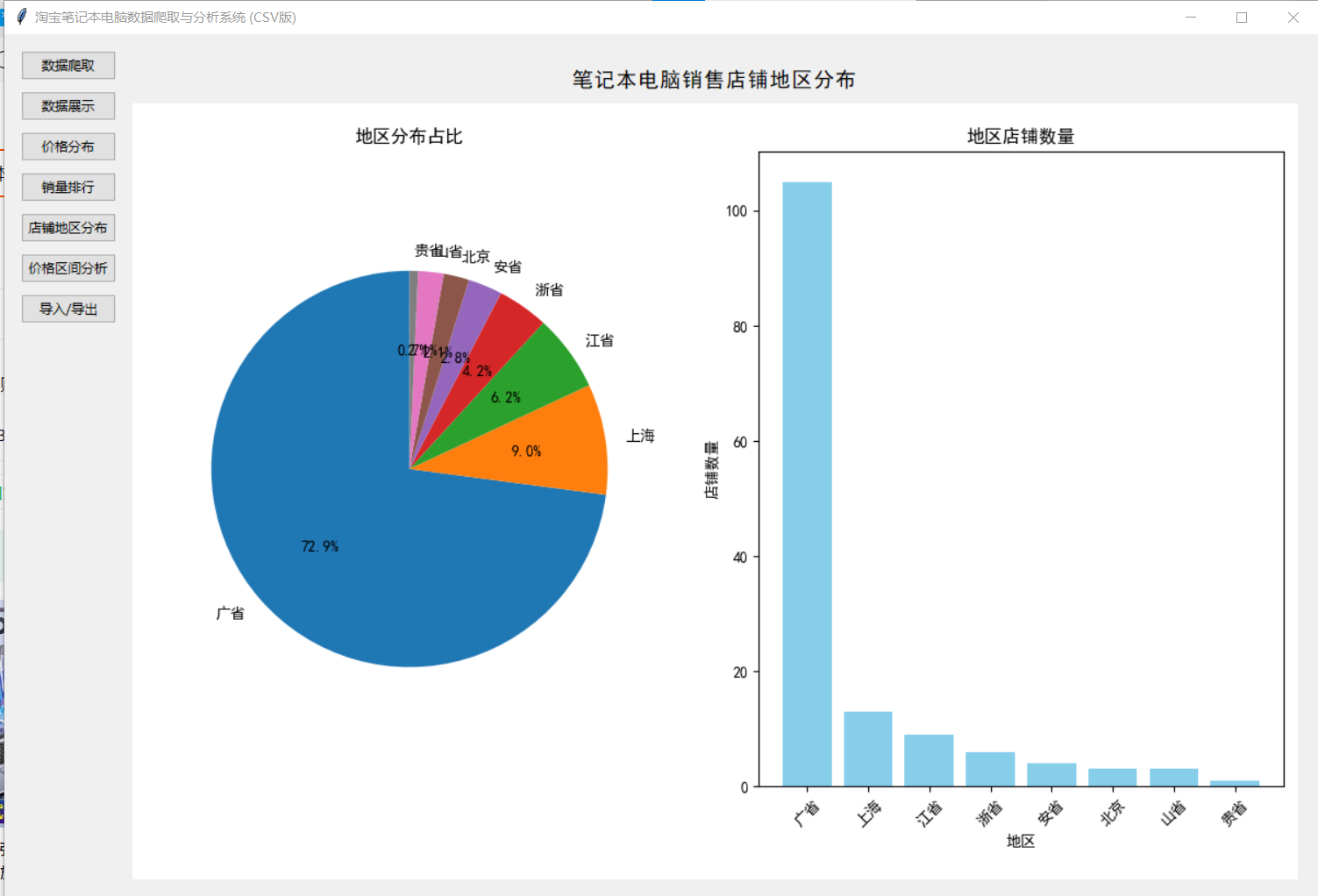
def show_region_distribution_frame(self):
"""显示店铺地区分布页面"""
self.clear_content_frame()
region_frame = ttk.Frame(self.content_frame)
region_frame.pack(fill=tk.BOTH, expand=True, padx=10, pady=10)
ttk.Label(region_frame, text="笔记本电脑销售店铺地区分布", font=("SimHei", 14)).pack(pady=10)
try:
# 获取地区数据
addresses = [item['address'] for item in self.data if item['address'] != '未知地区']
if not addresses:
ttk.Label(region_frame, text="没有找到地区数据,请先爬取数据").pack(pady=20)
return
# 处理地区数据,提取省份
province_data = {}
for addr in addresses:
if addr.startswith(('北京', '上海', '天津', '重庆')):
province = addr[:2]
elif addr.startswith('内蒙古'):
province = '内蒙古'
elif addr.startswith('新疆'):
province = '新疆'
elif addr.startswith('宁夏'):
province = '宁夏'
elif addr.startswith('广西'):
province = '广西'
elif addr.startswith('西藏'):
province = '西藏'
else:
province = addr[:1] + '省'
if province in province_data:
province_data[province] += 1
else:
province_data[province] = 1
# 按数量排序,取前10
sorted_provinces = sorted(province_data.items(), key=lambda x: x[1], reverse=True)[:10]
provinces = [item[0] for item in sorted_provinces]
counts = [item[1] for item in sorted_provinces]
# 创建图表
fig, (ax1, ax2) = plt.subplots(1, 2, figsize=(12, 6))
# 饼图
ax1.pie(counts, labels=provinces, autopct='%1.1f%%', startangle=90)
ax1.axis('equal')
ax1.set_title('地区分布占比', fontsize=12)
# 柱状图
ax2.bar(provinces, counts, color='skyblue')
ax2.set_title('地区店铺数量', fontsize=12)
ax2.set_xlabel('地区', fontsize=10)
ax2.set_ylabel('店铺数量', fontsize=10)
ax2.tick_params(axis='x', rotation=45)
# 调整布局
plt.tight_layout()
# 将图表嵌入Tkinter
canvas = FigureCanvasTkAgg(fig, master=region_frame)
canvas.draw()
canvas.get_tk_widget().pack(fill=tk.BOTH, expand=True)
except Exception as e:
ttk.Label(region_frame, text=f"生成地区分布图表出错: {str(e)}").pack(pady=20)
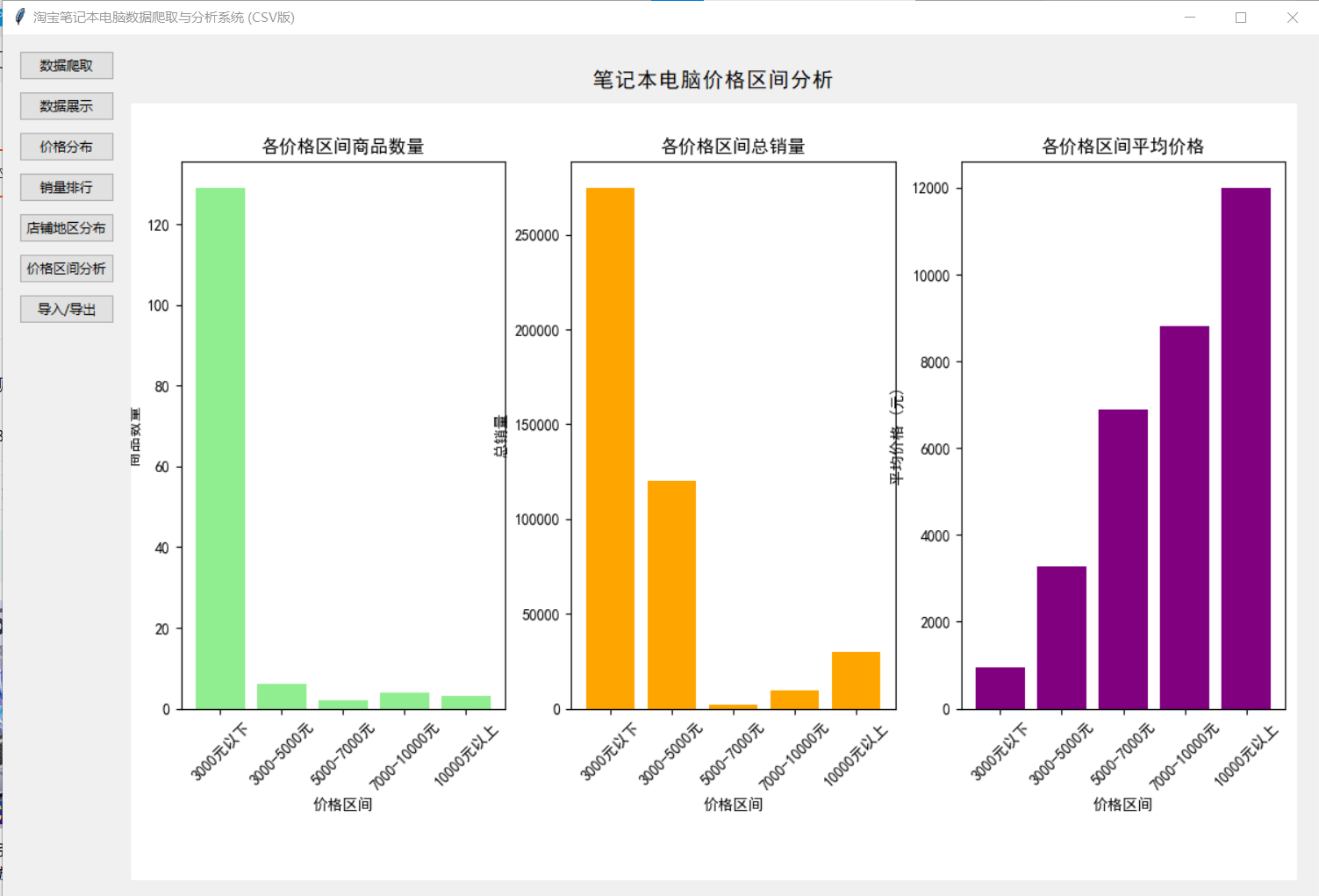
def show_price_range_frame(self):
"""显示价格区间分析页面"""
self.clear_content_frame()
price_range_frame = ttk.Frame(self.content_frame)
price_range_frame.pack(fill=tk.BOTH, expand=True, padx=10, pady=10)
ttk.Label(price_range_frame, text="笔记本电脑价格区间分析", font=("SimHei", 14)).pack(pady=10)
try:
# 获取价格和销量数据
prices = [item['price'] for item in self.data if item['price'] > 0]
sales = [item['sales'] for item in self.data if item['sales'] > 0]
if not prices or not sales:
ttk.Label(price_range_frame, text="没有找到足够的数据,请先爬取数据").pack(pady=20)
return
# 定义价格区间
ranges = [
(0, 3000),
(3000, 5000),
(5000, 7000),
(7000, 10000),
(10000, float('inf'))
]
range_labels = [
"3000元以下",
"3000-5000元",
"5000-7000元",
"7000-10000元",
"10000元以上"
]
# 统计每个区间的商品数量和总销量
range_counts = [0] * len(ranges)
range_sales = [0] * len(ranges)
range_avg_price = [0.0] * len(ranges)
for i, (min_p, max_p) in enumerate(ranges):
items_in_range = [(p, s) for p, s in zip(prices, sales) if min_p <= p < max_p]
range_counts[i] = len(items_in_range)
range_sales[i] = sum(s for _, s in items_in_range)
if range_counts[i] > 0:
range_avg_price[i] = sum(p for p, _ in items_in_range) / range_counts[i]
# 创建图表
fig, (ax1, ax2, ax3) = plt.subplots(1, 3, figsize=(15, 5))
# 各区间商品数量
ax1.bar(range_labels, range_counts, color='lightgreen')
ax1.set_title('各价格区间商品数量', fontsize=12)
ax1.set_xlabel('价格区间', fontsize=10)
ax1.set_ylabel('商品数量', fontsize=10)
ax1.tick_params(axis='x', rotation=45)
# 各区间总销量
ax2.bar(range_labels, range_sales, color='orange')
ax2.set_title('各价格区间总销量', fontsize=12)
ax2.set_xlabel('价格区间', fontsize=10)
ax2.set_ylabel('总销量', fontsize=10)
ax2.tick_params(axis='x', rotation=45)
# 各区间平均价格
ax3.bar(range_labels, range_avg_price, color='purple')
ax3.set_title('各价格区间平均价格', fontsize=12)
ax3.set_xlabel('价格区间', fontsize=10)
ax3.set_ylabel('平均价格 (元)', fontsize=10)
ax3.tick_params(axis='x', rotation=45)
# 调整布局
plt.tight_layout()
# 将图表嵌入Tkinter
canvas = FigureCanvasTkAgg(fig, master=price_range_frame)
canvas.draw()
canvas.get_tk_widget().pack(fill=tk.BOTH, expand=True)
except Exception as e:
ttk.Label(price_range_frame, text=f"生成价格区间分析图表出错: {str(e)}").pack(pady=20)
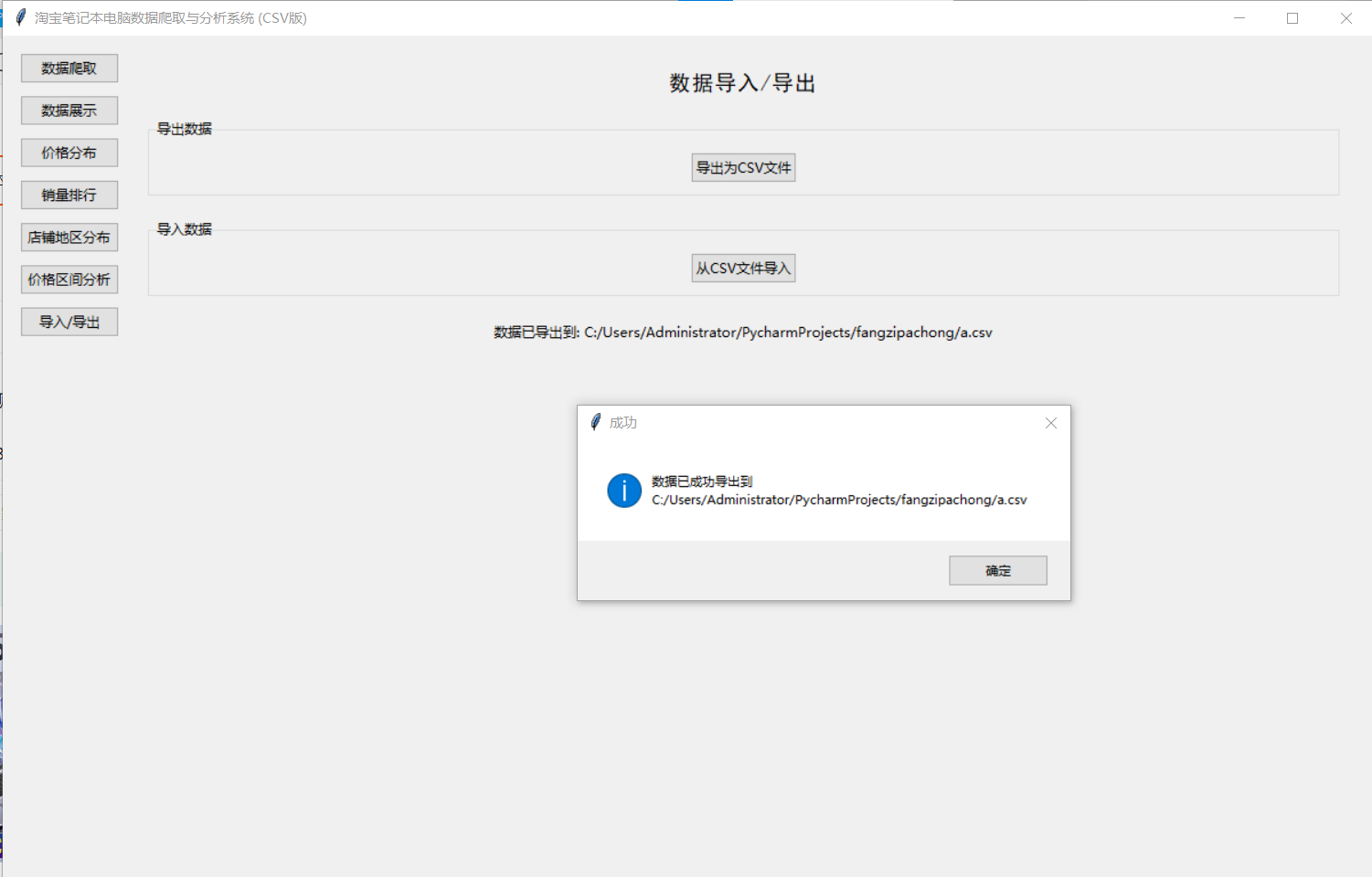
def show_import_export_frame(self):
"""显示导入/导出页面"""
self.clear_content_frame()
import_export_frame = ttk.Frame(self.content_frame)
import_export_frame.pack(fill=tk.BOTH, expand=True, padx=10, pady=10)
ttk.Label(import_export_frame, text="数据导入/导出", font=("SimHei", 14)).pack(pady=10)
# 导出功能
export_frame = ttk.LabelFrame(import_export_frame, text="导出数据")
export_frame.pack(fill=tk.X, padx=10, pady=10)
ttk.Button(export_frame, text="导出为CSV文件", command=self.export_csv).pack(pady=10)
# 导入功能
import_frame = ttk.LabelFrame(import_export_frame, text="导入数据")
import_frame.pack(fill=tk.X, padx=10, pady=10)
ttk.Button(import_frame, text="从CSV文件导入", command=self.import_csv).pack(pady=10)
# 状态信息
self.import_export_status = tk.StringVar()
self.import_export_status.set("准备就绪")
ttk.Label(import_export_frame, textvariable=self.import_export_status).pack(pady=10)
def export_csv(self):
"""导出数据为CSV文件"""
if not self.data:
messagebox.showwarning("警告", "没有数据可导出")
return
file_path = filedialog.asksaveasfilename(
defaultextension=".csv",
filetypes=[("CSV文件", "*.csv"), ("所有文件", "*.*")],
title="保存CSV文件"
)
if file_path:
try:
with open(file_path, 'w', encoding='utf-8', newline='') as f:
fieldnames = self.data[0].keys()
writer = csv.DictWriter(f, fieldnames=fieldnames)
writer.writeheader()
writer.writerows(self.data)
self.import_export_status.set(f"数据已导出到: {file_path}")
messagebox.showinfo("成功", f"数据已成功导出到 {file_path}")
except Exception as e:
self.import_export_status.set(f"导出失败: {str(e)}")
messagebox.showerror("错误", f"导出失败: {str(e)}")
def import_csv(self):
"""从CSV文件导入数据"""
file_path = filedialog.askopenfilename(
filetypes=[("CSV文件", "*.csv"), ("所有文件", "*.*")],
title="选择CSV文件"
)
if file_path:
try:
with open(file_path, 'r', encoding='utf-8') as f:
reader = csv.DictReader(f)
imported_data = []
for row in reader:
# 转换数据类型
row['price'] = float(row['price'])
row['sales'] = int(row['sales'])
imported_data.append(row)
self.data = imported_data
self.save_data()
self.import_export_status.set(f"数据已从 {file_path} 导入")
messagebox.showinfo("成功", f"成功导入 {len(self.data)} 条数据")
except Exception as e:
self.import_export_status.set(f"导入失败: {str(e)}")
messagebox.showerror("错误", f"导入失败: {str(e)}")
if __name__ == "__main__":
root = tk.Tk()
app = TaobaoLaptopSystem(root)
root.mainloop()
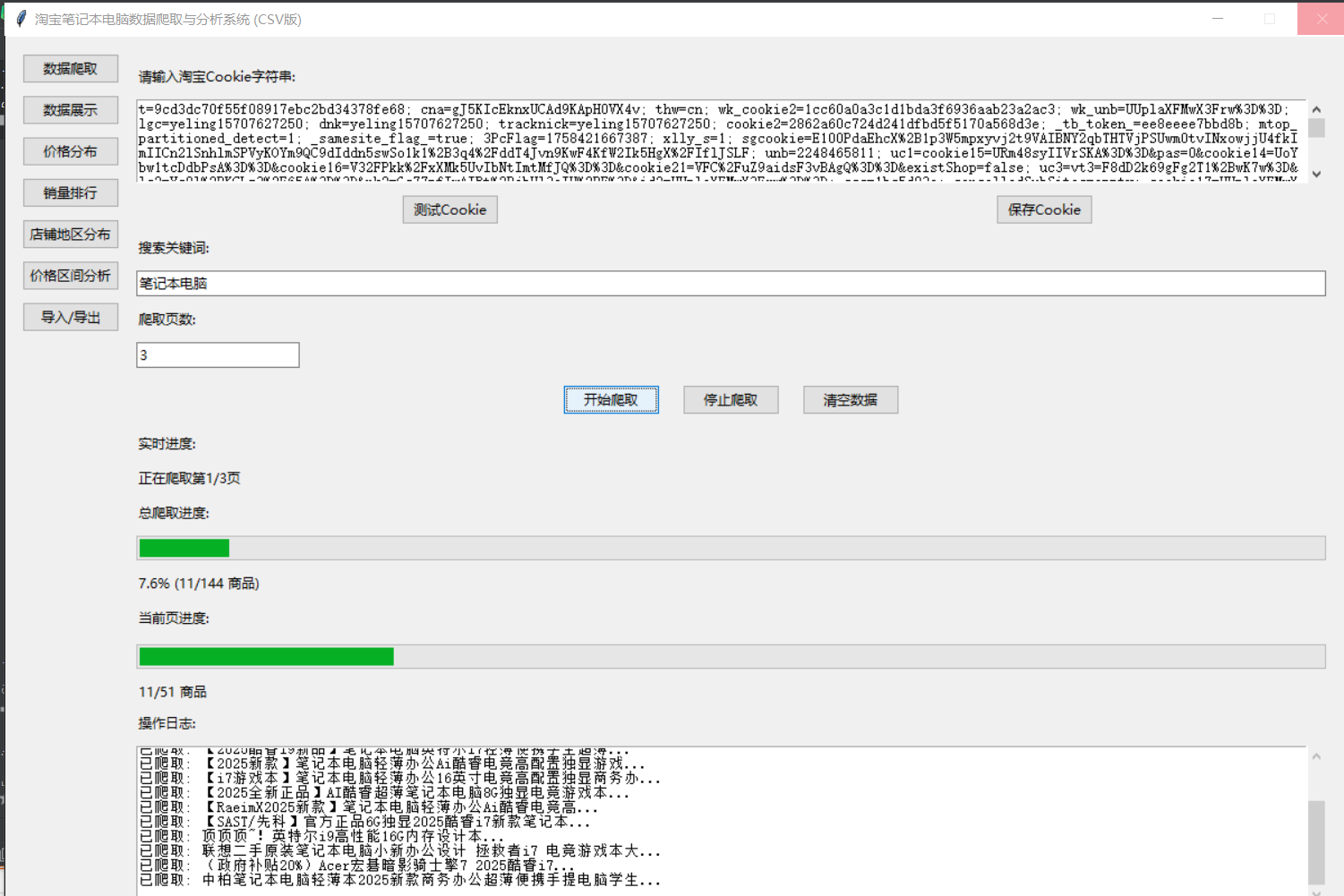
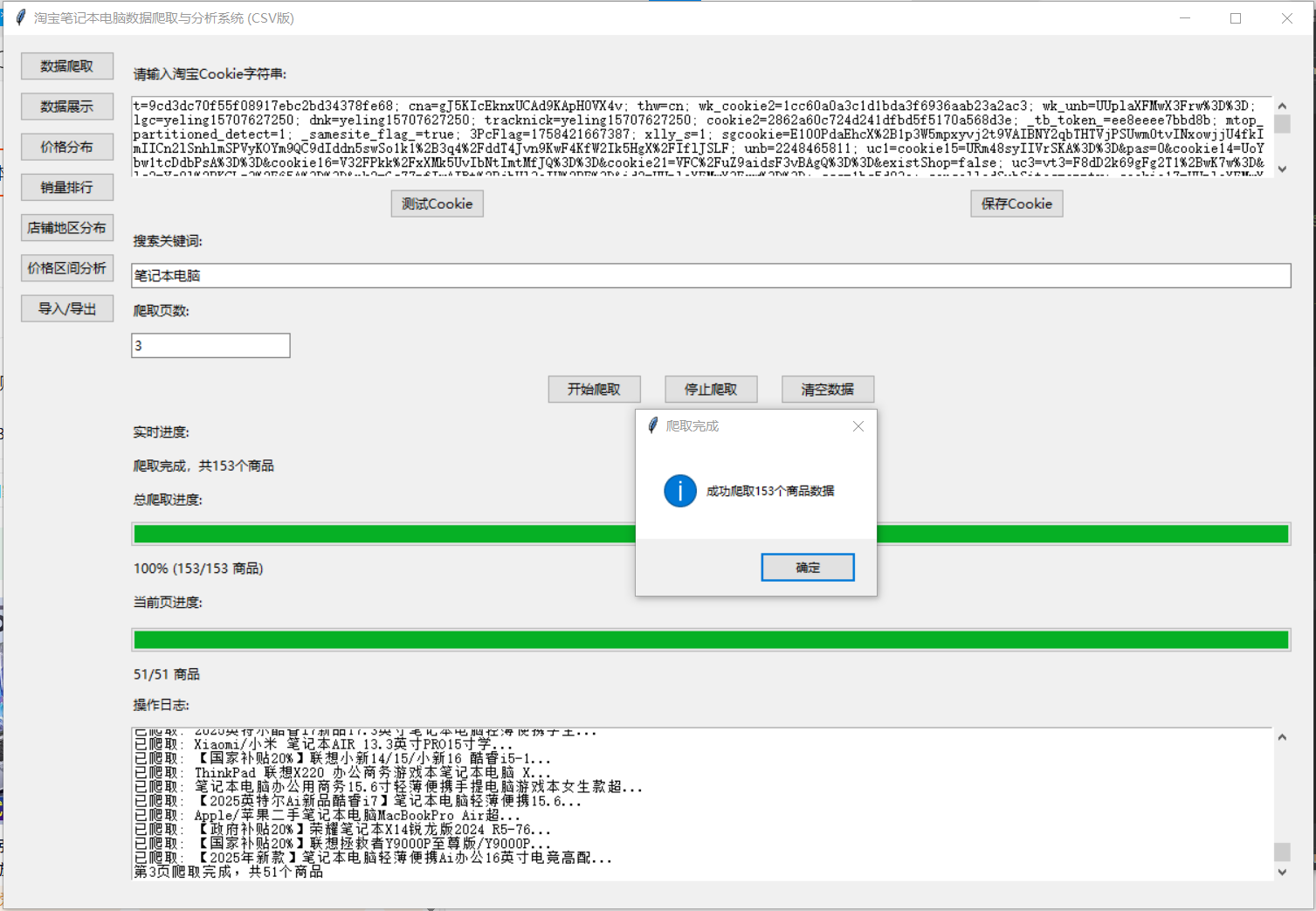
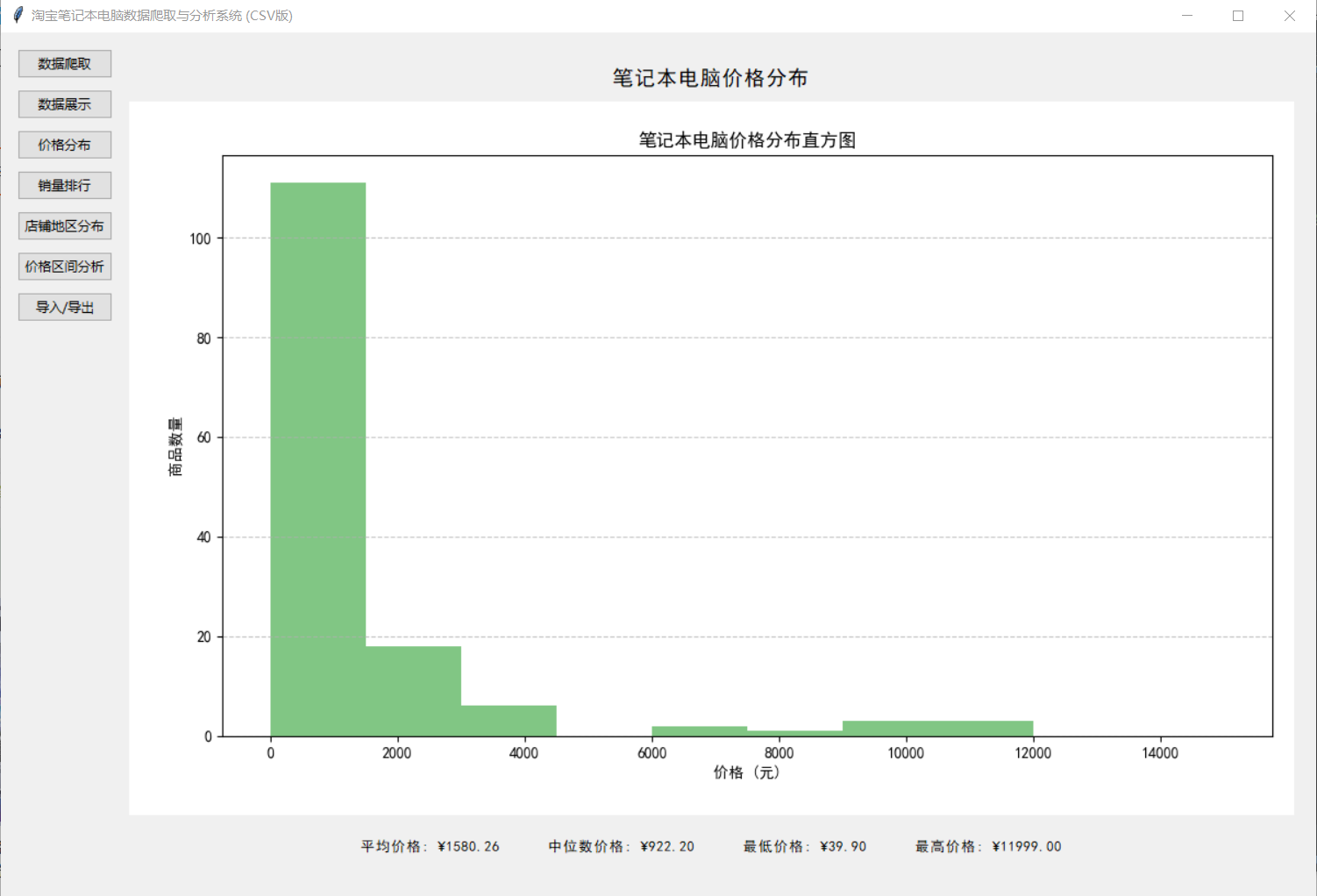
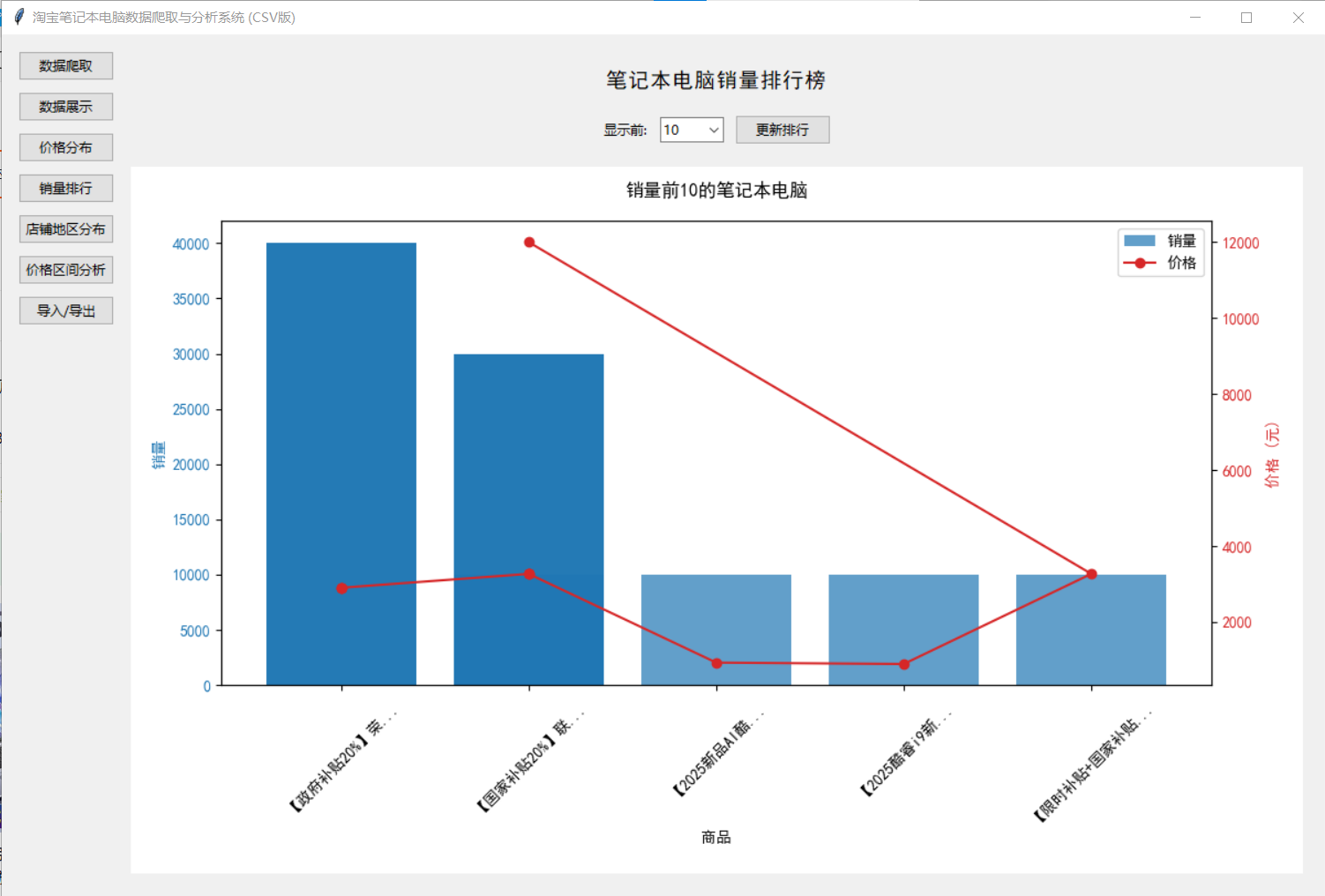
在这里插入图片描述

北京人形旗下天工造物具身智能开源社区,聚焦具身天工与慧思开物两大平台
更多推荐
 16
16 0
0- 0


 已为社区贡献16条内容

所有评论(0)