iec104-python库使用指南
IEC104 协议概述
IEC 60870-5-104(简称 IEC104)是电力系统中广泛应用于远程监控和控制设备的国际标准通信协议。该协议基于 TCP/IP 网络架构,默认使用端口 2404,实现了主站与子站之间的高效数据交换,能够满足电力自动化系统对实时性和可靠性的高要求。IEC104 协议主要应用于变电站自动化、电力调度系统、配电自动化等领域,实现了对远程设备的遥测、遥信、遥控和遥调等功能
IEC104 协议采用客户端/服务器通信模型,其中控制中心(主站)通常作为客户端,而远程终端设备(子站)作为服务器。协议定义了完整的应用数据单元(ASDU)结构,每个 ASDU 包含了信息对象地址、数据值、质量描述符和时间戳等信息,能够传输各种类型的监控数据。通信过程中,IEC104 支持三种报文格式:I 格式(信息传输)、S 格式(确认)和 U 格式(控制功能),确保了数据的完整性和有序传输
理解 IEC104 协议的报文结构是实现该协议的基础。一个完整的 IEC104 报文包含启动字符(0x68)、长度字段、控制域(8 字节)、应用服务数据单元(ASDU)和校验和等部分。ASDU 又由数据单元标识符(类型标识、可变结构限定词、传输原因、公共地址)和一个或多个信息对象组成。这种结构设计既保证了协议的标准化,又提供了足够的灵活性来适应不同的应用场景
安装iec104-python库
-
linux下安装(github原作者方法)
-
安装依赖
sudo apt-get install build-essential python3-pip python3-dev python3-dbg python3 -m pip install --upgrade pip -
克隆仓库
git clone --depth=1 --branch=main https://github.com/Fraunhofer-FIT-DIEN/iec104-python.git cd iec104-python git submodule update --init -
构建 wheel
python3 -m pip wheel .
-
-
linux下安装(本人镜像方法)
因为git submodule总是出现拉取依赖仓库失败的情况,我干脆把依赖也跟源代码放到一起放到国内镜像站了
-
安装依赖
sudo apt-get install build-essential python3-pip python3-dev python3-dbg python3 -m pip install --upgrade pip -
克隆仓库
git clone https://gitee.com/chen-dongyu123/iec104-python.git -
构建wheel
python3 -m pip wheel .
-
使用iec104-python库
使用iec104-python库实现iec104server
-
定义iec104server类
from typing import List import c104 import random import time from src.iec104.log import log class IEC104Server: def __init__(self, ip="0.0.0.0", port=2404, common_address=1): """ 初始化IEC 104服务器 :param ip: 服务器监听IP地址,默认0.0.0.0表示监听所有接口 :param port: 服务器监听端口,默认2404是IEC 104标准端口 :param common_address: 站地址,默认1 """ self.ip = ip self.port = port # 创建c104服务器实例 self.server = c104.Server(ip=ip, port=port) # 添加一个站 self.station = self.server.add_station(common_address=common_address) # 存储所有监控点的列表 self.points: List[c104.Point] = [] # 存储所有命令点的列表 self.commands = [] # 关联测点map self.related_point_map = {} # 设置默认回调函数 self._setup_callbacks() -
添加监控测点函数
def add_monitoring_point( self, io_address, point_type=c104.Type.M_ME_NC_1, report_ms=1000 ): """ 添加一个监控点到站 :param io_address: 信息对象地址(IOA) :param point_type: 点类型,默认是归一化值测量量(M_ME_NC_1) :param report_ms: 自动上报间隔(毫秒) :return: 创建的监控点对象 """ # 创建监控点 point = self.station.add_point( io_address=io_address, type=point_type, report_ms=report_ms ) if point: # 设置自动传输前的回调 point.on_before_auto_transmit(callable=self._before_auto_transmit) # 设置读取前的回调 point.on_before_read(callable=self._before_read) # 添加到监控点列表 self.points.append(point) return point -
添加命令点函数
def add_command_point(self, io_address, point_type=c104.Type.C_RC_TA_1): """ 添加一个命令点到站 :param io_address: 信息对象地址(IOA) :param point_type: 点类型,默认是调节步命令(C_RC_TA_1) :return: 创建的命令点对象 """ # 创建命令点 command = self.station.add_point(io_address=io_address, type=point_type) # 设置接收命令的回调 command.on_receive(callable=self._on_step_command) # 添加到命令点列表 self.commands.append(command) return command -
获取指定ioa地址值函数(暴露给外部系统)
def get_point_value(self, io_address: int, frame_type: int = 0) -> float: """ 获取指定IOA的监控点值 :param io_address: 信息对象地址(IOA) :param frame_type: 帧类型 :return: 监控点值 """ # 如果是遥测或者遥信 if frame_type == 0 or frame_type == 1: for point in self.points: if point.io_address == io_address: point = self.station.get_point(io_address=io_address) if point: if frame_type == 0: return float(point.value) elif frame_type == 1: return bool(point.value) elif frame_type == 2 or frame_type == 3: # 遥控或者遥调 for command in self.commands: if command.io_address == io_address: command = self.station.get_point(io_address=io_address) if command: if frame_type == 2: return bool(command.value) elif frame_type == 3: return float(command.value) return 0 -
设置指定ioa地址值函数(暴露给外部系统)
def set_point_value( self, io_address: int, value: float, frame_type: int = 0 ) -> None: """ 设置指定IOA的监控点值 :param io_address: 信息对象地址(IOA) :param value: 要设置的值 :param frame_type: 帧类型,默认遥测 """ try: # 如果是遥测或者遥信 if frame_type == 0 or frame_type == 1: for point in self.points: if point.io_address == io_address: point = self.station.get_point(io_address=io_address) if point: if frame_type == 0: point.value = float(value) elif frame_type == 1: point.value = bool(value) elif frame_type == 2 or frame_type == 3: # 遥控或者遥调 for command in self.commands: if command.io_address == io_address: command = self.station.get_point(io_address=io_address) if command: if frame_type == 2: command.value = bool(value) elif frame_type == 3: command.value = float(value) except Exception as e: log.info(f"设置监控点值失败: {e}") raise e -
启动服务器相关函数
def start(self): """启动IEC 104服务器""" self.server.start() def run(self, timeout=30): """ 运行服务器主循环 :param timeout: 超时时间(秒),默认30秒 """ # 等待客户端连接 while not self.server.has_active_connections: log.debug("等待客户端连接...") time.sleep(1) time.sleep(1) c = 0 # 保持连接直到超时或连接断开 while self.server.has_open_connections and c < timeout: c += 1 log.debug("保持连接中...") time.sleep(1) def isRunning(self) -> bool: """检查服务器是否运行中""" return self.server.is_running -
创建运行实例
if __name__ == "__main__":
    # 创建服务器实例
    server = IEC104Server(ip="0.0.0.0", port=2404, common_address=1)

    # 添加监控点(IOA=11)和命令点(IOA=12)
    server.add_monitoring_point(io_address=11)
    server.add_command_point(io_address=12)

    # 启动服务器并运行主循环
    server.start()
    server.run(timeout=30)
使用例子
将104服务端嵌入到模拟设备系统中
-
开启服务端
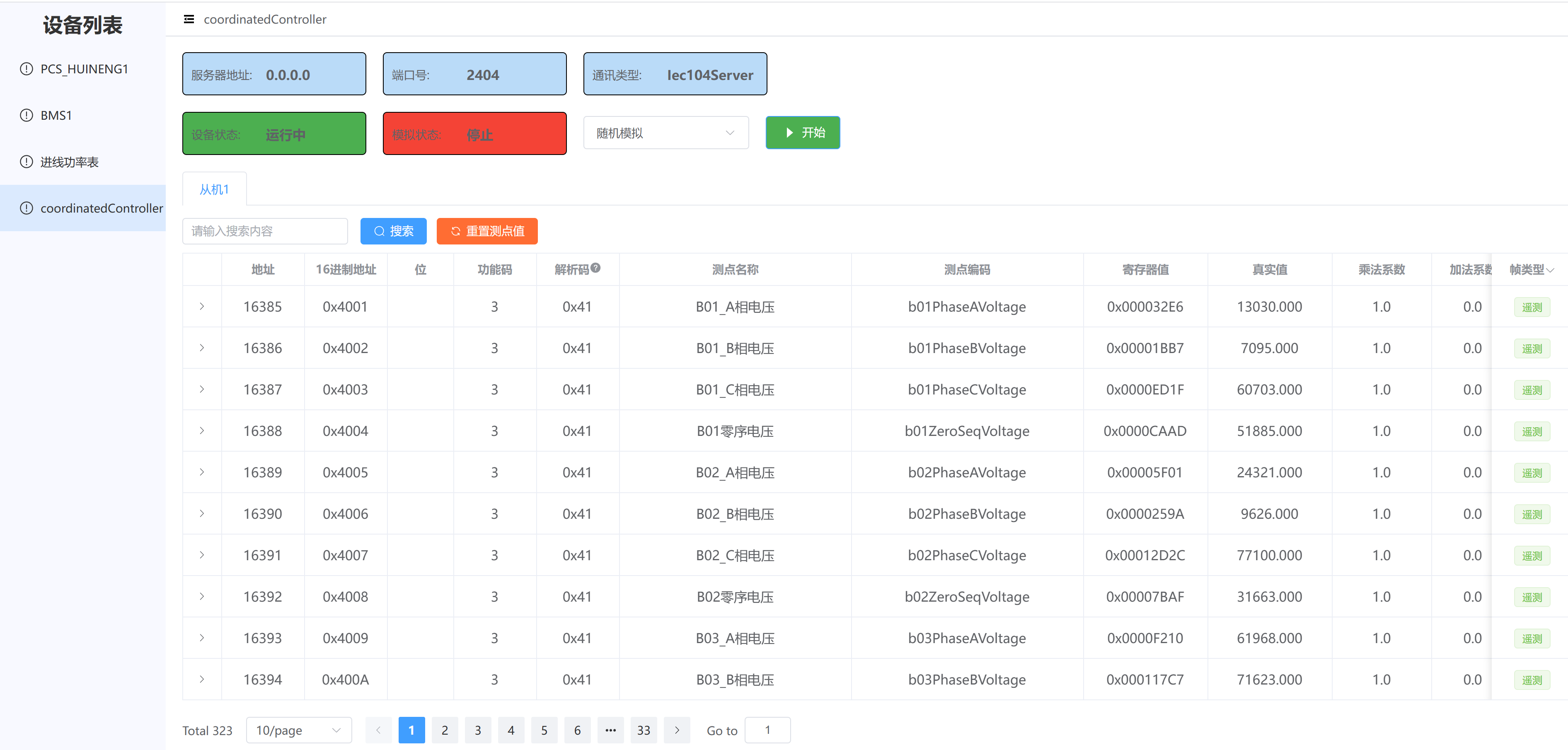
-
使用IEC104主站模拟软件,测试服务端数据
测试对比后,发现上送的值无误
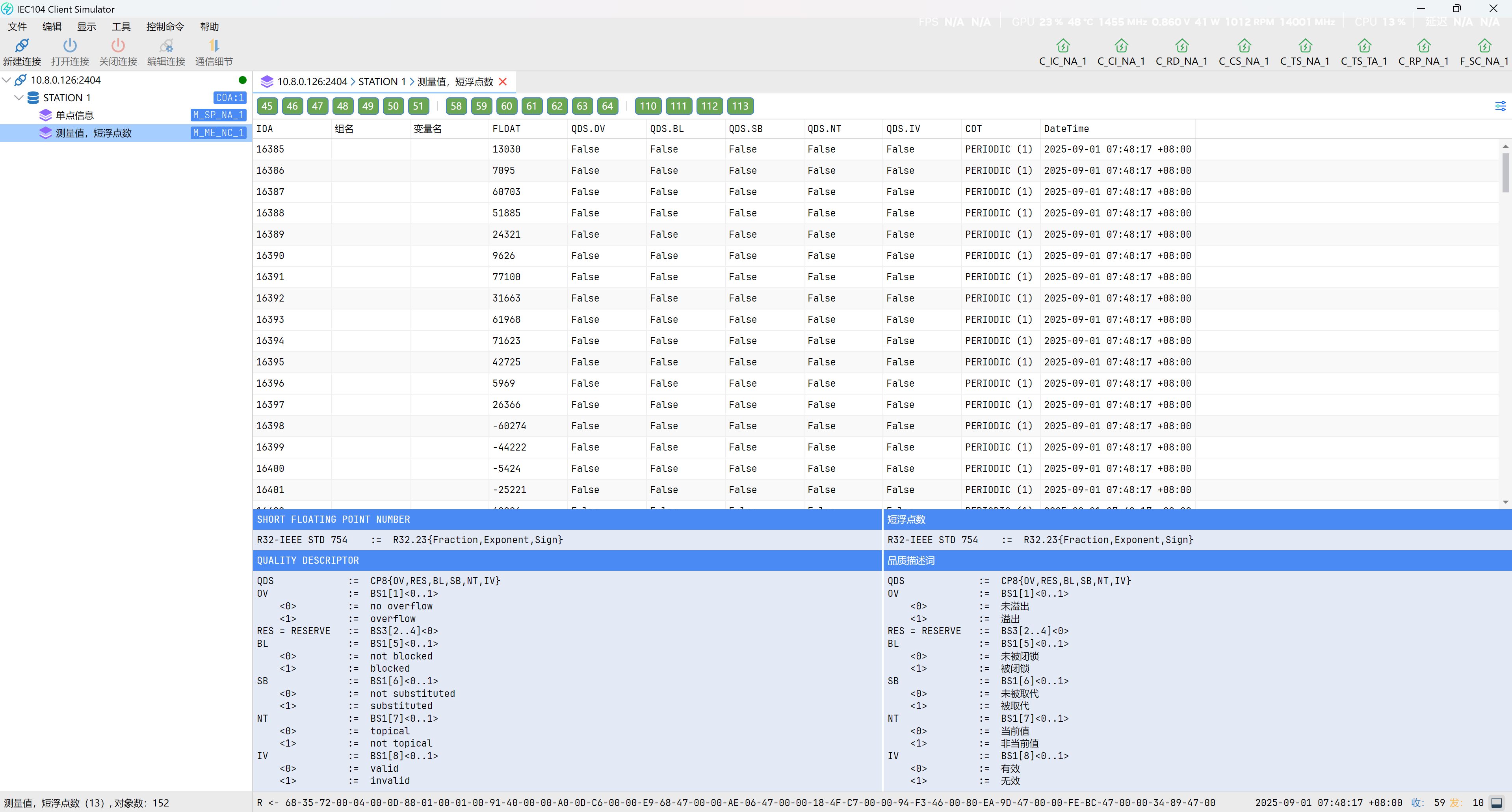
查看报文监控,也显示正常
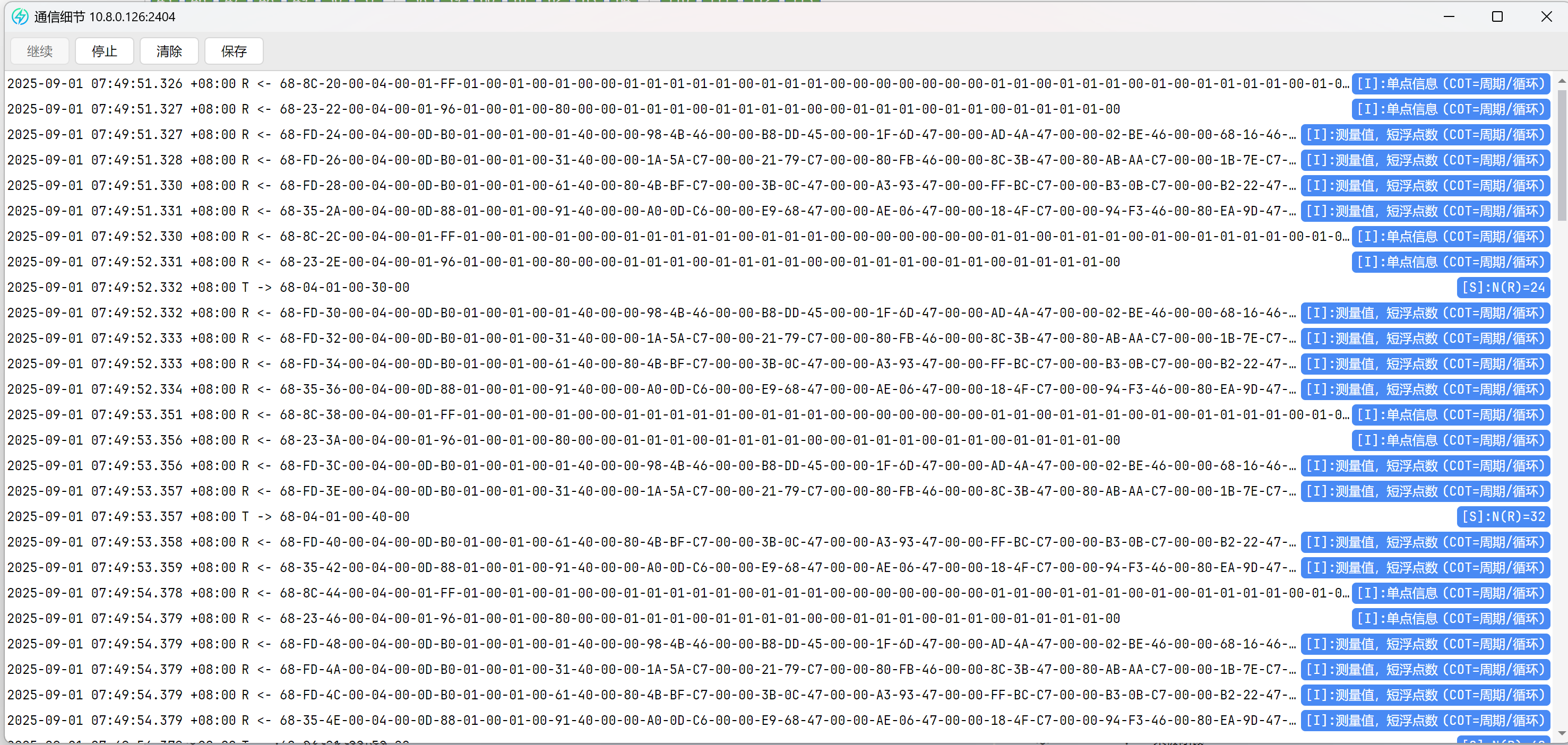

北京人形旗下天工造物具身智能开源社区,聚焦具身天工与慧思开物两大平台
更多推荐
 25
25 0
0- 0


 已为社区贡献6条内容

所有评论(0)