Python爬虫入门——起点小说信息爬取
·
网络爬虫是一种自动化获取互联网信息的技术,它可以模拟人类浏览网页的行为,从网页中提取所需的数据。在大数据时代,网络爬虫已经成为了获取数据的重要手段之一。
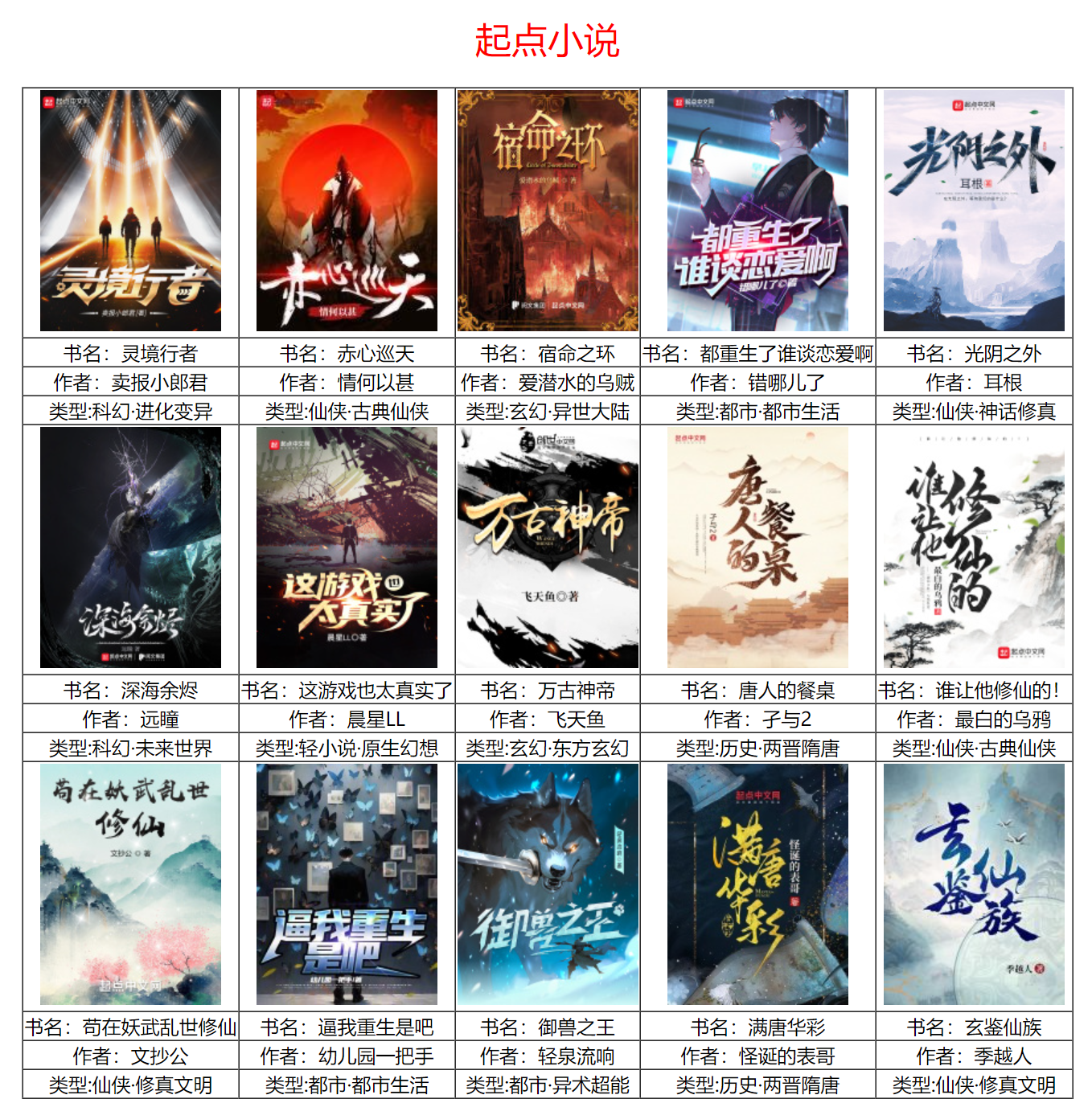
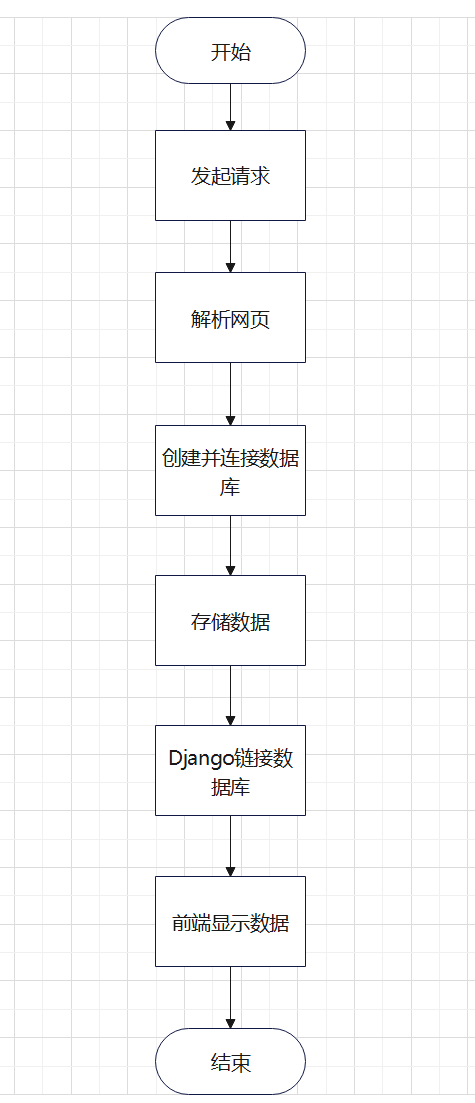
爬取起点小说网的任务包括爬取小说的书名,作者,小说类型,图片链接以及小说的链接。爬取信息后保存到数据库,再从数据库中提取信息在前端页面展示。
数据流图
数据爬取
url = 'https://www.qidian.com/all/'
headers = {'User-Agent':'Mozilla/5.0 (Windows NT 10.0; Win64; x64) AppleWebKit/537.36 (KHTML, like Gecko) Chrome/109.0.0.0 Safari/537.36 SLBrowser/9.0.0.10191 SLBChan/103'}
resp = requests.get(url,headers=headers)
#初始化pyQuery对象
doc = PyQuery(resp.text)
#书名
names = [a.text for a in doc('h2 a')]
#作者
authers = doc('p.author a.name')
authers_list = []
for i in range(len(authers)):
    authers_list.append(authers[i].text)
#类型
#type1
types = doc('p.author a')
types_list = []
for k in range(1,len(types),3):
    types_list.append(types[k].text)

#type2
types_list2 = []
for n in range(2,len(types),3):
    types_list2.append(types[n].text)

#链接
attr = 'data-eid' #属性
value = 'qd_B57' #属性值
links = doc(f'a[{attr}="{value}"]')
links_list = []
for m in links:
    links_list.append('https:'+m.attrib['href'])
#图片
imgs = doc('a[data-eid="qd_B57"] img')
imgs_list = []
for j in imgs:
    imgs_list.append('https:'+j.attrib['src'])
数据存储
#连接数据库
con = Connect(host="127.0.0.1",port=3306,user="root",password="root")
cursor = con.cursor()#获取游标
con.select_db("db")
for name,auther,type1,type2,link,img in zip(names,authers_list,types_list,types_list2,links_list,imgs_list):
    sql = "insert into novel values(%s,%s,%s,%s,%s,%s)"
    cursor.execute(sql,[name,auther,type1,type2,link,img])
    con.commit()
cursor.close()
con.close()
Django获取数据
#连接数据库
conn = Connect(host="127.0.0.1",port=3306,user="root",password="root")
cursor = conn.cursor()#获取游标
conn.select_db("db")
sql = "select * from novel"
cursor.execute(sql)
result = cursor.fetchall()#获取所有结果
conn.commit()
cursor.close()
conn.close()
数据响应到前端
def runoob(request):
    context = {}
    k = len(result)
    for i in range(k):
        context[f'name{i}'] = result[i][0]
        context[f'auther{i}'] = result[i][1]
        context[f'type1{i}'] = result[i][2]
        context[f'type2{i}'] = result[i][3]

        context[f'LinkImg{i}'] = f'<a href={result[i][4]} target="_blank"><img src="{result[i][5]}"></a>'
    return render(request, 'h.html', {'content':context})
前端关键代码
前段关键代码:
<tr>
    <td class="img">{% autoescape off %} {{LinkImg0}} {% endautoescape %}</td>
    <td class="img">{% autoescape off %} {{LinkImg1}} {% endautoescape %}</td>
    <td class="img">{% autoescape off %} {{LinkImg2}} {% endautoescape %}</td>
    <td class="img">{% autoescape off %} {{LinkImg3}} {% endautoescape %}</td>
    <td class="img">{% autoescape off %} {{LinkImg4}} {% endautoescape %}</td>
</tr>
<tr>
    <td class="info">书名:{{name0}}</td>
    <td class="info">书名:{{name1}}</td>
    <td class="info">书名:{{name2}}</td>
    <td class="info">书名:{{name3}}</td>
    <td class="info">书名:{{name4}}</td>
</tr>
    <tr>
    <td class="info">作者:{{auther0}}</td>
    <td class="info">作者:{{auther1}}</td>
    <td class="info">作者:{{auther2}}</td>
    <td class="info">作者:{{auther3}}</td>
    <td class="info">作者:{{auther4}}</td>
</tr>
    <tr>
    <td class="info">类型:{{type10}}·{{type20}}</td>
    <td class="info">类型:{{type11}}·{{type21}}</td>
    <td class="info">类型:{{type12}}·{{type22}}</td>
    <td class="info">类型:{{type13}}·{{type23}}</td>
    <td class="info">类型:{{type14}}·{{type24}}</td>
</tr>

北京人形旗下天工造物具身智能开源社区,聚焦具身天工与慧思开物两大平台
更多推荐
 9
9 0
0- 0


 已为社区贡献1条内容

所有评论(0)