UE C++ 实现 智慧城市 中围绕一个点的移动旋转自由视角
·
一.
1.额外的头文件
#include "GameFramework/SpringArmComponent.h"
#include "Camera/CameraComponent.h"
2.先看头文件,大概能看出思路。旋转平移,以及左右鼠标激活的限制,条件。并且还有是视角切换到自己。
protected:
	// Called when the game starts or when spawned
	virtual void BeginPlay() override;

public:
	// Called every frame
	virtual void Tick(float DeltaTime) override;

	// Called to bind functionality to input
	virtual void SetupPlayerInputComponent(class UInputComponent* PlayerInputComponent) override;
	UPROPERTY(VisibleAnywhere, BlueprintReadOnly, Category = MySceneComponent)
	USpringArmComponent* SpringArm;

	UPROPERTY(VisibleAnywhere, BlueprintReadOnly, Category = MySceneComponent)
	UCameraComponent* Camera;
	void ActiveRotate();
	void DeActiveRotate();
	void ActivePin();
	void DeActivePin();
	void Zoom(bool Direction, float ZoomSpeed);
	void PanX(float Value);
	void PanY(float Value);
	void RotateX(float Value);
	void RotateY(float Value);
	void SetPossess();
private:
	bool PinEnable = false;
	bool RotateEnable = false;
二.实现
1.构造里首先 加载Component组件,设置它虽Controller旋转,并且相机移动,旋转平滑。不带有碰撞。
{
 	// Set this pawn to call Tick() every frame.  You can turn this off to improve performance if you don't need it.
	PrimaryActorTick.bCanEverTick = true;
	RootComponent = CreateDefaultSubobject<USceneComponent>("Root");
	SpringArm = CreateDefaultSubobject<USpringArmComponent>("SpringArm");
	Camera = CreateDefaultSubobject<UCameraComponent>("Camera");
	SpringArm->TargetArmLength = 300;
	SpringArm->bDoCollisionTest = false;
	SpringArm->bUsePawnControlRotation = true; // Rotate the arm based on the controller,Controller是绝对旋转
	SpringArm->bEnableCameraLag = true;   //平滑
	SpringArm->bEnableCameraRotationLag = true; //旋转平滑
	Camera->SetupAttachment(SpringArm);
	SpringArm->SetupAttachment(RootComponent);
	AutoPossessPlayer = EAutoReceiveInput::Player0;
}
2.远近,比较常规的写法。弹力臂,伸缩。和输入绑定设置,并作限制。
void XXX::Zoom(bool Direction, float ZoomSpeed)
{
	if (Direction) {
		if (SpringArm->TargetArmLength >= 30 && SpringArm->TargetArmLength <= 50000) {
			SpringArm->TargetArmLength += (ZoomSpeed * 100);
			if (SpringArm->TargetArmLength >= 50000)
			{
				SpringArm->TargetArmLength = 50000;
			}
		}
	}
	else {
		if (SpringArm->TargetArmLength >= 30 && SpringArm->TargetArmLength <= 50000) {
			SpringArm->TargetArmLength -= (ZoomSpeed * 100);
			if (SpringArm->TargetArmLength <= 30)
			{
				SpringArm->TargetArmLength = 30;
			}
		}
	}
}
3.当前位置和朝向,左右前后平移。这个应该最难的,不仅要用欧拉角旋转矩阵计算你当前朝向的前后左右,避免死锁,计算准确。还需要时刻记录,你当前的Controller朝向,因为Controller带动着Pawn在你朝向前后左右分别移动。并且还做了效果处理,当镜头越远,移动幅度越大。网上只看到蓝图实现的,C++自己尝试出来的。
void XXX::PanX(float Value)
{
	FRotator YarRotation(0, GetControlRotation().Yaw,0);
	// 先根据欧拉角表示的旋转向量 构造旋转矩阵,再通过矩阵获取X轴的方向向量(即you方)
	const FVector RightDirection(FRotationMatrix(YarRotation).GetUnitAxis(EAxis::Y));
	if (Value&&PinEnable)
	{
		AddActorLocalOffset(-RightDirection * Value*10* SpringArm->TargetArmLength*0.01f);
	}
}

void XXX::PanY(float Value)
{
	//AddControllerPitchInput(Value);
	FRotator YarRotation(0, GetControlRotation().Yaw, 0);
	// 先根据欧拉角表示的旋转向量 构造旋转矩阵,再通过矩阵获取X轴的方向向量(即正前方)
	const FVector ForwardDirection(FRotationMatrix(YarRotation).GetUnitAxis(EAxis::X));
	if (Value && PinEnable)
	{
		AddActorLocalOffset(-ForwardDirection * Value * 10* SpringArm->TargetArmLength*0.01f);
	}
}
4.旋转,也有一定难度。原则上是改动GameController的Yaw,Pitch就能带动Pawn旋转。但是yaw问题不大,360°随便转,它是连续的。但Pitch一般要做限制不穿地。当值超过360会跳变为0,小于0,也会跳变。这里限制,在一个不跳变的区间。当然如果用欧拉角可能也可以实现。
void ::RotateX(float Value)
{
	if (Value && RotateEnable)
	{
		AddControllerYawInput(Value*2);
	}
}


void ::RotateY(float Value)
{
	if (Value && RotateEnable)
	{
		FRotator CurRot(GetControlRotation().Pitch, GetControlRotation().Yaw, GetControlRotation().Roll);
		//AddControllerPitchInput(Value);
		/*if (GetControlRotation().Pitch <= 0)
		{*/
			double ToPitch = CurRot.Pitch + Value*2;
			if (ToPitch >= 355)
			{
				ToPitch = 355;
			}
			else if(ToPitch <= 280)
			{
				ToPitch = 280;
			}
			UE_LOG(LogTemp,Warning,TEXT("%f"), CurRot.Pitch);
			FRotator TmpRot(ToPitch, GetControlRotation().Yaw, GetControlRotation().Roll);
			GetController()->SetControlRotation(TmpRot);
		/*}*/
	}
}
5.让镜头,转移到自己的控制权。
void ::SetPossess()
{
	APlayerController* tmpPC = UGameplayStatics::GetPlayerController(GetWorld(), 0);
	tmpPC->Possess(this);
}
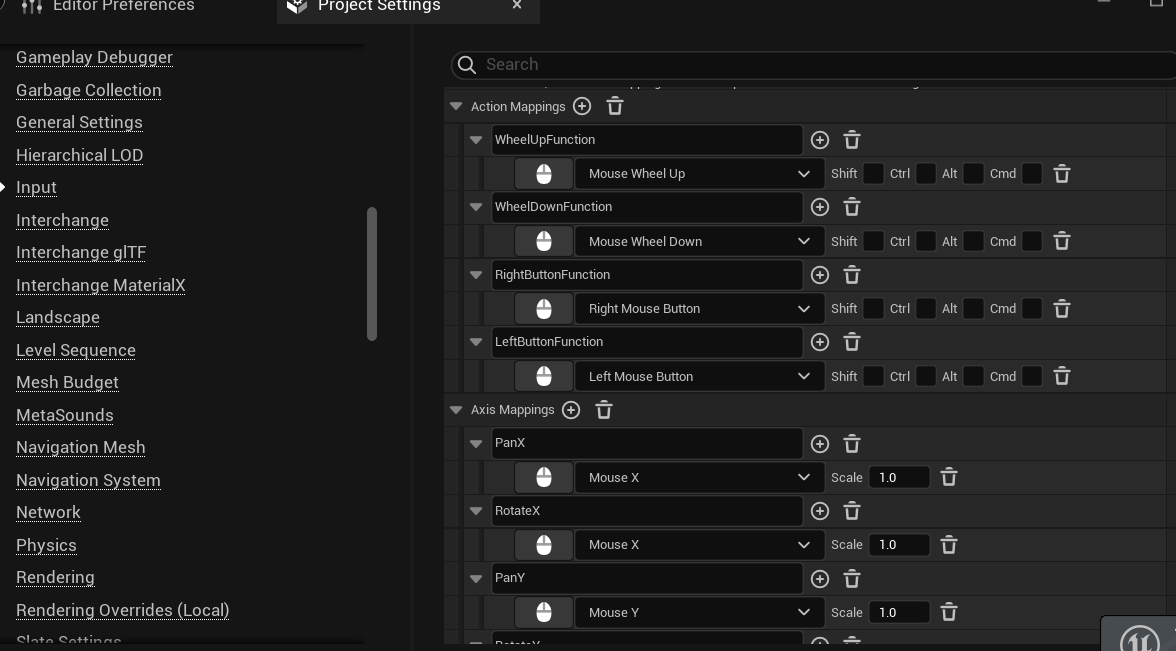
6.输入绑定

北京人形旗下天工造物具身智能开源社区,聚焦具身天工与慧思开物两大平台
更多推荐
 7
7 0
0- 0


 已为社区贡献1条内容

所有评论(0)