爬虫工具:Firecrawl
git官网:https://github.com/mendableai/firecrawl
文档:https://docs.firecrawl.dev/introduction
Firecrawl 是一种 API 服务,它获取 URL、对其进行抓取并将其转换为干净的 markdown。我们会抓取所有可访问的子页面,并为每个子页面提供干净的 markdown。无需站点地图。
前提条件
服务器需要较高的运行内存(部署后至少需要2G空余内存),不然执行复杂的抓取任务会报错
本地运行
- node.js
- pnpm
- redis
自托管
- Docker环境
安装步骤
本地运行
- 下载源码
使用git或下载压缩包
git clone https://github.com/mendableai/firecrawl.git
- 设置环境参数
在根目录中创建一个 .env,可以复制 apps/api/.env.example 中的模板
cd /firecrawl/apps/api
cp .env.example .env
默认不会设置身份验证或任何可选子服务(pdf 解析、JS 阻止支持、AI 功能)
# .env

# ===== Required ENVS ======
NUM_WORKERS_PER_QUEUE=8
PORT=3002
HOST=0.0.0.0

#for self-hosting using docker, use redis://redis:6379. For running locally, use redis://localhost:6379
REDIS_URL=redis://redis:6379

#for self-hosting using docker, use redis://redis:6379. For running locally, use redis://localhost:6379
REDIS_RATE_LIMIT_URL=redis://redis:6379
PLAYWRIGHT_MICROSERVICE_URL=http://playwright-service:3000/html

## To turn on DB authentication, you need to set up supabase.
USE_DB_AUTHENTICATION=false

# ===== Optional ENVS ======

# Supabase Setup (used to support DB authentication, advanced logging, etc.)
SUPABASE_ANON_TOKEN=
SUPABASE_URL=
SUPABASE_SERVICE_TOKEN=

# Other Optionals
# use if you've set up authentication and want to test with a real API key
TEST_API_KEY=
# set if you'd like to test the scraping rate limit
RATE_LIMIT_TEST_API_KEY_SCRAPE=
# set if you'd like to test the crawling rate limit
RATE_LIMIT_TEST_API_KEY_CRAWL=
# set if you'd like to use scraping Be to handle JS blocking
SCRAPING_BEE_API_KEY=
# add for LLM dependednt features (image alt generation, etc.)
OPENAI_API_KEY=
BULL_AUTH_KEY=@
# use if you're configuring basic logging with logtail
LOGTAIL_KEY=
# set if you have a llamaparse key you'd like to use to parse pdfs
LLAMAPARSE_API_KEY=
# set if you'd like to send slack server health status messages
SLACK_WEBHOOK_URL=
# set if you'd like to send posthog events like job logs
POSTHOG_API_KEY=
# set if you'd like to send posthog events like job logs
POSTHOG_HOST=

# set if you'd like to use the fire engine closed beta
FIRE_ENGINE_BETA_URL=

# Proxy Settings for Playwright (Alternative you can can use a proxy service like oxylabs, which rotates IPs for you on every request)
PROXY_SERVER=
PROXY_USERNAME=
PROXY_PASSWORD=
# set if you'd like to block media requests to save proxy bandwidth
BLOCK_MEDIA=

# Set this to the URL of your webhook when using the self-hosted version of FireCrawl
SELF_HOSTED_WEBHOOK_URL=

# Resend API Key for transactional emails
RESEND_API_KEY=

# LOGGING_LEVEL determines the verbosity of logs that the system will output.
# Available levels are:
# NONE - No logs will be output.
# ERROR - For logging error messages that indicate a failure in a specific operation.
# WARN - For logging potentially harmful situations that are not necessarily errors.
# INFO - For logging informational messages that highlight the progress of the application.
# DEBUG - For logging detailed information on the flow through the system, primarily used for debugging.
# TRACE - For logging more detailed information than the DEBUG level.
# Set LOGGING_LEVEL to one of the above options to control logging output.
LOGGING_LEVEL=INFO
- 安装依赖项
使用 pnpm 安装依赖项
# cd apps/api # 确保您位于正确的文件夹中
pnpm install # 确保您拥有 pnpm 版本 9+!
- 运行项目
您需要打开 3 个终端来运行服务。
终端 1 - 设置 redis
在项目中的任何位置运行命令
redis-server
终端 2 - 设置工作程序
现在,导航到 apps/api/ 目录并运行:
pnpm run worker
如果您要使用 llm-extract 功能](https://github.com/mendableai/firecrawl/pull/586/)),您还应该导出 OPENAI_API_KEY=sk-______
这将启动负责处理抓取作业的工作程序。
终端 3 - 设置主服务器
为此,请导航到 apps/api/ 目录。如果您尚未安装 pnpm,可以在此处安装:https://pnpm.io/installation
接下来,使用以下命令运行您的服务器:
pnpm run start
- 测试
curl -X POST http://localhost:3002/v1/crawl \
    -H 'Content-Type: application/json' \
    -d '{
      "url": "https://docs.firecrawl.dev"
    }'
自托管
- 下载源码
使用git或下载压缩包
git clone https://github.com/mendableai/firecrawl.git
- 设置环境参数
在根目录中创建一个 .env,可以复制 apps/api/.env.example 中的模板
cd /firecrawl/apps/api
cp .env.example .env
默认不会设置身份验证或任何可选子服务(pdf 解析、JS 阻止支持、AI 功能)
# .env

# ===== Required ENVS ======
NUM_WORKERS_PER_QUEUE=8
PORT=3002
HOST=0.0.0.0

#for self-hosting using docker, use redis://redis:6379. For running locally, use redis://localhost:6379
REDIS_URL=redis://redis:6379

#for self-hosting using docker, use redis://redis:6379. For running locally, use redis://localhost:6379
REDIS_RATE_LIMIT_URL=redis://redis:6379
PLAYWRIGHT_MICROSERVICE_URL=http://playwright-service:3000/html

## To turn on DB authentication, you need to set up supabase.
USE_DB_AUTHENTICATION=false

# ===== Optional ENVS ======

# Supabase Setup (used to support DB authentication, advanced logging, etc.)
SUPABASE_ANON_TOKEN=
SUPABASE_URL=
SUPABASE_SERVICE_TOKEN=

# Other Optionals
# use if you've set up authentication and want to test with a real API key
TEST_API_KEY=
# set if you'd like to test the scraping rate limit
RATE_LIMIT_TEST_API_KEY_SCRAPE=
# set if you'd like to test the crawling rate limit
RATE_LIMIT_TEST_API_KEY_CRAWL=
# set if you'd like to use scraping Be to handle JS blocking
SCRAPING_BEE_API_KEY=
# add for LLM dependednt features (image alt generation, etc.)
OPENAI_API_KEY=
BULL_AUTH_KEY=@
# use if you're configuring basic logging with logtail
LOGTAIL_KEY=
# set if you have a llamaparse key you'd like to use to parse pdfs
LLAMAPARSE_API_KEY=
# set if you'd like to send slack server health status messages
SLACK_WEBHOOK_URL=
# set if you'd like to send posthog events like job logs
POSTHOG_API_KEY=
# set if you'd like to send posthog events like job logs
POSTHOG_HOST=

# set if you'd like to use the fire engine closed beta
FIRE_ENGINE_BETA_URL=

# Proxy Settings for Playwright (Alternative you can can use a proxy service like oxylabs, which rotates IPs for you on every request)
PROXY_SERVER=
PROXY_USERNAME=
PROXY_PASSWORD=
# set if you'd like to block media requests to save proxy bandwidth
BLOCK_MEDIA=

# Set this to the URL of your webhook when using the self-hosted version of FireCrawl
SELF_HOSTED_WEBHOOK_URL=

# Resend API Key for transactional emails
RESEND_API_KEY=

# LOGGING_LEVEL determines the verbosity of logs that the system will output.
# Available levels are:
# NONE - No logs will be output.
# ERROR - For logging error messages that indicate a failure in a specific operation.
# WARN - For logging potentially harmful situations that are not necessarily errors.
# INFO - For logging informational messages that highlight the progress of the application.
# DEBUG - For logging detailed information on the flow through the system, primarily used for debugging.
# TRACE - For logging more detailed information than the DEBUG level.
# Set LOGGING_LEVEL to one of the above options to control logging output.
LOGGING_LEVEL=INFO
一定要将USE_DB_AUTHENTICATION设置为false
- 构建并运行 Docker 容器:
docker compose build
docker compose up -d
这将运行 Firecrawl 的本地实例,可通过 http://localhost:3002 访问。
你应该能够在 http://localhost:3002/admin/@/queues 上看到 管理端Bull Queue Manager UI。
- 测试
curl -X POST http://localhost:3002/v1/crawl \
    -H 'Content-Type: application/json' \
    -d '{
      "url": "https://docs.firecrawl.dev"
    }'
其他
- 开启AI功能
docker-compose.yaml中有对OpenAI的配置
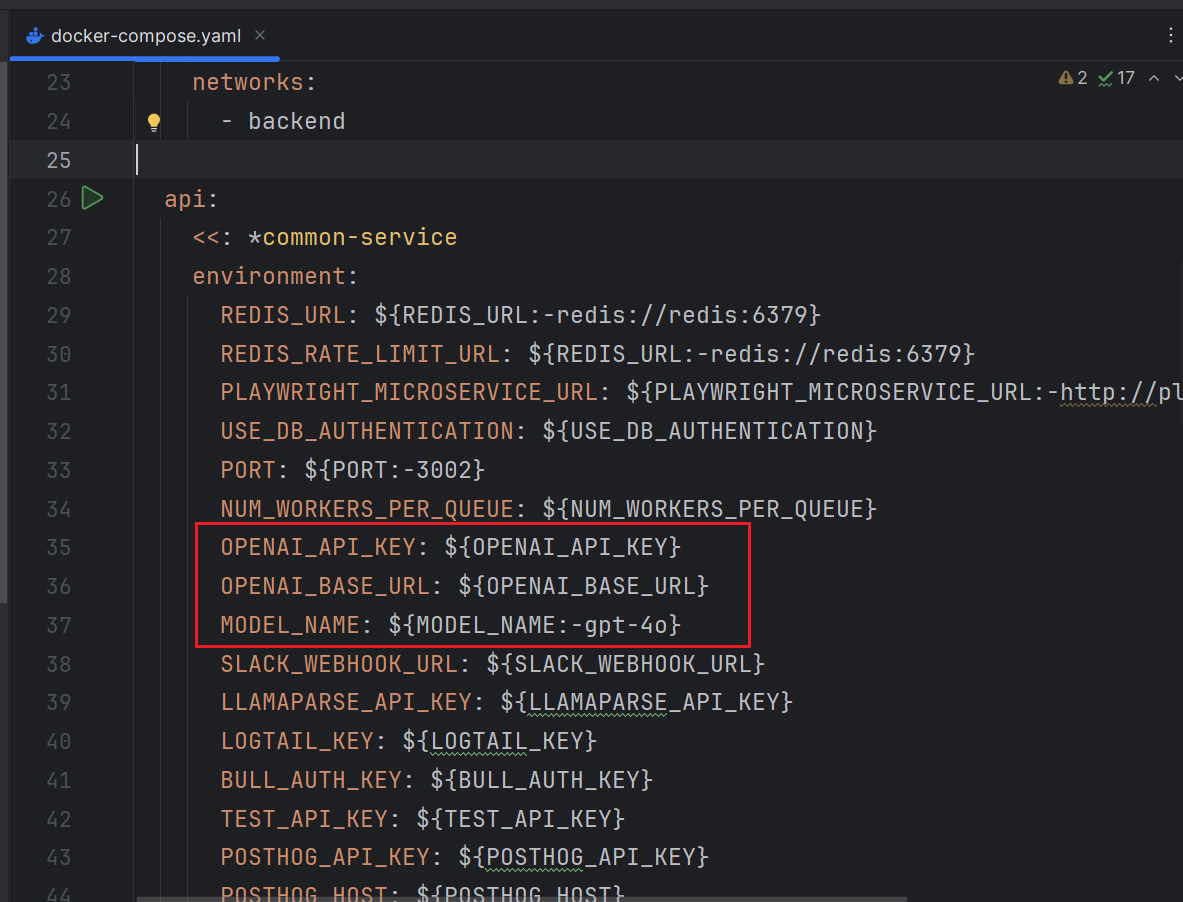
因此我们可以跟换为兼容OpenAI API的其他大模型。只需要在.env文件中添加这些设置即可
OPENAI_API_KEY=xxx
OPENAI_BASE_URL=xxx
MODEL_NAME=xxx
然后重启
docker compose down
docker compose up -d

北京人形旗下天工造物具身智能开源社区,聚焦具身天工与慧思开物两大平台
更多推荐
 9
9 0
0- 0


 已为社区贡献2条内容

所有评论(0)