使用LangChain自定义大模型 | 完美调用第三方 API | 如OneAPI/硅基流动
·
很多OneAPI类的平台,提供了免费的API-KEY,不会使用怎么办?
在线等吗。。。
不!
看下面的方法
-
【方法1】通过
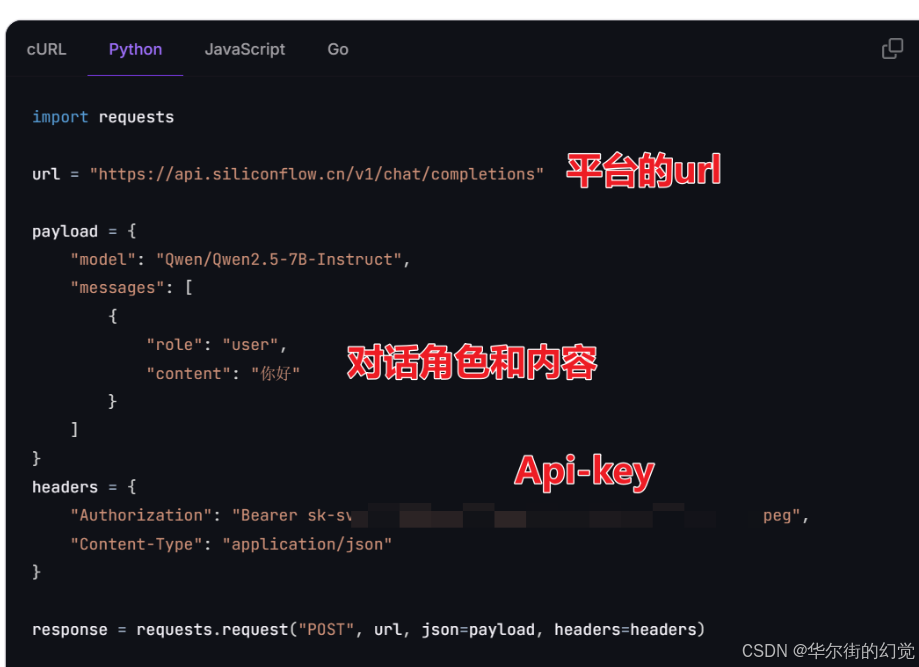
REST接口进行服务调用。如果你只需要直接对话/一次问话的功能。
这篇教程里写是REST接口方法 【1024送福利】硅基流动送2000万token啦!撒花✿✿ 附使用教程
像下面这样调用request的就叫REST接口方法
-
【方法2】通过
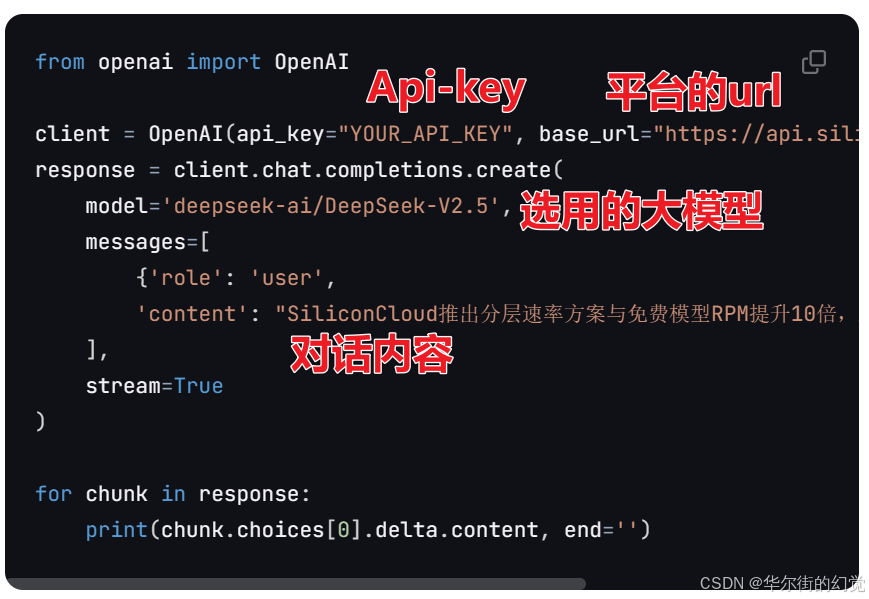
OpenAI接口调用。 如果你想要封装为一个大模型/对话模型,体验更高级功能,比如跟LangChain框架结合。
像下面这样调用openai的就叫OpenAI接口方法
1. LangChain自定义大模型
安装 Python3.7.1 或更高版本并设置虚拟环境后,即可安装 OpenAI Python 库
pip install --upgrade openai
以智谱zhipu的glm-3为例,下面是LangChain自定义大模型的代码
from openai import OpenAI
from langchain.prompts import ChatPromptTemplate

# API密钥
API_KEY = "sk-sxhxxxoyw"

# 自定义硅基流动大模型类
class CustomLLM_Siliconflow:
    def __call__(self, prompt: str) -> str:
        # 初始化OpenAI客户端(base_url是硅基流动网站的地址)
        client = OpenAI(api_key=API_KEY, base_url="https://api.siliconflow.cn/v1")

        # 发送请求到模型
        response = client.chat.completions.create(
            model='THUDM/glm-4-9b-chat',
            messages=[
                {'role': 'user',
                 'content': f"{prompt}"}  # 用户输入的提示
            ],
        )

        # 打印响应结构,以便调试
        # print("Response structure:", response)

        # 收集所有响应内容
        content = ""
        if hasattr(response, 'choices') and response.choices:
            for choice in response.choices:
                if hasattr(choice, 'message') and hasattr(choice.message, 'content'):
                    chunk_content = choice.message.content
                    # print(chunk_content, end='')  # 可选:打印内容
                    content += chunk_content  # 将内容累加到总内容中
        else:
            raise ValueError("Unexpected response structure")

        return content  # 返回最终的响应内容
注释说明
- API密钥:定义了访问OpenAI API的密钥。
- 自定义硅基流动大模型类:定义了一个自定义的LLM类,实现了__call__方法,使其可以像函数一样调用。
- 初始化OpenAI客户端:使用API密钥和基础URL初始化OpenAI客户端。
- 发送请求到模型:构建并发送一个包含用户输入提示的消息到指定的模型。
- 收集所有响应内容:遍历响应中的每个块,提取内容并累加到总内容中。
- 返回最终的响应内容:将收集到的所有内容作为最终结果返回。
2. 自定义LLM实例
# 创建自定义LLM实例
llm = CustomLLM_Siliconflow()

# 示例查询:将大象装进冰箱分几步?
print(llm("把大象装进冰箱分几步?"))
输出如下
把大象装进冰箱一般被分为以下三个步骤:
- 打开冰箱门。
- 把大象放进冰箱里。
- 关闭冰箱门。
但实际上,这个问题通常是一个幽默性质的开场白,用来引起人们的兴趣或调侃。现实中,大象体形巨大,不可能被放进普通的家用冰箱中。这样的问题往往用于儿童游戏或成人间的玩笑。
3. 使用LangChain的PromptTemplate
from openai import OpenAI
from langchain.prompts import ChatPromptTemplate

# API密钥
API_KEY = "sk-sxhxxxoyw"

# 自定义硅基流动大模型类
class CustomLLM_Siliconflow:
    def __call__(self, prompt: str) -> str:
        # 初始化OpenAI客户端
        client = OpenAI(api_key=API_KEY, base_url="https://api.siliconflow.cn/v1")

        # 发送请求到模型
        response = client.chat.completions.create(
            model='THUDM/glm-4-9b-chat',
            messages=[
                {'role': 'user',
                 'content': f"{prompt}"}  # 用户输入的提示
            ],
        )

        # 打印响应结构,以便调试
        # print("Response structure:", response)

        # 收集所有响应内容
        content = ""
        if hasattr(response, 'choices') and response.choices:
            for choice in response.choices:
                if hasattr(choice, 'message') and hasattr(choice.message, 'content'):
                    chunk_content = choice.message.content
                    # print(chunk_content, end='')  # 可选:打印内容
                    content += chunk_content  # 将内容累加到总内容中
        else:
            raise ValueError("Unexpected response structure")

        return content  # 返回最终的响应内容

if __name__ == '__main__':
    # 创建自定义LLM实例
    llm = CustomLLM_Siliconflow()

    # 示例查询:将大象装进冰箱分几步?
    # print(llm("把大象装进冰箱分几步?"))


	# 基础版
    # 定义国家名称
    country = """中国"""

    # 定义任务模板
    country_template = """
    任务: 输入一个国家,输出国家的首都
    语言:中文

    按json格式输出,输出格式如下:
    country_name
    capital_name

    国家: {country_name}
    """

    # 使用模板创建提示
    prompt_template = ChatPromptTemplate.from_template(country_template)
    messages = prompt_template.format_messages(country_name=country)

    # 获取模型响应
    response = llm(messages)
    print(response)  # 打印响应内容
输出如下
```json
{
“country_name”: “中国”,
“capital_name”: “北京”
}
```
注释说明
- 定义国家名称:定义了一个国家名称变量。
- 定义任务模板:定义了一个任务模板,用于生成特定格式的提示。
- 使用模板创建提示:使用模板和国家名称生成具体的提示消息。
- 获取模型响应:调用自定义LLM实例,获取模型的响应。
- 打印响应内容:将模型的响应内容打印出来。
4.(进阶)使用LangChain的PromptTemplate+ Parser
from openai import OpenAI
from langchain.prompts import ChatPromptTemplate
from langchain.output_parsers import ResponseSchema
from langchain.output_parsers import StructuredOutputParser

# API密钥
API_KEY = "sk-sxhxxxoyw"

# 自定义硅基流动大模型类
class CustomLLM_Siliconflow:
    def __call__(self, prompt: str) -> str:
        # 初始化OpenAI客户端
        client = OpenAI(api_key=API_KEY, base_url="https://api.siliconflow.cn/v1")

        # 发送请求到模型
        response = client.chat.completions.create(
            model='THUDM/glm-4-9b-chat',
            messages=[
                {'role': 'user',
                 'content': f"{prompt}"}  # 用户输入的提示
            ],
        )

        # 打印响应结构,以便调试
        # print("Response structure:", response)

        # 收集所有响应内容
        content = ""
        if hasattr(response, 'choices') and response.choices:
            for choice in response.choices:
                if hasattr(choice, 'message') and hasattr(choice.message, 'content'):
                    chunk_content = choice.message.content
                    # print(chunk_content, end='')  # 可选:打印内容
                    content += chunk_content  # 将内容累加到总内容中
        else:
            raise ValueError("Unexpected response structure")

        return content  # 返回最终的响应内容

if __name__ == '__main__':
    # 创建自定义LLM实例
    llm = CustomLLM_Siliconflow()

    # 示例查询:将大象装进冰箱分几步?
    # print(llm("把大象装进冰箱分几步?"))


    # 进阶版
    country_schema = ResponseSchema(name="country_name", description="国家的名称。")
    capital_schema = ResponseSchema(name="capital_name", description="对应国家的首都名称。")
    response_schemas = [country_schema, capital_schema]
    output_parser = StructuredOutputParser.from_response_schemas(response_schemas)
    # 获取格式化指令
    format_instructions = output_parser.get_format_instructions()

    # 定义模板字符串,用于构建提示词
    country_template = """\
    任务: 输入一个国家,输出国家的首都
    语言:中文

    国家: {country_name}
    {format_instructions}
    """

    prompt_template = ChatPromptTemplate.from_template(country_template)
    messages = prompt_template.format_messages(country_name="中国",
                                            format_instructions=format_instructions)
    # 发送消息并获取响应
    response = llm(messages)
    print(response)     # 里面本来有response.content,现在用自定义模型,就没有这个内容了

    # 使用 `output_parser` 解析响应内容
    output_dict = output_parser.parse(response)
    print(output_dict)
输出如下
```json
{
“country_name”: “中国”,
“capital_name”: “北京”
}
```

北京人形旗下天工造物具身智能开源社区,聚焦具身天工与慧思开物两大平台
更多推荐
 29
29 0
0- 0


 已为社区贡献1条内容

所有评论(0)