Web爬虫--fofa-资产信息搜集
·
免责声明:本文仅做技术交流与学习...
目录
fofa.py
import requests
from bs4 import BeautifulSoup

# 登录fofa之后,把自己的cookie弄过来.
header={
    'cookie':''
}
# 参数为搜索的语法.
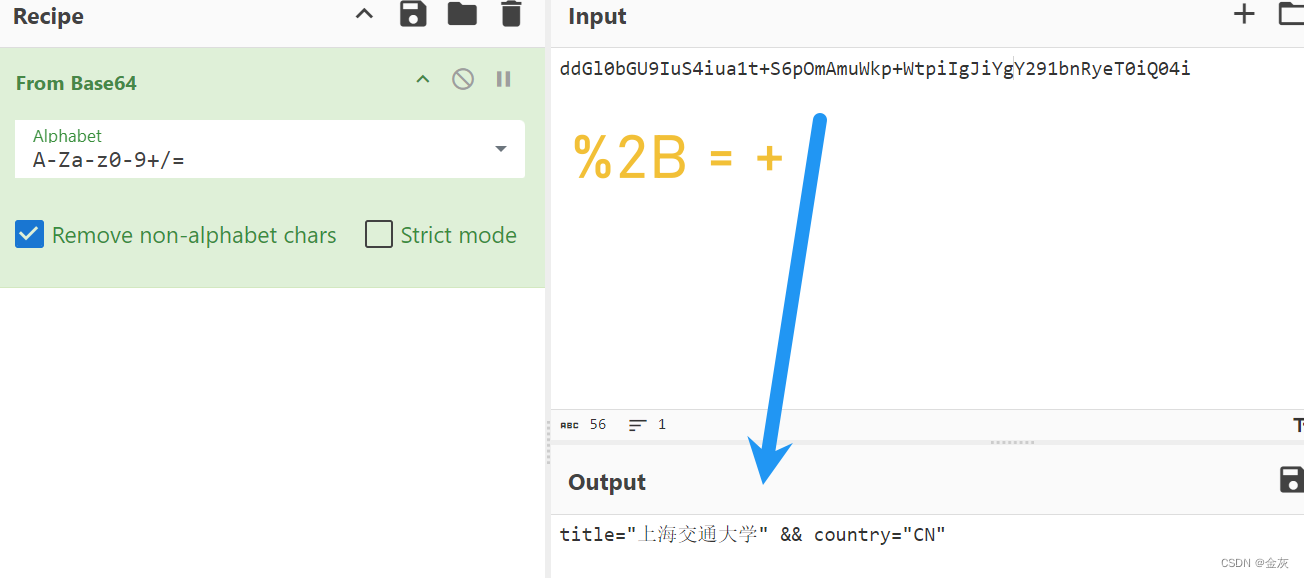
url='https://fofa.info/result?qbase64=dGl0bGU9IuS4iua1t%2BS6pOmAmuWkp%2BWtpiIgJiYgY291bnRyeT0iQ04i'
s=requests.get(url,headers=header).text
# print(s)
soup = BeautifulSoup(s, 'lxml')
# 获取要搜索的总页数.
edu1=soup.find_all('p',attrs={'class': 'hsxa-nav-font-size'})
for edu in edu1:
    edu_name = edu.span.get_text()
    i=int(edu_name)/10
    yeshu=int(i)+1
    # print(yeshu)
# 依次对每页的数据进行爬取:
    for ye in range(1,yeshu+1):
        url = 'https://fofa.info/result?qbase64=dGl0bGU9IuS4iua1t%2BS6pOmAmuWkp%2BWtpiIgJiYgY291bnRyeT0iQ04i&page='+str(ye)+'&page_size=10'
        print(url)
        s = requests.get(url,headers=header).text
        edu1=soup.find_all('span',attrs={'class': 'hsxa-host'})
        # 提取所有域名(网址):
        for edu in edu1:
            edu_name = edu.a.get_text().strip()
            print(edu_name)
fofa搜索参数分析

-------------->
fofa_api.py
通过fofa的api接口直接调用.
import requests
import base64


# email=your_email&key=your_key&qbase64=dGl0bGU9ImJpbmci
def get_fofa_data(email, apikey):
    for edu_name in open('edu_name.txt', encoding='utf-8'):
        e = edu_name.strip()
        # 搜索语法
        search = '"%s" && country="CN" && title=="Error 404--Not Found"' % e
        # 先编码在解.......
        b = base64.b64encode(search.encode('utf-8'))
        b = b.decode('utf-8')
        url = 'https://fofa.info/api/v1/search/all?email=%s&key=%s&qbase64=%s' % (email, apikey, b)

        s = requests.get(url).json()
        print('查询->' + edu_name)
        print(url)

        # 拿取详细数据:
        if s['size'] != 0:
            print(edu_name + '有数据啦!')
            for ip in s['results']:
                print(ip[0])
        else:
            print('没有数据')


if __name__ == '__main__':
    email = ''
    apikey = ''
    get_fofa_data(email, apikey)
北京人形旗下天工造物具身智能开源社区,聚焦具身天工与慧思开物两大平台
更多推荐
 7
7 0
0- 0


 已为社区贡献4条内容

所有评论(0)