python --实现sse推送(nginx配置)、redis、post流式接收
flask-sse
import json

import redis
from flask import Flask, current_app
from flask_cors import CORS
from flask_sse import sse
from redis import Redis

app=Flask(__name__)
CORS(app, supports_credentials=True)

app.config["REDIS_URL"]="redis://localhost"
app.register_blueprint(sse,url_prefix='/stream')   # sse请求地址(订阅消息)

@app.route('/send')   # 发布消息
def send_message():
    sse.publish({"message":"Hello!"},type='greeting')
    return"Message sent!"
页面demo
<!DOCTYPE html>
<html>
<head>
    <title>SSE Demo</title>
</head>
    <body>
    <div id="message-div"></div>
    <script>
        var source = new EventSource("http://127.0.0.1:5000/stream") // 创建EventSource对象,连接到SSE流

        source.addEventListener("message", function (event) { // 监听"message"事件
            console.log(event.data)});
    </script>
    </body>
</html>
自实现:
import json

import loguru
import redis
from flask import Flask, current_app, request
from flask_cors import CORS

class PubSub(object):
    '''发布订阅者'''

    def __init__(self):
        self._conn = redis.Redis(connection_pool=redis.ConnectionPool(decode_responses=True))

    def pub(self, message, channel_name, type):
        '''
        发布
        @params message       --> 消息内容; 字符串格式;
        @params channel_name  --> 频道;
        @params type          --> 自定义类型;
        '''
        self._conn.publish(channel_name, json.dumps({'data': {'message': message}, 'type': type}))

    def sub(self, channel_name):
        '''
        订阅
        @params channel_name  --> 频道;
        响应格式:
            event:greeting
            data:{"message": "Hello!"}

            event:greeting
            data:{"message": "Hello!"}
        '''
        pubsub = self._conn.pubsub()  # 生成订阅对象
        pubsub.subscribe(channel_name)
        try:
            for pubsub_message in pubsub.listen():
                loguru.logger.debug(f'消息中间件:{pubsub_message}')
                yield getattr(self, pubsub_message['type'])(pubsub_message)
        finally:
            try:
                pubsub.unsubscribe(channel_name)
            except ConnectionError: ...

    def message(self, pubsub_message):
        '''常规消息'''
        msg_dict = json.loads(pubsub_message['data'])
        return f'event:{msg_dict["type"]}' + '\n' + f"data:{str(msg_dict['data'])}" + '\n\n'

    def subscribe(self, *args):
        '''发起连接消息'''
        return f'event:connect' + '\n' + f"data:ok" + '\n\n'


app=Flask(__name__)
CORS(app, supports_credentials=True)
p = PubSub()
@app.route('/sse')
def sse():
    '''
    订阅消息
    Eg:
    <script>
        var source = new EventSource("/sse?channel_name=demo") // 创建EventSource对象,连接到SSE流

        source.addEventListener("message", function (event) { // 监听"message"事件
            console.log(event.data)});
    </script>
    '''
    channel_name = request.args.get('channel_name')
    return current_app.response_class(
        p.sub(channel_name),
        mimetype='text/event-stream',
    )

@app.route('/send')
def send():
    '''
    发布消息
    /send?channel_name=demo&mes=测试下
    '''
    mes = request.args.get('mes')
    channel_name = request.args.get('channel_name')
    p.pub(channel_name=channel_name, message=mes, type='message')
    return f'send:{mes}'


if __name__ == '__main__':
    app.run(debug=True)
nginx配置
 server {
        listen       443 default ssl;
        listen       [::]:443 default ssl;
        server_name  _;

        ssl_certificate /root/project/code/tree_hole_gpt/ssl/(文件);
        ssl_certificate_key /root/project/code/tree_hole_gpt/ssl/(文件);
        ssl_session_timeout 5m;
        ssl_ciphers ECDHE-RSA-AES128-GCM-SHA256:ECDHE:ECDH:AES:HIGH:!NULL:!aNULL:!MD5:!ADH:!RC4;
        ssl_protocols TLSv1 TLSv1.1 TLSv1.2;
        ssl_prefer_server_ciphers on;

        gzip on;
        gzip_buffers 4 32k;
        gzip_types "*";
        gzip_vary on;
        gzip_min_length 1k;
        gzip_comp_level 6;
        gzip_http_version 1.1;

        proxy_set_header Host $http_host;
        proxy_set_header X-Real-IP $remote_addr;
        proxy_set_header X-Forwarded-For $proxy_add_x_forwarded_for;
        proxy_set_header X-Forwarded-Proto $scheme;
        proxy_read_timeout 120s;      #nginx代理等待后端服务器的响应时间
        proxy_connect_timeout 120s;  #nginx代理与后端服务器连接超时时间(代理连接超时)
        proxy_send_timeout 120s;    #后端服务器数据回传给nginx代理超时时间


        location / {
            proxy_pass http://127.0.0.1:8001;
        }

		location /ws/ {#ws协议时
            proxy_http_version 1.1;
            proxy_set_header Host  $host;
            proxy_set_header X-Real-Ip $remote_addr;
            proxy_set_header X-Forwarded-For $proxy_add_x_forwarded_for;
            proxy_set_header X-Nginx-Proxy true;
            proxy_redirect off;
            client_max_body_size 10m;
            proxy_pass http://127.0.0.1:8001;
            proxy_set_header Upgrade $http_upgrade;
            proxy_set_header Connection "upgrade";
            proxy_connect_timeout 300s;
            proxy_read_timeout 300s;
            proxy_send_timeout 300s;
       }

        location /sse/ {
            proxy_set_header Host $http_host;
            proxy_set_header X-Real-IP $remote_addr;
            proxy_set_header X-Forwarded-For $proxy_add_x_forwarded_for;
            proxy_set_header X-Forwarded-Proto $scheme;
            proxy_cache off;
            proxy_buffering off;
            proxy_pass http://127.0.0.1:8001;
            proxy_http_version 1.1;
            proxy_set_header Upgrade $http_upgrade;
            proxy_set_header Connection "Upgrade";
        }
        location /media/ {
            alias /root/project/code/tree_hole_gpt/media/;
            expires 30d;
        }

        location /static/ {
            alias /root/project/static/;
            expires 30d;
        }
    }
}
django sse
方式一:
REDIS_CACHE = redis.Redis(host=REDIS_HOST, port=REDIS_PORT, db=1, password='Admin123.', decode_responses=True)
TIXIAN_CHANNEL_NAME = 'TIXIAN'  # 提现消息订阅者频道名

class SubMessageView(View):
    '''消息订阅'''

    def get(self, request, *args, **kwargs) -> StreamingHttpResponse:
        '''消息订阅者'''
        response = StreamingHttpResponse()
        response.streaming_content = self.chat()
        response['Cache-Control'] = 'no-cache'
        # response['Content-Type'] = 'application/json'
        response['Content-Type'] = 'text/event-stream'
        return response

    def chat(self):
        pubsub = REDIS_CACHE.pubsub()
        pubsub.subscribe(TIXIAN_CHANNEL_NAME)
        try:
            for pubsub_message in pubsub.listen():
                loguru.logger.debug(f'消息中间件:{pubsub_message}')
                if pubsub_message['type'] == 'subscribe':
                    yield f'event:connect' + '\n' + f"data:ok" + '\n\n'
                else:
                    msg_dict = json.loads(pubsub_message['data'])
                    yield f'event:{msg_dict["type"]}' + '\n' + f"data:{json.dumps(msg_dict['data'])}" + '\n\n'
        finally:
            try:
                pubsub.unsubscribe(TIXIAN_CHANNEL_NAME)
            except ConnectionError:
            ...
发布
REDIS_CACHE.publish(TIXIAN_CHANNEL_NAME,
                            json.dumps({'data':
                                            {'message': f'{SERVER_URL}/media/music/music.mp3'},
                                        'type': 'tixian_message'}
                                       ))
方式二【推荐】:
class SubMessageView(View):
    '''消息订阅'''

    def get(self, request, *args, **kwargs) -> StreamingHttpResponse:
        '''消息订阅者'''
        user_id = self.request.GET.get('user_id')
        response = StreamingHttpResponse()
        response.streaming_content = self.chat(user_id)
        response['Cache-Control'] = 'no-cache'
        # response['Content-Type'] = 'application/json'
        response['Content-Type'] = 'text/event-stream'
        return response

    def chat(self, user_id):
        pubsub = REDIS_CACHE.pubsub()
        pubsub.subscribe(NOTICE_CHANNEL_NAME)
        try:
            while True:
                pubsub_message = pubsub.get_message(timeout=180)
                if not pubsub_message:
                    yield f'event: heartbeat' + '\n' + 'data:ping' + '\n\n'
                    continue

                loguru.logger.debug(f'消息中间件:{pubsub_message}')
                if pubsub_message['type'] == 'subscribe':
                    yield f'event: connect' + '\n' + f"data:ok" + '\n\n'

                else:
                    msg_dict = json.loads(pubsub_message['data'])
                    info = msg_dict['info']
                    if str(user_id) == str(info['user_id']): # 只有监听的id等于发布的id才给推送
                        yield f'event: {msg_dict["type"]}' + '\n' + f'id:{user_id}' + '\n' + f'data:{info}' + '\n\n'

        finally:
            try:
                pubsub.unsubscribe(NOTICE_CHANNEL_NAME)
                pubsub.close()
            except ConnectionError:
                ...
发布
def qiangzhituichu(self, request, *args, **kwargs) -> Response:
    '''
    强制退出
    @params user_id --> 用户id;
    '''
    user_id = self.request.GET.get('user_id')
    REDIS_CACHE.publish(NOTICE_CHANNEL_NAME,
                        json.dumps({'info': {'code': 401, 'msg': '退出登录', 'user_id': int(user_id)}, 'type': 'message'}))
    return Response({'code': 0, 'msg': 'success'})
Django SSE 纯文字不依赖redis
class LingganJiexiView(APIView):
    '''灵感解析'''

    def get(self, request, *args, **kwargs) -> StreamingHttpResponse:
        '''
        灵感解析
        @params user_id  --> 用户id;
        @params ctypes   --> 0: 虚拟试衣; 1:商品写真; 2:通用生成器; 3: AI后期融合器;
        @params img_url  --> 图片url;
        '''
        user_id, ctypes, img_url = [self.request.GET.get(key) for key in ('user_id', 'ctypes', 'img_url')]
        prompt = '请告知我这个图片的提示词,20个字以内,不要附带任何其他文字!'
        response = StreamingHttpResponse(
            self.stream_parsing(img_url, prompt),
            content_type="text/event-stream; charset=utf-8"
        )
        # 禁用缓存,确保流式实时返回
        response["Cache-Control"] = "no-cache"
        response["X-Accel-Buffering"] = "no"  # 禁用Nginx缓冲(生产环境需配置)
        return response

    def stream_parsing(self, img_url, prompt):
        '''流式解析结果'''
        response = streaming_qa(img_url, prompt)
        for line in response.iter_lines():
            if line:
                line_str = line.decode('utf-8').lstrip('data: ')
                if line_str == '[DONE]':
                    break

                try:
                    chunk = json.loads(line_str)
                    if "choices" in chunk and len(chunk["choices"]) > 0:
                        content = chunk["choices"][0]["delta"].get("content", "")
                        if content:
                            if content.strip():
                                yield f"data: {content}\n\n"

                except json.JSONDecodeError:
                    continue

        yield "data: [DONE]\n\n"  # 发送结束标识
前端
<!DOCTYPE html>
<html lang="zh-CN">
<head>
    <meta charset="UTF-8">
    <title>流式解析</title>
</head>
<body>
    <!-- 显示结果的输入框 -->
    <input type="text" id="resultInput" style="width: 500px; height: 30px; font-size: 16px;" placeholder="解析中...">

    <script>
        // 目标接口URL
        const url = "https://www.suizhiaitech.com/front_end/api/lingganjiexi/?user_id=1&ctypes=2&img_url=https://www.suizhiaitech.com/media/20260107002235_kwmtg.jpg";
        const inputEl = document.getElementById('resultInput');

        // 核心流式解析逻辑
        async function fetchStream() {
            try {
                const res = await fetch(url, {
                    method: 'GET',
                });

                const reader = res.body.getReader();
                const decoder = new TextDecoder('utf-8');
                let content = '';

                while (true) {
                    const { done, value } = await reader.read();
                    if (done) break;

                    // 解析流式数据
                    const chunk = decoder.decode(value);
                    chunk.split('\n\n').forEach(line => {
                        if (line.startsWith('data: ') && line !== 'data: [DONE]') {
                            const text = line.slice(6);
                            if (text) {
                                content += text;
                                inputEl.value = content; // 实时更新输入框
                            }
                        }
                    });
                }
            } catch (e) {
                inputEl.value = '解析失败:' + e.message;
            }
        }

        // 页面加载后执行
        fetchStream();
    </script>
</body>
</html>
fastapi订阅
class PubSub(object):
    '''发布订阅者(异步版)'''

    def __init__(self):
        self._conn = None  # 异步Redis连接

    async def _init_conn(self):
        """初始化连接(内部调用)"""
        if self._conn:
            return
        try:
            self._conn = await aioredis.from_url(
                f"redis://{REDIS_HOST}:{REDIS_PORT}",
                password=REDIS_PASSWORD,
                db=REDIS_DB,
                decode_responses=True
            )
            await self._conn.ping()
            logger.success(f'redis连接成功;【{REDIS_HOST}:{REDIS_PORT}/{REDIS_DB}】')
        except Exception as e:
            logger.error(f'redis服务连接超时:【{e}】【{REDIS_HOST}:{REDIS_PORT}/{REDIS_DB}】')
            self._conn = None

    async def pub(self, message, channel_name, msg_type):
        '''发布'''
        await self._init_conn()
        if not self._conn:
            return
        await self._conn.publish(
            channel_name,
            json.dumps({'data': {'message': message}, 'type': msg_type})
        )

    async def sub(self, channel_name):
        '''订阅'''
        await self._init_conn()
        if not self._conn:
            return

        pubsub = self._conn.pubsub()
        await pubsub.subscribe(channel_name)
        try:
            async for pubsub_message in pubsub.listen():
                logger.debug(f'消息中间件:{pubsub_message}')
                yield await getattr(self, pubsub_message['type'])(pubsub_message)
        finally:
            try:
                await pubsub.unsubscribe(channel_name)
            except ConnectionError:
                pass

    async def message(self, pubsub_message):
        '''常规消息'''
        msg_dict = json.loads(pubsub_message['data'])
        return f'event:{msg_dict["type"]}\n' + f'id:1\n' + f'retry:5000\n' + f"data:{str(msg_dict['data'])}\n\n"

    async def subscribe(self, *args):
        '''发起连接消息'''
        return f'event:connect\n' + f'id:1\n' + f'retry:5000\n' + f"data:ok\n\n"


pubsub = PubSub()

async def ar_msg_push_views(request: Request):
    '''
    ar消息订阅 @params  channel_name --> 频道名  ar相关固定传ar;
    '''
    channel_name = request.query_params.get('channel_name')
    logger.warning(f'订阅频道:【{channel_name}】')

    async def event_generator():
        async for msg in pubsub.sub(channel_name):
            if await request.is_disconnected():  # 检查客户端是否断开连接
                logger.error(f'客户端断开连接,停止订阅【{channel_name}】')
                break
            yield msg

    return StreamingResponse(
        event_generator(),
        media_type="text/event-stream",
        headers={
            "Cache-Control": "no-cache",  # 禁止缓存
            "X-Accel-Buffering": "no",  # 禁用反向代理缓冲(Nginx)
            "Connection": "keep-alive"  # 保持长连接(部分客户端依赖)
        }
    )

async def argate_views(request: Request):
    '''
    ar大门(发布)
    @params image_base64        --> b64图;
    @params regions             --> 区域[[[1140, 680],[1650, 680],[1650, 3600],[1140, 3600]]];
    @params scores_threshold    --> 阈值;
    @params cameraId            --> 摄像机id;
    @params labelCode           --> 标签id;
    @params labelName           --> 标签名称;
    '''
    params = await request.json()  # 请求参数
    image_base64, regions, scores_threshold, cameraId, labelCode, labelName = [params.get(key, None) for key in
                                                                               ('image_base64', 'regions',
                                                                                'scores_threshold', 'cameraId',
                                                                                'labelCode', 'labelName')]
    logger.debug(f'参数: '
                 f'regions: 【{regions}】'
                 f'scores_threshold: 【{scores_threshold}】'
                 f'cameraId:【{cameraId}】'
                 f'labelCode:【{labelCode}】'
                 f'labelName:【{labelName}】')

    await pubsub.pub({'cameraId': cameraId,
                      'labelCode': labelCode,
                      'labelName': labelName,
                      'box': [[1, 2, 3, 4], [2, 3, 4, 5]]},
                      'ar',  # 频道名称 固定ar 和订阅一样
                      'door'   # 消息类别
                     )
    try:
        return {"code": 200, "message": 'success', "data": {}}
    except Exception as e:
        return {"code": 500, "message": str(e), "data": {}}


前端代码
<!DOCTYPE html>
<html>
<head>
    <title>SSE Demo</title>
</head>
    <body>
    <div id="message-div"></div>
    <script>
        var source = new EventSource("http://192.168.8.119:49351/ar_msg_push?channel_name=ar") // 创建EventSource对象,连接到SSE流

        source.addEventListener("connect", function (event) { // 监听"message"事件
            console.log('连接成功')
            console.log(event.data)});

        source.addEventListener("door", function (event) { // 监听"door"事件
            console.log('ar大门事件')
            console.log(event.data)});
    </script>
    </body>
</html>

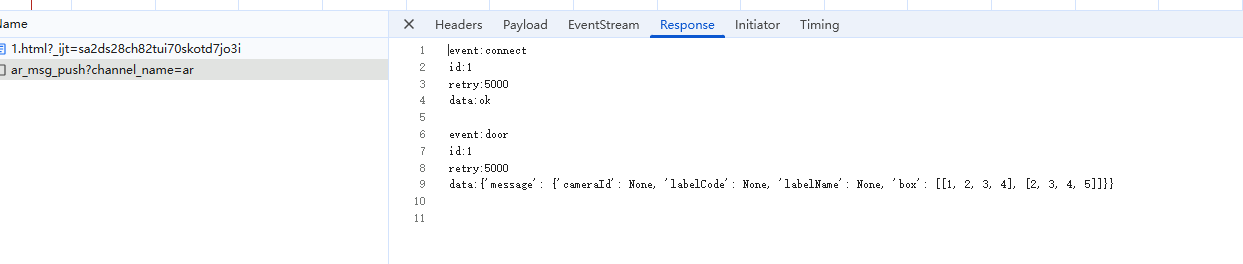
-
event:connect
作用:定义消息的 “事件类型”,用于区分不同业务场景的消息。
说明:
这是一个自定义事件类型(你可以根据业务命名,如 event:login、event:notification 等)。
客户端可以通过 EventSource.addEventListener(‘connect’, 回调函数) 专门监听这类事件,实现 “按类型处理消息” 的逻辑。
若省略该字段,客户端会将消息视为 “默认消息”,触发 message 事件。 -
id:1
作用:给消息分配唯一标识,用于客户端重连时的 “断点续传”。
说明:
客户端会记录最后收到的 id 值(通过 event.lastEventId 获取)。
当连接断开并重新建立时,客户端会在请求头中携带 Last-Event-ID: 1,服务端可根据该 ID 补发后续消息,避免消息丢失。
通常建议 id 按顺序递增(如 1、2、3…),确保唯一性和连续性。 -
retry:5000
作用:指定客户端连接断开后的自动重试间隔(单位:毫秒)。
说明:
示例中 5000 表示:如果 SSE 连接意外断开,客户端会在 5 秒后自动尝试重新连接。
若省略该字段,客户端会使用默认策略(通常是 3 秒左右,且可能随重试次数递增)。
该字段由客户端自动解析,无需额外代码处理。 -
data:ok
作用:存储消息的实际内容,是 SSE 中唯一必填的字段。
说明:
所有业务数据都通过 data 传递,内容可以是字符串、JSON 等格式(客户端需自行解析)。
示例中 ok 表示 “连接成功” 的状态通知,实际场景中可替换为具体业务数据(如 data:{“user”:“xxx”,“message”:“hello”})。
若内容多行,可拆分为多个 data 字段(客户端会自动合并),例如:
redis 列表操作
在Python中,可以
使用redis-py库来操作Redis数据库中的列表数据结构。以下是一些常用的Redis列表操作方法:
lpush(key, value): 在列表的左侧插入一个或多个值
rpush(key, value): 在列表的右侧插入一个或多个值
lpop(key): 移除并返回列表的左侧第一个元素
rpop(key): 移除并返回列表的右侧第一个元素
lrange(key, start, end): 获取列表指定范围内的元素
llen(key): 获取列表的长度
lindex(key, index): 获取列表指定索引位置的元素
lset(key, index, value): 设置列表指定索引位置的元素的值
lrem(key, count, value): 移除列表中指定值的元素
ltrim(key, start, end): 截取列表指定范围内的元素
这些方法可以帮助你对Redis中的列表数据进行增删改查操作。你可以根据具体的需求选择合适的方法来操作Redis列表。
hash操作
# 定义用户信息
user_id = 1
user_info = {
    'username': 'john_doe',
    'email': 'john@example.com',
    'age': 30,
    'city': 'New York'
}

# 将用户信息存储到Redis的Hash中
r.hmset(f'user:{user_id}', user_info)

# 获取用户信息
stored_user_info = r.hgetall(f'user:{user_id}')

# 打印用户信息
print("Stored User Info:")
for field, value in stored_user_info.items():
    print(f"{field.decode('utf-8')}: {value.decode('utf-8')}")

# 修改用户信息
r.hset(f'user:{user_id}', 'age', 31)

# 获取修改后的用户信息
updated_user_info = r.hgetall(f'user:{user_id}')

# 打印修改后的用户信息
print("\nUpdated User Info:")
for field, value in updated_user_info.items():
    print(f"{field.decode('utf-8')}: {value.decode('utf-8')}")

# 删除用户信息
r.delete(f'user:{user_id}')

# 检查用户信息是否被删除
deleted_user_info = r.hgetall(f'user:{user_id}')
if not deleted_user_info:
    print("\nUser info has been deleted.")
POST接收流式
后端:
class ChatView(APIView):
    '''AI问题相关'''

    # authentication_classes = (FrontLoginRequiredAuthentication,)

    def post(self, request, *args, **kwargs) -> StreamingHttpResponse:
        '''
        提问
        @params user_id  --> 用户id;
        '''
        user_id, _ = [self.request.data.get(key) for key in ('user_id', '_')]

        response = StreamingHttpResponse(
            self.fetch_request(),
            content_type='text/event-stream; charset=utf-8'
        )
        response['Cache-Control'] = 'no-cache'  # 禁止缓存
        response['X-Accel-Buffering'] = 'no'  # 禁止 Nginx 缓冲
        return response


    def fetch_request(self):
        '''提问'''
        url = 'https://api.deepseek.com/chat/completions'
        headers = {
            'Content-Type': 'application/json',
            'Authorization': 'xxxxxxxxx',
        }

        data = {
            "model": "deepseek-v4-pro",
            "messages": [
                {"role": "system", "content": "你是绒易画像助手,精通羽绒相关的所有知识!"}, # 规定角色 性格 风格
                {"role": "user", "content": "你是谁?"} # user用户    assistant这是AI的回复角色
            ],
            "thinking": {"type": "enabled"}, # disabled关闭思考  enabled开启
            "reasoning_effort": "high", # 思考强度 high  max
            "stream": True
        }
        response = requests.post(url, headers=headers, json=data, stream=True)
        for line in response.iter_lines(chunk_size=512):
            if line:
                decoded_line = line.decode('utf-8')
                if decoded_line == 'data: [DONE]':
                    break

                if decoded_line.startswith('data: '):
                    json_str = decoded_line[6:]
                    try:
                        chunk_data = json.loads(json_str)
                        delta = chunk_data['choices'][0].get('delta', {})
                        reasoning = delta.get('reasoning_content', '') # 思考内容
                        content = delta.get('content', '')
                        if reasoning:
                            msg = json.dumps({"leixing": 0, "text": reasoning}, ensure_ascii=False)
                            yield f'{msg}\n\n'

                        if content:
                            msg = json.dumps({"leixing": 1, "text": content}, ensure_ascii=False)
                            yield f'{msg}\n\n'

                    except Exception as e:
                        err_msg = json.dumps({"error": str(e)}, ensure_ascii=False)
                        yield f'{err_msg}\n\n'

        yield f'DONE\n\n'

# nginx 配置 在响应头加了就不用管nginx了:
        #location /front_end/api/chat/ {
        #    proxy_buffering off; # 关闭缓冲
        #    proxy_cache off;    # 关闭缓存,防止旧数据被误用
        #    proxy_http_version 1.1; # 使用 HTTP/1.1 以支持长连接和分块传输
        #    proxy_set_header Connection ""; # 保持连接,避免提前断开
        #    proxy_read_timeout 600s; # 较长超时,适应AI生成时间
        #    proxy_send_timeout 600s;
        #    proxy_pass http://127.0.0.1:8003;
       # }
前端:
<!DOCTYPE html>
<html>
<meta charset="UTF-8">
<body>
<script>
async function testSSE() {
  const url = "xxxxx";
  try {
    const res = await fetch(url, {
      method: "POST",
      headers: {
        "Content-Type": "application/json"
      },
      body: JSON.stringify({})
    });

    const reader = res.body.getReader();
    const decoder = new TextDecoder("utf-8");
    let buffer = "";

    while (true) {
      const { done, value } = await reader.read();
      if (done) {
        console.log("流传输整体结束");
        break;
      }

      buffer += decoder.decode(value, { stream: true });
      const lines = buffer.split("\n");
      buffer = lines.pop() || "";

      for (let line of lines) {
        const trimLine = line.trim();
        if (!trimLine) continue;
        console.log("原始单行:", trimLine);

        // 判断结束标识
        if (trimLine === "DONE") {
          console.log("✅ 对话接收完毕");
          return;
        }

        // 直接尝试解析JSON
        try {
          const jsonObj = JSON.parse(trimLine);
          console.log("✅ 解析JSON:", jsonObj);
        } catch (e) {
          console.error("❌ 不是合法JSON,跳过", trimLine);
        }
      }
    }
  } catch (err) {
    console.error("请求异常", err);
  }
}
testSSE();
</script>
</body>
</html>

北京人形旗下天工造物具身智能开源社区,聚焦具身天工与慧思开物两大平台
更多推荐
 0
0 0
0- 0


 已为社区贡献5条内容

所有评论(0)