javafx 出现错误 Graphics Device initialization failed for : d3d, sw
·
环境
jdk 17.0.6
IntelliJ IDEA 2022.3.2
错误原因
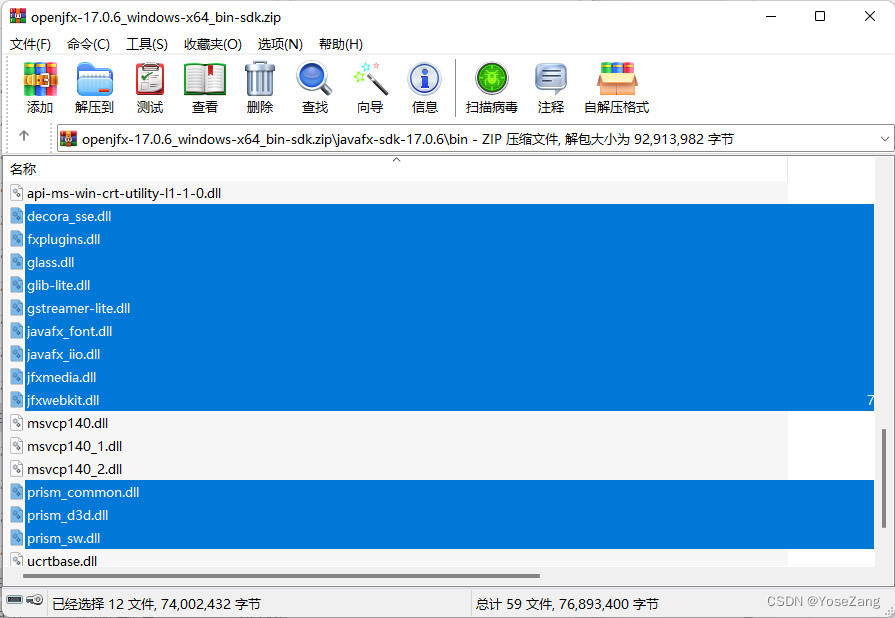
javafx中的需要的dll没有拷贝到java的bin目录中去。
错误信息
运行javafx项目需要:
1)设置项目结构->库中添加javafx库。
2)IDEA中虚拟机选项填写正确:
–add-modules
javafx.controls,javafx.fxml
–module-path
${PATH_TO_FX}
–add-exports
javafx.graphics/com.sun.javafx.sg.prism=ALL-UNNAMED
其中${PATH_TO_FX}是IDEA环境变量,保存了javafx类库的地址(如果地址中有空格,则需要在设置时两端加上双引号"")可以替换为javafx类库的地址。
设置好以上两步后,运行程序,出现如下错误:
Graphics Device initialization failed for :  d3d, sw
Error initializing QuantumRenderer: no suitable pipeline found
java.lang.RuntimeException: java.lang.RuntimeException: Error initializing QuantumRenderer: no suitable pipeline found
	at javafx.graphics/com.sun.javafx.tk.quantum.QuantumRenderer.getInstance(QuantumRenderer.java:283)
	at javafx.graphics/com.sun.javafx.tk.quantum.QuantumToolkit.init(QuantumToolkit.java:254)
	at javafx.graphics/com.sun.javafx.tk.Toolkit.getToolkit(Toolkit.java:266)
	at javafx.graphics/com.sun.javafx.application.PlatformImpl.startup(PlatformImpl.java:291)
	at javafx.graphics/com.sun.javafx.application.PlatformImpl.startup(PlatformImpl.java:163)
	at javafx.graphics/com.sun.javafx.application.LauncherImpl.startToolkit(LauncherImpl.java:659)
	at javafx.graphics/com.sun.javafx.application.LauncherImpl.launchApplicationWithArgs(LauncherImpl.java:410)
	at javafx.graphics/com.sun.javafx.application.LauncherImpl.launchApplication(LauncherImpl.java:364)
	at java.base/jdk.internal.reflect.NativeMethodAccessorImpl.invoke0(Native Method)
	at java.base/jdk.internal.reflect.NativeMethodAccessorImpl.invoke(NativeMethodAccessorImpl.java:77)
	at java.base/jdk.internal.reflect.DelegatingMethodAccessorImpl.invoke(DelegatingMethodAccessorImpl.java:43)
	at java.base/java.lang.reflect.Method.invoke(Method.java:568)
	at java.base/sun.launcher.LauncherHelper$FXHelper.main(LauncherHelper.java:1082)
Caused by: java.lang.RuntimeException: Error initializing QuantumRenderer: no suitable pipeline found
	at javafx.graphics/com.sun.javafx.tk.quantum.QuantumRenderer$PipelineRunnable.init(QuantumRenderer.java:95)
	at javafx.graphics/com.sun.javafx.tk.quantum.QuantumRenderer$PipelineRunnable.run(QuantumRenderer.java:125)
	at java.base/java.lang.Thread.run(Thread.java:833)
Exception in thread "main" java.lang.reflect.InvocationTargetException
	at java.base/jdk.internal.reflect.NativeMethodAccessorImpl.invoke0(Native Method)
	at java.base/jdk.internal.reflect.NativeMethodAccessorImpl.invoke(NativeMethodAccessorImpl.java:77)
	at java.base/jdk.internal.reflect.DelegatingMethodAccessorImpl.invoke(DelegatingMethodAccessorImpl.java:43)
	at java.base/java.lang.reflect.Method.invoke(Method.java:568)
	at java.base/sun.launcher.LauncherHelper$FXHelper.main(LauncherHelper.java:1082)
Caused by: java.lang.RuntimeException: No toolkit found
	at javafx.graphics/com.sun.javafx.tk.Toolkit.getToolkit(Toolkit.java:278)
	at javafx.graphics/com.sun.javafx.application.PlatformImpl.startup(PlatformImpl.java:291)
	at javafx.graphics/com.sun.javafx.application.PlatformImpl.startup(PlatformImpl.java:163)
	at javafx.graphics/com.sun.javafx.application.LauncherImpl.startToolkit(LauncherImpl.java:659)
	at javafx.graphics/com.sun.javafx.application.LauncherImpl.launchApplicationWithArgs(LauncherImpl.java:410)
	at javafx.graphics/com.sun.javafx.application.LauncherImpl.launchApplication(LauncherImpl.java:364)
	... 5 more
解决方法
将javafx\bin中的dll拷贝到jdk安装目录的bin文件夹中:
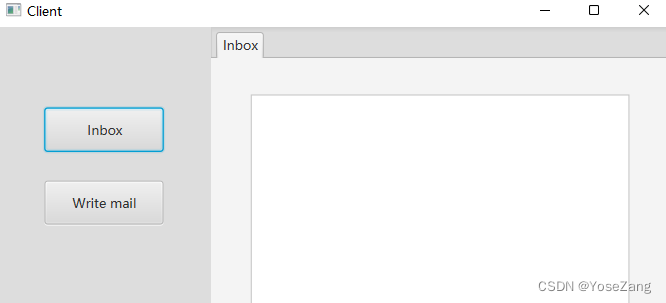
再次运行,运行成功

北京人形旗下天工造物具身智能开源社区,聚焦具身天工与慧思开物两大平台
更多推荐
 7
7 0
0- 0


 已为社区贡献4条内容

所有评论(0)