GeForce RTX 309报错:RuntimeError: CUDA error: no kernel image is available for execution on the device
·
原因分析:
“NVIDIA GeForce RTX 3090 with CUDA capability sm_86 is not compatible with the current PyTorch installation.
The current PyTorch install supports CUDA capabilities sm_37 sm_50 sm_60 sm_70.
”
所安装的torch版本与cuda版本不适配;
解决办法:
(1)卸载所安装的torch torchvision torchaudio
pip uninstall torch
pip uninstall torchvision
pip uninstall torchaudio
(2)使用pytorch官网命令安装
我得cuda版本是11.7,但是官网目前支持到11.6,所以下载下11.6版本的;
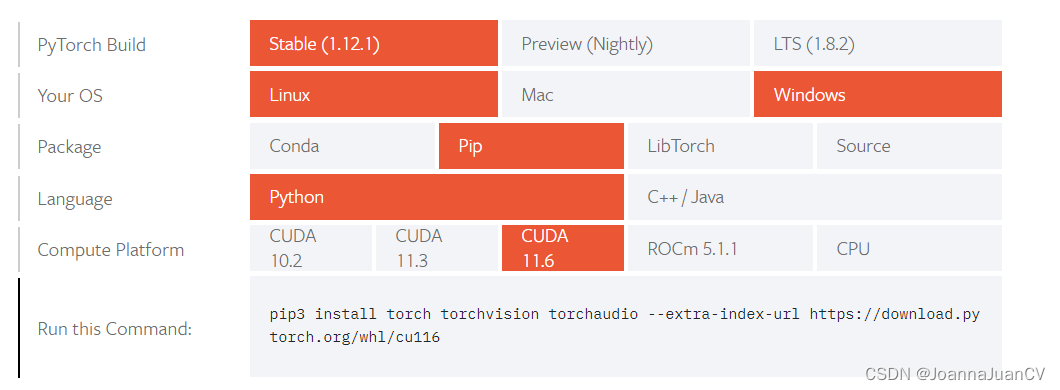
命令:
pip3 install torch torchvision torchaudio --extra-index-url https://download.pytorch.org/whl/cu116
安装完成。
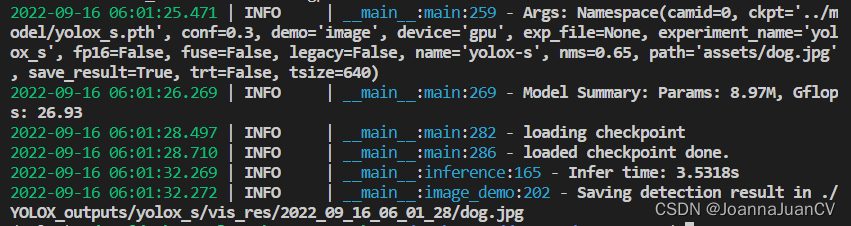
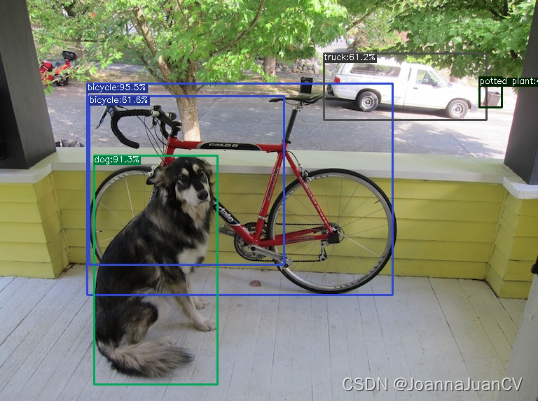
测试yolox:
python setup.py develop
python tools/demo.py image -n yolox-s -c ../model/yolox_s.pth --path assets/dog.jpg --conf 0.3 --nms 0.65 --tsize 640 --save_result  --device gpu

北京人形旗下天工造物具身智能开源社区,聚焦具身天工与慧思开物两大平台
更多推荐
 0
0 0
0- 0


 已为社区贡献6条内容

所有评论(0)